sesh
- By
Tracks gold per hour, XP per hour and more for every play session and every level.
sesh1.png
Screenshot 2026-10-10 234430.png
sesh2.png
sesh3.png
Description
Sesh shows what every play session was worth. From login to logout it tracks the gold you make, the value of the items you pick up, experience, monsters slain, quests, dungeon runs and zones, and it keeps the same stats for every level. Look back by day, week, month or all time, compare your levels on a chart, find your best sessions and streaks, and post the numbers of a session or a level in chat.
Made for World of Warcraft: Forever. There's nothing to set up: install it and play.
Commands
| Command | What it does |
|---|---|
/sesh |
Open or close the Sesh window |
/sesh mini |
Turn the mini window on or off |
/sesh share |
Share the current session in chat |
/sesh history |
Open History |
/sesh leveling |
Open Leveling |
/sesh summary |
Open the Summary |
/sesh options |
Open the options |
/sesh new |
End the current session and start a new one |
/sesh debug |
Diagnostics for bug reports |
- Mini window: click it to open Sesh, Shift-drag it to move it, right-click it to choose its numbers or hide it.
- Minimap and data bars: Sesh is in the addon compartment on the minimap, and adds a data text to data-bar addons (left-click opens Sesh, right-click shares).
Features
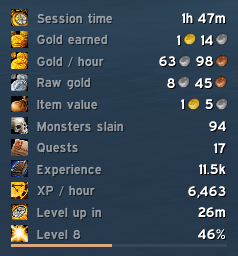
- Mini window — a small panel with just the numbers you pick and nothing else: session time, gold earned, gold per hour, XP per hour, time to level, level progress, kills, quests and more. It shows whenever the main window is closed, and its background can fade out completely so only the numbers stay on screen.
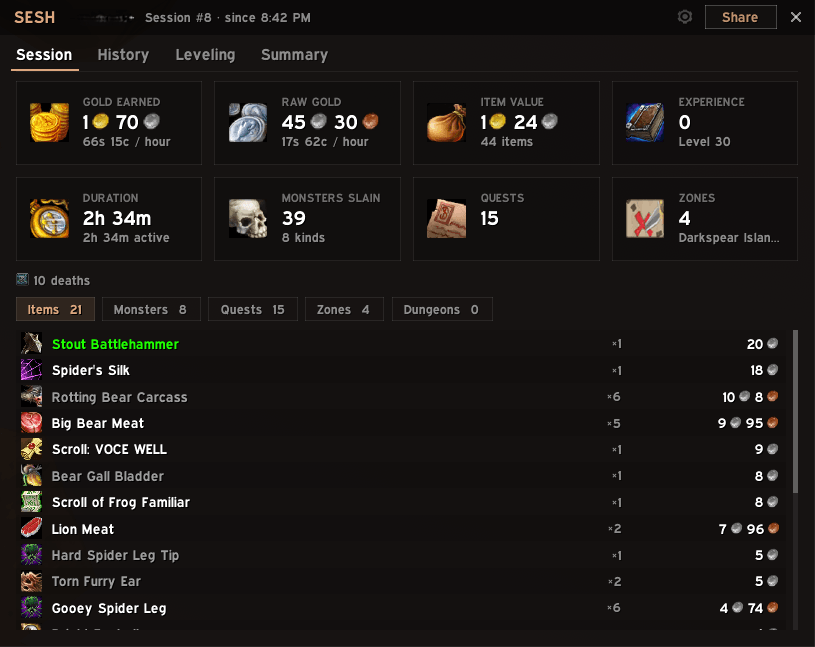
- The current session at a glance — gold earned and gold per hour, experience and XP per hour with time to level, duration, monsters slain, quests and zones, plus lists of every item, monster, quest, zone and dungeon run, with icons.
- Item value — every item you get is worth its auction house price from Auctionator, or its vendor price when there's no auction price. Without Auctionator, Sesh uses vendor prices.
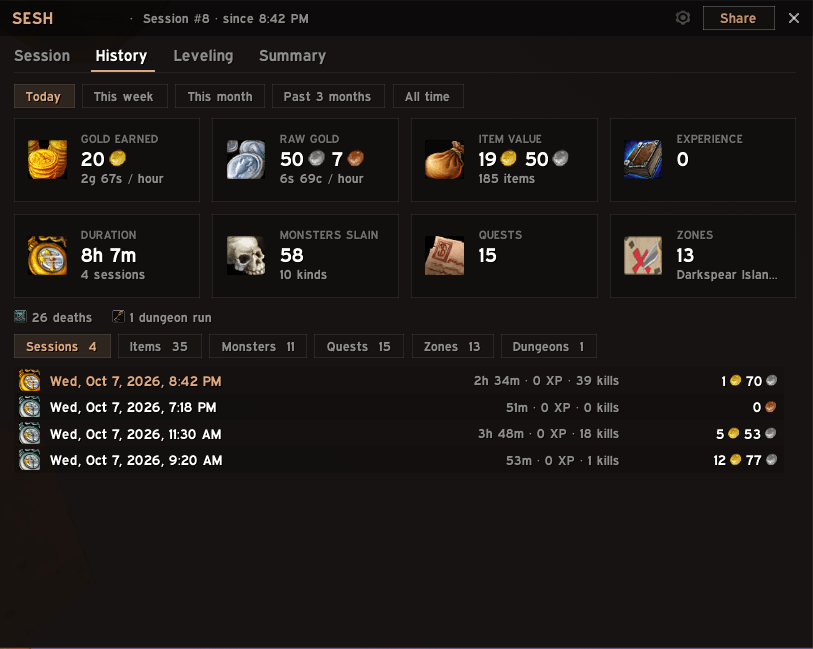
- History — Today, This week, This month, Past 3 months and All time, each with its totals and its list of sessions. Open any session to see it in full, share it or delete it.
- Leveling — your progress through the current level, with rested experience and when you'll level up; a chart comparing your levels by time, XP per hour, gold, kills, quests or deaths; and every level's full stats: time played, experience, gold, monsters, quests, dungeon runs, deaths and zones. When you level up, Sesh sums up the level in chat (only you see it).
- Dungeon runs — each visit to a dungeon, with the bosses killed and how long it took.
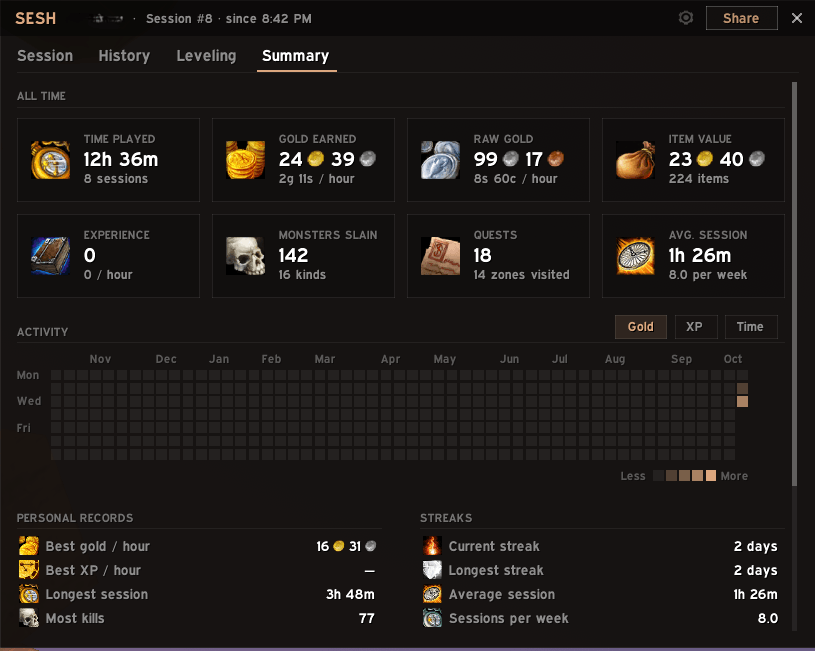
- Summary — all-time totals, an activity grid coloured by gold, XP or time played, personal records, daily streaks and your top items, monsters and zones.
- Sharing — post a session or a level in chat as one message, with the numbers you choose.
- Also tracked — deaths, achievements and Legacy Points.
- Fits your UI — a flat, minimal look inspired by EllesmereUI. When EllesmereUI is installed, Sesh follows its accent colour and font.
- Lightweight — event-driven with no polling, virtualized lists, and compact storage that keeps years of history small.
Works with (all optional)
- Auctionator — auction house prices for item value.
- EllesmereUI — Sesh follows its accent colour and font.
- Data-bar addons (LibDataBroker) — Sesh adds a data text with the number you choose, gold per hour by default.
How the numbers are counted
- Gold earned is raw gold plus item value: what a session brought in. It isn't accounting, so spending is never subtracted.
- Raw gold is money you loot and get from quests. Money that arrives while a merchant, mailbox, trade, auction house or bank window is open doesn't count: it's a transfer, or the sale of items whose value was already counted.
- Items are what you loot and receive, quest rewards included. Crafted and bought items don't count. Items you can trade are worth their auction price (or their vendor price when there is none). Soulbound items can only go to a vendor, so they're worth their vendor price.
- Nothing is counted twice. Disenchanting an item or opening a container (a clam, a lockbox) counts what comes out like any loot, and counts the item as used up: its value comes off in the session where that happens. So a disenchanting session the next morning, or on an alt you mailed the items to, shows what the dust is worth minus what the items were worth. Item value can even be negative, when you disenchant something worth more than its dust. Selling to a vendor doesn't count either: the item counted when you got it.
- Hourly rates leave out AFK time (you can change this).
- Monsters slain counts killing blows by you and your group; critters don't count. In some instances the game hides which monster died: those kills still count, as "Unidentified".
- A session runs from login to logout and survives /reload. Logging back in on the same character within a few minutes continues it (configurable), so a disconnect doesn't split a dungeon run.
- A level's time is the time you played at that level, over all sessions. The experience that finishes a level counts toward it; whatever spills over counts toward the next one.
- A dungeon run lasts from entering a dungeon until you've been out of it for 15 minutes, so a corpse run after a wipe doesn't split it. The game doesn't say when a dungeon is complete, so runs show the bosses killed.
Options
Everything is in Options > AddOns > Sesh (or type /sesh options):
- Open Sesh at login, and the window scale
- The mini window: whether it shows, its scale, its background opacity and which numbers it shows (with a separate choice while leveling)
- Leave AFK time out of hourly rates
- Continue a session after relogging within 5, 10 or 15 minutes, or never
- Forget empty sessions shorter than 1, 5 or 10 minutes, or keep them all
- The first day of the week, and what the activity grid and the level chart show
- Sum up finished levels in chat
- What the data text shows
- Delete this character's history
Privacy
Everything is stored on your computer, in WoW's saved variables, and Sesh never sends anything on its own. Sharing puts a message in your chat box; you choose where it goes.
Good to know
- Stats are kept per character; settings apply to all your characters. A new character with the name of a deleted one starts fresh instead of getting the deleted character's history.
- WoW saves addon data when you log out or reload. If the game crashes, the stats since then are lost.
- Levels you played before installing Sesh aren't tracked. A level it saw only part of is marked "partly tracked", with how far into the level it started.
Feedback
Bugs and ideas are welcome: open an issue on GitHub or leave a comment here. For a bug, please include what /sesh debug prints.
Sesh is open source under the MIT license. It isn't affiliated with Blizzard Entertainment or EllesmereUI.
sesh Team