Quest Together
- By
Useful QoL for questing in a party such as auto sharing and accepting of quests, party chat announcements, share all command, and a dynamic party progress summary panel.
questtogether.png
Description
Quest Together makes questing in a party easier. It shares the quests you pick up with your party, posts in party chat when you finish an objective, and shows everyone's progress on the quests around you in a small panel, so you always know who still needs those last two boar tusks.
Made for World of Warcraft: Forever. There's nothing to set up: install it, group up and quest. It works best when everyone in the party has it.
Commands
| Command | What it does |
|---|---|
/qt |
Show what's switched on, and the commands |
/qt options |
Open the options |
/qt panel |
Turn the party progress panel on or off |
/qt preview |
Show the panel with example progress for 30 seconds, to place it |
/qt share |
Share every quest someone in your party is missing |
/qt share stop |
Stop sharing |
/qt debug |
Diagnostics for bug reports |
/questtogether works as well as /qt. On the panel: Shift-drag it to move it, right-click it for its menu.
Features
- Shares your quests — every quest you accept is shared with your party a moment later. Anyone who already has it is skipped, and quests are shared one at a time, so nobody gets a pile of quest windows at once. A quest a party member shared with you isn't shared back, and when two of you take the same quest from a quest giver, it's only shared once.
- Catch up late joiners — Share quests the party is missing (
/qt share, the panel's menu or the options) offers a newcomer every quest in your log they don't have yet, one after another, and tells you how many they took. - Accept shared quests automatically (optional, off by default) — quests your party members share with you are accepted without the quest window.
- Party chat announcements, worded like Questie's, with a star icon in front: 6/6 Boar slain for [The Boar Hunt]! when you finish an objective. Finishing a quest's last objective posts just that line, without a second one for the quest. Quest names are clickable links. Each objective is announced once: logging in with objectives already done, or dropping below a count and getting back to it, posts nothing.
- Level-up announcements — when you level up, Quest Together posts how many quests you turned in at the level you just finished: [Quest Together]: 7 quests completed at Level 12! The turn-in that levels you up counts toward the old level, and the count carries over reloads and logouts. A level it only saw part of (because it was installed partway through, for example) isn't posted; it tells you so instead.
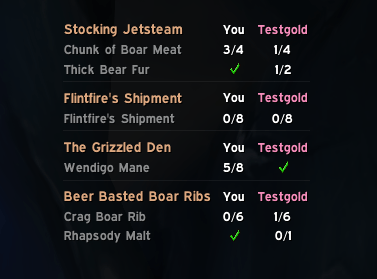
- Party progress panel — when you walk into a quest's area (the shape the map draws for it), a small panel shows how far everyone is on that quest:
The Boar Hunt You Thrall Jaina Boar Tusk ✓ 4/6 2/6 Bear Meat ✓ ✓ 3/10 Not on quest: Anduin
Finished objectives get a green check and names are in class colours. The panel only shows while you're in a party and there's progress to show. A quest you finish stays on it until the rest of the party has finished it too, or you leave the zone. Instead of the quests in the area you're in, it can also show every quest in the current zone, or every quest you share with your party. - Fits your UI — a flat, minimal look inspired by EllesmereUI. When EllesmereUI is installed, Quest Together follows its accent colour and font.
- Lightweight — it reacts to the game's quest events, does no work while you're solo beyond keeping track of your own quests, and sends party members only small updates.
Where the panel's numbers come from
- Party members with Quest Together send each other their quest progress, so you see their exact counts, updated within about a second.
- Party members without it are filled in from what the game itself tells you: their progress when the game shares it, otherwise whether they're on the quest (shown as
?) or not. When the game can't tell, they're listed under No info.
Options
Everything is in Options > AddOns > Quest Together (or type /qt options):
- Share accepted quests (on by default)
- Accept quests the party shares (off by default)
- Share quests the party is missing (a button)
- Announce finished objectives, and announce level-ups (both on by default)
- Show the party progress panel, and which quests it shows: the ones whose area you're in, the ones in this zone, or all the quests your party shares
- The panel's size and background opacity, and a preview to place it
The switches and the panel's mode are also in the panel's right-click menu.
Privacy
- Quest Together posts in party chat only while you're in a party (never in a raid), and only the announcements above.
- To your party members' copies of the addon it sends quest IDs and objective counts, nothing else: no quest names, no objective text, no player names.
- Your settings, the panel's position and each character's quest count for its current level are stored on your computer, in WoW's saved variables.
Good to know
- Questie can announce finished objectives in party chat too. If you use both, turn the announcements off in one of them, or your party sees them twice. Quest Together reminds you once when it finds Questie loaded. The same goes for other addons that share your quests (like the quest sharing option in RestedXP Guides).
- Sharing and announcements are for parties. In a raid, the panel still shows your own group's progress.
- Some quests can't be shared (class quests, for example); those are skipped. Sharing waits until you're out of combat.
- If the game doesn't allow an addon to share quests or post for you, Quest Together tells you and stops trying for the session.
Feedback
Bugs and ideas are welcome: open an issue on GitHub or leave a comment here. For a bug, please include what /qt debug prints. It shows only quest IDs and numbers, never names, so it's safe to share.
Quest Together is open source under the MIT license. It isn't affiliated with Blizzard Entertainment, Questie or EllesmereUI.
Quest Together Team