Sentinel
- By
A modern, Secret-Value-safe Lua error watcher for World of Warcraft. It catches, dedupes, persists, and lets you share UI bugs.
Screenshot_3.png
Description
Sentinel
A modern, Secret-Value-safe Lua error watcher for World of Warcraft, it catches, dedupes, persists, and lets you share UI bugs.




Overview
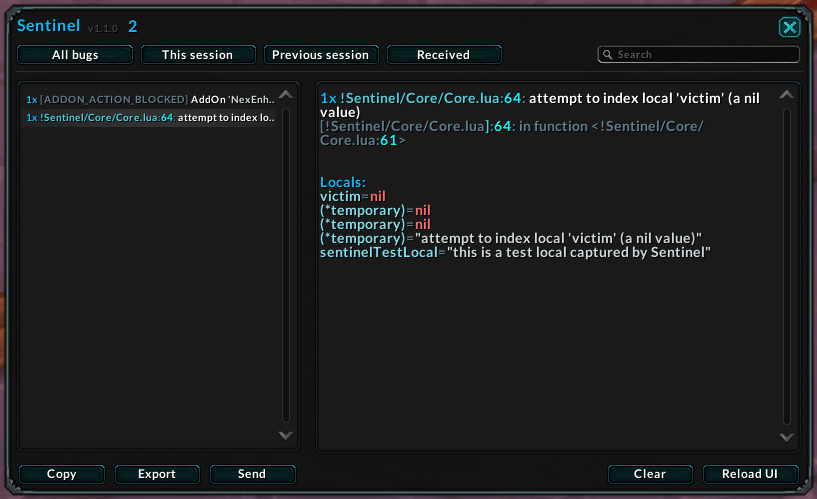
Sentinel is a from-the-ground-up Lua error display built for the modern WoW client. It quietly takes ownership of the game's error handler, captures the full call stack and locals at the fault site, and presents everything in a clean, dark, readable window, then lets you copy, export, or send a bug straight to a friend for help.
It's designed for the Midnight era from day one: every value that touches the UI is checked against the new Secret Value system, so Sentinel degrades gracefully instead of throwing errors of its own.
- Catches everything that matters, Lua errors with stack + locals, plus blocked/forbidden action taint and Lua warnings.
- Never spams your frame rate, a token-bucket throttle pauses capture during an error storm so addon CPU never competes with rendering.
- Remembers across sessions, errors persist in SavedVariables, grouped by play session, with a hard cap so the file never balloons.
- Share bugs peer-to-peer, send a caught error to another Sentinel user and triage it together.
- Reach it your way, a minimap button, an Addon Compartment entry, and a LibDataBroker data source for broker bars (Titan Panel, ChocolateBar, Bazooka…), so you can keep your minimap clean.
- Native & modern, Blizzard Settings panel, hover help on every tab and button, modern scrollbars, and an ornate Maw/runecarving frame skin over a flat dark theme.
Installation
Via an addon manager (recommended)
- CurseForge, search for Sentinel and install.
Manual
- Download the latest release from the Releases page.
- Extract the
!Sentinelfolder intoWorld of Warcraft\_retail_\Interface\AddOns. - Restart the game (or
/reloadif already in-game).
The leading ! keeps Sentinel near the top of the load order so it can hook the error handler as early as possible.
Getting Started
| Command | Description |
|---|---|
/sentinel or /sen |
Toggle the Sentinel window |
/sen help |
List every slash command |
/sen status |
Show current capture, alert, taint, and stored-error status |
/sen config |
Open the settings panel |
/sen clear |
Wipe all stored errors (confirmation dialog) |
/sen pause |
Stop recording new errors temporarily |
/sen resume |
Start recording new errors again |
/sen sound |
Toggle the new-error sound on/off |
/sen chat |
Toggle new-error chat announcements on/off |
/sen test |
Fire a genuine test error (real stack + locals) to verify capture |
/sen build |
Print your WoW client/build/interface information |
Minimap button
| Action | Result |
|---|---|
| Left-click | Open the error window |
| Right-click | Open settings |
| Shift-click | Reload the UI |
| Alt-click | Wipe all stored errors (confirmation dialog) |
| Drag | Reposition around the minimap ring |
Broker / data source
Sentinel publishes a LibDataBroker-1.1 "data source" object, so any broker display addon, Titan Panel, ChocolateBar, Bazooka, and friends, can show the live error count, the full hover tooltip, and the same left/right/shift/alt click actions on a panel of your choosing. The data source stays in sync even when the minimap button is hidden, which is ideal when your minimap is already crowded.
Sentinel also registers an Addon Compartment entry, so it's reachable even with the minimap button hidden. Hide the minimap button in settings and use the broker source or compartment entry instead, whichever fits your UI.
Features
Error Capture
- Full stack + locals, captures the call stack and local variables at the real fault site, the same way Blizzard's own handler does.
- Sole-owner handler, installs its error handler last and prevents it from being silently replaced, and disables legacy grabbers (
!BugGrabber,!Swatter,!BaudErrorFrame) so capture is never swallowed. - Taint & warnings, also records
ADDON_ACTION_BLOCKED/ADDON_ACTION_FORBIDDEN, the macro equivalents, andLUA_WARNING, while suppressing the default blue blocked-action popups. - Dedupe + counts, repeated errors are collapsed into one entry with an occurrence counter and re-stamped time.
- Flood protection, a token-bucket throttle pauses capture if errors arrive faster than a safe rate, protecting your FPS.
The Window
- Tabbed views, All bugs, This session, Previous session, Received, plus live Search.
- Smart default, opens to This session, or falls back to All bugs when the session is clean but older bugs exist, so you never land on an empty list.
- Syntax-highlighted detail, colourised stack traces and locals in a readable, scrollable pane.
- Hover tooltips everywhere, every row shows occurrences, last-seen date/time, session, and (for shared bugs) who sent it, and every tab and action button also explains itself on hover, so the difference between Copy (just the selected error) and Export (every error in the current tab) is always clear.
- Copy, Export & Delete, copy a single error, export the whole list as genuinely clean plaintext (WoW colour codes are stripped), or delete just the selected report without wiping your history.
Sharing
- Send to a player, share the selected error with another Sentinel user via a chunked, throttled addon channel (AceComm-3.0 + AceSerializer-3.0).
- Send session, dedicated button to whisper every error from the current session (up to 50 per payload), and Shift+Send remains a shortcut.
- Chat hyperlinks, new-error chat lines include a clickable link that opens that error in the window.
- Received tab, incoming bugs are tagged with the sender's name and marked with a
*in the list. - Secret-safe transport, Secret values are stripped before sending, and sharing is disabled inside instances (where Midnight blocks addon messages) with a nudge to use Export instead.
- Hardened receive path, inbound reports use protocol v1, are size-capped, field-capped, deduped per sender/message, rate-limited per sender, and chat-throttled so a buggy or malicious peer cannot flood your chat or bloat your SavedVariables.
Settings
A clean options page built on Blizzard's own Settings API:
- Toggle the minimap button
- Throttled sound on new errors
- Chat announcement on new errors
- Auto-open the window on a new error (never during combat)
- Ignore blocked-action / taint noise entirely
- Pause and resume all error capture temporarily
- Cycle Blizzard taintLog level (0-4) on retail clients
- One-click wipe of all stored errors (with confirmation)
Localization
Full UI translations for deDE, esES/esMX, frFR, koKR, ruRU, zhCN, zhTW, ptBR, and itIT, settings panel, slash help, tooltips, and taint log included.
Performance & Safety
- Event-driven throughout, no idle
OnUpdate, and the minimap button only polls while being dragged. - Combat-aware, hides the error window (and export dialog) on combat enter and restores after, and auto-open during combat queues for regen.
/senstill works mid-fight if you need it. - Memory-conscious, pooled list rows, reused tables, and a capped error store.
- Docs-driven Secret Values, guards only where Blizzard tags them (error handler messages / stack / locals), with no speculative combat or wire-path Secret checks.
- Persistence done right,
LoadSavedVariablesFirst, default-merging, and schema versioning for safe upgrades.
Configuration
Open the panel with /sen config (or through the Blizzard AddOns settings). All toggles apply live. Settings are bound directly to your SavedVariables, so they persist per account.
Contributing
Contributions, bug reports and ideas are welcome! Open an issue or a pull request. When filing a bug, including your client version and a /reload-able repro helps a ton.
Credits
Sentinel is a ground-up rewrite, but it stands on the shoulders of the addons that defined Lua error handling in WoW, studied with respect and reimagined for the modern client:
- Rabbit & contributors (!BugGrabber), the proven error-handler ownership and stack/locals capture approach.
- Funkydude & contributors (BugSack), inspiration for friendly error display and peer sharing.
- Baudtack (!BaudErrorFrame), the original lightweight error-frame concept this project grew out of.
- The Ace3 team, AceComm-3.0, AceSerializer-3.0, CallbackHandler-1.0 and LibStub, embedded for sharing.
- Tekkub & contributors (LibDataBroker-1.1), the broker data-source standard, embedded so Sentinel can live on your panel of choice.
Sentinel reuses none of their code verbatim, it's a new implementation with its own architecture, UI, persistence, sharing, and Midnight Secret-Value compatibility layer.
Support
Appreciate the work that goes into Sentinel? Consider showing your support:
- PayPal, paypal.me/KkthnxTV
- Patreon, patreon.com/Kkthnx
- Battle.net / Balance,
Kkthnx#1105orJRussell20@gmail.com - In-game gold, Kkthnx on Area 52 (US)
License
All Rights Reserved. You may download and run Sentinel for your own personal use in
World of Warcraft. Copying the source or assets into another project, redistributing
the addon, or publishing a modified version is not permitted without written
permission. Bundled libraries under Libs/ stay under their own original licenses.
See LICENSE for the full text.
Developed and maintained by **Josh "Kkthnx" Russell**. Built to keep your UI honest.
Sentinel Team

Owner