Bagforge
A lightweight, modern bag replacement forged for Midnight — categorized panels, smart search, and a full bank suite without the bloat.
Overview
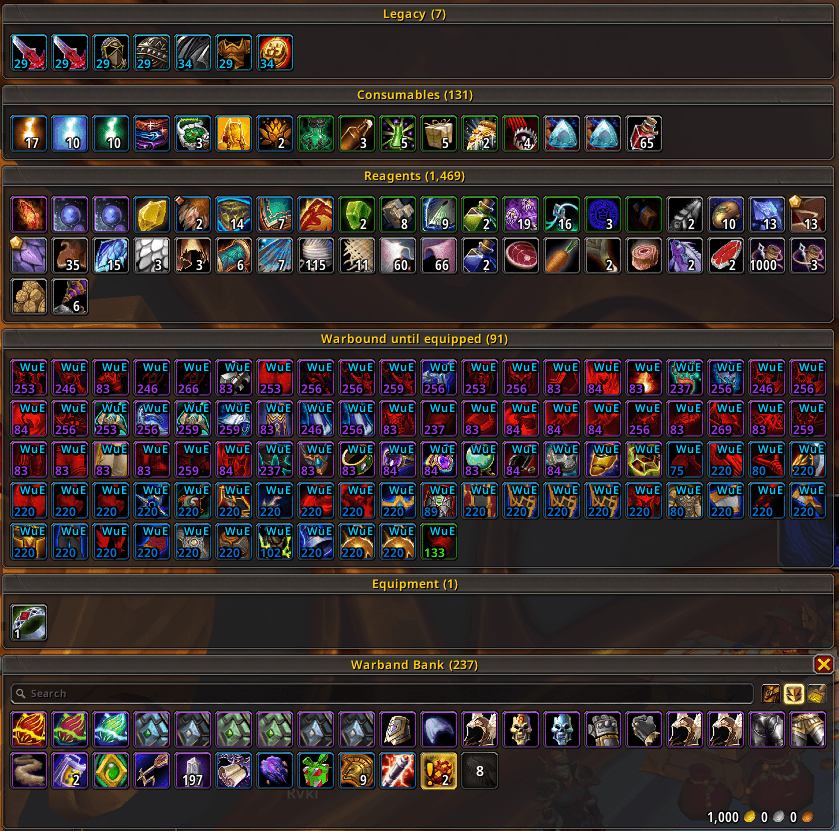
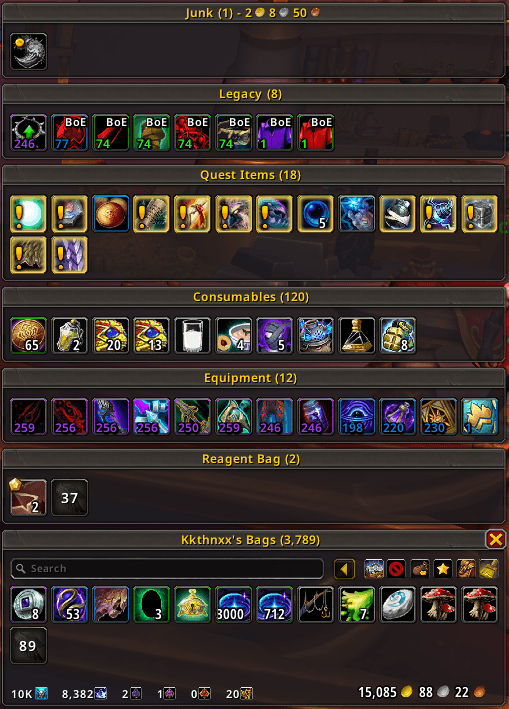
Bagforge replaces Blizzard's default backpack and bank windows with a clean, cargBags-style layout: a main Bag panel plus optional category panels stacked above it (Recent Items, Equipment, Reagents, Quest Items, Junk, and more). Everything is event-driven, pooled, and tuned for performance, with Midnight (12.0) Secret-value guards throughout so combat and instance restrictions are handled safely.
- One window, many panels — specialty filters get their own bordered sections; the main bag panel owns search, sort, money, and controls.
- Fully toggleable — turn category filters off and run a single flat bag, or enable only the buckets you care about.
- Character + Warband bank — categorized bank views with deposit, sort, tab bar, and reagent-deposit toggle.
- Power-user organization — custom categories, saved search queries, stack merge, slot locks, and a visual category manager.
- Extensible — a plugin API lets other addons register categories, sort modes, and corner widgets (Pawn upgrade arrows ship built-in).
- Native settings — Blizzard's modern Settings API (
Esc → Options → AddOns → Bagforge), with live-apply toggles wherever possible.
Requires: World of Warcraft retail Midnight (Interface 120000+).
Installation
Via an addon manager (recommended)
Manual
- Download the latest release from the Releases page.
- Extract the
Bagforge folder into World of Warcraft\_retail_\Interface\AddOns.
- Restart the game (or
/reload if already in-game).
Bagforge replaces the default combined-bags UI while enabled. Disable the addon (or its bag suppression) if you need Blizzard's stock bags back.
Getting Started
| Command |
Description |
/bf or /bagforge |
Open or close the bags |
/bf config |
Open the settings panel |
/bf open |
Open the bags |
/bf close |
Close the bags |
/bf sort |
Sort and stack the bags |
/bf sortbank |
Sort the character bank |
/bf sortwarbank |
Sort the warband bank |
/bf depositbank |
Deposit items into the character bank |
/bf depositwarbank |
Deposit items into the warband bank |
/bf reset |
Reset the bag window position |
/bf resetbank |
Reset the character bank position |
/bf resetwarbank |
Reset the warband bank position |
/bf columns <number> |
Set backpack item columns (6–18) |
/bf bankcolumns <number> |
Set character bank columns |
/bf warbandcolumns <number> |
Set warband bank columns |
/bf filter <name> on\|off |
Toggle a built-in category filter |
/bf cat <add\|remove\|clear\|order\|list> |
Manage custom category assignments |
/bf junk <add\|remove\|clear\|list> |
Manage the account-wide custom junk list |
In-window shortcuts
| Action |
How |
| Sort bags |
Sort button (top-right) or /bf sort |
| Search |
Type in the search box (dims or hides non-matches) |
| Flash-find a stack |
Alt-click an item (highlights every matching stack in open bags/bank) |
| Assign a custom category |
Arm the star button, then left-click items |
| Mark custom junk |
Arm the junk-coin button, then left-click items |
| Quick-delete (below Rare) |
Arm the delete button, then Ctrl+Alt left-click |
| Delete cheapest item |
Goblin-head button (left = confirm, right = preview in chat) |
| Lock a slot from sorts/transfers |
Ctrl+right-click a slot (padlock overlay) |
| Drop onto free slot |
Click or drop an item on the trailing free-slot box |
| Reset window position |
Right-click the close button |
| Equipped bag slots |
Bag-bar toggle (backpack icon) |
Configuration
Open the panel with /bf config (or Esc → Options → AddOns → Bagforge).
Settings groups
| Group |
What lives here |
| General |
Backpack columns, bag bar, flash-find, bank windows, columns, deposit reagents, bank tabs |
| Item Display |
Item level, bind labels (BoE/BoU/BoA/WuE), unusable tint, overlay corner positions |
| Filters |
Built-in category toggles, custom categories, search categories, stack merge, item sort, Category Manager |
| Extras |
Auto vendor (junk + repair), delete-cheapest protections |
| Plugins |
Enable/disable third-party Bagforge plugin sources |
Most toggles apply live without /reload.
Features
Backpack window
- Categorized layout — optional specialty panels (Recent, Equipment, Reagents, Quest, Junk, Collections, Housing Decor, and more) stack above the main Bag panel; each panel is a bordered grid with a header.
- Main Bag panel — holds the search bar, sort/assign/junk/delete controls, gold display, tracked currencies, and the item grid.
- Free-slot box — trails the last item like cargBags: shows empty slot count and accepts click/drop to fill the next empty slot.
- Authenticator slots — when your account is not Battle.net Authenticator–secured, shows Blizzard's four padlocked backpack slots and green + button (same templates and popup as default combined bags).
- Bag bar — optional flyout for equipped bag slots (Bag 1–4, reagent bag).
- Blizzard suppression — hides the default combined-bags frame while Bagforge is active.
- Movable — drag the window; position is saved per character. Right-click close resets position.
Bank
- Character bank — categorized panels, deposit-all, sort, money footer, purchased-tab support.
- Warband bank — separate categorized window for account storage.
- Bank tabs — optional tab bar toggle.
- Deposit reagents — syncs with Blizzard's
bankAutoDepositReagents CVar for deposit-all behaviour.
- Shared layout engine — same masonry column wrapping and category panels as the backpack.
Item filters (built-in categories)
Toggle each bucket independently under Filters → Enable Item Filters:
- Recent Items, Junk, Equipment Sets, Warbound Until Equipped, Legendary, Azerite Armor, Equipment, Collections, Housing Decor, Reagents, Consumables, Quest Items, Anima, Primordial Stones, Legacy, Lower Level (with item-level threshold).
Turn the master switch off to keep everything in one flat bag panel.
Custom organization
- Custom categories — pin any item to a named panel (
/bf cat add, assign mode, or drag-drop onto a category panel).
- Saved search categories — rule-based panels using a compact query language (
type:glyph, gear ilvl>=600, tt:use:, quality flags, name tokens, OR with |, NOT with !).
- Category Manager — rename, recolour headers, reorder, enable/disable, import/export JSON, and delete custom/search categories.
- Stack merge — collapse identical stacks into one button with combined count.
- Item sort — quality, name, item level, expansion, plus plugin-registered sort modes.
- Slot locks — exclude slots from sort, deposit, and vendor sweeps.
- Search box — filter the open view; optionally hide (or dim) non-matching items.
Item display
- Item level — quality-coloured ilvl on equippable gear.
- Bind status — BoE, BoU, BoA, WuE labels on unbound items.
- Unusable tint — red icons for wrong class or too-low level.
- Junk marker — coin overlay on grey and custom-junk items.
- Custom-category star — marks manually assigned items.
- Configurable corners — choose where ilvl, bind text, and markers appear.
- Pawn integration — optional green upgrade arrow when Pawn is installed.
Extras
- Auto vendor — optional auto-sell grey junk and/or custom-junk items at merchants; auto-repair with optional guild-fund preference.
- Delete cheapest — one-click destroy of the lowest vendor-value item (with confirmation and class-type protections).
- Quick delete mode — destroy sub-rare items without typing DELETE (armed from the toolbar).
- Flash find — Alt-click highlights every matching stack across open bags and bank.
Plugin API
Other addons can extend Bagforge without merging code:
- Ship a separate addon with
## Dependencies: Bagforge in its .toc.
- Call
Bagforge.API:RegisterCategory, RegisterSortMode, and/or RegisterCornerWidget after load.
- Plugin settings appear under Plugins; each source can be toggled off.
See Core/API.lua for the full contract (API.version = 2, pcall-guarded callbacks, debounced rescans).
Midnight (12.0) compatibility
Bagforge targets Midnight retail (Interface: 120000+). Secret Values are respected:
- No arithmetic or comparisons on combat/instance-secret data without
issecretvalue guards.
- Tooltips use throttled rebuilds and Blizzard mixin paths where available.
- Quest objective counts, money, GUIDs, and similar APIs are handled with safe fallbacks.
Test thoroughly in combat, dungeons, and Mythic+ before relying on search queries that read tooltip text (tt: tokens cache for 60 seconds per slot).
Contributing
Contributions, bug reports, and ideas are welcome! Open an issue or a pull request. When filing a bug, include your client build, other bag addons (if any), and steps to reproduce after a /reload.
Building a plugin? Read Core/API.lua and register through Bagforge.API after ADDON_LOADED.
Credits
Bagforge stands on patterns and ideas from the wider addon community:
- cargBags — panel layout, free-slot trailing, category stacking model.
- Siweia (NDui) — category filters, custom junk, assign/delete modes, item-level overlays.
- BetterBags — saved search category grammar and plugin category registration.
- p3lim, yleaf, and the NexEnhance codebase — engine/module architecture, settings integration, and Midnight migration patterns.
- Pawn (Vger) — optional upgrade-arrow integration.
Thank you all.
Support
Appreciate the work that goes into Bagforge? Consider showing your support:
License
Released under the MIT License. See LICENSE for details.
Developed and maintained by Josh "Kkthnx" Russell. Forged for Midnight.