NexEnhance
- By
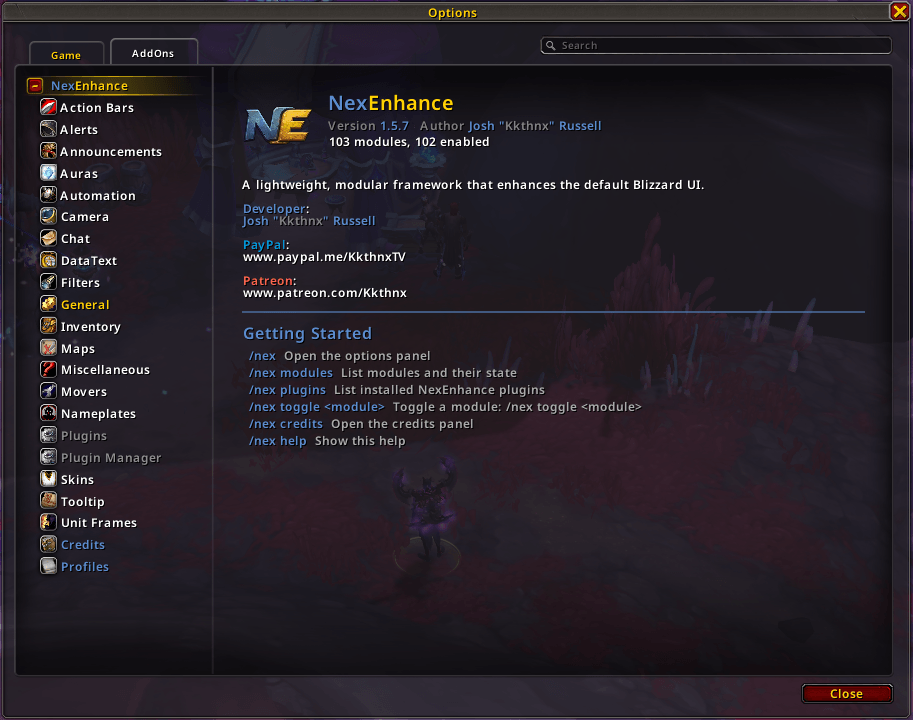
A lightweight, modular framework that enhances the default Blizzard UI — it improves, it doesn't replace.
NE_1.png
Description
NexEnhance
A lightweight, modular framework that enhances the default Blizzard UI. It improves, it doesn't replace.




Overview
NexEnhance supercharges the stock World of Warcraft interface without throwing it away. Instead of replacing Blizzard's UI with a heavy custom skin, it layers 90+ small, opt-in modules on top of the default frames. These include class-coloured health, item levels, smart automation, tooltip data, chat cleanup, minimap tools, micro-button datatexts, and more.
Every feature is self-contained and toggleable, so you can run the full suite or cherry-pick exactly what you want. The whole thing is built event-driven and tuned for performance, with Midnight (12.0) Secret-value guards throughout so combat and instance restrictions are handled safely.
- Enhance, don't replace. Your UI still looks and behaves like Blizzard's, just better.
- Modular. 90+ independent modules, each with its own settings and live-apply toggles.
- Extensible. A plugin API lets other authors ship separate addons that plug into NexEnhance profiles, events, and settings.
- Native settings. A clean options panel built on Blizzard's own Settings API, plus Edit Mode movers for repositionable elements.
- Performance-first. Local caches, throttled updates, frame runners, and combat-safe deferrals throughout.
Installation
Via an addon manager (recommended)
- CurseForge. Search for NexEnhance and install.
Manual
- Download the latest release from the Releases page.
- Extract the
NexEnhancefolder intoWorld of Warcraft\_retail_\Interface\AddOns. - Restart the game (or
/reloadif already in-game).
On first login you'll get a short setup screen (/nex install) that applies recommended Blizzard CVars (auto-loot, locked action bars, class-coloured raid frames, and more), sets up a sensible chat window layout with channel colours for General / Trade / Local Defense, and reloads. Everything else is left untouched.
Getting Started
| Command | Description |
|---|---|
/nex or /nexenhance |
Open the options panel |
/nex config |
Open the options panel |
/nex modules |
List every module and whether it's enabled |
/nex plugins |
List installed third-party NexEnhance plugins |
/nex toggle <module> |
Toggle a module (or plugin) on/off |
/nex editmode / /nex em |
Open Edit Mode (same as /editmode) |
/nex keybinds / /nex kb |
Open Key Bindings in Settings |
/nex install |
Re-run the first-time setup screen |
/nex profile |
Open the profile import/export window |
/nex changelog |
Open the in-game changelog |
/nex credits |
Open the credits panel |
/nex reminder |
Preview the Buff Reminder icons |
/nex afk |
Preview the AFK Camera screen |
/nex lootroll |
Preview the Loot Roll bars |
/nex rare |
Preview the Rare Alert popup |
/nex alerttest |
Preview achievement / loot / money alert toasts |
/nex questnotify |
Self-test Quest Notification announcements |
/nex way <coords> |
Set a user map waypoint (TomTom-style, also /way, /pin, /nexway) |
/nex abandonquests |
Abandon every quest in your log (with confirmation) |
/nexjunk add <item> |
Manage your custom Auto Vendor junk list |
/nexfilter |
Manage Chat Filter keywords |
/nex debug |
Debug logging, dumps, and export help |
/nex poiscan [mapID] |
Dump area POIs on your current map (event setup) |
/nexlogo |
Replay the login logo flyby |
/rl, /reloadui, //, /. |
Reload the interface |
Configuration
Open the panel with /nex (or Esc -> Options -> AddOns -> NexEnhance).
Landing page
The top-level NexEnhance page shows the logo, version, live module count, and a quick slash-command reference. Modules added in a recent update show a New! badge until you open their section.
Per-option reset
Hover any option whose value differs from default. A small revert icon appears beside the label. Click it to reset that one setting live (no /reload). Section headers get the same treatment to reset an entire module at once (with confirmation).
Themed groups
Modules are sorted into sidebar categories that match the options panel:
| Group | What lives here |
|---|---|
| General | UI scale, number format, hide help tips / combat errors / UI clutter |
| Action Bars | Button styling, cooldown text, GCD bar, range colouring, cast-on-key-down, extra/zone buttons, quest item button |
| Unit Frames | Class/level colours, target layout, player cast bar, hide DPS role icon |
| Nameplates | Quest icons on plates, target arrows, NPC reaction bar colours |
| Auras | Buff reminder |
| Inventory | Item level, mail, durability, loot frame, vendor tints, delete helpers |
| Chat | Chat tweaks, copy button, emojis, channel rename / URLs / timestamps |
| Filters | Chat Filter spam controls, system chat talent-learn filter |
| Tooltip | Tooltip styling, IDs, icons, item level, hover tips, mount source, vendor location, crafting reagents, Pawn integration |
| Skins | Light restyles. Objective tracker, character sheet, chat bubbles, color picker, Details!, hero talent swap, missing stats |
| DataText | Minimap stats/clock/location, experience bar, guild/friends/gold micro-button tooltips |
| Maps | Minimap, world map, fog reveal, Wowhead links, map pin navigation |
| Plugins | Settings for third-party NexEnhance extensions (when installed) |
| Automation | Vendor, quest, loot, invite, fishing, auction house, delves, and other hands-off helpers |
| Announcements | Quest progress, rare/world-event alerts, level-up announcer |
| Camera | Max zoom distance, AFK cinematic screen |
| Alerts | Achievement/loot toasts, loot roll UI, LFG/PvP queue timer |
| Movers | Drag frames, widget movers (Edit Mode) |
| Miscellaneous | Social colours, menu buttons, popup QoL, animation, audio sync, profiles canvas, and more |
Most toggles apply live. A few that restyle protected frames note "reload to apply." Repositionable elements (Buff Reminder, Experience Bar, Rare Alert, Loot Roll, Extra Quest Button, Alert Frames, Map Pin Navigation, and others) integrate with Edit Mode.
Canvas pages
These sit alongside the themed groups in the NexEnhance sidebar:
| Page | Description |
|---|---|
| Profiles | Create, copy, switch, reset, delete, import, and export settings profiles (compressed export supported) |
| Plugin Manager | Overview of installed third-party plugins with enable toggles and install guidance |
| Credits | Authors and projects NexEnhance builds on |
| Changelog | In-game release notes (auto-shown once after each update) |
Plugins & extensions
Since 1.4.0, other addon authors can extend NexEnhance without merging code into the main package.
- Ship a separate addon with
## Dependencies: NexEnhancein its.toc. - Call
NexEnhance:RegisterPlugin({ ... })after NexEnhance loads. - Plugin settings appear under Plugins, use Plugin Manager for a quick overview.
A starter template lives in Examples/NexEnhancePluginTemplate/. See that folder's README for the full contract (NexEnhance.API_VERSION, profile DB keys, lifecycle hooks, and RegisterOptions).
Features
NexEnhance groups its modules into the same themed categories you'll find in the options panel.
General
- UI Scale. Pixel-perfect (1 UI pixel = 1 screen pixel) auto-scaling, or a manual scale of your choice. Reload-safe and combat-aware.
- Number Format. Choose how large numbers abbreviate everywhere: Standard (
1.2k/3.4m), East Asian (1.2w/3.4y), or full numbers. - Hide Help Tips. Suppress Blizzard's one-time tutorial popups (NexEnhance's own tips are spared).
- Hide Combat Errors. Silence the red combat-error spam in the default UI error frame.
- Hide UI Elements. Optional toggles for the buff collapse arrow, micro menu and bag bar cluster, and portrait combat feedback numbers.
Action Bars
- Action Bars. Style Blizzard action buttons, abbreviate hotkeys, toggle macro names, stack counts and keybind text (with adjustable font sizes), and skin the Extra Action / Zone Ability buttons.
- Cooldown Text. Formatted countdown numbers on cooldowns, with coloured/plain and decimal/integer styles, a configurable mm:ss threshold, a weeks tier, optional scaling that hides text on tiny cooldowns, and Midnight-safe duration objects.
- GCD Bar. A class-coloured sweep bar during the global cooldown (Edit Mode anchor).
- Range Coloring. Tint action-button icons and hotkeys when out of range, out of power, or unusable (event-driven, Secret-safe).
- Cast On Key Down. Fire action buttons on key press instead of release.
- Extra Quest Button. A keybindable button for the closest usable quest item from your log, with Edit Mode positioning and HUD-matching art.
Unit Frames
- Class Colours. Colour unit-frame health by class (players) or reaction (NPCs) across player, target, focus, boss, party and more.
- Target Frame Layout. Optional player-style target frame. Hide the reaction strip on Target/Focus/Boss and move the target name beside the portrait.
- Level Colours. Classic difficulty-coloured level text. Optional "always show level" instead of the skull icon.
- Player Cast Bar. Cosmetic overlay. Icon above the bar, cast time below. Optional latency SafeZone (red band) and latency text.
- Hide DPS Role Icon. Hide the DPS sword on party/raid frames (tank/healer icons stay).
Nameplates
- Nameplate Quest Icons. Quest icon on NPC nameplates tied to your active quests, with optional objective progress text.
- Target Arrows. Left/right or top arrow indicators on your current target's nameplate. Optional friendly nameplate CVars.
- Reaction Colors. Darker NPC reaction tints on nameplate health bars (players left to Blizzard class colours).
Auras
- Buff Reminder. Show a "Lack" icon when you're missing a buff you can provide. Resizable icons, a Blizzard-style border, and an Edit Mode mover (preview with
/nex reminder).
Inventory
- Item Level. Item levels on equipped, bag, merchant, trade and loot items, with optional gem/socket/enchant info, missing-enchant warnings, BoE/BoA/WuE bind labels, and an adjustable font size.
- Durability. Lowest equipped-item durability on the Character pane with a per-slot repair-cost tooltip.
- Mail. Collect-Gold, Take-All and quick-delete buttons on the mailbox.
- Already Known. Tint already-known recipes, pets, toys, cosmetics, and housing decor green at vendors, the Auction House and Guild Bank.
- Junk Icon. Always show the coin icon on Poor-quality bag items, not just at a merchant.
- Unusable Items. Tint bag/bank icons red for gear your class can't use or that you're too low level for.
- Quick Item Delete. A simple Yes/No prompt instead of typing DELETE for high-quality and quest items.
- Delete Cheapest. A bag button that finds and destroys the lowest vendor-value item (with confirmation and class protection toggles).
- Loot Frame. Let Blizzard's default loot window grow taller so more items fit on one page.
Chat
- Chat. Flat tabs, edit-box border/positioning/colouring, hide-when-inactive, side-button and scroll-bar hiding, Tab channel switching, quick scroll, sticky whispers, whisper sound, a font-size menu, repositionable Battle.net pop-up and Quick Join button, and Keyword Auto-Invite.
- Chat Copy. A button to copy the chat window's text (preserves emoji source text via hidden links).
- Chat Emojis. Replace text emoticons (
:D,:smile:,<3, …) with inline textures. Optional speech-bubble emojis. - Chat Channels. Abbreviate or hide channel tags (
[Party Leader]->[PL]), clickable/copyable URLs, and optional timestamps.
Filters
- Chat Filter. Hide spam by keyword or repeated near-identical messages, block strangers/repeat spammers, and append item level and sockets to item links in chat. Manage keywords in the settings panel or with
/nexfilter. - System Chat Filter. Hide the learn/unlearn spell spam when changing talents.
Tooltip
- Tooltip. Faction/role icons, hidden realm names and titles, Mythic+ score, quality-coloured border, configurable health-bar position/height, and Secret-safe guards.
- Tooltip IDs. Append spell, item, quest and other IDs.
- Tooltip Icons. Show an icon next to the tooltip title.
- Tooltip Item Level. Average item level on inspected player tooltips (optionally Shift-only).
- Hover Tips. Tooltips when hovering item/spell links in chat.
- Mount Source. A mount's collection status and source on aura tooltips.
- Vendor Location. For special barter/curio items, show where to turn them in and Ctrl-Click to drop a map waypoint.
- Crafting Reagents. On usable craftable items, show required reagents with bag/bank counts.
- Pawn Integration. Optional coordination with Pawn (suppress duplicate icons/borders when both are enabled).
Skins
Light, targeted restyling of select Blizzard frames. Improved, not replaced.
- Objective Tracker. Hide header backgrounds, tidy the minimise button, optional class-coloured bars.
- Character Frames. Restyle and resize the Character and Inspect frames.
- Missing Stats. Surface hidden character-sheet stats (attack power, weapon speed, spell power, regen, movement) and tidy the readouts.
- Chat Bubbles. Tooltip-style border and channel-tinted text on speech bubbles.
- Details!. Skin Details! Damage Meter windows with a minimalistic look and Blizzard-style border.
- Color Picker. R/G/B inputs, class-colour swatches, and a reskinned hex row on Blizzard's colour picker.
- Hero Talent Swap. Right-click the hero talent button on the Talents pane to swap to your inactive hero tree.
DataText
- Stats. A movable FPS/latency readout under the minimap, with a memory/addon tooltip, flip order, and class-coloured numbers.
- Experience Bar. A movable replacement for Blizzard's status tracking bar (XP, housing XP, reputation, honor, Azerite) with fade options and Edit Mode sizing.
- Clock. A minimap clock with a lockout/reset tooltip (daily/weekly resets, saved instances, Midnight world events, delves, and more).
- Location. Zone and sub-zone text at the top of the minimap, optionally on mouseover.
- Guild. Online count on the Guild micro button plus a roster tooltip on hover.
- Friends. A grouped friends/Battle.net roster tooltip on the social / Quick Join button.
- Currency & Gold. A wealth tooltip on the Character micro button (session gold, per-character totals, Warband bank, token price, tracked currencies).
Maps
- Minimap. Square shape, clean border, status pulse (combat/mail/invites), Easy Volume (Ctrl-scroll), a middle-click shortcut menu, and a button-collecting tray.
- World Map. Player/cursor coordinates, draggable windowed map (position saved), and fade-while-moving.
- Map Reveal. Reveal unexplored areas by removing fog of war, with optional dimming of revealed tiles.
- Wowhead Links. Copyable Wowhead links on the world map (tracked quest) and achievement frame.
- Map Pin Navigation. Unlimited super-track range, custom distance text, arrival ETA, auto-track new waypoints, and
/way//pin//nexwaycommands.
Automation
Hands-off quality-of-life.
- Auto Vendor. Auto-sell junk and repair (with guild funds) at merchants, plus a custom junk list (
/nexjunk). Yields to Bagforge when it owns the same automation. - Auto Greed. Automatically roll Greed or Disenchant on low-rarity group-loot drops (off by default).
- Quick Quest. Auto accept/turn-in quests by frequency, protect costly turn-ins, auto-skip story gossip and utility NPCs, with a configurable override key and per-NPC ignore.
- Faster Loot. Paced auto-loot when the loot window opens.
- Faster Movie Skip. Instantly confirm the cinematic skip dialog.
- Smart Fishing. While channeling. Soft-target interact bind, muted ambience, one-key bobber looting (hold Shift when casting to skip).
- Auction Search Fallback. On the AH browse tab, retry without "Current Expansion Only" when a search returns zero results.
- Auction Search History. Recent browse searches in a dropdown when you focus the search box.
- Smart Minimap Tracking. Auto-enable repair-vendor tracking when gear is damaged, mailbox tracking when mail is pending.
- Quick Join. Premade Groups QoL. Double-click to apply, auto-accept applicants, hide LFG popups, show leader rating.
- Decline Duels. Auto-decline player and pet-battle duel requests.
- Cancel Bad Buffs. Remove cosmetic costume and holiday transforms out of combat (off by default).
- Auto Accept Invites. Accept group invites from friends and/or guild.
- Guild Invite Filter. Auto-decline guild invites from strangers (with statistics on its options page). Off by default.
- Auto Resurrect. Accept resurrections out of combat, with an optional thank-you emote.
- Auto Goodbye. Send a friendly farewell after a dungeon or Mythic+ run.
- Auto Keystone. Slot your Mythic+ keystone when the Challenge Mode UI opens.
- Holiday Dungeon. Nudge you toward the active holiday or Timewalking queue when opening the Dungeon Finder.
- Auto Hide Tracker. Hide the Objective Tracker during bosses, arenas and (optionally) Mythic+.
- Auto Role. Keep your party/raid role synced with your spec. Optionally auto-answer role polls.
- Auto Summon. Summon your pet or mount when you start moving (configurable).
- Auto PvP Release. Release spirit in battlegrounds/arenas when you die.
- Delves Automation. Auto-confirm the single-choice borrowed-power popup, with optional chat announcement.
- Auto Warband Gold. Deposit surplus gold to (or withdraw from) the Warband bank when you open the bank.
- Achievement Screenshot. Auto-screenshot when you earn a new achievement.
Announcements
- Quest Notification. Announce accepted quests, objective progress, and completions to your group, with optional progress updates and a completion sound.
- Rare Alert. Announce nearby rares and world events when their vignette appears, with a movable click-to-track popup, anti-burst sound throttle, and optional map-pin sharing in chat.
- Level Announcer. Announce level-ups (with time-to-level) to a channel of your choice.
Camera
- Camera Zoom. Raise the maximum camera zoom-out distance beyond the default.
- AFK Camera. An immersive cinematic AFK screen. Rotating camera, your character (with class rune and faction crest) alongside a random collected battle pet, clock, logout countdown, rotating account stats and a whisper log. Preview with
/nex afk.
Alerts
- Alert Frames. Move achievement/loot/reward popups to the top of the screen, optionally hide the Talking Head, configurable stack spacing (
/nex alerttest). - Loot Roll. Compact, skinned group-loot roll bars with a draggable anchor (preview with
/nex lootroll). - Queue Timer. A larger, colour-coded LFG/PvP ready countdown with a warning sound.
Movers
- Drag Frames. Click-and-drag most Blizzard windows (including bags and the world map title bar) to move them.
- Widget Movers. Edit Mode integration for Blizzard's below-minimap and top-center widget containers.
Miscellaneous
- Social Colours. Class-coloured names and difficulty-coloured levels in the Friends, Who and Guild panels.
- Menu Buttons. Quick social actions (Add Friend, Guild Invite, Copy Name, Whisper) on unit right-click menus.
- Trade Target Info. Show whether your trade partner is a stranger, friend or guild member.
- Achievement Back Button. A back button on the achievement frame to return to the previous category.
- Popup QoL. Auto-confirm BoP loot, Enter on purchases, Alt-right-click full merchant stacks, click-through event toasts, and more (each sub-option off by default).
- Animation. A login logo flyby (
/nexlogo) and an animated entering/leaving combat banner. - Audio Sync. Restart the sound subsystem when Windows changes your audio output device (fixes the "no sound until reload" bug).
- Reload UI.
/rl,/reloadui,//and/.reload commands.
Always-On
- BlizzFix. A collection of quiet bug fixes for default-UI quirks (no settings, just works).
Contributing
Contributions, bug reports and ideas are welcome. Open an issue or a pull request. When filing a bug, including your client version and a /reload-able repro helps a ton. For deeper diagnosis, /nex debug export copies a scoped log you can paste into a report.
Building a plugin? Start from Examples/NexEnhancePluginTemplate/ and read Core/Plugins.lua for the registration contract.
Credits
NexEnhance stands on the shoulders of incredible addon authors. Borrowed with respect, adapted to fit the default UI, and shared back with gratitude. Full attributions live in-game under /nex credits, including:
- Elv & the Tukui team (ElvUI). AFK module foundation, datatexts, loot roll
- Mortalknight (GW2 UI). AFK model animation cycle
- Siweia (NDui) and yleaf. Chat, automation, tooltip, inventory and item-level groundwork
- p3lim. QuickQuest, ExtraQuestButton, Dashi helpers, and LibEditMode
- Peterodox (Plumber), Leatrix (Leatrix Plus), lightspark (ls_Monobrow), Lars Norberg, Shestak, Cloudy, emelio, and Alteredcross
- Yuyuli (Speedy AutoLoot). Faster Loot rewrite, Cybeloras (Improved Loot Frame). Loot Frame, maqjav & Maciza-Tyrande (RareScanner). Rare Alert popup, LudiusMaximus. Achievement Back Button
Thank you all. NexEnhance would not exist without you.
Support
Appreciate the work that goes into NexEnhance? Consider showing your support:
- PayPal. paypal.me/KkthnxTV
- Patreon. patreon.com/Kkthnx
- Battle.net / Balance.
Kkthnx#1105orJRussell20@gmail.com - In-game gold. Kkthnx on Area 52 (US)
License
Released under the MIT License. See LICENSE for details.
Developed and maintained by Josh "Kkthnx" Russell. Built with love for the default UI.
NexEnhance Team
Owner