Scene Cast
- By
Who is around you right now: the players nearby with their Total RP 3 names, who is in character, who is talking and who has you targeted.
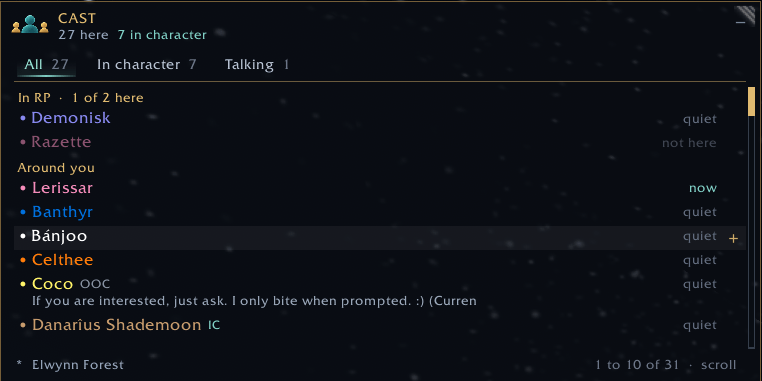
Everyone around you, with the scene you have open in Scene at the top.
Description
Scene Cast
Scene Cast is made for roleplayers who want to know who is around them. It keeps a small list of the players nearby: their Total RP 3 names, who is in character and who is not, the Currently line they wrote, who has you targeted and who has been talking. At a crowded inn it shows at a glance who is there for the evening and who is only passing through. It belongs to the Scene family and works best with Scene installed, but it works on its own too. It only reads what the game already shows you and never sends anything.
Who is here
Everyone near you is listed with their name in the game's class colour, IC or OOC from Total RP 3, and the Currently line under the name. An eye marks the people who have you targeted right now, and the right column says how long ago each person last spoke, or quiet if they have not. The ones who spoke last sit at the top. Hover a name for the whole picture: character name, class, the full Currently line and when they last spoke.
Three filters sit on top: All, In character and Talking. The numbers next to them always count everyone who is here, so you see at a glance how many are in character and how many are actually talking.
Just left
People who walk out of sight stay under Just left for a few minutes, so you can still see who it was. The group is folded to a single line with a count, and a click opens it. Turning the camera never sends anyone there: a person has to be out of sight for a minute first. A new zone or a loading screen starts the list over, and a right click on the mark in the top left corner clears it by hand.
Best with Scene
Scene Cast works best with Scene installed. The scene you have open in Scene gets its own group at the top with every member of it: the ones who are here first, then the ones who are not, and a count like RP 3 of 5 here. A plus on each row adds that person to the scene you have open.
Click a name and Scene's own person panel opens next to the list. Add them to any of your scenes, start a new scene with them, write a note, whisper them, open their Total RP 3 profile or target them, all in one place.
Docked to Scene
The window can hang on Scene's window, to the right, the left, above or below. Above or below it takes Scene's width and you drag the free edge to set the height. It moves with Scene and hides when Scene is minimized. Minimize it while docked and it turns into a slim bar at Scene's edge that still says how many are here, who is talking and who is looking at you. The plus on the bar opens the list again.
It follows Scene's background opacity, and with Same fade as Scene on, Scene, Scene Stage and Scene Cast fade after the same quiet time and wake up together. The mouse over any of the three wakes them all.
On its own
Without Scene, Scene Cast still lists everyone around you with their names, status and Currently line. A click on a name offers Target, Whisper and the Total RP 3 profile, and the window minimizes to a small tab you can place anywhere.
Good to know
- Like the Eyes on you list in Scene, Scene Cast reads visible nameplates, so friendly nameplates need to be on (Shift V) to see everyone. Without them it only sees the people who talk, your target and your group, and the corner of the window tells you they are off.
- The game gives addons no friendly nameplates in dungeons, raids and battlegrounds, so the list stays empty there.
- It shows who is around you, not where they stand. The game does not tell addons that, so it is a list and not a map.
- In character, out of character and Currently come from Total RP 3, for the profiles Total RP 3 already has. Scene Cast never asks for profiles itself.
- Settings are under Options > AddOns > Scene Cast, sorted into List, Window, Fading and General. Right click the minimap button to get there, and /scenecast opens or closes the window.
- The lock icon frees the window to be moved, and the corner grip resizes it. Only Blizzard's public addon API, no libraries.
- Still early: things may move around, and feedback is welcome in the comments.
The Scene Cast Team