Rocket Mount - Mount Collection Tracker
- By
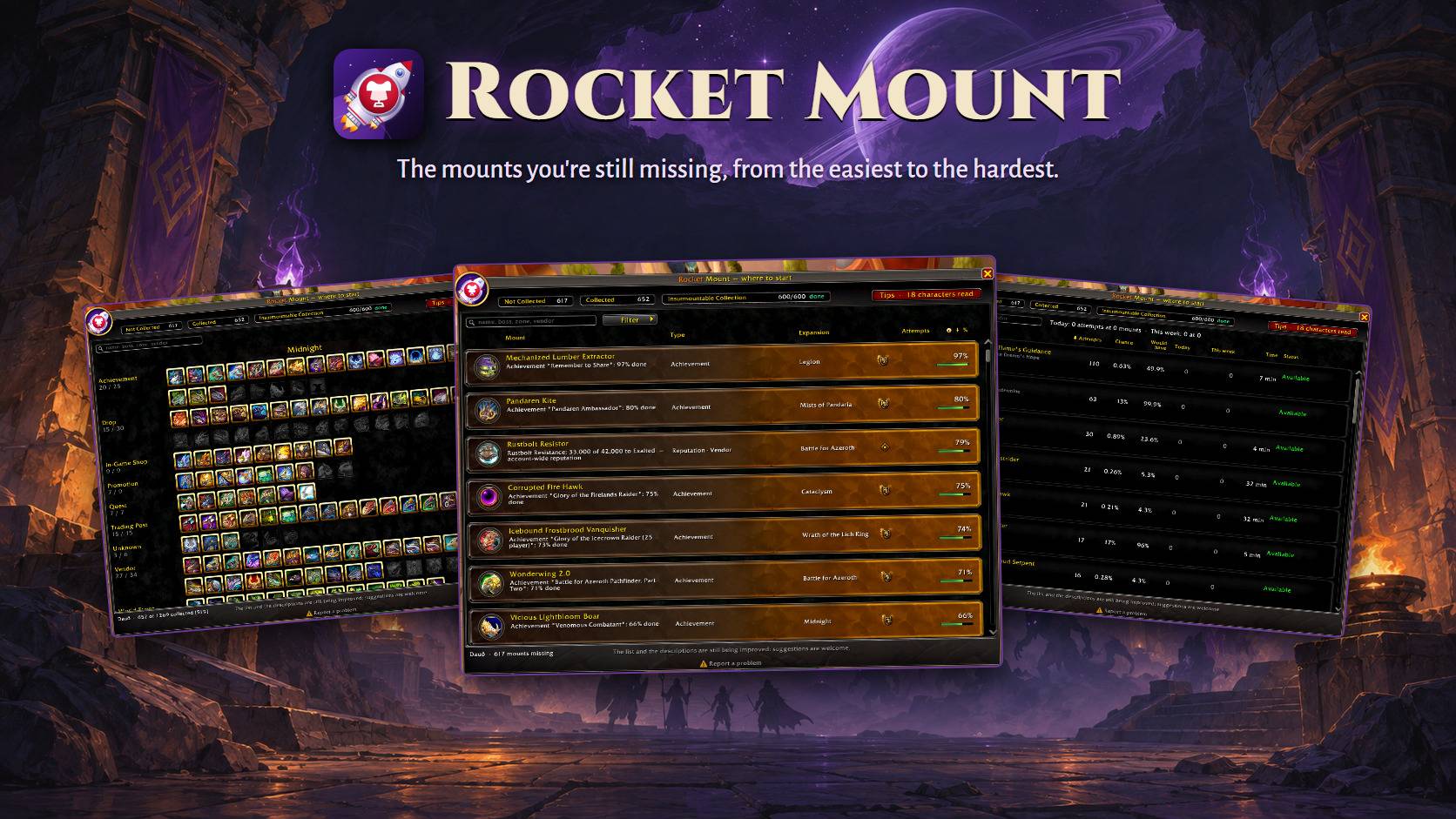
The mounts you are still missing, ordered from easiest to hardest, with how to get each one and every source marked on the world map.
PAGINA RocketMount - capa.jpg
PAGINA RocketMount - lista.jpg
PAGINA RocketMount - tentativas.jpg
PAGINA RocketMount - colecao.jpg
PAGINA RocketMount - mapa.jpg
Description
Rocket Mount
The mounts you are still missing, ordered from easiest to hardest, with a card explaining how each one is obtained. For World of Warcraft: Midnight.
⚠️ This is an alpha. Please report what you find: the Report a problem link at the bottom of the addon's window gives you the address.
Why it exists
Mount catalogues already exist, and they are good. What none of them answers is the question you actually have when you open the journal: out of the four hundred mounts I don't own, which one should I go after today?
Rocket Mount answers that, and shows its reasoning. Every mount gets one number by a stated rule, and the row shows it. If you disagree with the ordering, you can see exactly why it ordered that way.
The one rule behind it
Absence of data is not absence of a requirement.
When the addon cannot read something, it says so, out loud, instead of quietly treating "nothing known" as "nothing in the way". A mount gated behind a reputation none of your characters has does not get to sit at the top of the list just because the API stayed silent about it.
That distinction is the whole design. Requirements are read from the game itself — reputation and renown, achievements, quests, vendor prices, and the item's own tooltip — rather than from a database maintained by hand, because a wrong hand-written entry looks exactly like a right one, forever.
The list
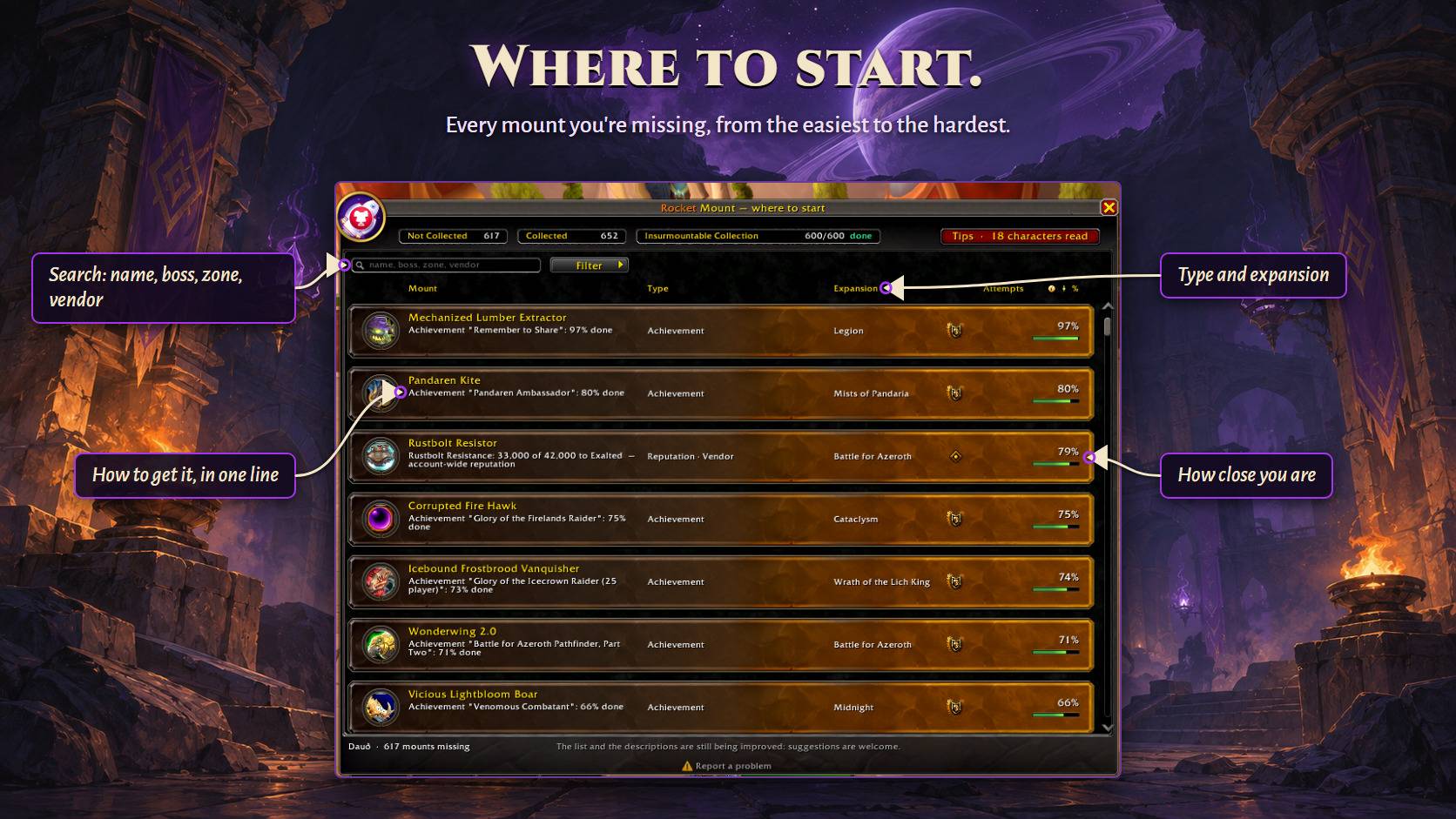
One list, ordered by one number, with columns: Mount, Type (Raid, Dungeon, Drop, Quest, Achievement, Renown, Reputation, Vendor, Profession, Event…), Expansion and %. Filter or group by Type and Expansion — inside a group the list is still ordered by the number.
The number is what the mount depends on: a drop's chance per attempt (a 1-in-3 cache is 33%), an achievement's progress counted like Almost Completed Achievements (partial criteria and meta achievements included — 546 of 600 mounts is 91%), or the road to a reputation or renown level; gold counts only once everything else is met. Achievement mounts are known from the game's own data, secret achievements included. Anything the addon cannot measure shows ? and goes last; nothing shows 100% without being checked for this character.
Every mount is in the list and says what it is. Mounts of the in-game shop, the Trading Post, promotions and the card game have their own tag and 0%, so you know why they are not a farm. Only the ones the game itself marks as gone are left out (and one click brings them back).
The split that holds it together: a requirement is not an acquisition. Reputation and currency say whether you may try. Only a deterministic acquisition — buying from the vendor, handing in the quest — can ever be "just go get it". With a drop chance in the way, a met requirement unlocks the farm; it never completes it.
What's in it
- A card for every mount, with how it is obtained, the chance (per difficulty, where it differs), the expansion, faction, the full list of requirements with each one marked met or not, and where to find it — plus a button that drops a map pin.
- Players' tips where the game's own text is not enough — a secret, a chain of steps, a treasure that needs a key: a short text written from what players reported, checked against other sources and signed with the year of the report.
- Every requirement, not just the worst one. A mount that needs both a currency and a reputation says both.
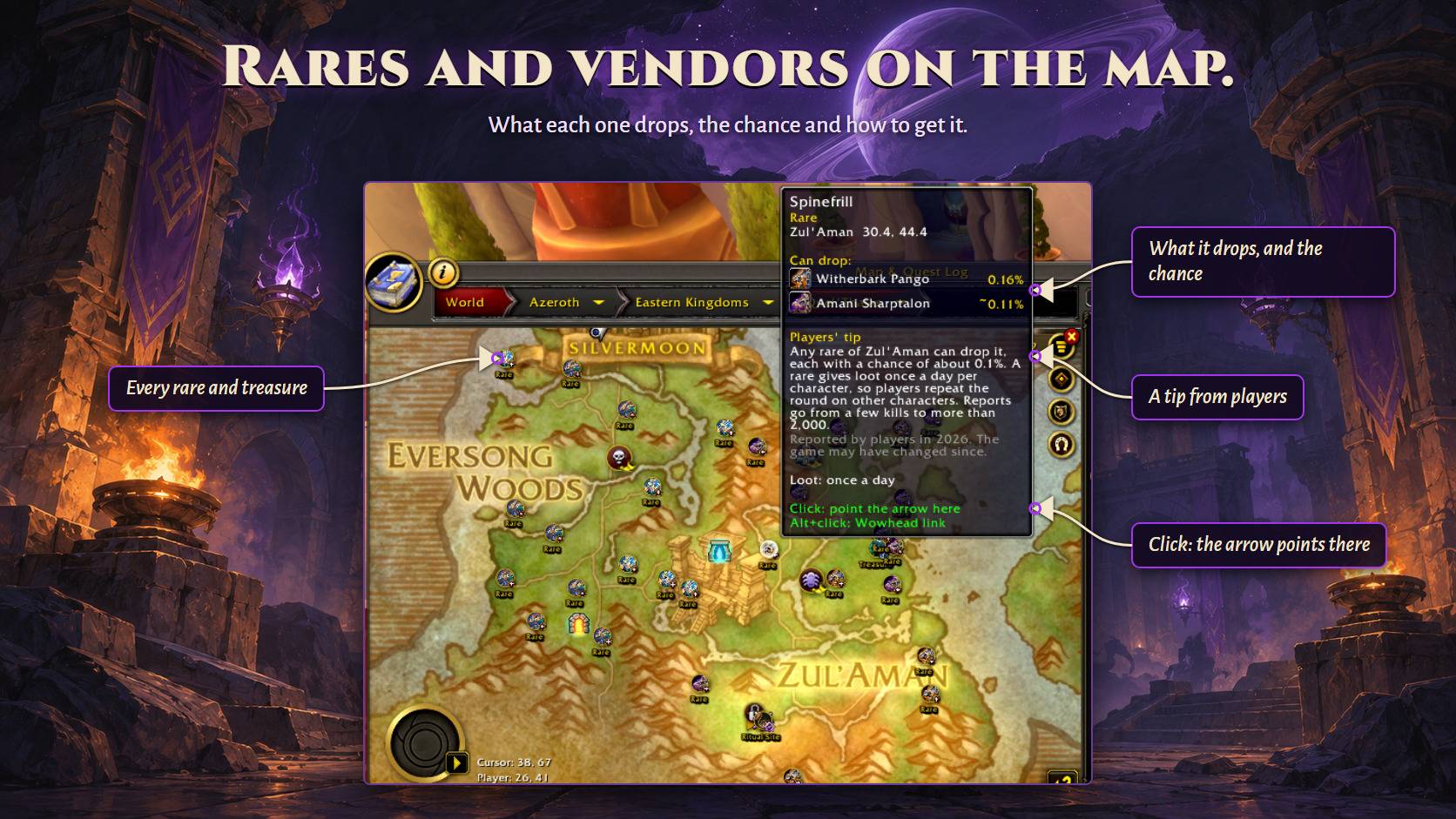
- Every source on the world map and the minimap. Rares, elites and world bosses, vendors, quest givers, treasures, portals, delves, ritual sites, the Horrific Visions and raid and dungeon entrances: each place a mount you are missing comes from is a marker with the mount's icon, drawn with the game's own map art. A rare that walks has one marker and its route. Hover for every mount there and the chance or how far along you are; click to point the arrow there; looted rares dim until they can drop again. A button on the map opens a menu: hide every marker, show only the mounts you are missing, or the collected ones too, with a gold ring.
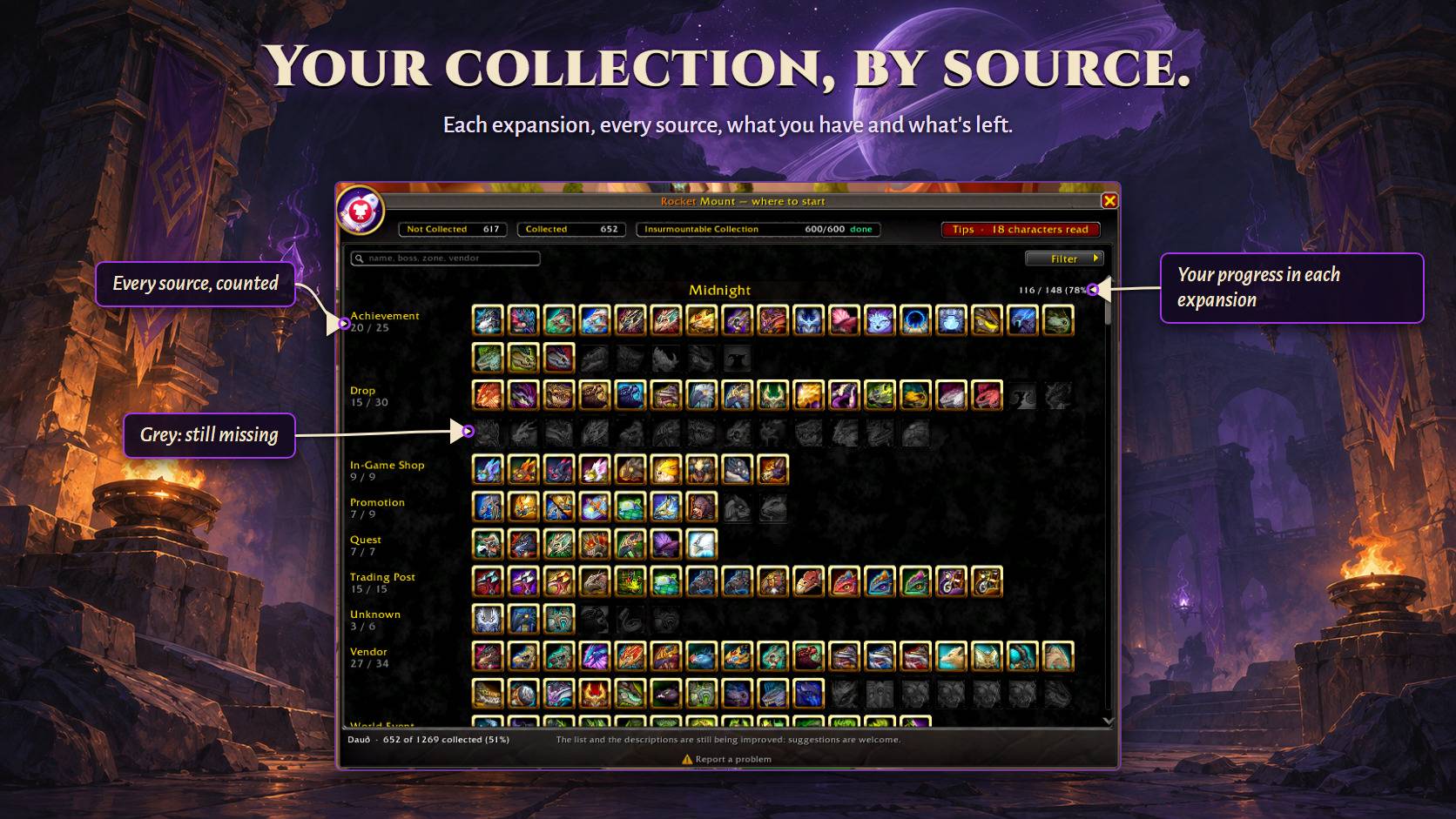
- A Collection tab. Every mount of the game by expansion and kind of source, the ones you have in colour and the ones you miss dimmed, with "have / total" for each block and filters for collected, not collected and kind of source. Click any mount to read about it at the side.
- A Wowhead button on every mount, with the link of its page ready to copy.
- From the list to the achievement. For a mount that comes from an achievement, the row's shield opens it in the game's own window; right-click tracks it.
- From the list to the map. A map pin on every row with a known place: one click marks it with the game's own map pin and points the arrow there -- vendor, quest giver, rare, chest, or the way in to the raid or dungeon. The chat line has the game's link to open the map on it.
- Sighting alerts, with the drop chance. Fly past a rare that drops a mount you're missing and an alert in the game's own style says who it is, the likeliest mount and its chance (built in — no other addon needed); hover it for every mount, click it to point the map arrow at the rare. Its marker pulses on the world map and the minimap (the game's own map ping) for five minutes or until you loot it, so it stands out from the rares around it. A short chime plays with it: pick one of four and its volume in the options, or turn it off. It triggers on the minimap vignette, nameplates, mouseover, target and the yell a rare makes when it spawns — and stays quiet for mounts you already own. Open world only: it stays quiet inside dungeons, raids, delves and scenarios.
- Which of your characters has that reputation. The game only ever talks about the character you are logged in on, so the addon keeps a ledger, written as each character logs in, and the card says plainly that it is a record rather than a live reading.
- Search across everything it knows — name, boss, zone, vendor, the game's own source text — so "fyrakk" finds the mount even though the word isn't in its name. Accents are folded.
- Filters by source, expansion and faction.
- English, Brazilian Portuguese, Spanish (Spain and Mexico), Italian, German, French, Russian, Korean and Chinese (Simplified and Traditional), following the game's language, using the game's own words where the game provides them.
No other addon needed
Rocket Mount works on its own and reads no other addon: drop chances, prices, vendors, quest givers, bosses and places all come with it, or from the game itself.
Commands
| Command | What it does |
|---|---|
/rmt |
opens and closes the list |
/rmt sources |
clears the source filter |
/rmt faction [mine\\|horde\\|alliance] |
filters by faction |
/rmt gone |
shows or hides the mounts that left the game |
/rmt warn |
turns the sighting alert on or off |
/rmt search <text> |
searches by name, boss, zone or vendor |
/rmt expansion [name] |
filters by expansion |
/rmt who |
the characters on record and how many reputations each has |
/rmt forget <name> |
takes a character that no longer exists out of the records |
/rmt pins |
what the world map drew, and what failed |
/rmt toast |
shows the new-mount alert now, to see how it looks |
/rmt minimap |
shows or hides the minimap button |
/rmt config |
options |
/rmt i18n |
checks the labels taken from the game |
/rmt debug [name] |
what the addon managed to read, for everything or for one mount |
The Portuguese command names it shipped with (busca, faccao, quem, esquecer, sumidas, aviso, fontes, minimapa, expansao) still work as aliases.
Known limits, stated up front
- Guild vendor mounts cannot be fully read. Every one of them needs Exalted with your guild plus, usually, a guild achievement — and nothing the game exposes links a guild achievement to a mount. The card tells you that instead of guessing.
- Expansion is derived from mount ID ranges, so a handful of late additions land one expansion off. It narrows a list; it is not a source of truth about when something was added.
- Attempt lockouts do not change the number. A 1% drop from a weekly boss and a 1% drop from a creature with no lockout are years apart, and today they show the same number. The row shows the method and you judge.
- Achievements spread over a zone have no marker. A mount from "find every treasure of the zone" is in the list with the game's text, not on the map.
Your attempts
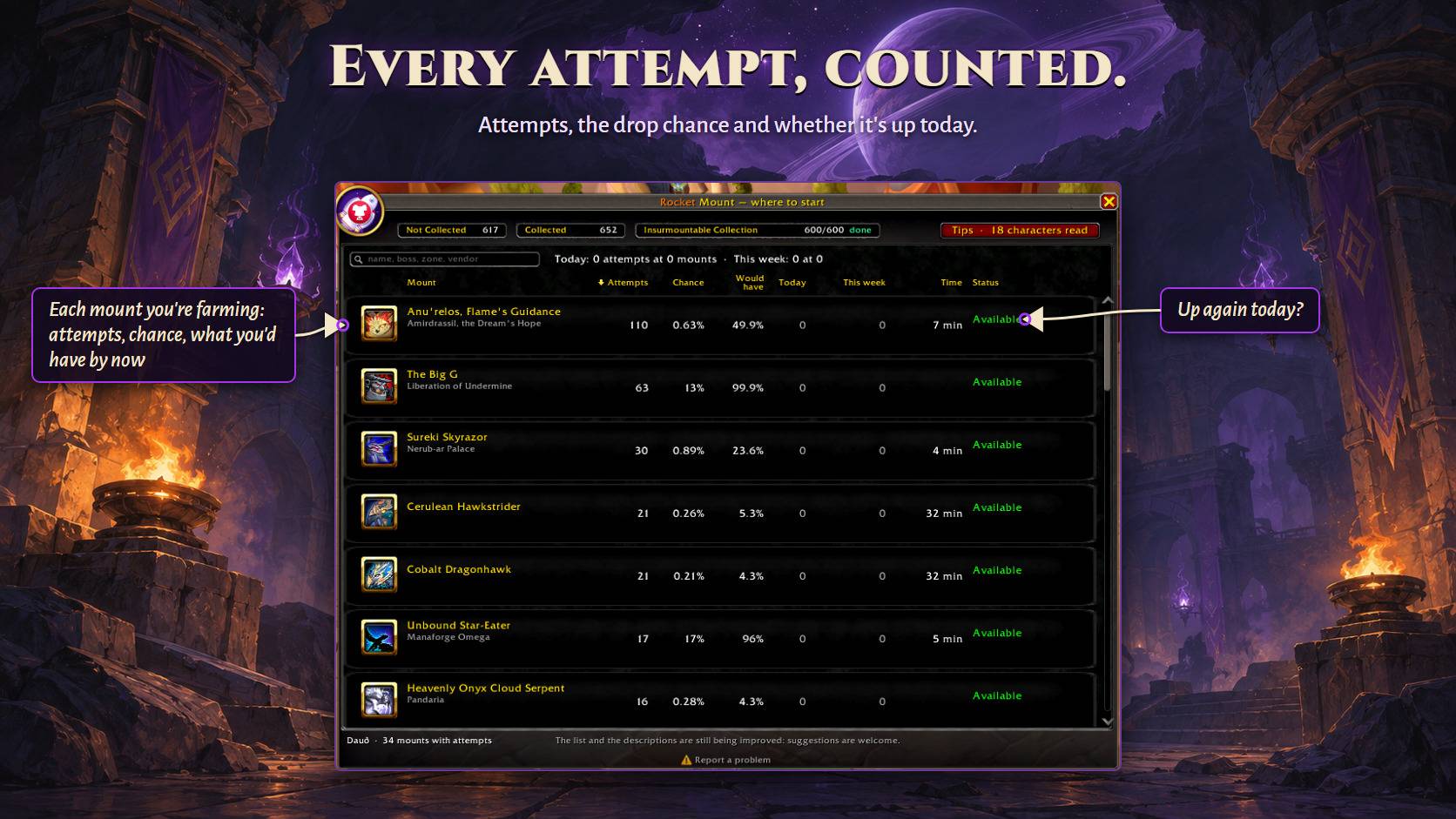
Every mount that drops by chance counts your attempts at it, for the whole account and for each character: a boss when it dies on a difficulty the mount drops on and was not already looted in your lockout, a rare when you loot it. When the mount comes, the card says on which try you got it. For 43 boss mounts the count also takes the kills from before the addon, from the game's own statistics of each character — years of Fyrakk on Mythic included. The list's Attempts column shows the count, and hovering it gives each character's share.
When you learn a mount, an alert just like the game's achievement one shows its name and icon — the addon's own alert, not a real achievement, and it can be turned off in the options.
The Attempts tab lists every mount you have tried for: the chance you had of getting it by now, your tries today and this week, and the time spent. Lockouts are per character, so the list, the card and the tab show which of your characters already did each source this lockout.
Mount events
Some world events can bring a mount from their reward. A few minutes before one starts, an alert says which mounts you are still missing from it, each one's chance, price or renown, and whether the reward is weekly, daily or once per event. Only events with a mount you do not have, and quiet once the week's reward is taken. In the options, under Mount events: the switch, how many minutes before (1 to 15) and one box per event. /rmt events lists them all.
Report a problem
Found a bug, or a mount in the wrong place? Tell us where it suits you:
- CurseForge — the Comments tab of this page.
- GitHub — https://github.com/otaviohonorio/RocketMount/issues
Say what you were doing and what happened. The Report a problem link at the bottom of the addon's window opens the address ready to copy, with the addon's version.
Rocket Mount is made by Otto Rocket. All rights reserved.
Support
Rocket addons are free and always will be, and a donation unlocks nothing: every feature is there for everyone. If this one saves you time, you can help pay for the hours that keep it current with each patch:
- PayPal — a one-off donation, any amount.
Rocket Mount - Mount Collection Tracker Team