Rocket Radar - Interrupts, Crowd Control, Threat & Party Cooldowns
- By
Interrupt marks and threat on Blizzard's nameplates, plus party cooldowns, crowd control, dispellable debuffs and incoming casts beside the party frames.
PAGINA RocketRadar - capa.jpg
PAGINA RocketRadar - geral.png
PAGINA RocketRadar - penalidades.png
Description
Rocket Radar
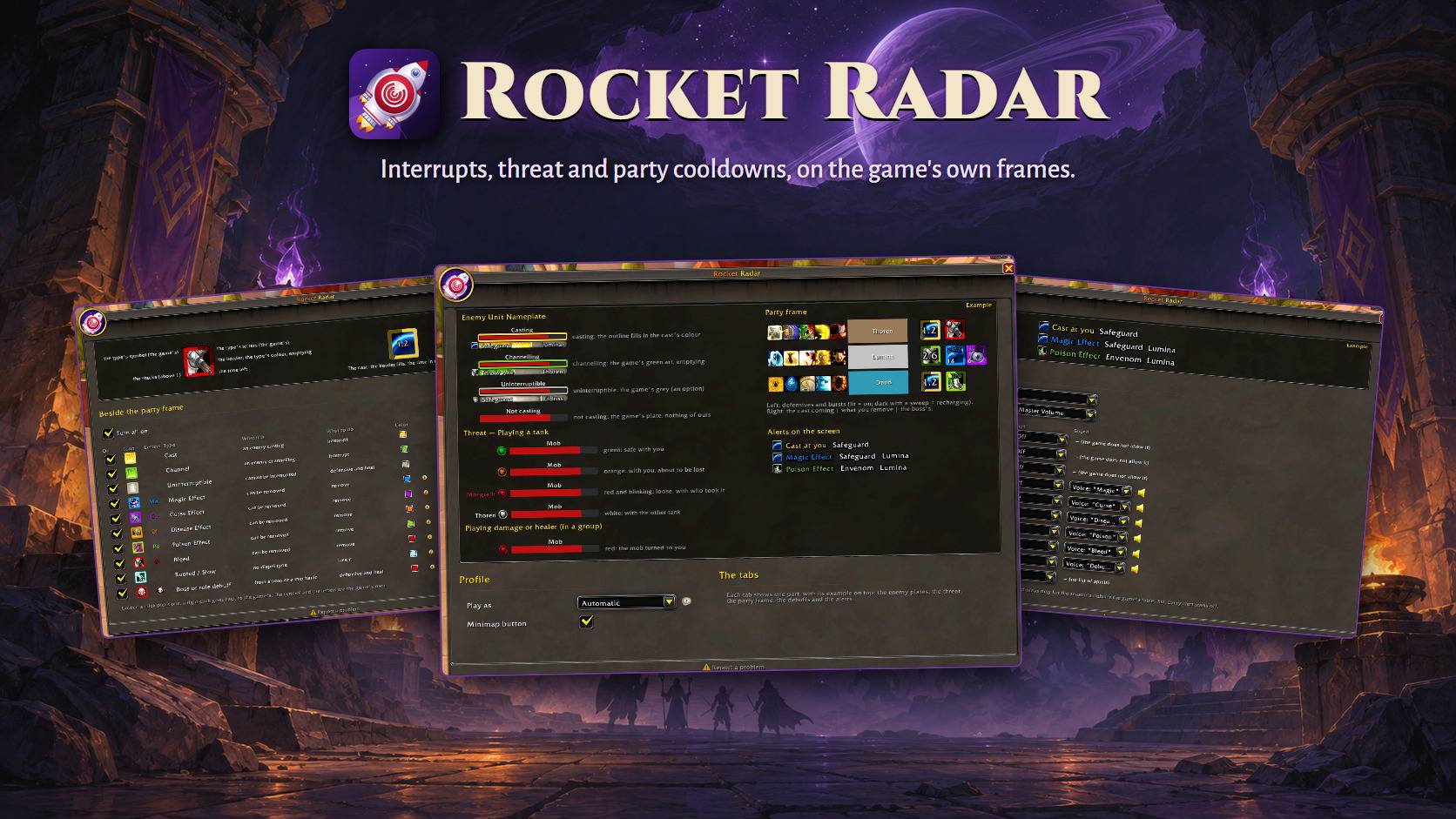
Adds to the game's own nameplates and party frames, without replacing them: what to interrupt, who holds each mob, what you can remove from your group, and when a teammate's defensive, burst or crowd control is up.
Why Rocket Radar?
Midnight hides most combat data from addons while you fight. A lot of the old nameplate tricks stopped working, and replacing the game's plates now means losing what the game itself knows.
Rocket Radar takes the other road: it keeps Blizzard's nameplates and party frames and draws a few clear marks on them and beside them. The game itself reads the casts and the debuffs and hands them to the marks, so everything works in combat, in a Mythic+ key and in a raid.
- Nothing to replace. Your plates and party frames stay the game's own; turn the addon off and they are exactly as before.
- Nothing on top of the party frame. Every icon sits beside it, so health and names stay readable.
- One window with examples. Each tab shows a live example of what it changes, so you see the result before you enter a fight.
Features
Enemy nameplates: what to interrupt
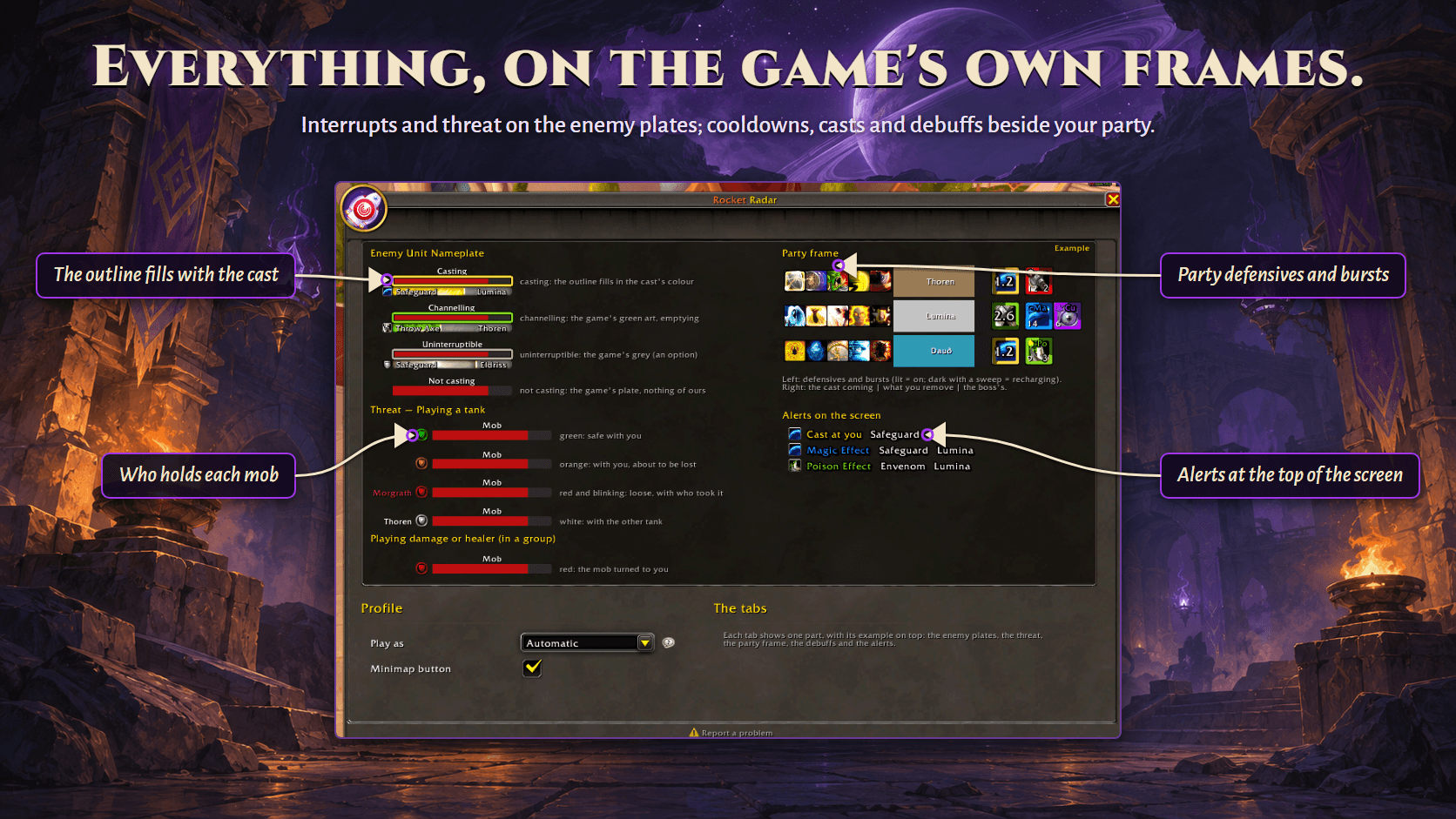
- When an enemy casts something that can be interrupted, the outline of its health bar takes the cast's colour and fills up with the cast. That plate also comes in front of the others, so it is easy to find in a pile.
- Which casts: only the ones the game marks as important, or all of them.
- Separate colours for a cast, a channel and, optionally, a cast that cannot be interrupted. By default these are the game's own cast bar colours.
- Three animations: Filling, like the cast bar; Full, the whole outline at once; Pulsing.
- A shortcut to the game's own Spread enemy plates option, so plates don't cover each other.
Threat: who holds each mob
A small shield beside every enemy plate:
| Playing a tank | |
|---|---|
| Green | the mob is with you and safe |
| Orange | with you, about to be lost |
| Red, blinking | loose, with the name of who took it, in their class colour |
| White | with the other tank |
Playing damage or healer in a group, the shield turns red only when a mob turns to you, so you know to step back or use a defensive.
Play as follows your specialization by default; you can also set it to tank or to damage/healer. Every colour can be changed with a click, and a right click goes back to the game's colour.
Party frames: left side — defensives, bursts and crowd control
- Beside each member's frame, their major defensives and their burst, lit while active and dark while recharging.
- Their class's crowd control too (stuns, silences, fears, interrupts that leave a mark): the icon lights up when it lands on an enemy and goes dark while it recharges, so you know who still has a stop for the next pull.
- 226 defensives and bursts and 51 crowd control abilities across every class and specialization, with the recharge and the talents that change it, checked against the game's own tables. You choose which ones each specialization shows.
- Your own icons use the game's exact recharge.
- A damage dealer shows up after the game's inspection, out of combat. A tank or a healer shows up at once.
- Adjustable icon size and icons per row; the block stays centred on the frame.
Party frames: right side — the cast coming, and what to remove
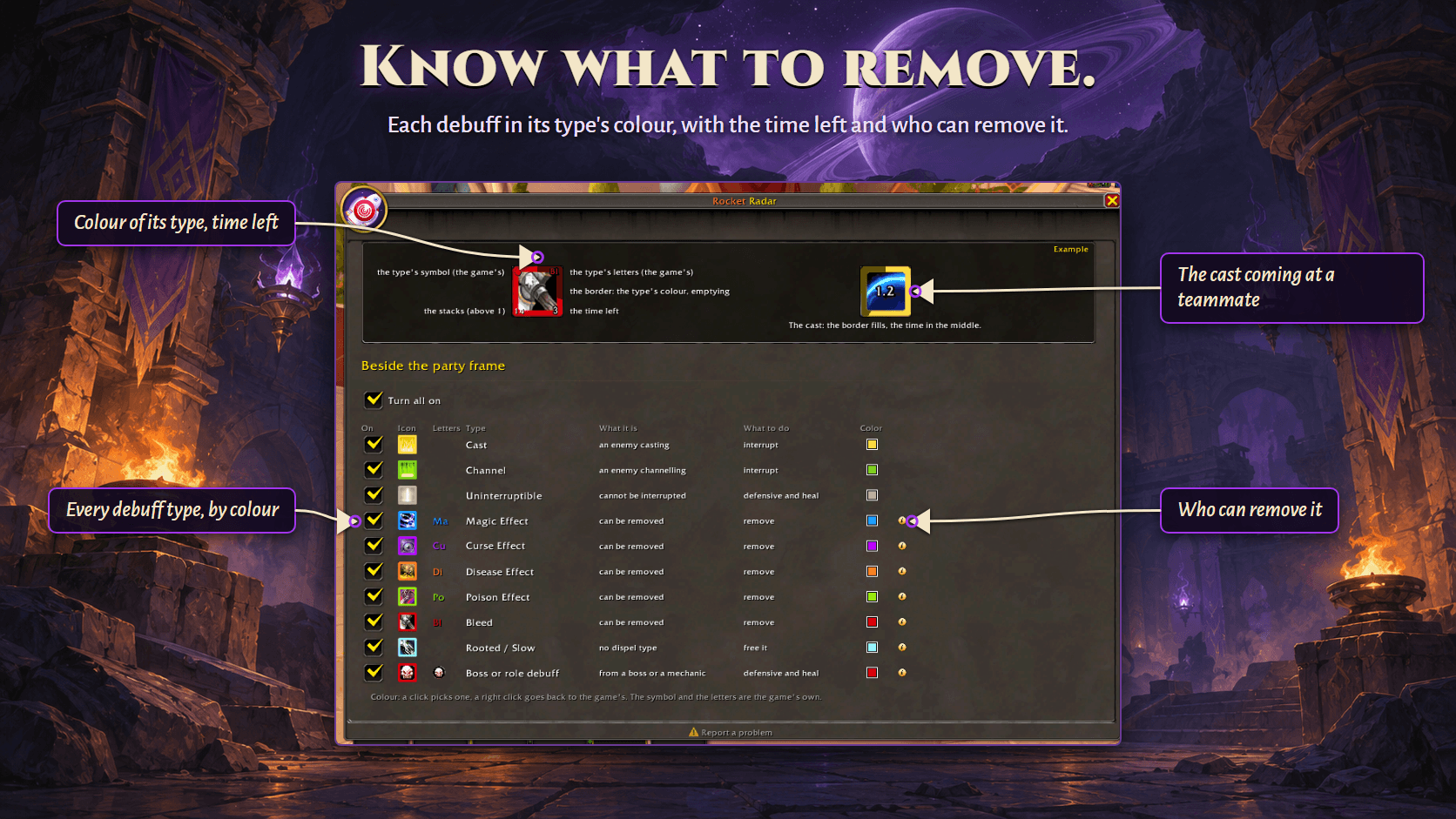
- The cast coming at that member: the spell's icon with a border that fills as the cast goes on. Up to three enemies at once, each in its own spot, so two casts at the same player never hide each other.
- Debuffs you can remove: only the types your specialization removes, or every typed debuff (your choice).
- A boss's or a role's debuff, shown apart from the others.
- Each debuff icon carries a border in its type's colour that empties with the time left. Its corners show the game's own symbol and letters for the type, the time left and the stacks.
- A table of every debuff type, with an info icon that lists which classes and specializations can remove it, with the spell names, read from the game's tables.
Alerts
- For each debuff type, a line at the top of the screen while it lasts: its icon, its type, the spell and who has it, in the class colour. Set it to Off, On you or Whole group. Every alert starts off.
- An optional sound when a debuff lands, from a list of game sounds, on the game channel you choose. The game plays it only for the current season's debuffs of that type that its own tables list, so some debuffs show the line without the sound.
- A "Cast at you" line when an enemy casts at you: the spell's icon and name. The game only tells an addon who a cast is aimed at when it is you.
Everywhere
- Available in the game's 11 languages. Game terms come from the game's own text in each language.
- Minimap button, the addon compartment, and a button in Options > AddOns that opens the window.
Commands
/rr          open or close the window
/rr test     show the mark on your current target's health bar for a few seconds
/rr party    show how many party icons are on screen and what the sensor reads
Good to know
- Rocket Radar never reads another addon. Install it alone and it does everything described here.
- What Midnight blocks stays blocked. The addon does not read hidden combat values. It hands them to the game's own widgets, which are allowed to show them, so a few things simply cannot exist. For example, a sound for a cast aimed at you is not possible.
- Some defensives cannot be seen on a teammate. When a spell leaves no aura on its caster, nothing reaches an addon, so it cannot be tracked.
Report a problem
Found a bug? Tell us where it suits you:
- CurseForge: the Comments tab of this page.
- GitHub: https://github.com/otaviohonorio/RocketRadar/issues
Say what you were doing and what happened. The Report a problem link at the bottom of the addon's window opens the address ready to copy, with the addon's version.
Rocket Radar is made by Otto Rocket. All rights reserved.
Support
Rocket addons are free and always will be, and a donation unlocks nothing: every feature is there for everyone. If this one saves you time, you can help pay for the hours that keep it current with each patch:
- PayPal: a one-off donation, any amount.
Rocket Radar - Interrupts, Crowd Control, Threat & Party Cooldowns Team