Screenshot 2026-01-18 183526.png
Screenshot 2026-01-18 183501.png
Screenshot 2026-01-18 183519.png
Description
RL WoW Messenger
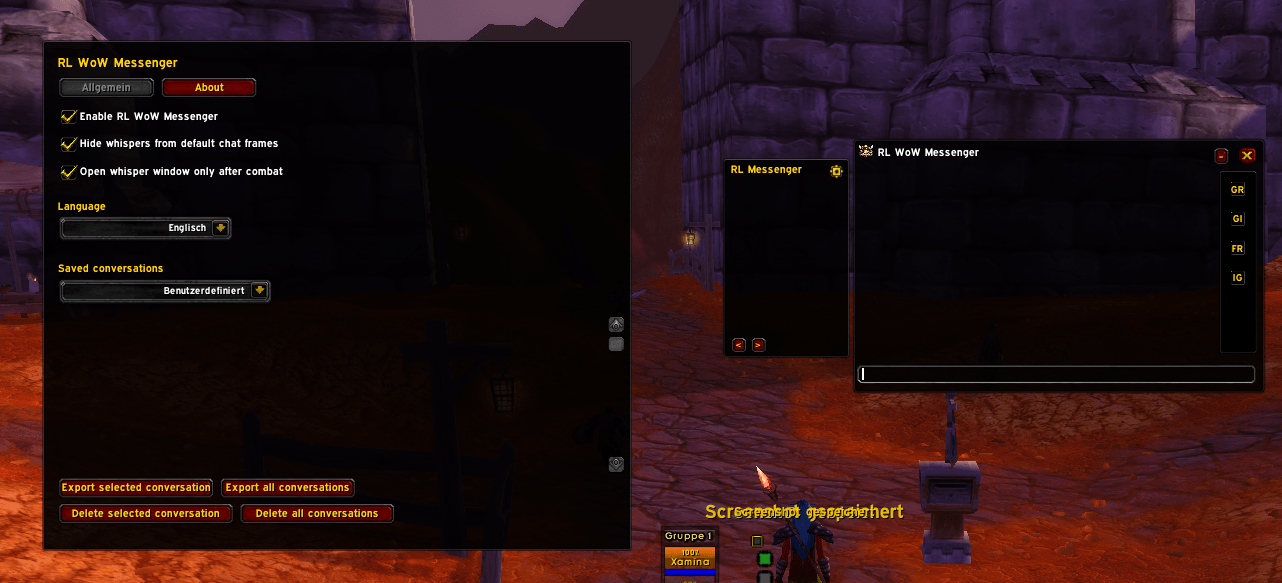
RL WoW Messenger is a whisper-focused chat addon for World of Warcraft Classic. It provides a modern, compact whisper window inspired by WIM, with powerful history handling and quality-of-life tools tailored for organized group play.
Features
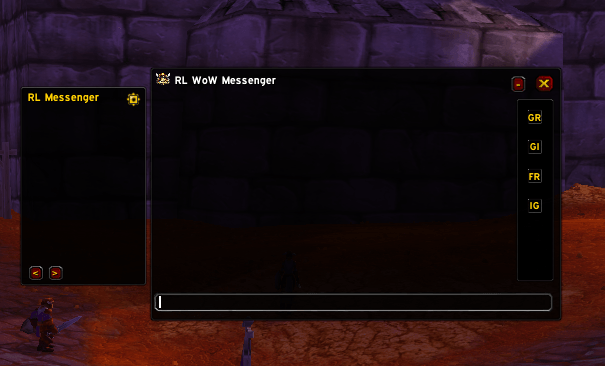
- Dedicated whisper window with tabbed conversations
- Side bar with quick actions:
- Invite to party/raid
- Invite to guild
- Add friend
- Toggle ignore
- Scrollable tab list next to the chat area
- Per-character whisper history, permanently stored via SavedVariables
- Export whisper history per conversation or for all conversations at once
- Delete single conversation history or all histories
- Old messages (older than 1 day or before last login) shown in grey
- Configurable filtering of whispers from the default chat frames
- Option to defer opening the whisper window while you are in combat
- Localized UI (German and English), with auto-detection from the game client
- Minimap button to quickly open or hide the messenger
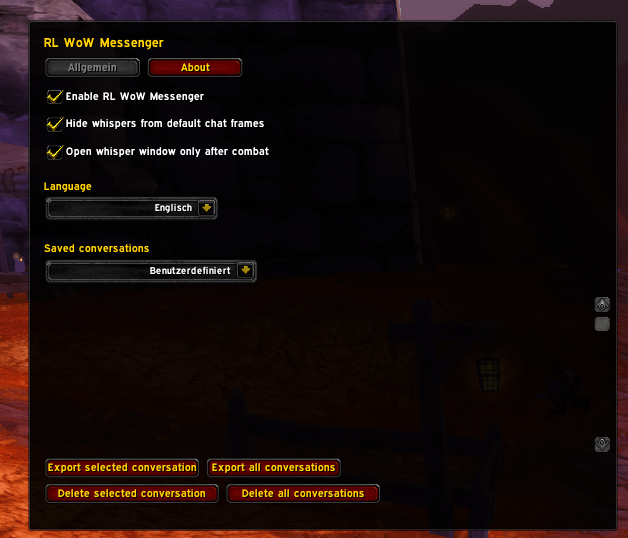
- Custom options window with tabs for General settings and About information
Installation
Close World of Warcraft.
Copy the
RLMessengerfolder into your WoW addons directory, for example:- Windows (Classic Era / WotLK-style):
World of Warcraft\_classic_\Interface\AddOns\RLMessenger - Your current setup uses:
World of Warcraft\_anniversary_\Interface\AddOns\RLMessenger
- Windows (Classic Era / WotLK-style):
Start the game and enable RL WoW Messenger in the AddOns menu on the character selection screen.
Usage
- Incoming and outgoing whispers will be routed into RL WoW Messenger while the addon is enabled.
- Each player you talk to gets its own tab; all tabs are listed in a scrollable bar next to the chat area.
- Use the buttons in the right side bar to:
- Invite the active whisper target to your group
- Invite the target to your guild
- Add the target as a friend
- Toggle ignore for that player
Configuration
Open the configuration window in one of these ways:
- Click the small gear button next to the RL Messenger header in the main messenger window, or
- Use the slash command
/rlwimor/rlwm.
General tab:
Enable RL WoW Messenger
Turn the addon on or off without unloading it.Hide whispers from default chat frames
If enabled, whispers will be filtered out of the standard chat windows and shown only in RL WoW Messenger.Open whisper window only after combat
When enabled, incoming whispers during combat will not pop up the window immediately; the window appears after you leave combat.Language
Choose between:- Automatic (client locale)
- German
- English
Saved conversations
- Choose a conversation from the dropdown to view/export its history.
- Use the buttons below to:
- Export selected conversation
- Export all conversations
- Delete selected conversation
- Delete all conversations
About tab
Shows basic information about the addon, including:
- Author: Robin Oliver Lucas (RL-Dev)
- Address: Schwarzbach 148, 42277 Wuppertal, Germany
- E-mail: robin@rl-dev.de
- Bug tracker: https://rl-dev.de/bugtracker.html
- PayPal (donations): robin@rl-dev.de
Slash Commands
/rlwimor/rlwmWithout arguments: toggle the main RL WoW Messenger window.
With
name message: send a whisper directly through RL WoW Messenger, for example:/rlwim Playername Hello there!
Localization
RL WoW Messenger currently supports:
- German (deDE)
- English (enUS and others)
By default the addon uses the game client's locale. You can override this in the options under Language.
Support & Bug Reports
- Bug tracker: https://rl-dev.de/bugtracker.html
- E-mail: robin@rl-dev.de
For feature requests, issues or feedback, please open a ticket on the bug tracker or contact the author via e-mail.
Donations
If you enjoy RL WoW Messenger and want to support development, you can donate via PayPal to:
robin@rl-dev.de
RL Messenger Team

Owner