Screenshot 2026-06-05 103608.png
Screenshot 2026-01-30 042000.png
Description
RL Mage
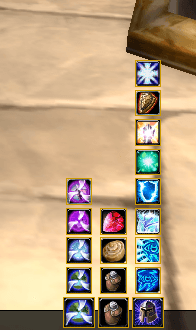
RL Mage is a Mage Utility Bar designed for World of Warcraft: The Burning Crusade Classic (Interface 20505). It provides a convenient and customizable interface for accessing essential mage spells such as teleports, portals, food, water, and buffs.
Features
- Smart Spell Detection: Automatically detects the highest rank of Conjure Food and Conjure Water.
- Teleport & Portal Menus: Easy access to all your learned teleport and portal spells.
- Buff Management: Quick access to Intellect and Armor buffs.
- Combat Secure: Uses SecureActionButtons to ensure spells can be cast during combat.
- Customizable:
- Hide specific spells (Alt + Right Click).
- Toggle visibility of entire categories (Teleports, Portals, Food, Buffs).
- Movable main button and minimap icon.
- Localization: Fully supports English and German clients.
Usage
Main Interface
- Left Click on the main button (Arcane icon) to toggle the Portal/Teleport menu.
- Drag the main button to move the bar on your screen.
- Left Click on spell buttons to cast them.
- Alt + Right Click on any spell button to hide it from the bar (useful for lower ranks or unused spells).
Options
To open the configuration menu:
- Left Click on the Minimap button.
- Or use the slash command:
/rlmage
In the options menu, you can:
- Enable/Disable specific categories (Teleports, Portals, Food, Buffs).
- Unhide spells that you have previously hidden.
- View "About" information.
Installation
- Download the addon.
- Extract the
RLMagefolder into your WoW AddOns directory:\World of Warcraft\_classic_\Interface\AddOns\ - (Restart WoW if it was running).
Author & Contact
Creator: Robin Oliver Lucas Author: XamiraNRW
Address: Schwarzbach 148 42277 Wuppertal Deutschland
Contact:
- Email: robin@rl-dev.de
- Homepage: https://rl-dev.de
- Bug Tracker: https://rl-dev.de/git/RLMageBar/issues
RL MageSet Team


Owner