RestedXP TomTom
- By
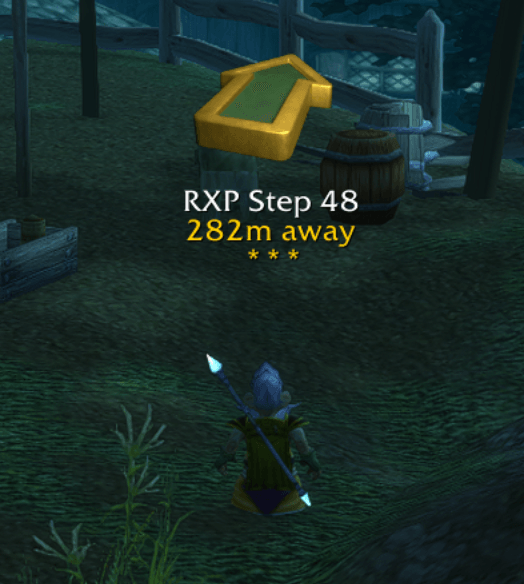
Disables the built-in RestedXP Guides waypoint arrow and uses TomTom’s Crazy Arrow instead.
Bildschirmfoto 2026-01-22 um 22.27.42.png
Description
# RestedXP-TomTom
Disables the built-in RestedXP Guides waypoint arrow and uses TomTom’s Crazy Arrow instead.
This addon does not modify RestedXP guide logic; it only changes how the “where do I go next?” arrow is displayed.
** For the best experience, make sure to keep your RestedXP Guides up to date. **
## Requirements
- **RestedXP Guides** (`RXPGuides`)
- **TomTom**
## What it does
- Forces RestedXP’s arrow to be disabled/hidden.
- Mirrors RestedXP’s current active waypoint target into a TomTom waypoint, so TomTom’s Crazy Arrow points to the same location.
- Keeps updating as RestedXP changes the active arrow target.
## What it does not do
- It does not create TomTom minimap/worldmap pins (it only uses the Crazy Arrow).
- It does not rewrite or replace RestedXP steps.
- It does not try to perfectly replicate all RestedXP arrow edge cases (instances, special world positions, etc.).
## Installation
1. Ensure you have **TomTom** and **RestedXP Guides** installed and working.
2. Copy this folder to your WoW addons directory:
- Classic Era example: `World of Warcraft/_classic_era_/Interface/AddOns/RestedXP-TomTom`
3. Restart WoW or run `/reload`.
4. In the AddOns list, enable:
- `RXPGuides`
- `TomTom`
- `RestedXP-TomTom`
## Usage
- Start or load a RestedXP guide as normal.
- The RestedXP arrow should remain hidden/disabled.
- TomTom’s Crazy Arrow should point to the current RestedXP target.
If you want to verify it’s working:
- Change steps in the RestedXP guide; the TomTom arrow should “jump” to the new target.
### Slash command
- `/rxptomtom` prints whether TomTom and the RestedXP arrow frame are detected, plus basic info about the current RestedXP arrow target.
- `/rxptomtom debug` toggles debug logging (prints when a TomTom waypoint is set).
- `/rxptomtom clear` removes the currently created TomTom waypoint.
If you manually delete the TomTom waypoint, the addon will recreate it automatically.
## Notes on compatibility
- The addon relies on RestedXP’s internal `RXPG_ARROW.element` data structure to read the current arrow target.
If RestedXP changes that internal representation in a future update, this addon may need updates.
- If TomTom is not loaded, the addon does nothing.
## Troubleshooting
**TomTom arrow doesn’t move**
- Confirm `TomTom` is enabled and its arrow is enabled in TomTom settings.
- Confirm RestedXP is actually producing an arrow target (some steps are text-only).
- Try `/reload`.
**RestedXP arrow still shows**
- Ensure `RestedXP-TomTom` is enabled.
- Check RestedXP settings for arrow-related options; this addon sets `RXPGuides.settings.profile.disableArrow = true` at runtime.
- Try disabling any other addons that also modify RestedXP’s arrow.
## Development notes
Key files:
- `RestedXP-TomTom.toc`
- `RestedXP-TomTom.lua`
High-level flow:
- On login, periodically:
- Disable/hide RestedXP arrow frame
- Read current RestedXP arrow target
- Replace the active TomTom waypoint so TomTom’s Crazy Arrow points to that target
The RestedXP TomTom Team