


Raid Bag
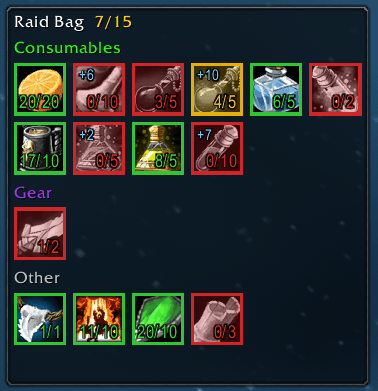
In-game HUD
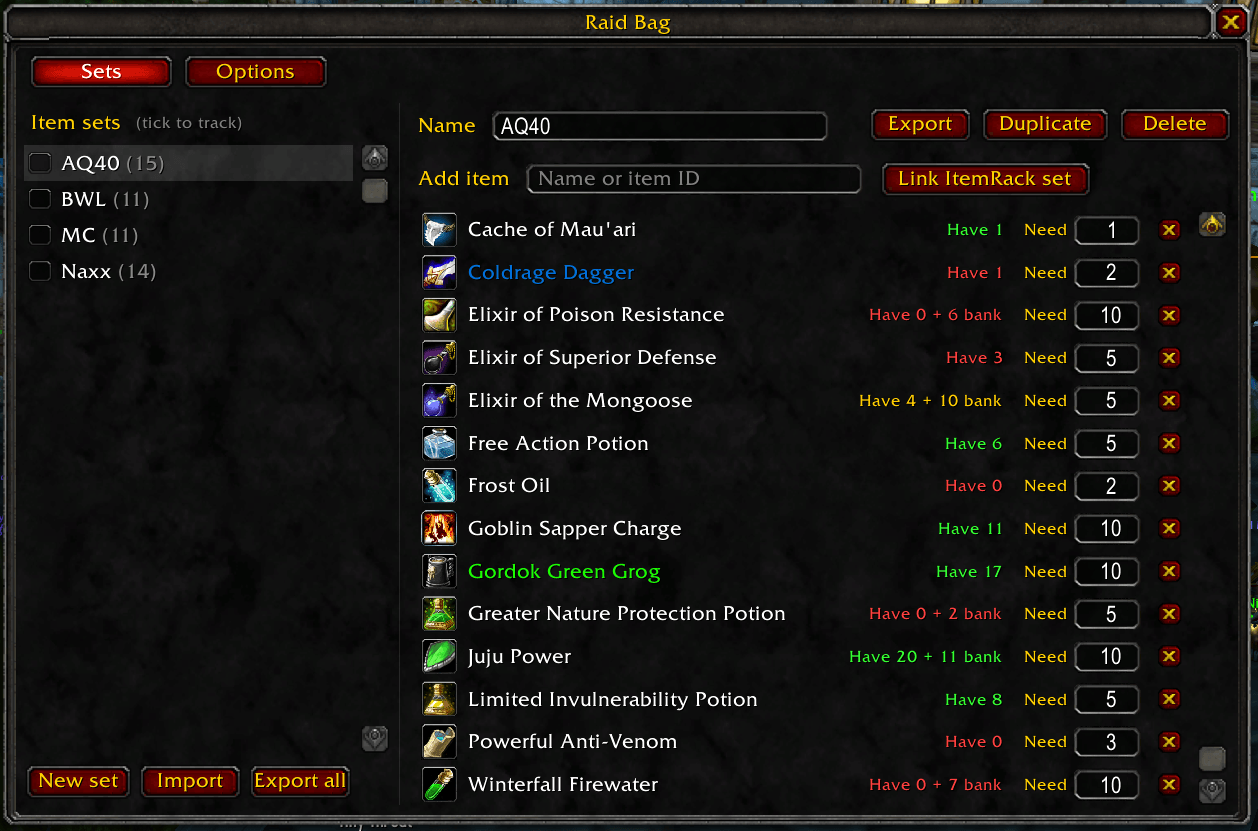
Item setup page
Description
Raid Bag
A WoW Classic addon for keeping track of what to bring to raid. Build item sets (e.g. "Naxx consumes", "Fire resist gear"), tick the ones you want for tonight, and a small icon tracker shows what you're carrying, what's still in the bank, and what you're short on.
Supports Classic Era / Season of Discovery / Hardcore, Anniversary (TBC) and Mists of Pandaria Classic.
Usage
Raid Bag has three windows:
- Set picker (left-click the minimap button, or
/rb): a small list of your sets. Tick the ones you're bringing tonight; each shows how many of its items you've packed. Pops up when you join a raid group (can be turned off). - Editor (shift-left-click the minimap button, or
/rb config): the Sets tab creates and fills sets, the Options tab holds all settings. - Tracker (right-click the minimap button): the icon display described below.
In the Sets tab:
- New set creates a set and lets you name it. Duplicate copies the selected set, handy for variants like "Naxx (tank)" and "Naxx (dps)".
- Add item searches every item in the game by name or ID. Press Enter to add the top result, or click one. With the search box focused you can also shift-click an item, or drag an item onto the list.
- Set the Need amount for each item, e.g. 20 Major Mana Potions.
- Tick the checkbox next to a set to track it on the current character. Sets are shared across characters, but each character picks its own tracked sets.
The tracker combines all tracked sets and groups the items into Consumables (potions, flasks, food, scrolls, ammo), Gear (weapons and armor, including trinkets) and Other (reagents, trade goods, everything else). An item in several tracked sets shows once. Consumables and reagents add up (20 potions + 10 potions = 30); gear and unique items use the highest amount any one set asks for, since the same trinket serves every set. Border colors:
| Border | Meaning |
|---|---|
| Green | You're carrying enough |
| Yellow | Not enough on you, but enough with the bank/mail included (+N top-left) |
| Red | You don't have enough anywhere on this character |
Hover an icon for a breakdown (bags, equipped, bank, mail, and alts/guild banks with Baganator/Syndicator). Shift-click links the item in chat. Unlock it to drag it around.
| Command | |
|---|---|
/rb |
Set picker |
/rb config, /rb options |
Editor, on the Sets or Options tab |
/rb show, hide, toggle |
Tracker visibility |
/rb lock, unlock |
Tracker dragging |
/rb reset |
Move the tracker back to the default position |
/rb grab |
Take missing items out of the open bank |
/rb ah |
Create an Auctionator shopping list of missing items |
/rb minimap |
Show or hide the minimap button |
By default both the set picker and the tracker pop up when you join a raid group, and the tracker hides in combat. All of this can be changed on the Options tab.
Restocking
Raid Bag turns what you're missing into one-click fixes. A small prompt appears when you open the right window. Drag it anywhere; close it with the X to hide it until your next visit.
- Bank: "Grab missing" moves exactly what you're short of into your bags,
splitting stacks (10 of your 40 potions, not all 40) and topping up partial
stacks. It stops if your bags fill up.
/rb grabdoes the same. - Vendors: if a vendor sells something you're missing even after counting your bank and mail (Ankhs, candles, arrows), the prompt offers to buy it, with the total price. It rounds up to the vendor's bundle size, skips items that cost tokens or honor, and buys once per visit. Optionally it buys automatically without asking.
- Auction house (with Auctionator):
"Create Auctionator list" makes a shopping list called "Raid Bag" with the
exact amounts you still need. Soulbound and quest items are left out, since
other players can't sell them.
/rb ahdoes the same.
Each one can be turned off in the Options tab under Restocking.
Sharing sets
In the editor's Sets tab, Export copies the selected set as a short string and Export all copies every set. Press Ctrl+C in the export window, then paste it in Discord, guild chat, a forum post, and so on. Import takes a pasted string (one or several sets) and adds the sets next to yours. If you already have a set with the same name, the import gets " (imported)" added to its name.
ItemRack integration
With ItemRack installed, the Sets tab has a Link ItemRack set button next to the search box. A linked set's gear becomes part of the Raid Bag set without copying it:
- It's read live, so changing the set in ItemRack updates Raid Bag.
- It shows in the tracker (under Gear), the set picker's packed count, the Baganator star and exports. Exports turn it into plain items, so friends without your ItemRack set still get the gear.
- Two of the same item in one ItemRack set (rings, one-handers) count as 2. An item that's both listed and linked uses the higher amount.
- ItemRack sets are per character. On a character without a set by that name, the link stays but contributes nothing and is marked "Not found on this character".
Baganator integration
With Baganator (and its data addon Syndicator) installed:
- Bank, mail, alt and guild bank counts come from Syndicator, so they're accurate without visiting the bank on each login.
- Items needed by a tracked set get a star in the corner of their Baganator bag slot. Move or disable it under Baganator's settings → Icons → Corners ("Raid Bag").
Without Baganator, the addon remembers your bank contents from the last time you opened the bank.
Raid Bag Team
