QuickEmote - Forever
- By
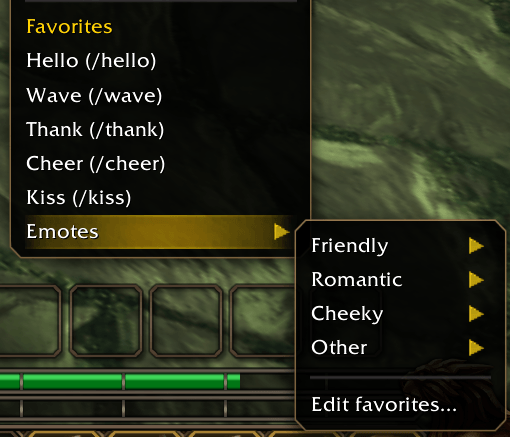
Tired of typing /wave every time? QuickEmote adds an Emotes submenu to the right-click menu of unit frames, so you can emote your target with a single click
Bildschirmfoto_20260918_205849.png
Description
QuickEmote
Tired of typing /hug, /wave or /chicken every time? QuickEmote adds an Emotes submenu to the right-click menu of unit frames, so you can emote your target with a single click.
Features
- Emotes submenu on the right-click menu of target, party, raid, focus and pet frames
- 34 emotes sorted into categories: Friendly, Romantic, Cheeky and Other
- Separate favorites per target type – players, hostile NPCs, friendly NPCs and neutral NPCs each get their own favorite list
- Favorites directly in the menu (optional) – skip the submenu entirely for your most-used emotes
- Choose where the menu appears – enable or disable it for players, hostile, friendly and neutral NPCs individually
- "Edit favorites…" entry opens the options straight on the matching target type
- Copy favorites from one target type to all others with one click
- Localized in English, German, French, Spanish, Italian, Portuguese (BR) and Russian
Usage
Right-click a unit frame → Emotes → pick a category → click an emote.
Options
Open with /quickemote or /qe, or via Options → AddOns → QuickEmote.
Notes
- Emotes are performed exactly as if you typed the slash command yourself.
- Some NPCs react to certain emotes – try
/chickenor/kisson a guard. - Favorites are saved account-wide.
The QuickEmote - Forever Team