NodeSightCompass
- By
A compass ring around your character for the herbs, ore, chests and rares NodeSight finds on your minimap – with popups and a per-node track list.
Bildschirmfoto_20261105_154517.png
Bildschirmfoto_20261105_160118.png
Description
NodeSightCompass
A compass and popups for the herbs, ore, chests and rares that NodeSight finds on your minimap.
NodeSightCompass is an add-on for NodeSight. NodeSight scans your minimap and works out what each tracking dot is. NodeSightCompass reads along with that scan and shows you where each node is, all around your character, so you can keep your eyes on the world instead of the minimap.
Requires NodeSight with Scan the minimap on, plus Find Herbs, Find Minerals or Find Treasure active.
Features
🧭 Node compass
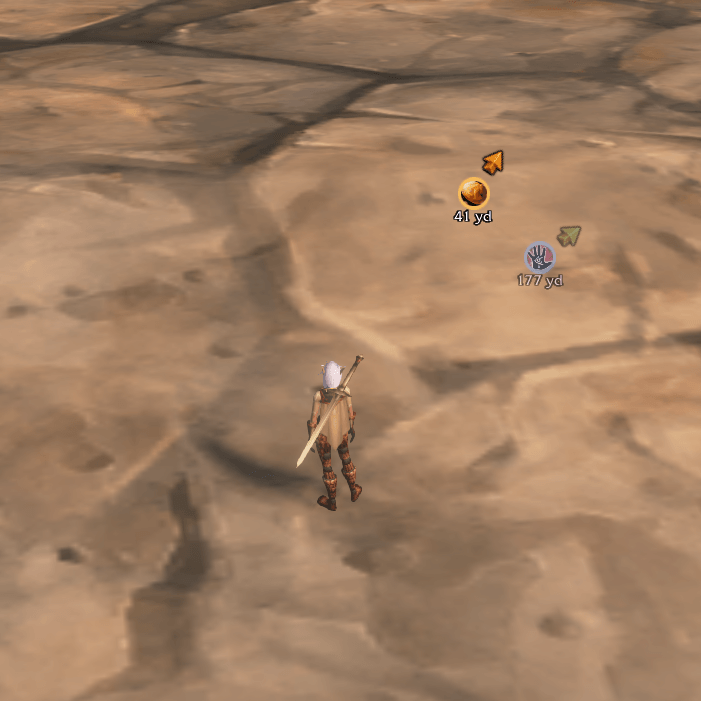
- Every node in sight shows up as a round icon on a ring around your character, placed in the direction of the node.
- A small colored arrow on each icon points to its node: green for herbs, orange for ore, yellow for chests and red for rares.
- Turns with your character, so an icon at the top of the ring is straight ahead.
- Shows the distance under each icon, in yards or meters.
- Icons fade out from 20 down to 10 yards and are gone once you're standing at the node. Walk away and they come back.
- Icons disappear when a node is gone, either gathered or out of range.
- You can set the icon size, arrow size, font size, ring radius, the most icons shown at once, and the ring's position.
🔔 Popups
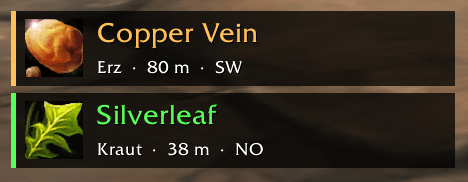
- A popup with icon, name, distance and compass direction (e.g. Kraut · 42 yd · NO) whenever a node shows up that wasn't there before.
- You can stack several popups, set how long they stay, click one to close it, and move them.
- Optional sound, with a raid warning for rares, and optional chat message.
- You can turn popups off on their own if you only want the compass.
✅ Node list: pick what you track
- Every new node you discover is saved to a list automatically.
- On the Nodes settings page, tick or untick each node to decide whether it gets a popup and a compass icon.
- Has a search box and Check all / Uncheck all buttons for the nodes currently shown, so you can search for "vein" and drop all the ore at once.
- German and English names of the same node share one entry.
- Also has master switches per kind (herbs, ore, chests, rares, leylines) and "Only what I can gather", which hides herbs and ore above your skill.
Commands
| Command | |
|---|---|
/nsc |
Open the settings |
/nsc test |
Show test popups |
/nsc unlock / /nsc lock |
Move or lock the popups and the compass |
/nsc on / /nsc off |
Turn the add-on on or off |
Settings: Esc → Options → AddOns → NodeSightCompass (with a Nodes subpage)
How it works
NodeSight keeps its finds to itself, so NodeSightCompass does not run a scan of its own. It listens to NodeSight's minimap scan as it happens and reads the same tooltip data. That's why it costs very little and never gets in NodeSight's way. NodeSight itself is not modified.
Credits
Node names, icons, skill levels and translations are from NodeSight by Krelock. All the hard work of finding nodes on the minimap is NodeSight's.
NodeSightCompass Team