PE_1.png
Description
PrecisionEdit
A focused companion for Blizzard's Edit Mode — it refines, it doesn't replace.
Overview
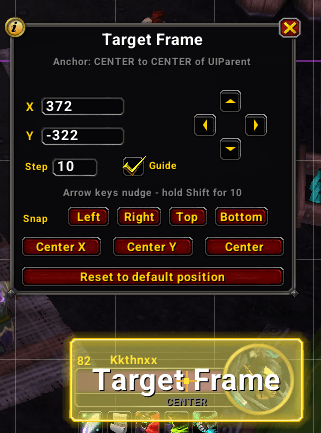
PrecisionEdit adds pixel-level control to World of Warcraft's built-in Edit Mode. Dragging frames around is quick but coarse; there's no way to type an exact position, move by a single pixel, or snap a frame cleanly to a screen edge. PrecisionEdit fills that gap with a small panel that appears the moment you select a frame in Edit Mode.
Everything is written back through Blizzard's own position-change path — the exact code a normal drag uses — so your changes save into the active Edit Mode layout and travel with your layout import/export strings. Nothing lives in a parallel system.
- Refine, don't replace — it drives Blizzard's Edit Mode, it doesn't reimplement it.
- Pixel-precise — at a pixel-perfect UI scale, one unit equals one screen pixel.
- Native feel — the panel matches Blizzard's Edit Mode dialogs, with a close button and a help (ℹ) button.
- Lightweight — fully event-driven (no polling), combat-safe, and Midnight secret-value hardened.
Installation
Via an addon manager (recommended)
- CurseForge — search for PrecisionEdit and install.
Manual
- Download the latest release from the Releases page.
- Extract the
PrecisionEditfolder intoWorld of Warcraft\_retail_\Interface\AddOns. - Restart the game (or
/reloadif already in-game).
There's nothing to configure to get started — open Edit Mode and select a frame.
Getting Started
| Command | Description |
|---|---|
| /pe or /precisionedit | Show help in chat |
| /pe reset | Reset the panel's own position |
| /pe lock | Lock / unlock the panel |
Open Edit Mode (Game Menu → Edit Mode), click any movable frame, and the PrecisionEdit panel appears. It hides automatically when you deselect a frame or leave Edit Mode.
Features
Positioning
- Exact Coordinates — type an absolute X / Y offset and press Enter; multi-point frames (like action bars) move rigidly.
- Nudge — a d-pad or the arrow keys move the frame one unit at a time; hold Shift to move by a configurable Step.
- Snap to Edge — kiss the selected frame to the left, right, top or bottom of the screen, scale-correct across mismatched frame scales.
- Center — center on the X axis, Y axis, or both.
- Reset — return the frame to its layout's default position.
Panel
- Anchor Guide — an optional on-screen crosshair marking the selected frame's anchor point, so you can see exactly what you're moving relative to.
- Live Readout — the panel shows the system name and live anchor, updating for your nudges and normal Blizzard drags.
- Movable & Lockable — drag the panel anywhere;
/pe lockkeeps it put.
Configuration
There's no separate options window — the panel itself holds the controls. Set the Step (Shift-nudge distance) and toggle the anchor guide right on the panel. Settings are stored account-wide; frame positions live in your Edit Mode layout, not here. Frame movement is unavailable during combat (Edit Mode is too), so PrecisionEdit defers gracefully and tells you why.
Contributing
Contributions, bug reports and ideas are welcome! Open an issue or a pull request.
When filing a bug, including your client version and a /reload-able repro helps a ton.
Credits
PrecisionEdit was inspired by PixelPerfectEditMode and built on the lessons of NexEnhance. Thanks to the wider WoW addon community — and to Blizzard, for an Edit Mode worth building on.
Support
Appreciate the work? Consider showing your support:
- PayPal — paypal.me/KkthnxTV
- Patreon — patreon.com/Kkthnx
- Ko-fi — ko-fi.com/kkthnx
License
Released under the MIT License. See LICENSE for details.
Developed and maintained by Josh "Kkthnx" Russell. Built with love for the default UI.
The PrecisionEdit Team


Owner