Plume of the Kirin Tor
- By
This addon will automatically record your journey. Its output can be uploaded into a LLM to render a high-quality journal of your adventures in WOW:Forever
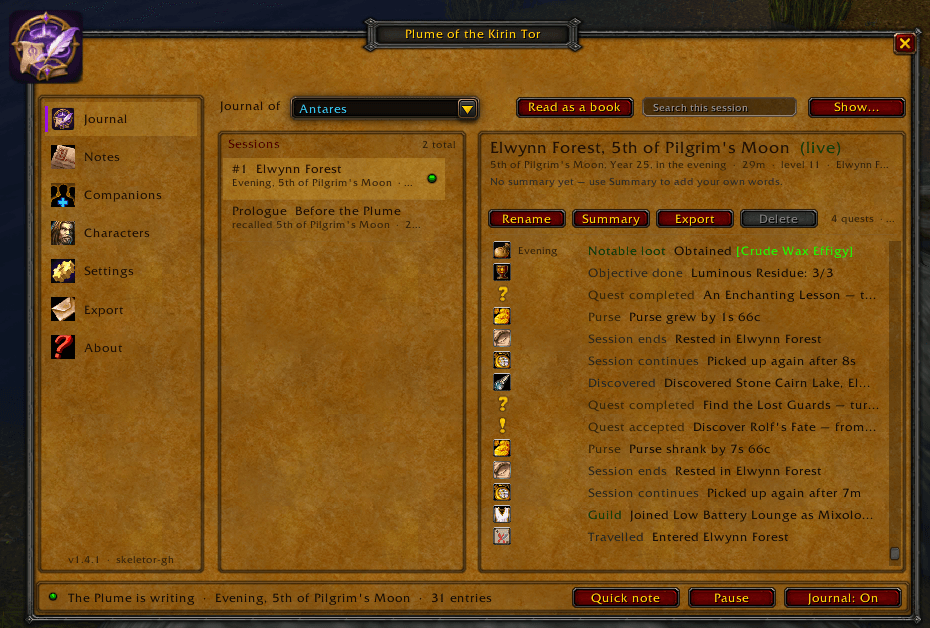
1.PNG
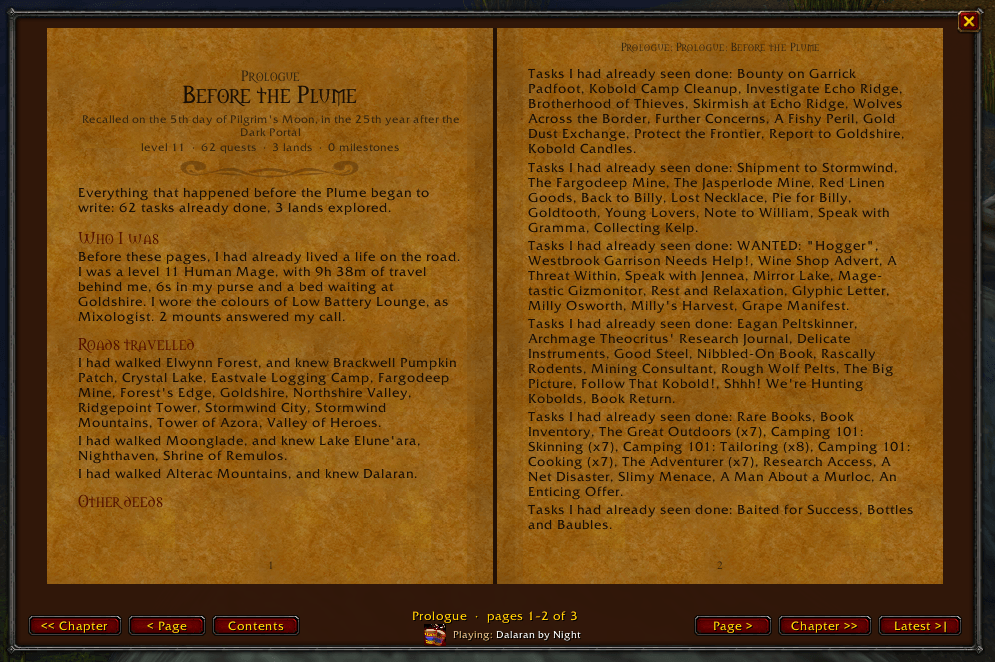
2.PNG
Plume1.PNG
Description
Plume of the Kirin Tor
An enchanted quill of the Kirin Tor. It writes down your adventures as you play, so your character's story is never lost.
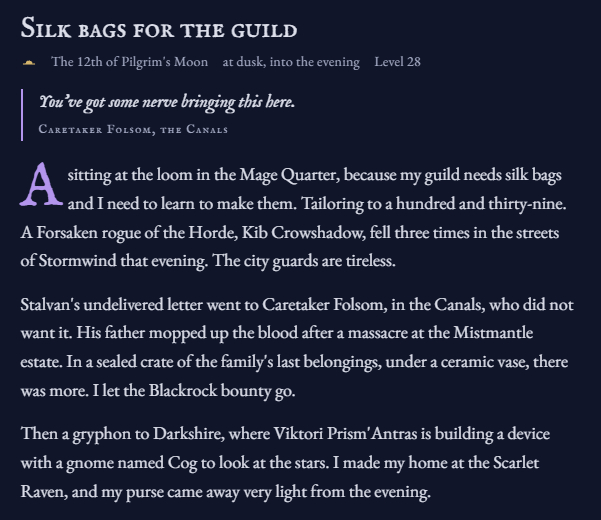
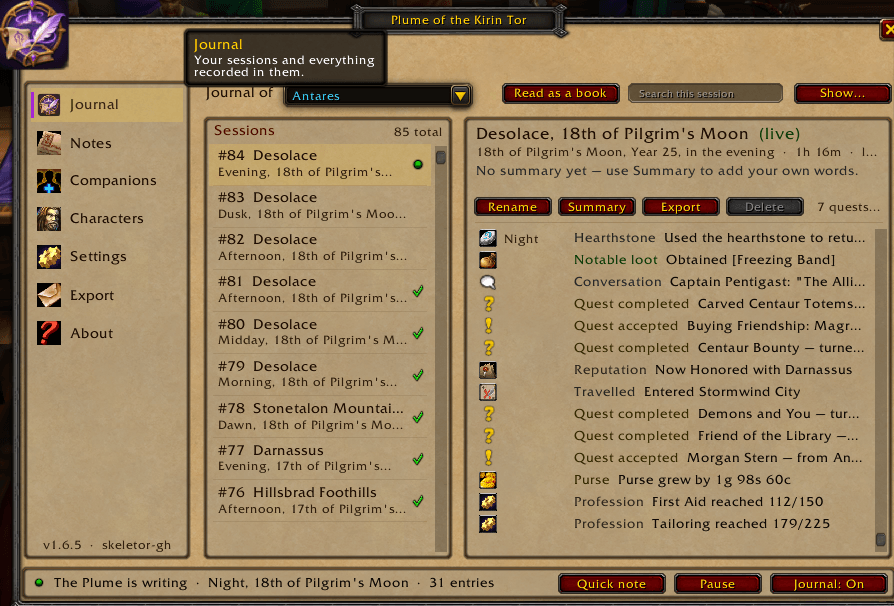
Plume of the Kirin Tor keeps a journal for each of your characters: the quests you took and the words of the people who gave them, the places you discovered, the companions who fought beside you, the foes you faced and the notes you wrote yourself. Read it in game as an illustrated book, with music from your class's part of the soundtrack, or export it as plain text and keep it forever.
Made for roleplayers, storytellers and anyone who has ever thought "what was the name of that paladin who saved me in Fargodeep?"
✒️ What the Plume writes down
- Quests and their story. Accepted, completed and abandoned quests, with who gave them, the full quest text, objectives, progress and completion text, and the coin earned.
- Conversations. What NPCs told you and what they said around you, with repeats and chatty town criers filtered out.
- Places. Zones, first visits to named areas, dungeons and raids, flights, hearthstones and the inns you called home.
- Companions. Party and raid members, by their Total RP 3 names when they have one, plus guild membership and rank. Keep your own notes about each person.
- Growth. Level ups, spells learned, profession milestones, reputation standings, notable loot and gold earned per session.
- Dangers. Elites and rares you faced and defeated, and every death.
- Your own notes. Write a line at any moment with
/plume <text>, a key binding or the minimap button. The game can't see who you met or how it felt; you can. - Conversation with other players (opt-in). Party, guild, nearby and whisper chat. Off by default. Only turn it on with the people involved.
🕯️ The Prologue: your story didn't start today
When a character who already has a past opens the journal, the Plume invites you to recall what came before. Nothing is written until you choose. It reads only what the game already knows about that character:
- Completed quests, grouped by storyline where the game knows one, with repeatable quests counted once.
- Places explored, with every named area you've uncovered on the map.
- Milestones, where the game keeps them.
- Your open quest log, trades, reputations, statistics and time on the road.
All of it becomes the Prologue, the first chapter of the journal and the book. Places you've already explored aren't announced again as first visits, and quests already in your journal aren't repeated. The Prologue works quietly a little at a time, pauses during combat and can be cancelled. Write it again any time with /plume prologue.
🌙 The Azerothian calendar
The journal is written inside the world, so it keeps time the way Azeroth does:
The 5th day of Pilgrim's Moon, in the 25th year after the Dark Portal, at dusk.
- Twelve moons named for the festivals: Deepwinter, Hearthsong, Seedsown, Noblegarden, Bloomtide, Midsummer, Highsun, Goldfield, Harvest Moon, Hallow's Moon, Pilgrim's Moon and Veil Moon.
- Years after the Dark Portal, starting at 25 for Forever (you can change it).
- Times of day instead of clock times: dawn, midday, dusk, the small hours.
- No real-world dates or realm names in your pages. They are still kept, as a faint archivist's note in tooltips and at the very end of exports.
- Prefer real dates? Switch the calendar in Global Settings.
📖 The journal book
- Read your journal in game as an open, two-page book.
- Every session is a chapter, written as diary prose: "Took up the task Book Return, asked of me by Marshal Dughan." The time of day is written as it changes, never as a clock.
- Quest texts appear as quotations, and your notes in blue ink.
- An illustrated contents page links to every chapter.
- It updates live while you play. Turn pages with the buttons, the arrow keys or the mouse wheel.
- Choose how much it shows: everything, the story only, or highlights.
🎵 Class music
While the book is open, a playlist from the game's own soundtrack plays for your class:
- Mages: Dalaran and the Lament of the Highborne.
- Paladins and priests: the Light.
- Warlocks: the Dark Titans.
- Druids: the Enchanted Forest.
- Every other class has its own playlist too.
Zone music returns when you close the book, and it closes on its own when combat starts (optional).
🗂️ Sessions that look after themselves
- Each time you play is a session, listed in the journal window.
- Reloads and quick relogs continue the same session.
- Crashes and disconnects are closed cleanly.
- Short empty sessions are discarded automatically.
- Rename sessions and write summaries in your own words.
- Search and filter the timeline by quests, places, companions, dangers and more.
👥 One journal per character
- Each character has its own on/off switch and its own choice of what gets recorded.
- Global settings cover everything else, account-wide.
- Alts you don't care about stay out of it; you're asked once per new character.
🔒 Private by design
- Everything stays on your computer, in your own SavedVariables file.
- No companion app, no account, no uploads.
- Plain text you can back up, read, share or delete whenever you like.
🛡️ Built to never get in the way
- Errors are caught, never shown mid-fight. They go to an in-game Diagnostics log.
- Light on the game: events are filtered to you and your target.
- Safety caps keep the saved file small.
- The saved journal is versioned and repairs itself, and a damaged file is preserved rather than wiped.
- Combat aware: the book and its music step aside when a fight starts.
- Taint-safe: every release is checked automatically to make sure Plume never touches the game's own globals or dialogs, so it can't break your unit frames, the Escape key or other addons.
⚙️ Easy to set up
- A short guided tour the first time you open the journal.
- A "What's new" window after each update.
- Full options in Game Menu → Options → AddOns → Plume of the Kirin Tor, plus a Settings page inside the journal.
- Parchment or night themes, window scale, and separate text sizes for the window and the book.
- Minimap button (works with SexyMap and minimap button bags through LibDBIcon) and Addon Compartment support.
⌨️ Commands
| Command | What it does |
|---|---|
/plume or /quill |
Open or close the journal |
/plume read |
Open the journal book, with class music |
/plume <text> |
Write a note into the current session |
/plume title <text> |
Name the current session |
/plume prologue |
Recall this character's past as a Prologue |
/plume pause |
Pause or resume recording |
/plume on / /plume off |
Journal this character, or stop |
/plume status |
Show what is being recorded right now |
/plume export |
Open the Export page |
/plume settings |
Open the Settings page |
/plume tour |
Replay the guided tour |
/plume whatsnew |
See what changed in this version |
/plume minimap |
Show the minimap button again and reset its place |
/plume wipe |
Erase everything Plume has saved (asks first) |
/plume help |
List every command |
Key bindings (Options → Key Bindings → AddOns → Plume of the Kirin Tor): open the journal, open the book, write a quick note, pause or resume.
Minimap button:
- Left-click: open the journal.
- Right-click: write a quick note.
- Ctrl-click: open the book.
- Shift-click: pause or resume.
🌍 Compatibility
- World of Warcraft: Forever (1.6)
- World of Warcraft: Midnight (Retail)
- Licence: MIT.
- Optional: Total RP 3, for companions' roleplay names.
- Language: English.
❓ FAQ
Where is my journal saved?
In World of Warcraft\_<version>_\WTF\Account<ACCOUNT>\SavedVariables\PlumeOfTheKirinTor.lua. WoW writes it when you log out or /reload.
Does it record other players' chat? Only if you turn it on, per character, per channel. It is off by default.
Will it slow my game down? No. It only listens to the events it needs, filters unit events to you and your target, and does nothing heavy while you are in combat.
Can I get my journal out of the game? Yes. The Export page gives you plain text for the current session, the selected session, sessions not yet exported or the whole journal.
The minimap button only shows when I hover over the minimap. That's SexyMap (or a similar minimap addon) hiding buttons until hover. In SexyMap, go to Buttons and set Plume to Always.
I found a bug. Open the journal's About page, copy the Diagnostics text and include it in your report.
Plume of the Kirin Tor is made by Skeletor. Higher still.
Plume of the Kirin Tor Team