OAP Party Utilities
- By
Party chat in its own window, a roll window, a buffs helper, a drink warning and a boss focus key - small helps for dungeon parties.
Description
OAP Party Utilities is a handful of small helps for when you are in a party. Your party chat gets a window of its own, away from the busy chat box, and stays there after the party ends. Around it: a roll window, a buffs helper, a drink warning for healers, a boss focus key and more.
Made for WoW Forever. (OAP: Old Age Pensioner. Written by one, for my own parties.)
Party chat in its own window
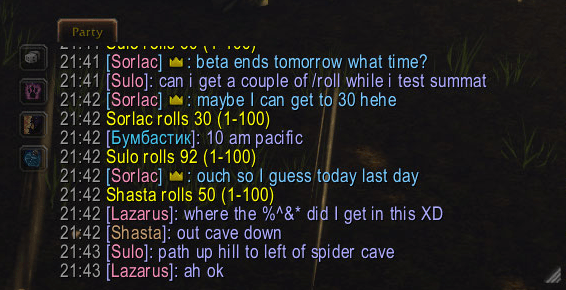
- Its own window: party chat (and instance chat in dungeon-finder groups), with the time, names in their class colour and a crown for the party leader. Names and item links can be clicked, as in chat.
- Enter talks to the party: join a party and the chat box's Enter goes to party chat, as if you had typed /p; leave and it is back to Say.
- Looks like chat: drag it by its Party tab, size it from the corner. It darkens under the mouse; two sliders set how dark.
- Kept: the last 500 lines are kept through a /reload or logout. When you leave the party, a popup asks whether to keep the chat or clear it. Joining the next party clears it, unless you untick that.
- Helper buttons sit down the window's side (or along the top or bottom): dice, buffs, LFG and out of mana.
/oappushows or hides it; the minimap button does too.
Rolls
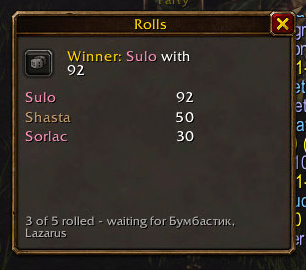
The dice button does a /roll 1-100. When anyone in the party rolls, a small window shows every roll, highest first, the winner (or a tie) and who has still to roll. Only the first 1-100 roll counts; rerolls and other ranges are shown, dimmed or in red. It closes by itself once everyone has rolled. If you are the leader, it can say the winner in party chat.
Buffs helper
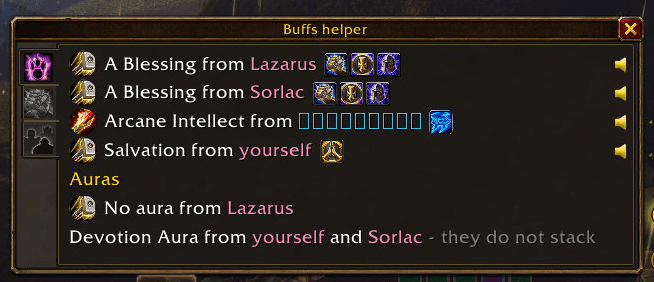
Between pulls, a small box lists the buffs you lack that someone in the party can give - "Power Word: Fortitude from Wisery", "A Blessing from Arthur" - and goes when you have them.
- Ask with a click: left-click a buff's icon to ask in party chat, right-click to whisper the giver.
- Give: a second page lists the party members who lack a buff you can give. Click the icon to cast it on them. The box opens on this page when someone needs your buffs.
- Party: a third page shows everyone's buffs, who gave them and how long they have left.
- Knows the party: a priest means Fortitude is expected, before anyone has buffed. From each paladin you need one Blessing, whichever they choose (but five paladins can only give four). With a warlock along, it reminds you while nobody has a Soulstone.
- Running low: a buff with under 5 minutes left is listed too, so you top it up between pulls instead of losing it mid-fight.
- Paladin auras: a section of their own under the buffs says when a paladin is running no aura, or two are running the same one.
- Mute a line: a buff nobody is going to give? Click the speaker beside it and that line stops popping the box up, until the buff is given, the party changes or you enter another dungeon.
- With OAP UnitButtons installed, its buttons are used for casting, and one of its bars can pulse beside whoever needs a buff.
/oappu buffsshows the box at once.
Drink warning and out-of-mana button
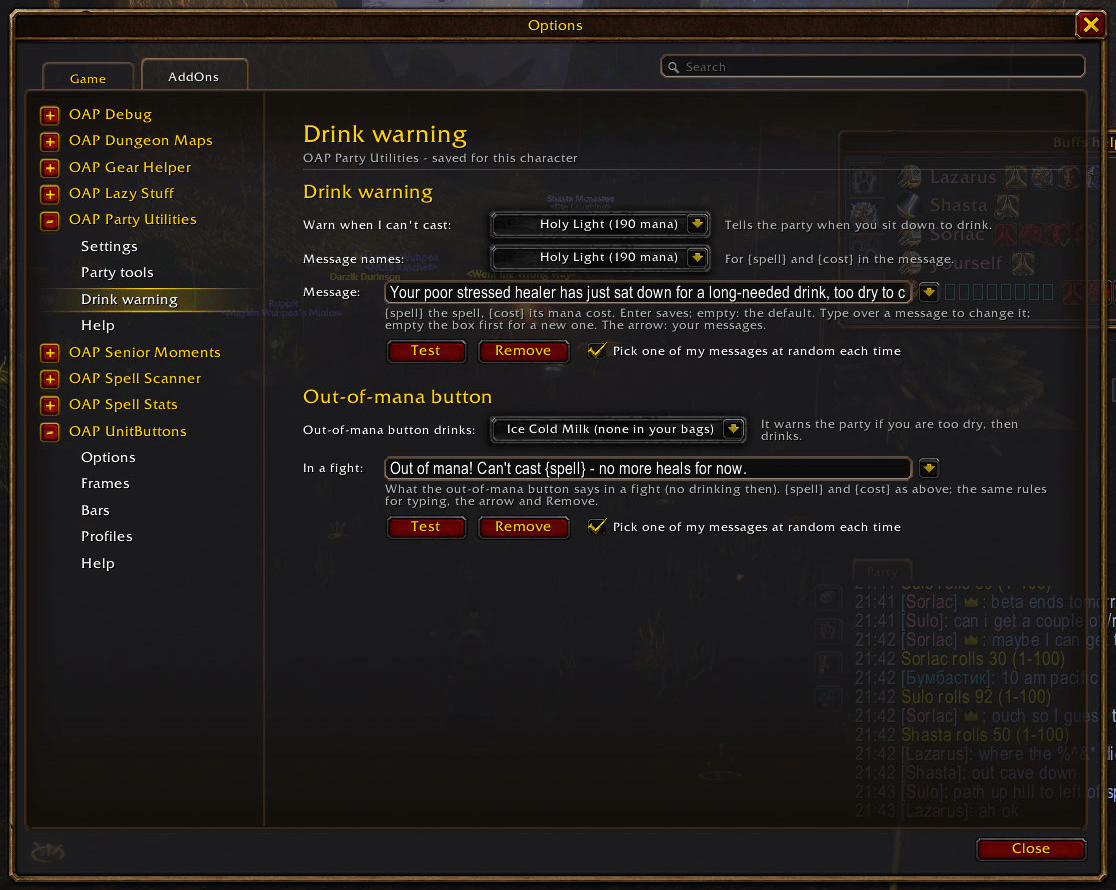
When you sit down to drink in a party with too little mana for a spell you choose, the party is told - "Your poor stressed healer has just sat down for a long-needed drink, too dry to cast Healing Wave!" Forever hides your mana from addons, but it does say whether you can afford a spell, so you pick the spell and it warns when you cannot.
- Your own words: write your own message, or pick from ready-made ones, plain and
cheeky.
{spell}and{cost}put in the spell and its mana cost; raid icon codes such as{skull}work too. It can pick one at random each time. - The out-of-mana button: one click warns the party, then drinks the drink you chose. In a fight it only tells the party, with a message from its own "In a fight" list - and that works even in boss fights.
/oappu drinksays what it sees;/oappu oomsends a warning now (a macro can use it).
Boss focus key
One key press makes the boss of your fight your focus, so you can watch it and use focus macros. Set the key on the Party tools page or in the game's Key Bindings. In a dungeon it finds the boss by name: it learns each dungeon's bosses as you meet them and remembers them for all your characters. During a boss fight a skull by the Party tab shows red until you have a focus, then gold, with a sound as it appears.
/oappu bosses lists the bosses it knows here; /oappu sound picks the sound.
LFG advertiser and time in queue
- LFG advertiser: type your looking-for-group message and a channel once; each send is
one click, and a small timer shows how long since the last one, ringing when it is time
to send again.
/oappu lfgor a right-click on the minimap button. - Time in queue: a small timer on the group finder's eye shows how long you have been waiting.
Role rings
On Blizzard's party frames, normal and raid-style, the gold ring round each member's role
icon is drawn in their class colour, so you can tell who is who at a glance. /oappu ring
changes how solid it is.
Good to know
- Made for WoW Forever.
- Its limits: the game lets addons read buffs only out of combat and before a boss fight, so the Buffs helper hides during fights. Addons cannot set your focus by themselves, so the boss key needs your key press, and it cannot change in combat. The LFG advertiser never sends by itself: the game allows it only from a click.
- Settings are on the addon's Options pages, saved per character.
- The manual: Options > AddOns > OAP Party Utilities > Help, and
/oappu help. - Works on its own. If you also install OAP Debug, it sends logs and timings there.
OAP Party Utilities Team