Nem: Pet Alerts
Never miss a pet problem again.
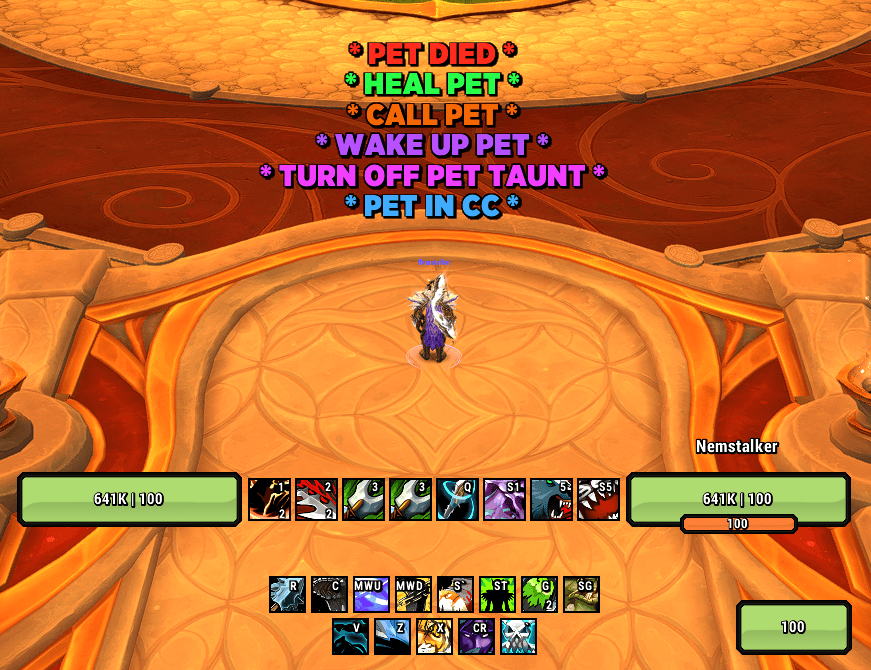
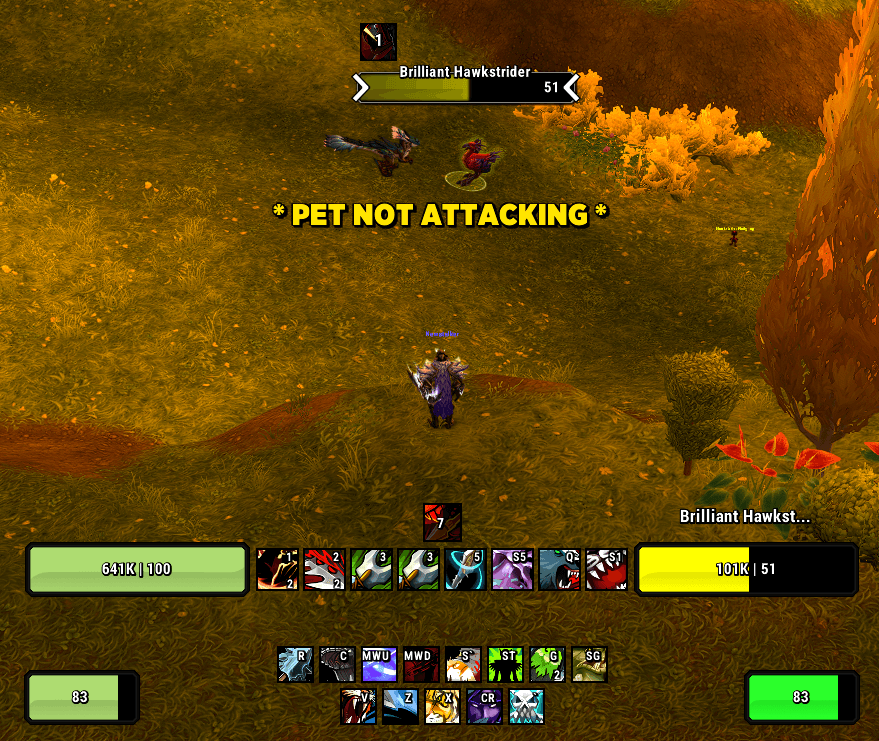
Nem: Pet Alerts is a clean, lightweight WoW Retail addon that puts a single, high-visibility warning on screen the moment your pet needs attention — dead, missing, crowd-controlled, sitting on Passive, idling in combat, low on health, or stuck in fake death. Alerts are spec-aware, suppressed during travel and downtime, and quiet when there is nothing wrong.
It is part of the Nem: Alerts suite, sharing its UI and customization style with Nem: Healer Alerts.
Support Status
Fully Supported — Spec-Aware, Travel-Suppressed, Talent-Aware
These specs ship with a dedicated module that uses the right pet terminology — Pet, Demon, Water Elemental, or Ghoul — and a tailored alert set for that build.
- Hunter — Beast Mastery, Marksmanship, Survival
- Warlock — Affliction, Demonology, Destruction
- Mage — Frost
- Death Knight — Unholy
Unsupported Specs — Clean Panel, No Empty Options
Other specs (and other classes) see a clean "Spec Not Supported" panel rather than empty or broken options.
Why Use Nem: Pet Alerts?
A pet that's dead, missing, crowd-controlled, idling, or stuck on Passive is the kind of problem you don't notice until your damage has been quietly half what it should be for the last minute. Nem: Pet Alerts surfaces those moments with a single readable on-screen warning that catches your eye without cluttering your UI, and stays completely silent the rest of the time.
Key Features
- High-visibility movable alert text with optional flash animation
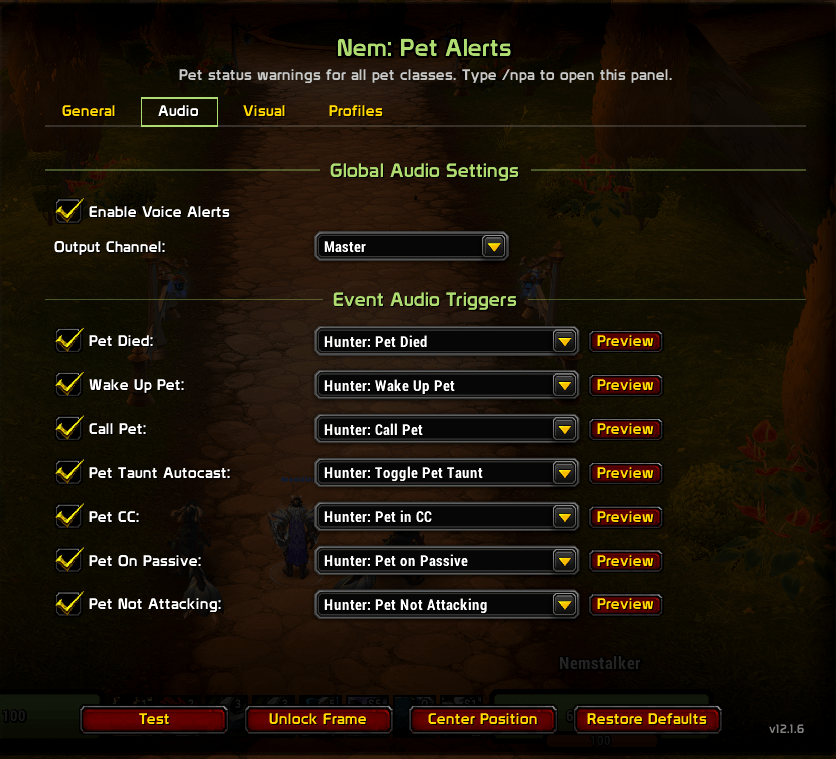
- Per-alert sounds with sound preview buttons, backed by LibSharedMedia
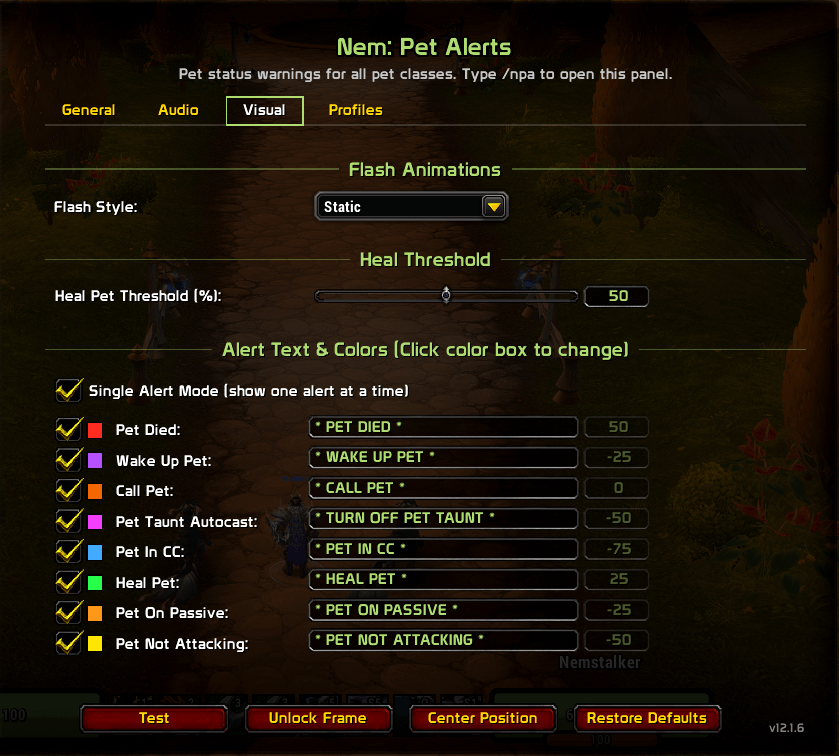
- Per-character alert text overrides — every alert's text is editable in the options panel
- Configurable Heal Pet health threshold (1–99%)
- Automatic class/spec detection — the right module loads on login, spec change, or
/reload
- Class-themed options panel — UI accents, scrollbar, sliders, and text inputs retint to your active spec
- Travel-, downtime-, and PvP-aware suppression — alerts stay quiet when they shouldn't fire
- Talent-aware — Warlock Grimoire of Sacrifice flips Summon Demon into a Sacrifice Demon prompt
- Persistent alerts that stay on screen until the underlying problem is resolved
- Test mode, unlock frame, and reset position for clean setup
- Compartment button support
- Self-contained — bundled media, fonts, and libraries; no external dependencies required
Smart Alert Behavior
Nem: Pet Alerts works hard to stay out of your way when nothing is wrong. Alerts only fire when they're actually actionable, and suppression is context-driven — the addon doesn't pop while you're traveling, resting, or in PvP situations where an alert wouldn't be correct.
- Travel-aware — suppressed while mounted, on a taxi, in a vehicle, flying, gliding (Dragonriding / Skyriding), or dead/ghost
- Downtime-aware — fully silent while resting in a city or inn, and resumes the moment you leave
- PvP-aware — taunt-autocast warnings are suppressed in PvP environments where a pet taunting is often correct
- Talent-aware — Warlock Grimoire of Sacrifice flips the Summon Demon alert into a Sacrifice Demon prompt, and silences itself once the sacrifice buff is up
- Spec-aware — each spec only tracks what applies; switching specs reconfigures the addon immediately
- Persistent — important alerts stay on screen until the underlying problem is resolved
Spec-Specific Alerts
Each spec module uses the terminology that fits the build — Pet, Demon, Water Elemental, or Ghoul — and only fires the alerts that apply to that pet.
Hunter — Beast Mastery, Marksmanship, Survival
Hunters see the full eight-alert set:
- Pet Missing — call / summon prompt
- Pet Dead — revive prompt
- Pet in Crowd Control
- Pet on Passive during combat
- Pet Idle in Combat — not attacking
- Pet Low Health — configurable threshold
- Pet Taunt Autocast — fires in group content; suppressed in PvP
- Play Dead / Wake Up Pet — clean handling of the fake-death state
Warlock — Affliction, Demonology, Destruction
Warlocks see the full eight-alert set, with terminology that swaps Pet for Demon:
- Demon Missing — summon prompt (flips to Sacrifice Demon under Grimoire of Sacrifice)
- Demon Dead
- Demon in Crowd Control
- Demon on Passive during combat
- Demon Idle in Combat
- Demon Low Health — configurable threshold
- Demon Taunt Autocast — fires in group content; suppressed in PvP
- Grimoire of Sacrifice — prompts to sacrifice your demon when the talent is taken; silences itself once the buff is up
Frost Mage
Frost Mage runs a streamlined six — no fake death, no taunt. Terminology shifts to Water Elemental:
- Water Elemental Missing
- Water Elemental Dead
- Water Elemental in Crowd Control
- Water Elemental on Passive during combat
- Water Elemental Idle in Combat
- Water Elemental Low Health — configurable threshold
Unholy Death Knight
Unholy runs a focused five — the Ghoul has no reliable death, fake-death, or taunt state to track. Terminology shifts to Ghoul:
- Ghoul Missing — raise prompt
- Ghoul in Crowd Control
- Ghoul on Passive during combat
- Ghoul Idle in Combat
- Ghoul Low Health — configurable threshold
Customization & Options
The in-game options panel is organized into four sections — Display, Sounds, Alerts, and Alert Options — and supports:
- Per-alert enable / disable
- Per-alert sound selection, with sound preview buttons
- Per-alert text editors — clear a box to restore the built-in default
- Spec-specific numeric inputs (Heal Pet health threshold, 1–99%)
- Font picker and font size, applied live
- Test mode, unlock frame, center position
- Restore Defaults — resets all alert texts, font, and frame position to built-in defaults
The bundled sound library is backed by LibSharedMedia, so any sounds added by other addons are also available in every dropdown.
Slash Commands
Both /npa and /petalerts map to the same handler.
Core:
/npa — open options
/npa on — enable the addon
/npa off — disable the addon
/npa toggle — toggle on / off
/npa test — toggle test mode for the current spec
/npa status — show enabled state, test mode, and detected class
/npa version — show the addon version
/npa help — list available commands
/npa reset — wipe saved variables and reload the UI
Additional Notes
- WoW Retail only
- Each spec module is fully self-contained — adding, changing, or disabling one spec never affects another
- Automatic module loading on class / spec detection
- Per-character saved variables — frame position and settings are kept per character
- Test mode cycles through every alert your active spec actually fires
- Bundled libraries: LibStub, CallbackHandler-1.0, LibSharedMedia-3.0
- Bundled media: a curated sound pack and a full font library
Feedback
For bug reports, feature requests, or general feedback, visit Nem's Nexus.
Credits
Originally inspired by Enkaf's WeakAura Hunter Pet Group.