mn_1.png
Description
MountNotify
Track boss kills until a mount drops — then announce it to your guild and group.



Built for retail World of Warcraft: Midnight (Interface 120007). No Ace3, no external libraries — event-driven, minimal allocations, Secret-value guards throughout.
Overview
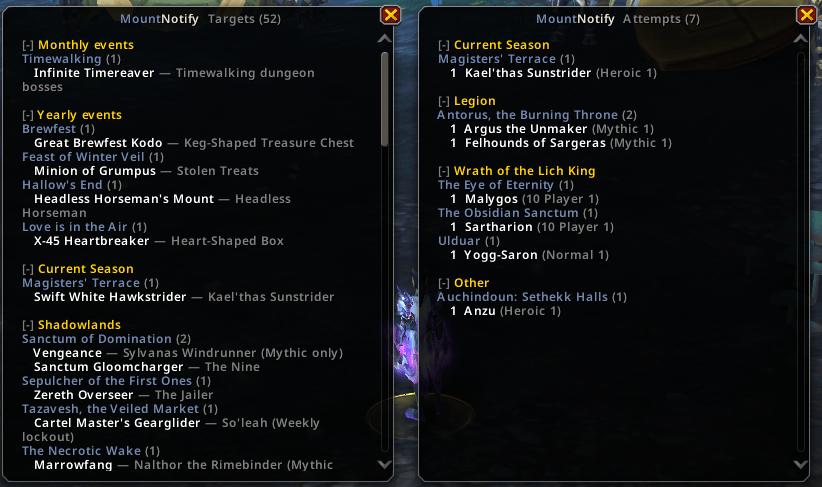
MountNotify answers one question: how many times did I have to kill this boss before the mount finally dropped? It counts instance kills per boss and difficulty, logs every mount you earn (with character, class, date, and kill number), and sends a single positive announcement when you finally get the drop.
The addon knows what you still need from the Mount Journal (uncollected drop mounts) plus a curated Wowhead farm catalog shipped with the addon — raid/dungeon bosses, weekly lockouts, mythic-only drops, and holiday / Timewalking mounts. When you collect a mount, that boss drops off the tracking list automatically.
- Smart tracking — only bosses that can still drop a mount you lack increment kill counters.
- Attribution-safe — vendor, quest, and promotion mounts never fake a “after N kills” announcement.
- Midnight-ready — no combat log dependency; instance kills via
ENCOUNTER_END, drops viaENCOUNTER_LOOT_RECEIVED/NEW_MOUNT_ADDED, world drops via loot source GUID. - Shareable data — export and import your history as a compact string (no third-party library).
Installation
Via an addon manager (recommended)
- Search for MountNotify on your preferred addon site when published, or install from the Releases page.
Manual
- Download the latest release and extract the
MountNotifyfolder into
World of Warcraft\_retail_\Interface\AddOns. - Restart the game or
/reload.
On first login, type /mn to open the Attempts window. The minimap button
(left-click Attempts, right-click Targets) appears by default; hide it with
/mn minimap.
Getting Started
| Command | Description |
|---|---|
/mn |
Open the Attempts window (kills per boss, grouped by expansion) |
/mn targets (farm) |
Open Targets — uncollected mounts you still want and where they drop |
/mn history (luck, drops) |
Open Drops & Luck — stats, longest grind, full drop history |
/mn attempts |
Print attempts to chat |
/mn stats |
Quick totals (mounts logged, wanted count, catalog status) |
/mn config |
Show announce and display settings |
/mn set <key> <on\|off> |
Toggle a setting (see Configuration) |
/mn export |
Copy your tracked data as a shareable string |
/mn import |
Paste an export string to merge data |
/mn minimap |
Show or hide the minimap button |
/mn test |
Fire a sample announcement |
/mn announce |
Re-send the message for your most recent drop |
/mn check <id> |
Debug a mount or item ID in the wanted/catalog maps |
/mn reset confirm |
Wipe all tracked data |
Also available: /mountnotify (alias for /mn).
Features
Kill counting
- Instance bosses —
ENCOUNTER_END(success only) increments per encounter + difficulty. Never double-counted. - Open-world / rares — drop date and source creature are logged when you loot the mount; attempt counts are not fabricated (Midnight removed the combat log).
- Kill gate — only catalog-matched mount-drop bosses increment counters; random dungeon bosses you farm for gear are ignored.
Drop detection & announcements
- Instance loot —
ENCOUNTER_LOOT_RECEIVEDties the item to the boss (self-filtered). - Collection —
NEW_MOUNT_ADDEDis the authoritative obtain trigger. - Attribution gate — announcements with kill counts require a correlated farm drop; store mounts and quest rewards stay silent or use the no-count template.
- Channels — guild (when other members are online) plus party, raid, or instance
chat. Toggle each with
/mn set.
Windows
| Window | Opens with | What it shows |
|---|---|---|
| Attempts | /mn, minimap left-click |
Kill counts by expansion → instance → boss |
| Targets | /mn targets, minimap right-click |
Uncollected farm mounts with boss, instance, and tags (Mythic only, Weekly lockout, events) |
| Drops & Luck | /mn history |
Luckiest drop, longest grind, averages, activity stats, full history |
Windows use collapsible expansion headers, a count badge in the title, and Blizzard’s modern minimal scrollbar.
Nearby rare alert
When a wanted world-rare mount NPC is near you (matched by name on nameplate,
target, or mouseover), MountNotify plays a raid-warning style alert. Toggle with
/mn set rarealert off.
Export / import
/mn export and /mn import use the client’s built-in C_EncodingUtil (CBOR +
Deflate + Base64). Import merges non-destructively — higher kill counts and new
mount records are kept; nothing is wiped unless you /mn reset confirm.
Configuration
Open settings with /mn config, then toggle with /mn set <key> <on|off>:
| Key | Default | Effect |
|---|---|---|
announce |
on | Master switch for drop announcements |
guild |
on | Send to guild when others are online |
group |
on | Send to party / raid / instance chat |
showall |
off | Attempts window: show every recorded boss, not only mount-drop bosses |
rarealert |
on | Nearby rare mount NPC warnings |
Minimap button position is saved when you drag it around the minimap ring.
How tracking works
- Wanted mounts — at login, the addon scans the Mount Journal for uncollected
drop-source mounts and merges them with rows from
MountCatalog.generated.lua. - Wanted bosses — bosses linked to those mounts are added to the kill gate; when you collect the last mount from a boss, that boss is pruned.
- On drop — the mount is recorded with kill number, difficulty, instance, and
character; one announcement fires (guarded against duplicate on
/reload).
Item IDs in the catalog resolve to mount IDs asynchronously (ITEM_DATA_LOAD_RESULT)
so mounts like Mimiron’s Head appear in Targets even when item data was not ready
at login.
Technical notes
- Engine mirrors the NexEnhance pattern: one global (
MountNotify), one event frame, module lifecycleADDON_LOADED → OnInitialize/PLAYER_LOGIN → OnEnable. - Saved data stores IDs only; display names resolve at runtime.
Contributing
Bug reports and ideas are welcome. Open an issue
or pull request. When filing a bug, include your client build and whether
/console scriptErrors 1 shows errors after /reload.
Support
Appreciate the work? Consider supporting the author:
- PayPal — paypal.me/KkthnxTV
- Patreon — patreon.com/Kkthnx
- In-game — Kkthnx on Area 52 (US)
License
Released under the MIT License. See LICENSE for details.
Developed and maintained by Josh "Kkthnx" Russell.
MountNotify Team

Owner