Mimic Setups
- By
Mimic a creator's talents, Cooldown Manager and Edit Mode setup in one click, with a backup taken first and Revert one click away.
w1.webp
Description
Mimic sets up your class UI the way the best players have it, in one click. Paste a creator's talent loadout, Cooldown Manager layout or Edit Mode layout, see what would change for you before anything happens, and mimic it, with a backup taken first and Revert one click away.
Why Mimic?
A good setup is three strings from three different Blizzard menus, and pasting them is the easy part. The hard part is knowing what you are about to do to your own UI, and getting it back if it was not for you.
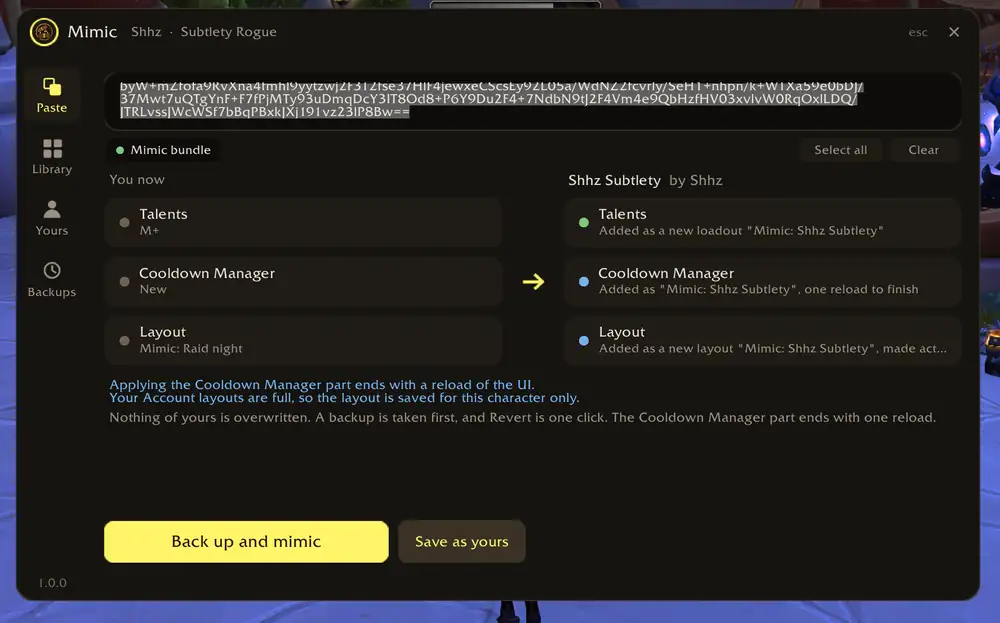
Mimic puts the two side by side: You now on the left, the setup on the right, tile for tile. Talents, Cooldown Manager, Layout. Each tile says what would be added and under which name, what differs on your screen, and what is skipped. Click a tile to leave that part out. Then one button.
Nothing of yours is overwritten
Everything Mimic adds is added next to your own: a new talent loadout, a new Edit Mode layout, a new Cooldown Manager layout, each called "Mimic: " plus the name you give it, so you can always tell them apart in Blizzard's menus. Your loadouts and layouts stay where they were.
A backup first, Revert one click away
Every apply takes a backup before it changes anything. A toast with Revert follows it, and Backups keeps the last ten automatic backups and every one you take yourself, each saying what it brings back, name by name. Delete asks twice.
One reload left
The Cooldown Manager only reads its settings when the UI loads, so that part ends with one click, Reload to finish. The window comes back to that step if you close it, and offers it again after login. Nothing is written until you click.
Features
- Paste anything: a talent string, an Edit Mode layout, a Cooldown Manager layout, or a whole Mimic setup carrying all three. The window says what it is the moment you paste
- You now, next to the setup: what is added, under which name, what differs (spec, screen shape, UI scale, a full layout list), what is skipped
- Name the build: the loadout, the layout and the Cooldown Manager layout are called "Mimic: " plus the name you type
- Backups and Revert: automatic before every apply, manual with Back up now, revert to any of them
- Your setups: save your current setup under a name, mimic it on an alt of the same class, share it as one string, or have it applied on login (only the parts that are missing)
- Pre-flight that speaks plainly: a loadout for another spec, a Cooldown Manager layout for another spec, full layout slots, a screen that differs; each is one sentence on the tile, never a wall of red
- In your class colour: the window belongs to the character that opened it
Getting started
- Type
/mimic(the minimap button and the addon compartment open it too) - Paste a string. Blizzard's own Export buttons give the right kind, and so do wago.io and creators' pages
- Click a tile to leave a part out, click Back up and mimic, name it, and if the Cooldown Manager is part of it, click Reload to finish
To share your own: Share my current setup puts one string in the field, selected for Ctrl+C.
Notes
- Requires patch 12.1
- No libraries. The addon uses Blizzard's own import functions and never touches the parts of Blizzard's UI code that taint action bars in combat
- Nothing leaves your machine; there is no server, no account, no telemetry
- The library of credited creator setups opens in 1.1
Report a problem
Type /mimic errors and /mimic trace in chat and paste the lines into a comment here, with what you did just before. Both survive reloads, so yesterday's problem is still readable today. Whatever happened, your backup is under Backups and Revert puts it back.
If you would like to support the work: https://ko-fi.com/adam5288
The Mimic Setups Team