McAwesome Unit Frames
- By
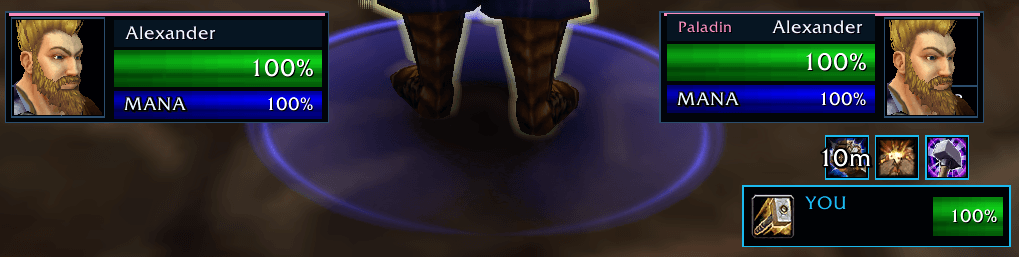
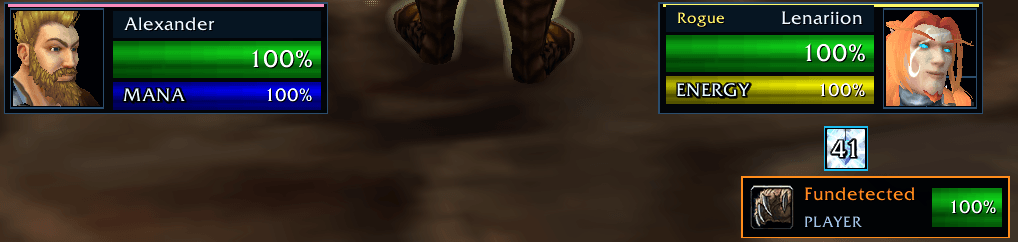
Compact, customizable unit frames with animated portraits, clear health and resource bars, visible auras, class and role indicators, alignment snapping, and tank-focused target-of-target awareness.
Screenshot 2026-09-30 191244.png

Screenshot 2026-09-30 191311.png
Screenshot 2026-09-30 191319.png
Screenshot 2026-10-01 052840.png
Screenshot 2026-10-01 212827.png
Screenshot 2026-10-02 064854.png
druid_forms.png
Description
McAwesome Unit Frames
Join the McAwesome Addons community on Discord for support, feedback, and updates.
Compact, combat-focused unit frames that keep threat, targets, party members, and raids readable at a glance.
McAwesome Unit Frames replaces the player, target, target-of-target, party, and raid frames while preserving familiar Blizzard interactions. It is especially useful for tanks who need to see immediately whether an enemy is attacking them, another tank, a healer, or another player.
Features
- Compact mirrored player and target frames with health and resource percentages plus visible numeric level badges on the lower-right of both portraits.
- An unmistakable red COMBAT badge above the player frame while the character is in combat.
- A faction-colored PVP status bar beneath the player portrait whenever the character is flagged.
- Blizzard's animated Zzz resting indicator above the player portrait whenever the character is inside an inn, city, or other rested area.
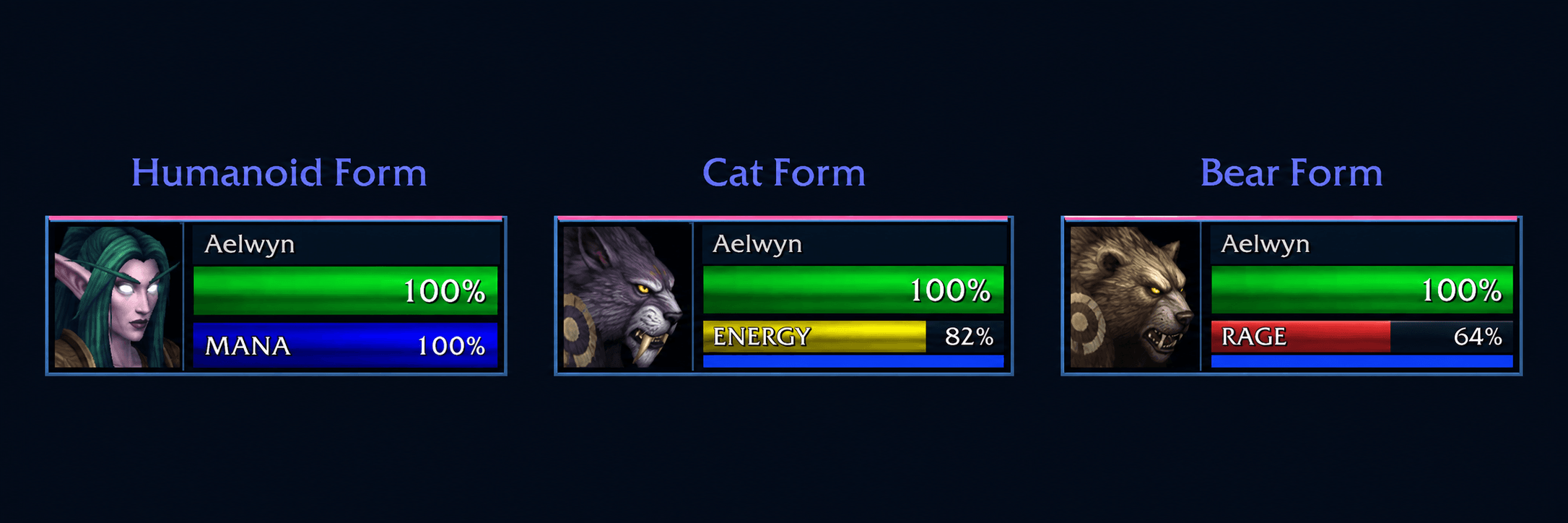
- Optional player-frame dual-resource druid display keeps mana visible beneath energy in cat form and rage in bear form without enlarging the frame.
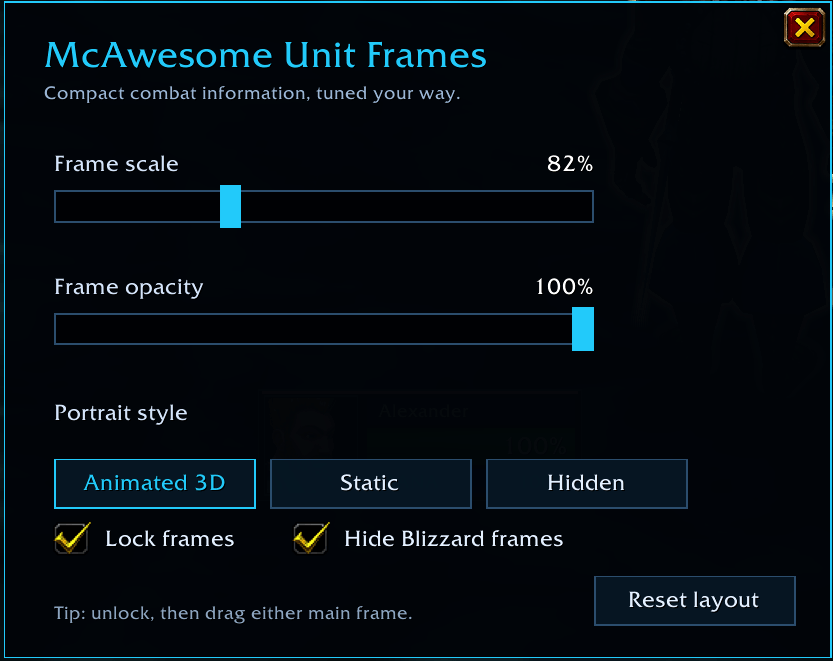
- Animated 3D portraits with race-safe camera headroom, static portraits, or portrait-free layouts.
- Target class, enemy classification, protected combat buffs and debuffs, and threat status.
- Slim hostile nameplate enhancements with native-bar health percentages, compact role-aware threat, enemy target roles, casts, and priority debuffs while retaining Blizzard's native labels and raid marker.
- Target-attached rogue combo points with dim empty pips and bright amber active pips.
- A clickable target-of-target card with clear YOU, OTHER TANK, HEALER, DPS, and fallback states.
- Movable party frames with vertical and horizontal layouts.
- Readable party mana tracking with a thicker resource bar and an in-bar percentage for mana users, making healer reserves easy to scan.
- Compact raid grids for 10-, 25-, and 40-player groups.
- A narrower 40-player layout arranged as four five-player group columns across two rows.
- Role icons when roles are assigned and class icons when they are not.
- Full Forever character names, including surnames when available.
- Independent scale and opacity controls for solo, party, and raid frames.
- Live party and 10-, 25-, and 40-player previews in the Configurator tab.
- Optional replacement of Blizzard's player, target, party, and raid frames.
- A paper-doll durability warning with an untinted live player model, real equipped-item icons in character-panel order, yellow low warnings, and red broken warnings.
- Two-pane McAwesome mouseover profile cards with live 3D portraits, class-colored names, guild rank, level, race, faction, class, assigned role, group placement, and best-effort location.
- Portrait overlays for PvP status and raid target markers, plus optional item-level and current-target details.
- Bottom-right or cursor-follow tooltip positioning with adjustable scale, opacity, and instant dismissal when leaving the unit. On World of Warcraft: Forever, McAwesome Reviews can optionally add its read-only player-history summary without exposing private notes.
- Optional Hide while in combat, disabled by default, securely suppresses addon gameplay frames and restores their normal visibility afterward.
- Family-wide Import Character Settings through McAwesome Configurator for reusing complete frame layout and appearance preferences on another character.
Party and Raid Frames
Party frames stack vertically by default and can be changed to a horizontal row. Raid frames automatically select a layout for 10, 25, or 40 players. The 40-player grid places groups 1–4 across the first row and groups 5–8 across the second, reducing the width without mixing the five-player groups.
Assigned roles use tank, healer, or damage icons. If no role is assigned, the character's class icon is shown instead. Cards also show health, power, range fading, and clear dead or offline states.
Druid Resources
The player frame can show a thin blue mana strip beneath the active shapeshift resource. Cat form displays energy plus mana, bear form displays rage plus mana, and humanoid or other mana-based forms retain the normal full-height mana bar. The frame never changes size when shifting. This is enabled by default and can be turned off with Show druid mana while shapeshifted in the Player and Target section; target, party, and raid frames remain unchanged.
Durability Diagram
Replace Blizzard's paper-doll warning with a movable McAwesome equipment diagram. A fully rendered, untinted current-player model occupies the center using Forever's full-body dressing-room model and camera sequence. Equipment follows the character panel order: head through wrists on the left, hands through trinkets on the right, and weapons/ranged/ammo along the bottom. In World of Warcraft: Forever 1.60.1 (interface 16001), yellow means 1–5 durability points remain and red means the item is broken at 0. Hovering a callout shows the item plus exact current/max durability and percentage.
Healthy items and the whole diagram stay hidden until a warning exists by default. The Durability section can enable dim healthy callouts for context, lock or move the diagram, and adjust scale and opacity while keeping the live character proportional. Use - in the diagram header to collapse an active warning to a compact strip and + to expand it; that choice is saved and importable. Warning Preview shows a non-destructive healthy/yellow/broken mixture, Inspect Real Values exposes current equipped-item condition without waiting for a warning, and Model Fallback makes the unavailable-model state inspectable. Return to normal warning behavior with Show Live Durability or /mauf durability real. Test state is not saved across reloads. The durability diagram always hides during combat, even with damaged equipment, and refreshes when combat ends.
The widget owns its complete presentation. Blizzard's state-managed DurabilityFrame remains untouched as a backend—never reparented or repositioned—and is only made transparent and non-interactive while replacement is enabled.
Target and Threat Information
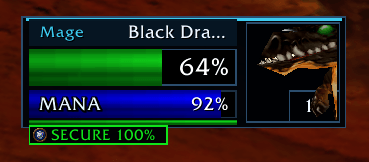
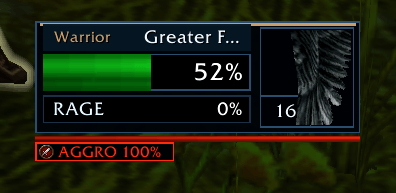
Target frames distinguish elite, rare, rare elite, and boss enemies. If the client protects a target's class or classification, the frame omits that restricted detail and keeps its neutral fallback styling. The threat rail reports tank states such as SECURE, LOSING, and TAUNT, or SAFE, HIGH, and AGGRO for damage dealers and healers. When the client withholds threat data, the addon shows THREAT ? instead of guessing.
The target-of-target card can be left-clicked to make that unit your target, including during combat. If the client protects the unit's class identity, the card uses a neutral portrait fallback instead of attempting to read the restricted value.
Rogues receive a compact combo-point strip across the top of the target portrait. Empty points stay dim and active points light amber; the strip follows Forever's target-aware combo-point state, supports up to seven points, and hides safely when values are protected.
The player frame's faction-colored PVP badge shows the remaining five-minute expiration countdown when the character was flagged by gameplay rather than by deliberately toggling PvP on. Manually enabled PvP keeps the compact PVP label without a misleading timer.
On clients that protect aura data in combat, the aura shelf uses Blizzard's secure aura container to show up to three player-applied debuffs and three target buffs, keeping effects such as Rend visible. Red borders distinguish debuffs from blue-bordered buffs. Older clients that still expose aura data retain the paged view of up to 40 harmful and 40 helpful effects.
Enemy Nameplates
Hostile world nameplates use Blizzard's native health bar with an integer percentage placed inside it. A mouse-transparent threat badge sits immediately to the right of the native level badge and mirrors the main target frame: a shield, healer cross, or crossed-swords icon plus the fully written SECURE, LOSING, TAUNT, SAFE, HIGH, or AGGRO state and its percentage when available. Assigned TANK, HEALER, and DPS target-role annotations stack beneath the threat badge; generic ungrouped-player targets are omitted.
Blizzard retains the native cast bar's complete presentation and lifecycle. McAwesome adds only a cyan remaining-time readout or red LOCK label, while up to six priority debuffs appear in their own reserved row below casts.
The custom crimson eye appears to the left of a hostile health bar only when Forever exposes positive evidence of enhanced stealth detection, such as a readable True Sight, Perception, or equivalent detection aura. An absent eye means detection is unconfirmed—not that the enemy is safe to approach while stealthed.
Blizzard retains ownership of nameplate geometry, visibility, input, and lifecycle. The Enemy Nameplates Configurator section controls each information layer, the debuff limit, confirmed stealth detection, and automatic or manually overridden threat role. Protected percentages are passed directly to formatted text widgets; an unreadable threat state uses a neutral THREAT label instead of being invented.
Mouseover Unit Details
Mouse over a player—or hover the McAwesome player, target, party, or raid frame—to see the appropriate compact unit tooltip without adding clutter. Player characters receive the McAwesome profile card; NPC targets retain Blizzard's native tooltip.
Only player-character mouseovers receive the profile card. If the client marks a player's identity as restricted, that mouseover remains fully Blizzard-owned instead of being inspected by the addon. NPCs—including enemies, quest objectives, vendors, and interactable units—retain Blizzard's native tooltip so objective progress and NPC-specific information remain available. Bags, spells, items, mail, minimap buttons, interaction prompts, and every other general interface tooltip remain fully Blizzard-owned.
- Two-pane presentation — a clean portrait pane on the left and readable identity details on the right, with the lighter two-tone header restricted to the text side.
- Dynamic portraits by default — the same live 3D unit model used by the main unit frames, tightly cropped to keep weapons and stray model geometry out of the background. The portrait fills the pane as the card grows, retries briefly when mouseover model data is delayed, and falls back safely to a static image. Turn off Use animated portrait when a traditional static portrait is preferred.
- Four-line player profile — class-colored name; green
< Guild Name > - Guild Rank;Level - Race - Faction; andClass - Assigned Role. - Party and raid placement — adds Your Group for someone in your party or raid subgroup, or Group N for another raid subgroup.
- Best-effort location — shows the map exposed by Forever or the current local area for visible players, while omitting remote, unavailable, or protected location data instead of guessing.
- PvP and raid indicators — a small faction PvP badge appears on the portrait's lower-right corner, while the unit's raid target marker sits over the upper-left corner.
- Best-effort equipment details — optional average equipped item level uses a throttled, out-of-combat equipment inspection. Successful results are cached briefly; unavailable or incomplete values are omitted rather than shown as
0or?. Specialization is not queried because Forever's inspected-talent API can disconnect the client. - Current target by default — shows the hovered unit's target, highlights
<<YOU>>in cyan when that target is you, and can be disabled in Configurator. Existing characters using the former off-by-default value are migrated to on once; later explicit choices are preserved. - No redundant health display — the unreliable health-value row and Blizzard's green tooltip health bar are removed.
- Flexible positioning — keep the card in the default bottom-right corner or have it follow the cursor with a consistent pointer gap at every tooltip scale. It disappears immediately when the pointer leaves the unit.
On World of Warcraft: Forever, when both McAwesome Unit Frames and McAwesome Reviews are enabled, the profile card asks Reviews to append its read-only player-history summary beneath the Unit Frames details. The integration is detected at runtime and safely skipped if Reviews is absent, incompatible, or encounters an error. McAwesome Reviews remains responsible for the summary and never supplies private notes to the tooltip. Without Unit Frames installed, Reviews can continue using Blizzard's default game tooltip independently.
Configuration
McAwesome Configurator is required on World of Warcraft: Forever. Type /mauf or /mauf options, or use Options/Settings → AddOns → McAwesome Unit Frames, to open the complete Unit Frames tab. It exposes general visibility, player and target appearance, party and raid layout, tooltip, durability, preview, and reset controls. Sliders update live; protected layout, visibility-driver, and Blizzard-frame changes wait safely until combat ends. Routine roster and role refreshes defer silently during combat; only a player-requested layout change reports that it will apply afterward.
Unlock frames to drag the player, target, party, and raid containers. Every frame position is saved per character and restored after /reload or a new login.
Hide while in combat is disabled by default. Enable it to suppress the addon-owned player, target, target-of-target, party, raid, and durability displays. Unit and roster refreshes cannot reopen them during combat, and combat exit restores only displays that were visible beforehand and remain enabled by their normal preferences. Configurator is never captured or reopened by this feature.
Player and target frames show health and the active resource as percentages by default. Choose Actual values under Health and resource text to use compact current / maximum labels instead. Forever's protected current and maximum values are passed separately to the game's font renderer without being combined, read, or compared by the addon. If combat protection prevents text rendering, the status bars continue updating and the affected label safely shows ?% until readable data returns.
Configurator's General tab imports a complete McAwesome setup. Open each source character once, then select a row formatted as <Character Full Name> [<Realm Name>] [<Game Version>] - <#> addon(s), choose Review Import, and select Import Checked Addons. Unit Frames copies player, target, party, raid, and durability positions using normalized physical-screen geometry; it then saves destination-native anchors and corrects the live result after layout. Scale, opacity, lock state, portrait and party layouts, health/resource display, druid mana, durability, visibility, tooltip settings, enabled state, and Blizzard-frame replacement transfer with those positions.
Only transferable presentation preferences enter Configurator's account-wide composite store. Character-specific gameplay and operational state stay on the destination character. Unit Frames refreshes portable geometry after its complete frame layout settles on login or /reload, then captures again on logout. Missing, old anchor-only, corrupt, or incompatible snapshots are skipped without resetting destination settings, and the final summary reports applied, deferred, skipped, or failed status per addon. Escape closes Configurator's topmost import or confirmation surface first and then its main window without replacing gameplay keybinds.
Slash Commands
| Command | Action |
|---|---|
/mauf or /mauf options |
Open the Unit Frames tab in McAwesome Configurator |
/mauf unlock |
Unlock frames for dragging |
/mauf lock |
Lock frame positions |
/mauf scale 50-150 |
Set solo frame scale |
/mauf alpha 20-100 |
Set solo frame opacity |
/mauf portraits animated |
Use animated portraits |
/mauf portraits static |
Use static portraits |
/mauf portraits off |
Hide portraits |
/mauf party vertical |
Stack party frames vertically |
/mauf party horizontal |
Arrange party frames horizontally |
/mauf durability preview |
Show a non-destructive mixed durability preview |
/mauf durability inspect |
Inspect current durability values without waiting for a warning |
/mauf durability fallback |
Preview the model-unavailable fallback |
/mauf durability real |
Exit preview and use real equipped-item durability |
/mauf blizzard |
Toggle Blizzard frame replacement |
/mauf reset |
Restore default positions and settings |
Installation
Install McAwesome Unit Frames from the CurseForge app. It installs McAwesome Configurator automatically as a required dependency. Then restart World of Warcraft or run /reload.
For manual installation, install both the inner McAwesomeUnitFrames folder and the separately downloaded McAwesomeConfigurator folder in World of Warcraft/.../Interface/AddOns. The Unit Frames addon folder should end at Interface/AddOns/McAwesomeUnitFrames.
Supported Game Versions
McAwesome Unit Frames is built for World of Warcraft: Forever 1.60.1 (interface 16001).
Forever may temporarily restrict unit identity, role, model, or threat information during combat. The addon uses neutral, class-based, or static fallbacks instead of inventing unavailable information.
McAwesome Unit Frames Team