MAX_Scrolling_Combat_Text_and_PVP_kill_streak
- By
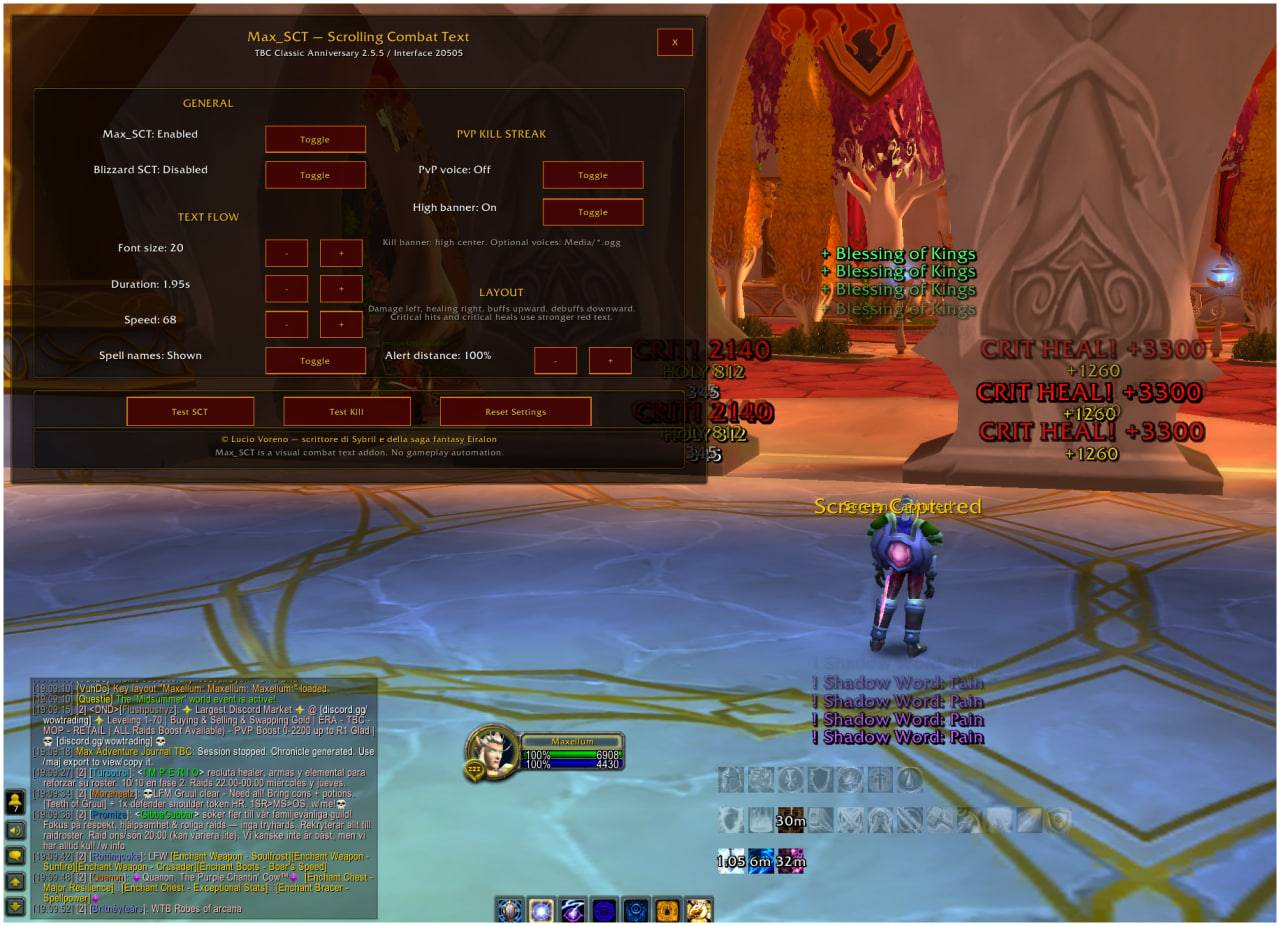
Max SCT is a custom scrolling combat text addon with damage, healing, buffs, debuffs and PvP kill streak banners. Includes configurable font, speed, distance, Blizzard SCT toggle, minimap button and immersive kill streak alerts.
MAX_SCT2.jpeg
MAX_SCT3.jpg
Description
Max SCT — Scrolling Combat Text and PvP Kill Streak
Max SCT is a custom scrolling combat text addon designed to replace the default Blizzard combat text with a cleaner, more immersive and more readable system.
It separates combat feedback around your character, making damage, healing, buffs, debuffs and PvP kill streaks easier to read during combat.
The addon is designed for players who want a more cinematic combat experience while keeping the interface lightweight and practical.
Main Features
Custom Scrolling Combat Text
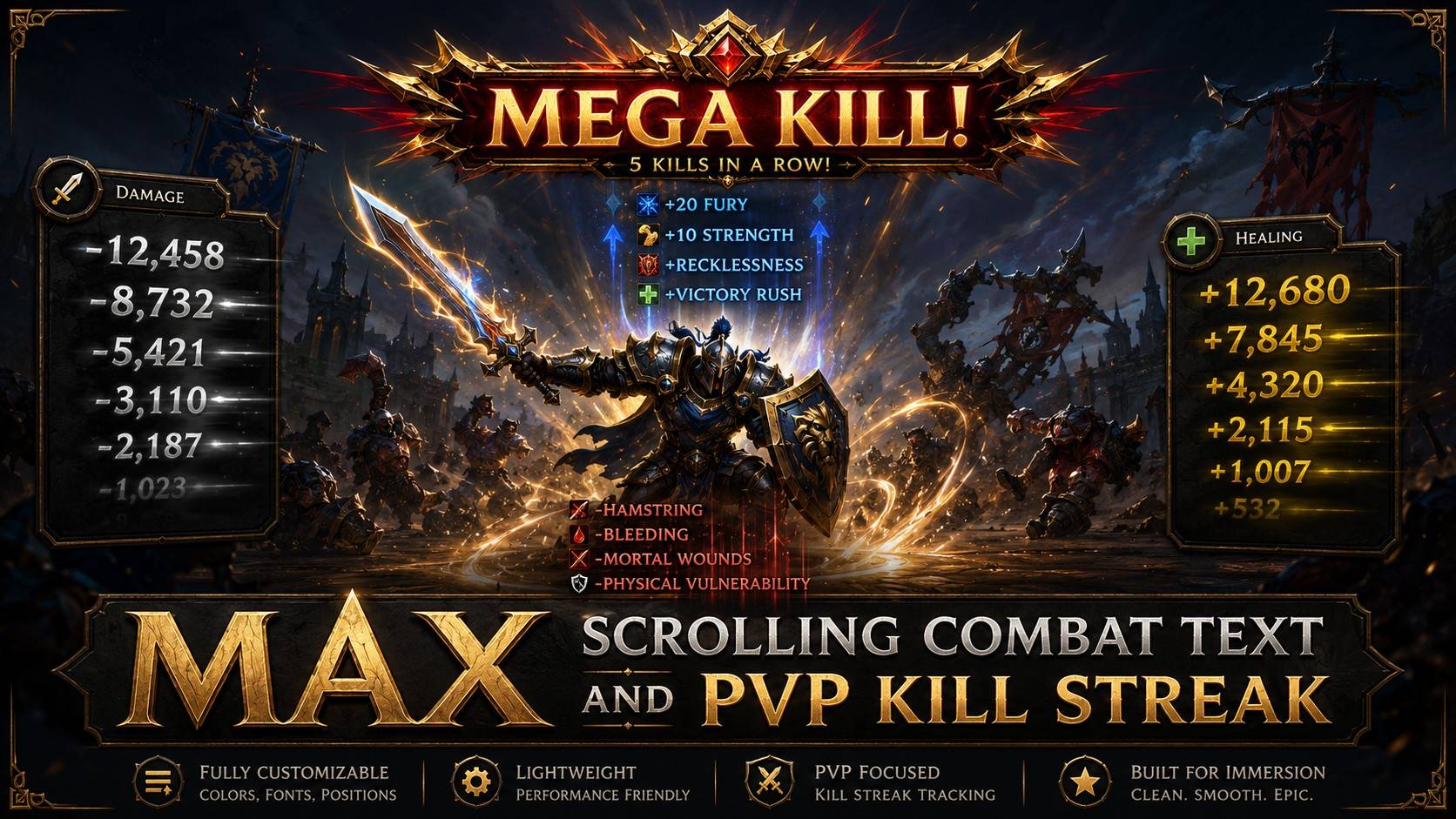
Max SCT displays combat information around your character using dedicated screen zones:
Left side of the character
-
Damage dealt by the player
-
Physical damage shown in white
-
Holy damage shown in yellow
-
Critical hits shown in red with a stronger visual effect
Right side of the character
-
Healing received by the player
-
Normal healing shown in yellow
-
Critical healing shown in red with a stronger visual effect
Above the character
-
Buff notifications
-
Buff text moves upward
Below the character
-
Debuff notifications
-
Debuff text moves downward
This layout keeps different combat events separated and easier to read.
PvP Kill Streak System
Max SCT includes a PvP kill streak banner system.
When you kill enemy players in PvP, the addon can display large center-screen announcements such as:
-
KILLED!
-
DOUBLE KILL!
-
TRIPLE KILL!
-
OMG KILL!
-
MEGA KILL!
-
MONSTRUOCITY KILL!
Kill streak messages appear high-center on the screen and are designed to feel bold, aggressive and immersive.
The kill streak counter resets when the player dies.
Optional Voice Pack Support
Max SCT supports optional custom voice files for PvP kill streak announcements.
You can place .ogg files inside the addon’s Media folder using these filenames:
killed.ogg
double_kill.ogg
triple_kill.ogg
omg_kill.ogg
mega_kill.ogg
monstruocity_kill.ogg
If no custom voice files are installed, the visual kill streak banners still work normally.
Options Panel
The addon includes an in-game options panel with controls for:
-
Enable / disable Max SCT
-
Disable Blizzard scrolling combat text
-
Font size
-
Text duration
-
Text speed
-
Spell name visibility
-
PvP voice hook
-
PvP high-center kill banner
-
Alert distance from the character
-
Test SCT
-
Test Kill
-
Reset settings
The panel can be opened from the minimap button or slash commands.
Minimap Button
Max SCT includes a minimap button for quick access.
Use it to open or close the options panel without typing commands.
Slash Commands
/maxsct
/msct
Open or close the options panel.
/maxsct test
Show test combat text.
/maxsct kill
Show a test PvP kill streak announcement.
/maxsct minimap
Show or hide the minimap button.
Designed For Immersion
Max SCT is meant to make combat feel more readable and more dramatic without turning the addon into a complex combat analysis tool.
It focuses on:
-
clean visual feedback;
-
clear separation of combat events;
-
readable critical hits and critical heals;
-
PvP kill streak immersion;
-
lightweight performance;
-
simple configuration.
Important Notes
Max SCT is a visual combat text addon only.
It does not automate gameplay.
It does not cast spells.
It does not perform combat actions.
It does not interact with protected gameplay functions.
It only changes how combat information is displayed on screen.
MAX_Scrolling_Combat_Text_and_PVP_kill_streak Team