Max Guild Crafting Network
- By
Max Guild Crafting Network connects guild crafters, recipes and requests in one shared network. Quickly find who can craft an item, coordinate materials and turn your guild roster into a living workshop across Azeroth.
MaxGuildCraftingNetwork_OsteriaArcana_CurseForge.jpg
MGCN_TBC.png
MGCN_OA_ed.jpeg
Description
MaxGuildCraftingNetwork
Osteria Arcana Guild Edition
Find the crafter. Check the materials. Build together.
A shared profession, recipe and reagent network created for World of Warcraft guilds.
VERSION 2.1.0 MODULAR REBUILD • TBC CLASSIC • GUILD SYNCHRONIZATION
Shared crafters • Recipe finder • Required reagents • Live bag counts • Guild visual editions
Turn the Guild Roster into a Living Workshop
MaxGuildCraftingNetwork transforms the profession knowledge of individual characters into a practical crafting resource for the whole guild. Instead of repeatedly asking in guild chat who can craft an item, enchantment, potion, piece of equipment or profession component, members can search a shared in-game database and immediately identify the right artisan.
Every participating character contributes a profile containing their name, realm, guild, class, level, professions, profession skill values, scanned recipes and last update. Main characters and alternate characters become part of the same network, allowing useful crafts and rare recipes to remain visible even when the owner is playing another character.
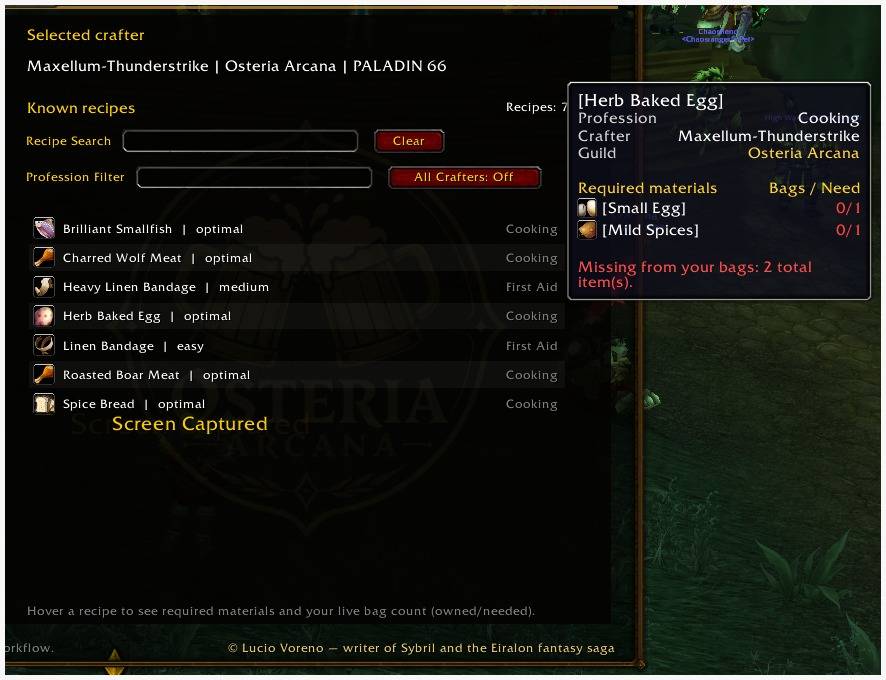
New in version 2.x: recipes and enchants can now include their complete reagent requirements. Hover a saved entry to compare every required material with the quantity currently present in your bags.
Required Materials and Live Bag Check
The recipe tooltip no longer shows only the name of the craft. When material data is available, it displays every required reagent, its item name and the exact comparison between what the viewing character owns and what the recipe needs.
| 0/2 | You own none of the two required items. |
| 1/2 | You own one, but one more is still missing. |
| 3/2 | You own enough material to satisfy the requirement. |
Sufficient quantities are shown in green; missing quantities are shown in red. The tooltip also reports whether all required materials are ready or how many total reagent units are still missing.
Important: this is a live check of the current character’s bags only. Bank storage, mail, guild bank and items owned by other characters are intentionally not included. If bag contents change while the tooltip is being viewed, the comparison is refreshed from the character’s current inventory.
Search One Crafter or the Entire Guild
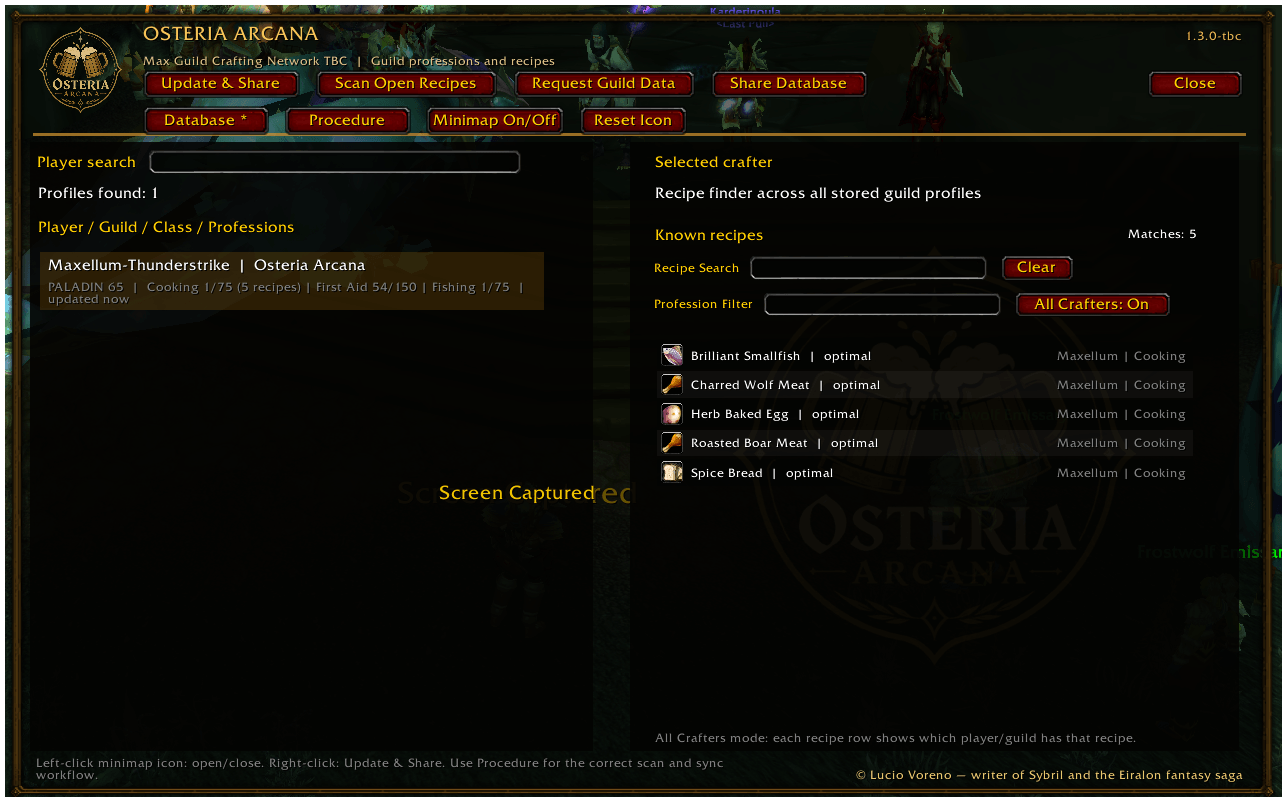
The left side of the interface contains the stored guild profiles, character search and profile selection. The search can match character names, realms, guild names, classes, professions and known recipe names.
Selecting a character opens that player’s detailed crafting collection. This is useful when you already know the artisan and want to inspect their profession coverage or recipes.
All Crafters searches every stored profile at the same time. Enter a complete or partial recipe name and the addon displays every matching craft together with its profession and owner. This makes it easy to locate rare recipes, enchants, raid consumables, bags, resistance equipment, weapons, armor, profession components and leveling items without checking characters one by one.
Profession and Recipe Scanning
The addon detects the character’s professions and current skill values. It can scan both standard TradeSkill windows and the classic Craft interface used by supported spell-based crafts and enchants.
Because the TBC client exposes only the profession window currently open, each profession must be scanned separately:
| 1 | Open one profession window. |
| 2 | Click Scan Open Recipes to record recipes, output items and required materials. |
| 3 | Repeat the scan for every profession you want to publish. |
| 4 | Click Update & Share when all scans are complete. |
Repeat this procedure after learning important new recipes. Previously scanned profession data is preserved between sessions through SavedVariables.
Updating from an older version: existing profiles and recipe names remain compatible, but reagent information appears only after each crafter opens the profession again, scans it with version 2.0.0 or newer, and uses Update & Share.
Guild Synchronization without External Services
MaxGuildCraftingNetwork uses World of Warcraft’s internal addon communication system. No website, external account, cloud database or companion application is required.
| Update & Share | Refreshes the current character profile and sends professions, recipes and reagent requirements to online guild users. |
| Scan Open Recipes | Reads the profession or craft window currently visible on screen. |
| Request Guild Data | Asks online guild members with the addon to send their latest profiles. |
| Share Database | Distributes locally stored profiles to help populate or restore the shared network. |
Only players with the addon installed can send, receive and interpret the synchronized information. Offline members cannot answer a live request, but previously received profiles remain stored locally until updated.
Version 2.x applies incoming recipe transfers only after they are complete, reducing partial lists during synchronization. It also protects the current character’s local profile from being replaced by an older synchronized copy.
Built for Real Guild Activity
MaxGuildCraftingNetwork is useful for social, leveling, raiding, PvP and progression guilds. Officers can review profession coverage. Raiders can find the characters capable of preparing consumables, enchants and resistance gear. New members can locate the right crafter without already knowing every main and alternate character. Recipe collectors can make valuable rare crafts visible to the whole community.
The addon does not automate crafting, transfer materials or create orders on behalf of the player. Its purpose is to provide accurate information so members can contact the correct artisan and organize the craft directly.
Clear Interface and In-Game Procedure
The two-panel interface keeps the guild roster and recipe collection visible at the same time. Recipe and profession filters help manage large databases, while contextual instructions explain what to do when no profile is selected, no recipes are stored or a search returns no result.
A dedicated Procedure tab explains scanning, synchronization, All Crafters search and material checking directly inside the game, so guild members do not need to leave World of Warcraft or read an external manual before contributing their data.
Minimap Controls
The addon includes a movable minimap button using the Osteria Arcana emblem. Left-click opens or closes the main interface. Right-click performs a quick Update & Share. Drag moves the icon around the minimap. Its position and visibility are saved between sessions, and the button can be hidden or restored through the addon controls.
Osteria Arcana Edition and Guild Variants
The current package is the Osteria Arcana Guild Edition. It uses a black and antique-gold fantasy theme, a custom guild emblem, themed headings, an internal watermark and matching artwork for the minimap button and AddOn-list icon.
The interface automatically displays the active character’s real guild name. Osteria Arcana remains the fallback visual identity when no guild name is available.
Version 2.1.0 separates interface, media, database and synchronization code into independent modules. This allows additional visual guild variants to use their own emblem, colors and identity while preserving the same crafting database, recipe search, reagent tracking and synchronization functions. Visual variants are themed editions of the same guild-focused addon rather than separate or incompatible systems.
A Genuine Modular Rebuild
Version 2.1.0 is not a cosmetic update to the old single-file addon. The former Lua monolith has been removed and the project has been rebuilt with dedicated modules for core utilities, events, commands, SavedVariables, profession discovery, recipe normalization, scanning, serialization, guild synchronization, profile lists, recipe lists, tooltips, the main window, minimap controls and media assets.
This structure makes future improvements and guild-specific editions safer to maintain without rewriting unrelated systems. The existing MaxGuildCraftingNetworkTBCDB database is preserved, and protocol compatibility with version 2.0.0 clients remains available.
Slash Commands
/mgcn — Open or close the main interface.
/mgcn show — Open or close the main interface.
/mgcn update — Update and share the current character profile.
/mgcn scan — Scan the currently open profession or craft window.
/mgcn recipes — Scan the currently open profession or craft window.
/mgcn share — Share the locally stored database.
/mgcn request — Request updated data from online guild users.
/mgcn minimap — Show or hide the minimap button.
/maxcraft and /mgcraft — Alternative command aliases.
Compatibility, Privacy and Scope
Designed for The Burning Crusade Classic 2.5.5 / 2.5.6 using Interface 20505 and Lua 5.1-compatible code.
All collected information comes from normal in-game character and profession data. It is stored locally and exchanged only through World of Warcraft’s internal guild addon channel. No external server, registration, analytics service or personal-data upload is used.
One Guild. Every Crafter. Every Recipe.
Connect professions, recipes and required materials so every guild member can find the right artisan and arrive prepared.
© 2026 Lucio Voreno — author of Sybril and creator of the World of Eiralon. All rights reserved.
Author: Lucio Voreno / Maxellum in game.
Max Guild Crafting Network Team