Master Vendor
- By
Search vendors, sell junk, keep ignore/junk/buy lists, and tint items you already know. Works on Midnight and WoW Forever Beta.
Screenshot 2026-09-17 210034.png
Screenshot 2026-09-17 210022.png
Description
V 1.2.1 + FOREVER BETA TEMP FIX NOW SAVES SETTINGS VIA ACCOUNT MACROS BE AWARE
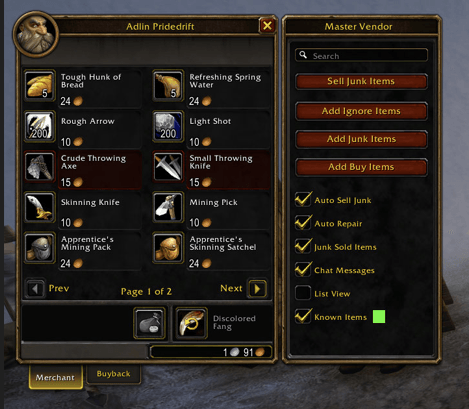
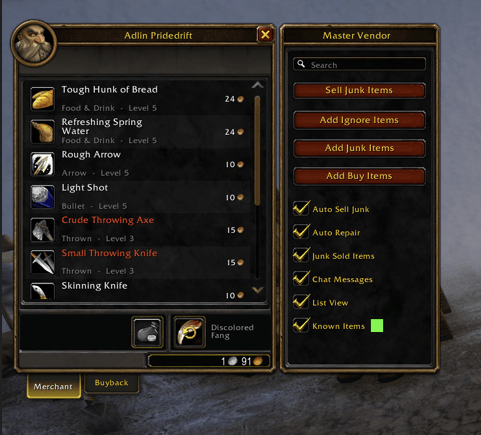
Master Vendor attaches a side panel to the merchant window.
No extra libraries. Settings are account-wide. Ignore, junk, and buy lists are per character so an alt will not sell your main's gear.
## Features
- Search box on the vendor
- Optional scrollable list view instead of paged merchant buttons
- Sell Junk (greys + your junk list)
- Auto Sell Junk
- Auto Repair
- Add sold items to the junk list
- Ignore list (never sold, never auto-added to junk)
- Junk list (always sold)
- Buy list (restock to a set count when the vendor sells that item)
- Drag items from bags or the vendor onto the list buttons
- Tint known recipes, mounts, toys, pets, appearances, and blueprints
- Color picker for the known-item tint, with a Default button
- Chat messages you can turn off
## How to use
Open a vendor. The panel sits on the right.
- Sell Junk Items — sells greys and junk-list items. Ignore list is skipped.
- Add Ignore / Junk / Buy — click to open the list, or drag an item onto the button.
- List windows have search, a clear-X on the search box, and Clear List.
- Buy list asks how many you want in bags (example: 40 water, or 1 blueprint).
- List View — one scrolling vendor list. Uncheck to use Blizzard pages again without a reload.
- Known Items — tints collected/known wares. Click the color square to change it.
## Slash commands
/mastervendor
/mv
/mv ignore
/mv junk
/mv buy
/mv autosell
/mv autorepair
## Install
Put the MasterVendor folder in Interface/AddOns.
Midnight: World of Warcraft/_retail_/Interface/AddOns/MasterVendor
Forever Beta: World of Warcraft/_classic_beta_/Interface/AddOns/MasterVendor
## Notes
- Lists are per character.
- Auto-buy only runs if that vendor sells something on your buy list.
- The side panel is always shown at a vendor. Auto sell, auto repair, auto-junk-sold, list view, known tint, and chat can each be turned off.
The Master Vendor Team