Master Chat
- By
Hide chat chrome, stack Blizzard chat buttons like classic, and show relative timestamps. Midnight and Forever.
Master Chat
Cleaner chat for the default UI on Retail and WoW Forever.
Master Chat tidies up Blizzard's chat window without replacing it. Hide and restore the whole chat with one button, see live relative timestamps in a Forever-safe stamp column beside every line, shorten channel names, use a Vanilla-style chat button stack, and pick a chat font with full Chinese, Japanese and Korean support.
Features
- One-button hide and restore - A small yellow button under the chat dock hides the chat chrome and fades the text. Restoring brings back only the tabs that were open. In combat, the text comes back immediately and the buttons and edit box follow once combat ends.
- Forever-safe stamp timestamps - Every line shows its age, such as [05.20s], [01.12m] or [02.07h], ticking at the speed you choose. Stamps live in a Master Chat column beside the chat frame (not inside Blizzard message text), so links and right-click on names keep working, and Forever stays free of AddOn blocked errors from timestamp work. Stamps sync with scroll and clip at the top and bottom like Blizzard's chat text, including half-visible lines. All chat tabs and pop-out windows get stamps except the Combat Log.
- Unified chat background - The stamp column and chat share one background that keeps your Blizzard chat color and opacity, without the stock background flashing through when tabs change.
- Vanilla-style button stack - Master Chat draws its own menu, scroll up/down/bottom, Channels, and Social buttons. Blizzard's chat buttons, scrollbar, and scroll-to-bottom control stay hidden while the Master Chat stack is shown. The down-button flash follows the active chat tab.
- Tabs aligned to the chat - Docked chat tabs sit on the left edge of the stamp column plus chat frame, so the dock matches the wider window.
- Plain chat input - Always on: the input box artwork is stripped while you type. The channel label and your text stay. With timestamps on, the input stretches to the stamp column's outer edge on every tab.
- Short channel names - [2. Trade - City] becomes [2. Trade], and Looking For Group becomes LFG. The channel number stays. Turn it off to see names exactly as Blizzard sends them.
- Tab flash on new messages - Unread chat tabs flash the same way whisper tabs do when a new message arrives (Combat Log excluded).
- Combat Log extras - No stamps on the Combat Log. Its dark filter bar extends across the stamp gutter when timestamps reserve that space.
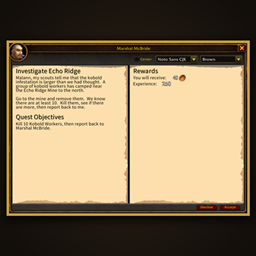
- Chat font with CJK support - Noto Sans CJK is the default and covers Chinese, Japanese and Korean at the same size. Arial Narrow, AR Hei, AR Kai, Korean 2002 and Friz Quadrata are also available, plus any LibSharedMedia fonts you have installed.
- Pop-out whisper windows - Whisper windows get the same font, timestamps, plain input, and styling as the rest of your chat.
- Chat cleanup - Font-size tricks in messages can't shrink your chat, oversized pictures are capped, extra line breaks are collapsed, and a message's color can't bleed into the next line.
- Edit Mode friendly - Stamp overlays step aside while Edit Mode is open and return when you leave it.
- Lightweight - Timestamps only update what actually changed, so the chat stays smooth.
Options
Open Esc > Options > AddOns > Master Chat. Changes apply right away.
- Show MasterChat buttons
- Start with chat hidden
- Relative timestamps
- Block other languages
- Short channel names
- Disable chat fade
- Timestamp speed
- Timestamp start (seconds or minutes)
- Timestamp color (pastel presets or a custom color)
- Chat text outline
- Chat font
Compatibility
- World of Warcraft Retail (Interface 120105)
- WoW Forever (Interface 16001)
One codebase supports both game versions.
Designed for the default UI. Master Chat is built for Blizzard's default interface. Other UI addons or interface replacements may cause problems. If you run into an issue, please report it with the addons you use, and I'll see whether it can be corrected.
Download size: Master Chat bundles the Noto Sans CJK font so Chinese, Japanese and Korean text display properly, which makes the download about 18 MB.
Optional Dependencies
- LibSharedMedia-3.0 - adds shared media fonts to the font list.
Credits and License
Author: Sarcazmo
Master Chat is (c) 2026 Sarcazmo. All Rights Reserved.
Master Chat bundles the Noto Sans CJK SC font, licensed under the SIL Open Font License 1.1. See LICENSE-NotoSansCJK.txt included with the addon.
Master Chat Team