LedgerGoblin
- By
A high-performance, event-driven mail routing system — it sends gold and items to your alts automatically, by rule.
LG_4.png
Description
LedgerGoblin
A high-performance, event-driven mail routing system — it sends gold and items to your alts automatically, by rule.



Overview
LedgerGoblin turns the daily chore of shuffling gold and loot to your alts into a set-and-forget routine. You describe where things should go — by item, by bind type, by quality, or by gold rule — open a mailbox, and it does the rest.
It's built the same way the rest of the toolkit is: event-driven, cached, and tuned for performance, so it stays light on memory and CPU. Mail is irreversible, so every send runs through a stack of safety gates and auto-run is strictly opt-in.
- Rule-based — a clear priority pipeline (specific item → bind type → quality), plus per-item keep reserves and a never-mail exclusion list.
- Safe by design — soulbound / Bind-on-Pickup items are never routed, large sends ask for confirmation, and the queue refuses to spend below postage + a learned repair reserve.
- Hands-off — optional auto-run when the mailbox opens, with a hold-Shift escape hatch.
- Native settings — a clean options panel built on Blizzard's own Settings API, plus a drag-and-drop Rule Editor window.
Installation
Via an addon manager (recommended)
- CurseForge — search for LedgerGoblin and install.
Manual
- Download the latest release from the Releases page.
- Extract the
LedgerGoblinfolder intoWorld of Warcraft\_retail_\Interface\AddOns. - Restart the game (or
/reloadif already in-game).
Auto-run is off by default — nothing is ever mailed until you set up a rule and either click Send or opt in to auto-run. Mail can't be undone, so LedgerGoblin would rather do nothing than do the wrong thing.
Getting Started
| Command | Description |
|---|---|
/ledger or /lg |
Open the configuration panel |
/ledger rules |
Open the Rule Editor window |
/ledger rule add <itemID\|name> <Target-Realm> |
Add an item route |
/ledger rule list |
List item routes |
/ledger rule remove [n] |
Remove route n (or the last one) |
/ledger rule toggle <n> |
Enable/disable route n |
/ledger keep <itemID> [N] |
Keep N in bags, send the rest (omit N to clear) |
/ledger exclude <itemID> |
Never mail this item |
/ledger exclude remove <itemID> |
Stop excluding this item |
/ledger send |
Route mail now (manual run) |
/ledger preview |
Show what would be sent, without sending |
/ledger log |
Show recent transfers |
/ledger stats |
Show lifetime and today's totals |
/ledger reset |
Clear transfer history and stats |
/ledger debug |
Explain why items do or don't route |
/ledger toggle |
Enable/disable auto-run on this character |
You can also use the AddOn Compartment button on the minimap: left-click opens settings, right-click opens the Rule Editor.
Features
Routing rules
LedgerGoblin resolves every item through one priority pipeline, stopping at the first rule that claims it:
- Exclusions — items on your never-mail list are skipped outright.
- Specific item rules — route an exact itemID or item name to a chosen alt.
- Bind routing — send Bind-on-Equip gear (while still unequipped) and account/warband-bound items to your alts.
- Quality routing — a catch-all by item quality (Poor → Epic).
Gold routing
- Keep a set amount and send the rest, send a fixed amount, or send a percentage of your gold.
- Reserve for repairs — never send gold below your learned full-repair cost, captured automatically at vendors (no flat guess).
Smart mailability
- Soulbound / Bind-on-Pickup and quest items are never routed — they can't leave your character, so the engine won't try. Rules for un-mailable items are blocked the moment you create them, by itemID, link, or name.
- Account/warband-bound items still route to your own alts even though the bag flags them "bound."
- Locked slots (items mid-move) are skipped everywhere — planning, sending, and rule validation.
The Rule Editor
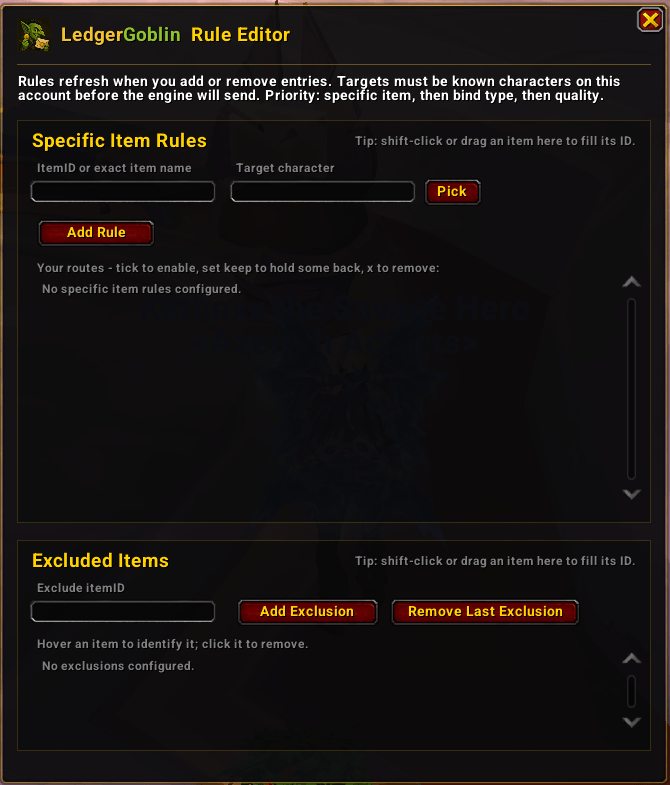
A movable window that coexists with your open bags. Drag an item in, or shift-click it straight from your bags, to fill its ID — no more hunting for itemIDs. Pick a target from a class-coloured roster menu of your alts.
Quality-of-life & safety
- Auto-run on mailbox open (opt-in) — hold Shift as the mailbox opens to skip a given run.
- Confirm large sends — a configurable gold threshold prompts before big transfers.
- Preview & Debug — see exactly what would be sent, and why each item does or doesn't route.
- Paced sending — one mail in flight at a time, advancing only on confirmed delivery, with a small cooldown between sends to keep the mailbox happy.
- Transfer log + stats — recent transfers plus lifetime and daily totals.
- Roster-aware — learns your alts so route targets validate before anything is sent.
Built for the modern client
- Midnight-ready — secret-value safe throughout; never branches on protected combat data.
- Performance-first — file-scope cached APIs, an allocation-light bag scan, and bounded classification caches.
Configuration
Open the panel with /ledger (or through the Blizzard AddOns settings). Settings are grouped into Routing Rules, Gold, Bind Routing, Item Quality Routing, and per-item rules/exclusions. Most toggles apply live. Per-item routing lives in its own movable Rule Editor window (/ledger rules) so it can stay open alongside your bags.
Contributing
Contributions, bug reports and ideas are welcome! Open an issue or a pull request. When filing a bug, including your client version and a /reload-able repro helps a ton.
Support
Appreciate the work that goes into LedgerGoblin? Consider showing your support:
- PayPal — paypal.me/KkthnxTV
- Patreon — patreon.com/Kkthnx
- Battle.net / Balance —
Kkthnx#1105orJRussell20@gmail.com - In-game gold — Kkthnx on Area 52 (US)
License
Released under the MIT License. See LICENSE for details.
Developed and maintained by Josh "Kkthnx" Russell. Built with love for the default UI.
The LedgerGoblin Team


Owner