LatencyGuard
- By
Dynamically adjusts your Spell Queue Window based on world latency for a snappier combat feel.
LatGuard_1.png
LatGuard_2.png
Description
LatencyGuard
A lightweight, set-and-forget tuner for your Spell Queue Window — it adapts to your ping so your combat always feels snappy.




Overview
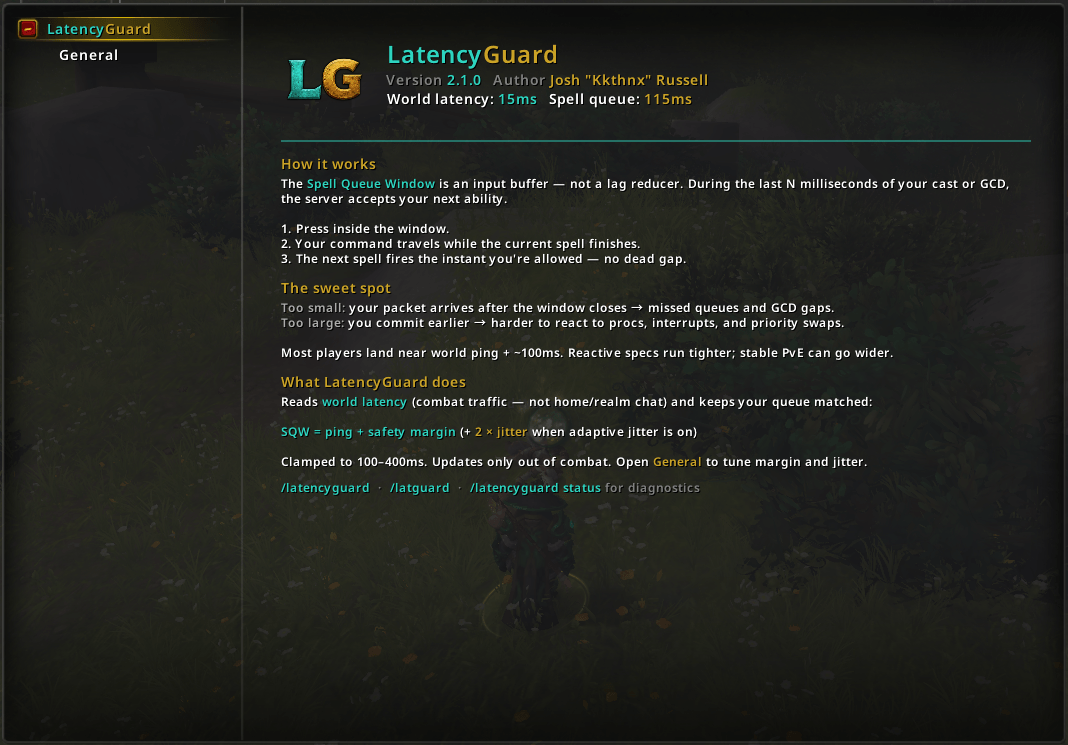
The Spell Queue Window is a hidden game setting (SpellQueueWindow) that controls the "buffer time" the game gives you to queue your next ability before the current one finishes. Set it too low and your rotation feels clunky and drops casts; set it too high and you lose precise control. The catch is that the ideal value depends entirely on your world latency — which changes from zone to zone, fight to fight, and day to day.
LatencyGuard solves that for you. It monitors your world ping and continuously recalculates the optimal queue window — your ping plus a safety margin, with optional jitter-aware widening when your connection is unstable.
- Set-and-forget — no math, no
/consolecommands, no guessing. It just keeps the right value applied. - Adaptive — recalculates from live world latency via
GetNetStats(), aligned with how Blizzard routes combat input. - Combat-safe — never touches a protected CVar mid-fight; pending changes are deferred until combat ends.
- Performance-first — event-driven with a low-frequency maintenance tick, local caches, and a change threshold so it only writes when it actually matters.
- Native settings — a clean options panel built on Blizzard's own Settings API.
Installation
Via an addon manager (recommended)
- CurseForge — search for LatencyGuard and install.
Manual
- Download the latest release from the Releases page.
- Extract the
LatencyGuardfolder intoWorld of Warcraft\_retail_\Interface\AddOns. - Restart the game (or
/reloadif already in-game).
There's nothing to configure to get the benefit — LatencyGuard starts managing your Spell Queue Window the moment you log in. Tweak the behavior anytime with /latencyguard or /latguard.
Getting Started
| Command | Description |
|---|---|
/latencyguard |
Open the options panel |
/latguard |
Open the options panel (short alias) |
/latencyguard status |
Print diagnostic ping/SQW state (for bug reports) |
It runs silently in the background. Enable SQW Update Messages in settings if you want chat lines when the window changes.
Features
Automatic Tuning
- Adaptive Spell Queue Window — sets
SpellQueueWindowtoworldPing + margin, clamped 100–400ms (Blizzard default is 400). - Jitter-aware margin — when enabled, adds
2 × σto your safety margin based on the last 25 world-latency samples; widens the queue when ping is unstable, tightens when stable. - Change threshold (hysteresis) — only rewrites the CVar when the target moved meaningfully, avoiding churn from tiny fluctuations.
- Latency discovery — briefly polls after login until
GetNetStatsreturns a valid world reading, then settles into a 30s cadence.
Combat Safety
- Deferred writes —
SpellQueueWindowcan't be changed while you're in combat. If an update is due mid-fight, LatencyGuard flags it and applies it the instant combat ends (PLAYER_REGEN_ENABLED). - Midnight-ready — built for the current client, with a defensive guard against the 12.0 Secret Values model so a future API change can never break the addon.
Options
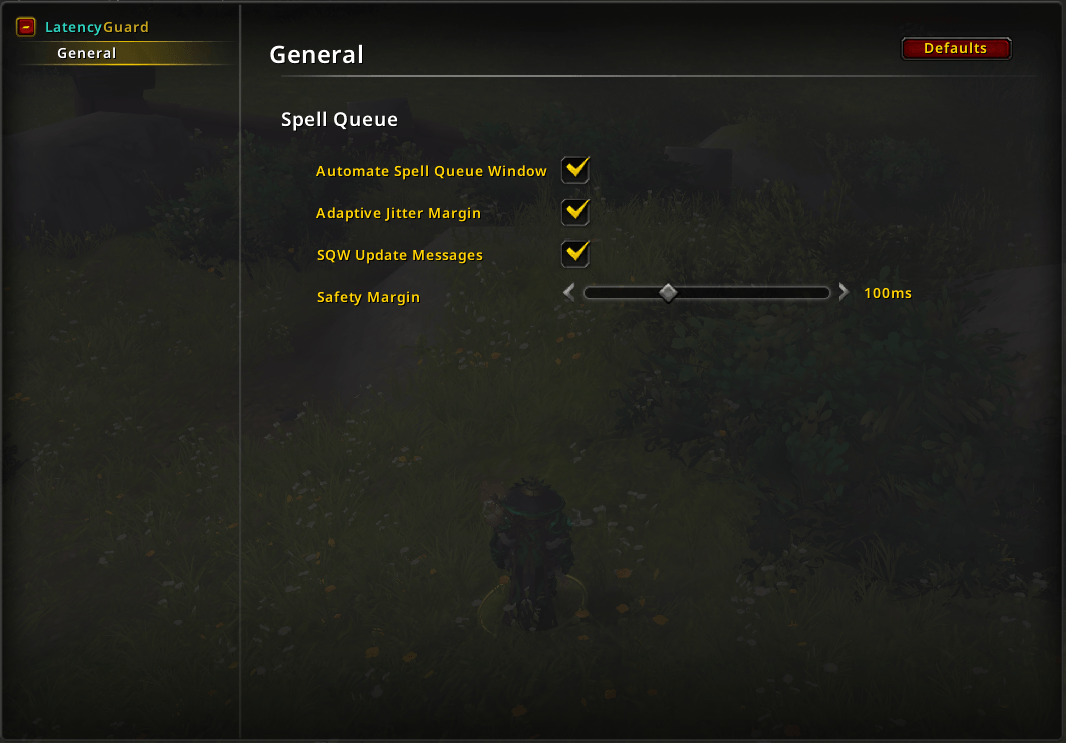
- Automate Spell Queue Window — the master switch. When off, LatencyGuard stops all adjustments immediately and leaves your CVar alone.
- Safety Margin — base headroom added to world ping (default 100ms).
- Adaptive Jitter Margin — on by default; adds
2 × σwhen latency variance is detected (needs 3+ samples). - Chat Feedback — optionally print a line when the queue window changes, with base + jitter breakdown.
Localization
- Ships with translations for enUS, deDE, esES, esMX, frFR, itIT, koKR, ptBR, ruRU, trTR, zhCN, and zhTW, with a graceful English fallback for any missing strings.
Configuration
Open the panel with /latencyguard or /latguard (or through the Blizzard AddOns settings). The main page explains what the Spell Queue Window is and why the addon exists; the Options subcategory holds the live toggles:
| Setting | Default | What it does |
|---|---|---|
| Automate Spell Queue Window | On | Enables/disables all automatic adjustments |
| Adaptive Jitter Margin | On | Widen margin when connection latency is unstable |
| Safety Margin | 100ms | Base headroom added to world ping |
| Enable Chat Feedback | Off | Print a line each time the spell queue window is updated |
All settings apply live — there's nothing to reload.
How It Works
- Measure —
GetNetStats()world latency (combat path; home is shown in status only). Refreshes ~every 30s. - Calculate —
target = worldPing + safetyMargin + (2×jitterσ when adaptive), clamped to 100–400ms. - Compare — apply when target moved 40ms+ since last write, or the game value drifted 40ms+ from target.
- Apply —
SetCVaronly out of combat; deferred toPLAYER_REGEN_ENABLED.
Jitter σ is measured from the last 25 world-latency samples (~12 min at steady ping). Needs 3+ samples before adaptive margin applies.
Contributing
Contributions, bug reports and ideas are welcome! Open an issue or a pull request. When filing a bug, including your client version, your typical world latency, and a /reload-able repro helps a ton.
Support
Appreciate the work that goes into LatencyGuard? Consider showing your support:
- PayPal — paypal.me/KkthnxTV
- Patreon — patreon.com/Kkthnx
- Battle.net / Balance —
Kkthnx#1105orJRussell20@gmail.com - In-game gold — Kkthnx on Area 52 (US)
License
Released under the MIT License.
Developed and maintained by **Josh "Kkthnx" Russell**. Built with love for a snappier combat feel.
LatencyGuard Team

Owner