Lafee ElvUI guild & contact hover
- By
interactive datatexts that show online contacts and members from your guild and each of your WoW communities
eee.png
Description
Lafee ElvUI Guild Hover
Important after updating to 1.1.12
Version 1.1.12 isolates guild, contacts, and community datatexts by character. Existing ElvUI assignments use the old shared identifiers and cannot be migrated automatically.
After installing the update:
- Restart the game or type
/reload. - Log in to each character and open ElvUI with
/ec. - Open Datatexts and reselect Guilde interactive, Contacts interactifs, and the communities used by that character.
- Repeat this once for every character.
ElvUI panel placement still belongs to the active ElvUI profile. Characters that need different datatext layouts must use separate ElvUI profiles.
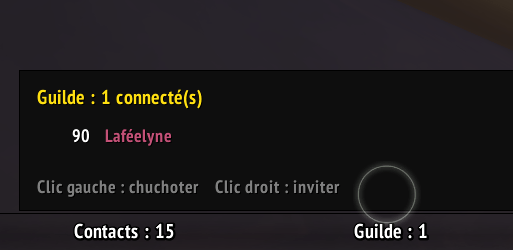
Lafee ElvUI Guild Hover is a World of Warcraft Retail extension for ElvUI. It adds interactive datatexts that show online contacts and members from your guild and each of your WoW communities.
Hover a datatext to open a clickable member list: left-click a member to whisper them, or right-click to invite their active WoW character.
Requirements
- World of Warcraft Retail
- ElvUI (required)
This addon does not modify any ElvUI files.
Features
- A dedicated Guilde interactive datatext for your guild.
- A dedicated Contacts interactifs datatext for WoW and Battle.net friends.
- One separate datatext for every subscribed WoW community.
- Guild, contacts, and community datatext IDs are isolated by character GUID.
- Community caches are saved per character, so characters never restore each other's subscriptions.
- Community datatext IDs also include the community
clubId, so duplicate or renamed community names are handled safely. - Online member count displayed directly on every datatext.
- Interactive, ElvUI-styled member list instead of a static tooltip.
- Compact member rows with level and class-colored name.
- BattleTags are displayed in a right-hand column for Battle.net contacts only.
- Battle.net favorites are sorted first; Battle.net-only contacts are shown in blue.
- Contacts lists include online WoW and Battle.net friends only.
- Left-click to open a whisper.
- Right-click to invite eligible characters.
- Scrollable lists for communities or guilds with more than 18 online members.
- Debounced updates for guild and community roster events.
- Native friend-event updates plus a lightweight fallback refresh while a datatext is visible.
/lgh refreshand optional debug mode.
Installing
- Download and extract the archive.
- Place the
lafee_elvui_guild_hoverfolder in:World of Warcraft/_retail_/Interface/AddOns/ - Start the game or type
/reload.
Adding the Datatexts in ElvUI
- Open ElvUI options with
/ec. - Open Datatexts, then select the panel and slot you want to use.
- Select Guilde interactive for your guild roster.
- Select Contacts interactifs for your WoW and Battle.net contacts.
- Select a community by its exact community name for its own roster.
Each community is registered as a separate ElvUI datatext and appears in the normal datatext selection list.
Datatext registrations are unique to each character. After upgrading, select the guild, contacts, and community datatexts once on every character. ElvUI panel placement still follows the active ElvUI profile; use separate ElvUI profiles when characters need different panel layouts.
Member List Actions
- Left-click: opens a whisper to the selected member when a valid character or Battle.net chat target is available.
- Right-click: invites the selected member when a valid active WoW character is available.
Invites are disabled for your own character, members already in your group, mobile-only members without a playable WoW character, and restricted combat situations.
Battle.net Community Limitations
Battle.net community members connected only through mobile chat are not counted as online WoW characters.
The addon never guesses a character name from a BattleTag. If the game does not provide a valid WoW character, the invite action is disabled. A Battle.net whisper is only offered when Blizzard provides usable account information.
Commands
| Command | Description |
|---|---|
/lafeeguildhover |
Shows the addon version, registered community count, and help. |
/lgh |
Short command alias. |
/lgh refresh |
Manually refreshes guild and community member lists. |
/lgh debug |
Toggles debug messages. Disabled by default. |
If a community is removed, use /reload to remove its datatext cleanly from ElvUI's options.
Troubleshooting
To show Lua errors, enter:
/console scriptErrors 1Then type /reload and report the full error message.
The Lafee ElvUI guild & contact hover Team