Lafee ElvUI frame group
- By
link several ElvUI movers into named groups so that moving one frame moves every frame in the same group
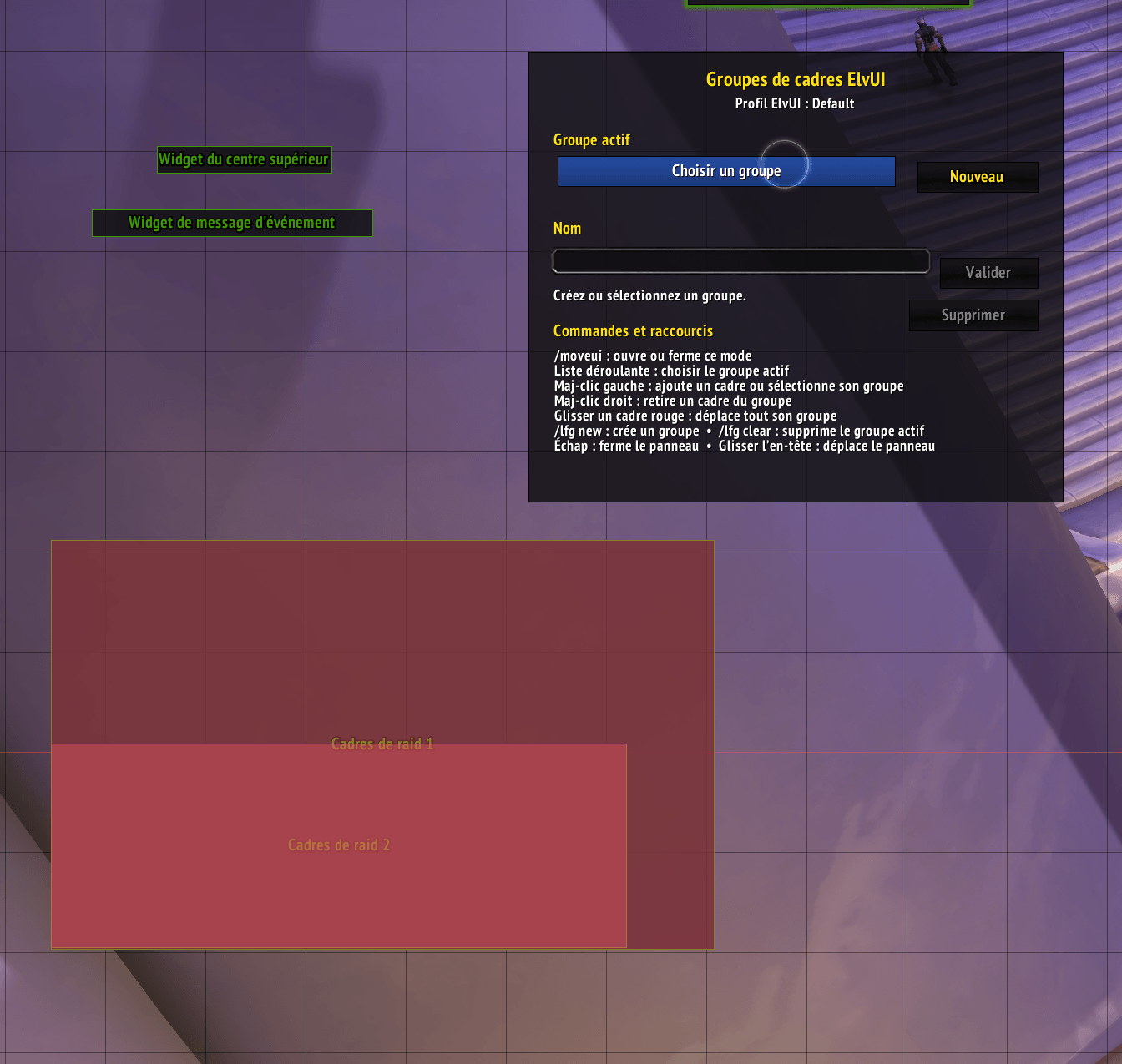
zzz.png
Description
Lafee ElvUI Frame Group
Lafee ElvUI Frame Group is a lightweight ElvUI plugin for World of Warcraft Retail. It lets you link several ElvUI movers into named groups so that moving one frame moves every frame in the same group.
The addon uses ElvUI's public mover system and does not modify any ElvUI files.
Features
- Create multiple named groups of ElvUI movers.
- Move all frames in a group together while using ElvUI's mover mode.
- Add, select, or remove movers with simple Shift-click shortcuts.
- Automatically opens its group panel with ElvUI mover mode, whether mover mode is opened from the ElvUI datatext,
/moveui, the ElvUI options, or the addon's minimap button. - Stores groups and positions separately for each ElvUI profile.
- Reapplies saved grouped positions after login, reload, and profile changes.
- Includes a movable minimap launcher.
- Does not use any additional libraries.
Requirements and compatibility
- World of Warcraft Retail
- Supported interface versions: 12.0.5, 12.0.7, and 12.1.0
- ElvUI is required
Installation
Download and extract the addon.
Make sure the resulting folder is named exactly
lafee_elvui_frame_group.Place it in:
World of Warcraft/_retail_/Interface/AddOns/Enable Lafee ElvUI Frame Group in the AddOns list on the character-selection screen.
Log in or type
/reloadif the addon was installed while the game was running.
How to use
- Open ElvUI mover mode by right-clicking the ElvUI datatext, typing
/moveui, or left-clicking the addon's minimap button. - Click New in the Lafee Frame Groups panel to create a group.
- Hold Shift and left-click an ElvUI mover to add it to the selected group.
- Repeat for every mover that should move together.
- Drag any red mover belonging to that group. The other linked movers follow it.
Mouse shortcuts
- Shift + Left Click on an ungrouped mover: add it to the selected group.
- Shift + Left Click on a grouped mover: select that mover's group.
- Shift + Right Click on a grouped mover: remove it from its group.
- Drag a grouped mover: move all movers in that group together.
Group panel
The panel is displayed only while ElvUI mover mode is active. It allows you to:
- choose the active group;
- create a new group;
- rename the selected group;
- delete the selected group;
- review the movers assigned to that group.
Slash commands
/lfg— display a short usage reminder./lfg new— create and select a new group./lfg clear— delete the selected group./moveui— open or close ElvUI mover mode.
Profiles and saved data
Groups and linked positions are stored per ElvUI profile in:
LafeeElvUIFrameGroupDB
Changing your ElvUI profile automatically switches to the matching group configuration.
Combat restrictions
ElvUI mover mode cannot be opened in combat. Group editing and repositioning should be performed while out of combat.
Limitations
- Only frames exposed through ElvUI's mover system can be grouped.
- Frames from other addons are supported only when they register an ElvUI mover.
- If a mover is removed or renamed by ElvUI or another plugin, its saved entry may remain unavailable until it exists again.
Troubleshooting
If the group panel does not appear:
Confirm that both ElvUI and Lafee ElvUI Frame Group are enabled.
Leave combat and open mover mode again by right-clicking the ElvUI datatext or typing
/moveui.Type
/reload.Enable Lua error reporting with:
/console scriptErrors 1
Then reproduce the problem and include the full error message in your report.
Privacy
This addon does not collect, transmit, or share any data.
The Lafee ElvUI frame group Team