a34a5a2d-07c5-4cec-9679-40e608f1050e.png
Capture d'écran 2026-08-16 232400.png
e378d73d-3600-4e86-b501-62b86e7d261e.png
Description
Lafee Aura Tracker
Keep the information that matters where your eyes already are.
Lafee Aura Tracker is a lightweight, highly configurable aura tracker for World of Warcraft Retail 12.1.
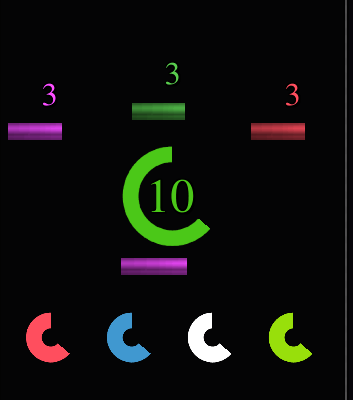
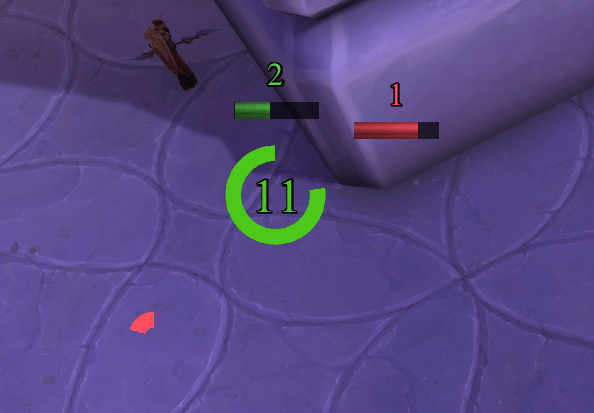
It is built around compact aura groups that can display stack counts, spell icons and duration indicators without forcing a traditional full-size aura-bar layout. Groups can be anchored to supported UI frames, placed anywhere on screen, or — for one enabled group at a time — follow the mouse cursor.
Formerly Lafee Cursor Aura. Existing configurations are preserved through the rename.
Features
Up to 6 independent anchor groups
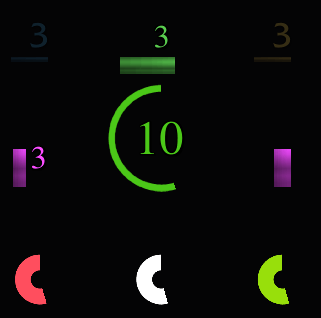
Each anchor group contains a compact 3×3 layout with 9 aura positions:
- 1 central aura
- 8 surrounding aura slots
With six groups available, the addon can manage up to 54 independently configured aura positions.
Each group has its own:
- name
- enabled / disabled state
- 9 aura trackers
- cursor or frame anchor
- anchor point and relative point
- global X/Y offsets
- optional background
- background width and height
- background colour and opacity
- square or rounded corners
- always-visible or combat-only background mode
Groups can be created, duplicated, renamed, deleted, enabled or disabled directly from the settings window.
Disabling a group hides all of its trackers and its background without deleting any configuration. Disabled groups remain selectable and editable, and their state is preserved across /reload.
One cursor group, multiple screen groups
One enabled anchor group can follow the mouse cursor while the others remain attached to UI frames or the screen.
Only one enabled group can own the cursor at a time. Assigning the cursor to another enabled group safely transfers cursor ownership and prevents duplicate cursor-following groups.
Disabled groups do not consume the cursor slot.
Independent aura trackers
Every one of the nine slots in a group can be configured separately.
A tracker can display any combination of:
- stack count
- spell icon
- duration progress
Each tracker can accept one or several Aura IDs, allowing multiple versions of an effect to share the same visual position.
Stack display
Stack counters can be configured with:
- font
- font size
- outline
- colour
- X offset
- Y offset
The stack display can also be disabled entirely.
Optional aura icons
Each tracker can optionally display the icon associated with its configured Aura ID.
Icon options include:
- show / hide icon
- icon size from 8 to 128 px
- independent X offset
- independent Y offset
By default, the icon is centered on the same position as the stack count, allowing the number to sit directly over the spell icon. The icon can then be moved independently when a different layout is preferred.
Icons are disabled by default so existing configurations keep their previous appearance.
Duration indicators
Aura duration can be displayed as:
- horizontal bar
- vertical bar
- circular indicator
Available options include:
- bar length
- bar thickness
- bar side / position
- gap from the tracked element
- circle size
- circle thickness
- progress colour
The addon uses its own configurable visual widgets while Blizzard supplies the protected aura timing information.
Flexible anchoring
Anchor groups can currently target:
- Screen / UIParent
- Blizzard Player Frame
- Blizzard Essential Cooldown Viewer
- Blizzard Utility Cooldown Viewer
- Blizzard Tracked Buffs
- ElvUI Player Frame
- ElvUI Player Power Bar
- ElvUI Player Cast Bar
- BetterCooldownManager Power Bar
- BetterCooldownManager Secondary Power Bar
- BetterCooldownManager Cast Bar
Each frame-anchored group can choose its anchor point, relative point and X/Y offsets.
Optional group backgrounds
Every group can have its own background with configurable:
- width
- height
- colour
- opacity
- rounded corners
- combat-only visibility
The background follows the same anchor as its group.
Live composition preview
The settings window contains a live preview of the selected group and its nine aura positions.
The preview reflects stack styling, icons, icon offsets and progress indicators while remaining fixed inside the settings window. Global screen-anchor offsets therefore do not push the preview out of view.
Per-character configuration
Lafee Aura Tracker stores its active configuration independently for each character.
Retail 12.1 / secret-safe aura handling
Lafee Aura Tracker is designed around the protected aura system used by modern World of Warcraft.
Aura stacks and durations are connected to addon-owned widgets through Blizzard's native aura container system. Blizzard writes protected aura information directly into those display widgets.
The addon does not attempt to continuously read restricted aura values into Lua, bypass secret-value restrictions, or rebuild protected aura state every frame.
Spell icons are resolved from the configured Aura IDs through the spell API rather than by reading protected active-aura values.
Getting started
- Install the addon and log into World of Warcraft.
- Type
/lator click the minimap button. - Select an anchor group.
- Select one of its nine aura positions.
- Enter one or more Aura IDs.
- Enable the tracker and configure stacks, icon and/or progress display.
- Position the aura within the group.
- Configure the group anchor and optional background.
- Add, duplicate or rename groups as needed.
- Use the checkbox beside a group name to enable or disable the entire group without deleting it.
Anchor group controls
The anchor-group panel provides quick controls for managing layouts:
+— create a new group×2— duplicate the selected groupAa— rename the selected groupX— delete the selected group- checkbox beside each group — enable or disable that group
Automatic group names stay compact after deletions (Anchor 1, Anchor 2, Anchor 3, …), while custom names are preserved.
Commands
/lat
Opens or closes the Lafee Aura Tracker settings window.
/lat preview
Toggles the runtime preview for the first tracker of the currently selected anchor group.
/lca
Legacy compatibility alias kept from Lafee Cursor Aura.
Default example
The central tracker of the original migrated group is initially configured for:
Bone Shield — Aura ID 195181
This is only a default example. Lafee Aura Tracker is a generic aura tracker and is not limited to Blood Death Knights.
Migration from Lafee Cursor Aura
The rename intentionally keeps the historical SavedVariables names:
LafeeCursorAuraDBLafeeCursorAuraCharacterDB
This preserves existing character configurations instead of forcing users to rebuild their setup.
The original group also keeps its historical slot-1 through slot-9 tracker IDs. Existing settings are migrated into the first anchor group rather than recreated from scratch.
Older profiles automatically receive defaults for newer features such as group enable state and aura icons.
Minimap button
The addon includes a LibDataBroker / LibDBIcon minimap launcher and works with common minimap-button collectors.
Performance
Cursor positioning is handled separately from aura-state updates, while protected aura data is delegated to Blizzard's native aura widgets.
There are no mandatory external addon dependencies. Required libraries are bundled with Lafee Aura Tracker.
Supported languages
The interface currently includes:
- English
- French
- German
- Spanish
- Latin American Spanish
- Italian
- Brazilian Portuguese
- Russian
- Korean
- Simplified Chinese
- Traditional Chinese
Compatibility
Designed for World of Warcraft Retail 12.1. The addon is not intended for Classic clients.
Integration targets currently include Blizzard UI, ElvUI and BetterCooldownManager frames. Third-party addons may rename or recreate their frames between versions, so external anchor compatibility can occasionally require updates.
Feedback and bug reports
When reporting a problem, useful information includes:
- Aura ID
- configured unit
- class / specialization
- client language
- selected anchor group
- cursor or frame anchor mode
- whether the issue occurs in or out of combat
- any Lua error displayed
License
Copyright © 2026 Lafeeleonie.
Lafee Aura Tracker is distributed under a restrictive license. See LICENCE.md for the complete terms.
Links
Source code / issues
GitHub:
https://github.com/Lafeeleonie/lafee_aura_tracker
Support development
Buy Me a Coffee:
buymeacoffee.com/lafeeleonie
Thank you for using Lafee Aura Tracker ❤️
Lafee Aura Tracker Team