Kaydee's Vendor Item Database
- By
Where can I buy this? Search every vendor item by name, vendor or zone, Alt+click any item to see the nearest vendor and price, and follow an arrow there. Built by players, shared with your guild.
Description
🧪 TESTERS WANTED! 🧪
Help build the database: open vendors, then send your finds to KaydeeVID@kaydee.codes (By using "/kvid export" in game)
Kaydee's Vendor Item Database is built from what players find in game. Every vendor you open makes it better for everyone. Type /kvid export, click Select text to copy, press Ctrl+C and paste it into an email. Your finds go into the built-in database in the next version. Thank you! 💚
Kaydee's Vendor Item Database
Where's the nearest place I can buy this? Search every vendor item by name, vendor or zone, Alt+click any item to see the nearest vendor that sells it, and follow an arrow straight there.
⚠️ Made for WoW Classic Era and World of Warcraft: Forever. Classic Era is out now and Forever support is ready for launch day. Classic and Forever data are always kept separate.
✨ Features
🔎 One table, every vendor item
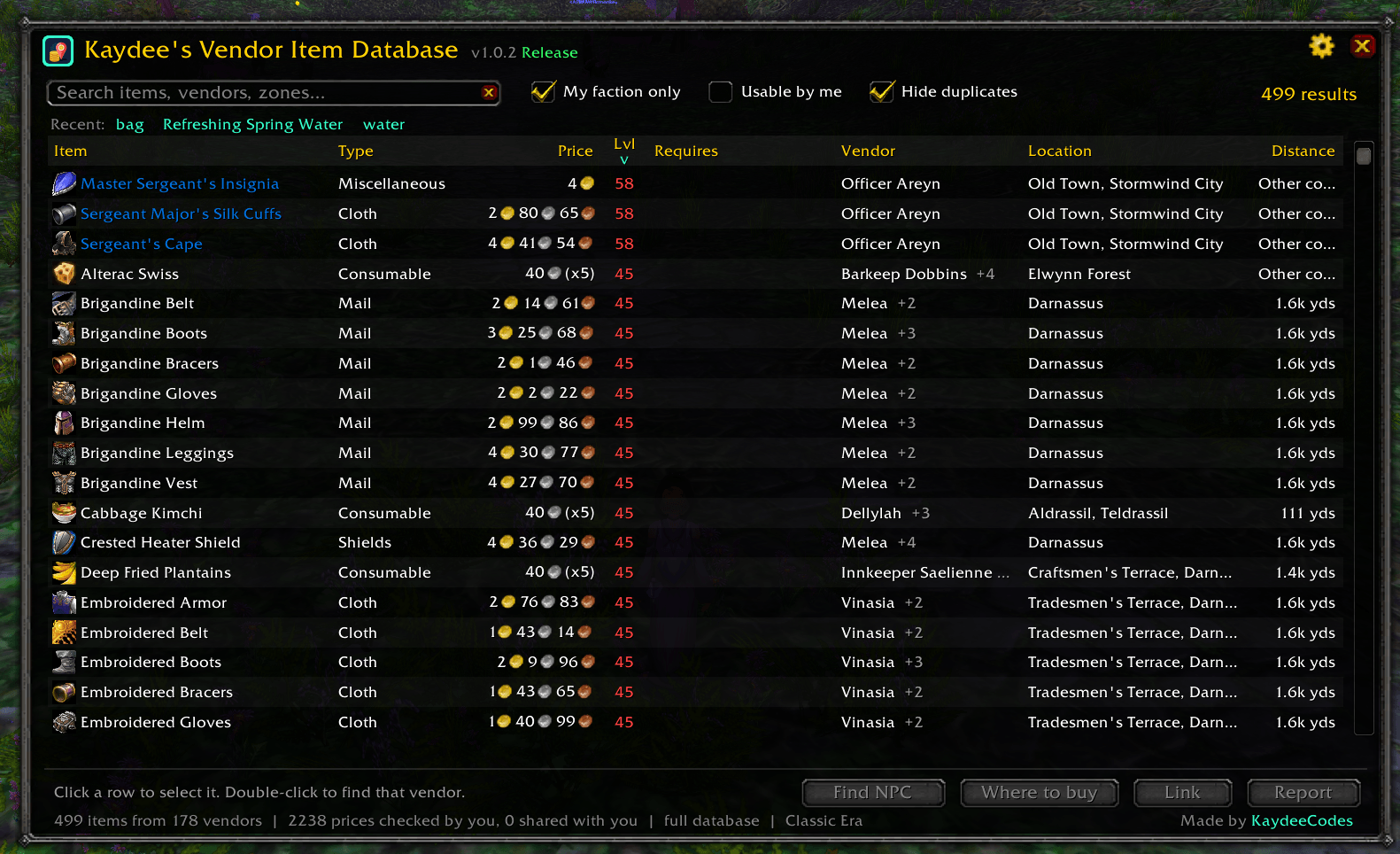
Type anything: an item (simple wood), a vendor (farley), a town (goldshire), a zone (stormwind), a type (recipe tailoring) or a faction (timbermaw). Every word you type has to match, so stormwind thread finds thread sold in Stormwind.
Each row shows the item, type, price, level, requirements (reputation, profession, class), vendor, location and distance. Click any column to sort it. Sort by Distance to find the closest vendor.
🖱️ Alt+click any item
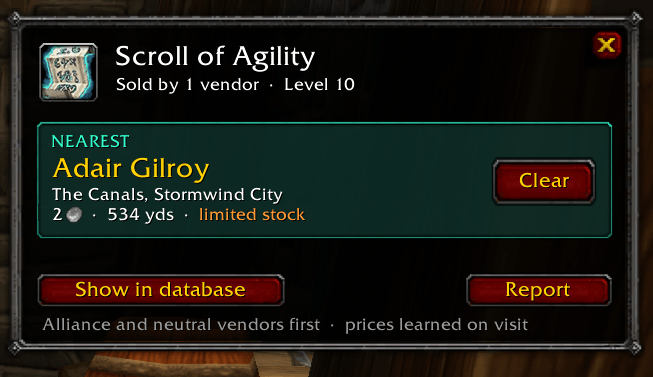
Alt+click an item in your bags, bank, chat links or loot. A small window pops up with the nearest vendor, their price and how far away they are, then every other vendor, nearest first. One click on Go and you're on your way.
🧭 Find NPC
An on-screen arrow with the vendor's name and distance, a pin on your world map and a pin on your minimap (an arrow on the edge when they're further away). The arrow clears itself when you arrive. On WoW Forever the game's own waypoint is set too. You don't need TomTom or any other addon.
💬 "Sold nearby" on tooltips
Vendor items get one quiet tooltip line, such as Sold nearby: Goldshire, 38c, 30 yds (Alt+click). You get the answer without opening anything.
🏗️ Built by players
Every vendor you open is added to your database automatically, with real prices, limited stock, what each item needs, and exactly where the vendor stands. If a vendor stops selling something, it drops off your list.
📦 Built-in database
Start with the vendors other players have already found, or start empty and discover everything yourself. You choose in the first-time setup and can switch any time. The built-in database grows with every version.
🤝 Share with your guild and party
When you open a vendor, the new find is shared with your party, raid and guild straight away. That's only a couple of tiny messages, and nothing is sent in combat. A catch-up check (every hour by default) fills in finds made while you were away. What you saw yourself always comes first, and you can turn sharing off or forget shared data at any time.
⚙️ Your settings
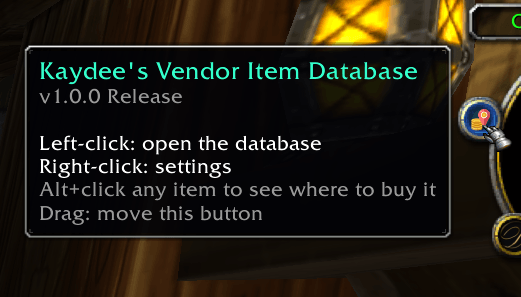
A short first-time setup, then a full settings panel: what to show, sharing and catch-up timer, window and popup size, what Alt+click opens, arrow, map and minimap pins, arrival sound, minimap button (show, auto-hide or hide) and more.
🐞 Report anything wrong
Vendor not where it says? Price wrong? The Report button writes out everything needed to fix it, ready to copy and email.
⌨️ Commands
| Command | What it does |
|---|---|
/kvid |
Open or close the database |
/kvid <search> |
Open it and search, e.g. /kvid simple wood or /kvid stormwind |
/kvid find <item> |
Show where to buy an item (you can shift+click an item link in) |
/kvid clear |
Clear the vendor arrow |
/kvid sync |
Catch up with your party and guild now |
/kvid export |
Copy what you've found to send to Kaydee |
/kvid status |
How much your database knows |
/kvid setup |
Run the first-time setup again |
/kvid options |
Open the settings |
/kvid minimap |
Show or hide the minimap button |
/kvid reset |
Put the windows back in the middle of the screen |
/kvid help |
List every command |
Key bindings: Esc › Options › Key Bindings › AddOns › Kaydee's Vendor Item Database, to open the database and clear the arrow.
🐛 Found a bug?
- Something wrong with a vendor or price? Click Report in the database window (or in the Alt+click popup) and email what it gives you to KaydeeVID@kaydee.codes.
- Lua error or something not working? Leave a comment here with what you were doing, your game (Classic Era or Forever) and a screenshot of the error if you can.
💚 More addons by Kaydee
- Kaydee's Pockets
- Kaydee's Miss Counter
- Kaydee's Retrack: turns your tracking back on after you die
- Kaydee's Auto Decline
- Everything by KaydeeCodes
Kaydee's Vendor Item Database Team