Kaydee's Auto Decline
- By
Automatically declines party invites and requests to join your group. Keep an allowlist for the people you want to hear from, and see how many invites were blocked and who sent them. Made for WoW: Forever.
2026-10-08 12_02_12-World of Warcraft.png
2026-10-08 12_02_29-World of Warcraft.png
2026-10-08 12_02_37-World of Warcraft.png
Description
⚠️ Made for World of Warcraft: Forever only ⚠️
This addon is built and tested for the WoW: Forever client only. It has not been tested on Retail, Classic Era, or any other version of World of Warcraft.
Kaydee's Auto Decline
Tired of random party invites popping up while you're questing, gathering or just standing in town? Kaydee's Auto Decline turns them down for you, quietly and instantly - like an ad blocker for party invites.
Your friends can still get through: put them on your allowlist and their invites come in as normal. And just like an ad blocker, it keeps a count of everything it blocked and shows you who it came from.
✨ Features
🚫 Auto decline
- Declines party invites the moment they arrive and closes the popup
- Declines requests to join your group when you're the leader
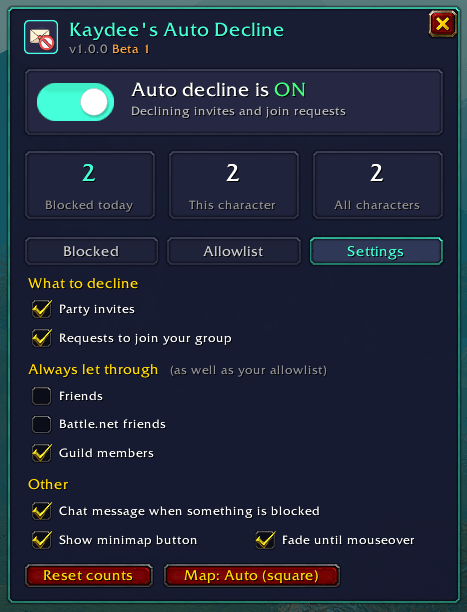
- Choose to decline invites, join requests, or both
🎚️ One-click on / off switch
- A big sliding switch at the top of the window - teal when on, grey when off
- Right-click the minimap button to switch it on or off without opening anything
- A key binding for switching it on / off too
✅ Allowlist
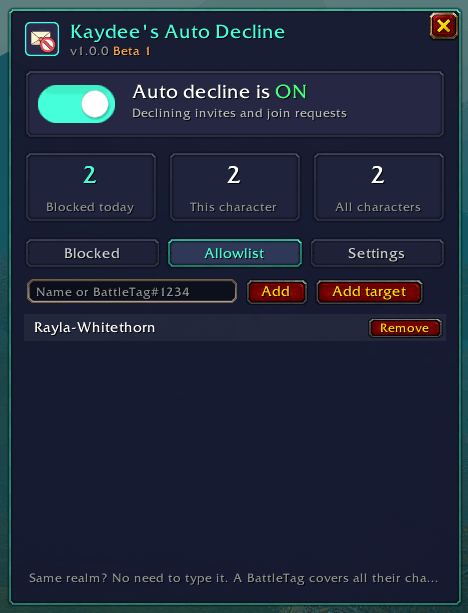
- People on your allowlist always get through, even while auto decline is on
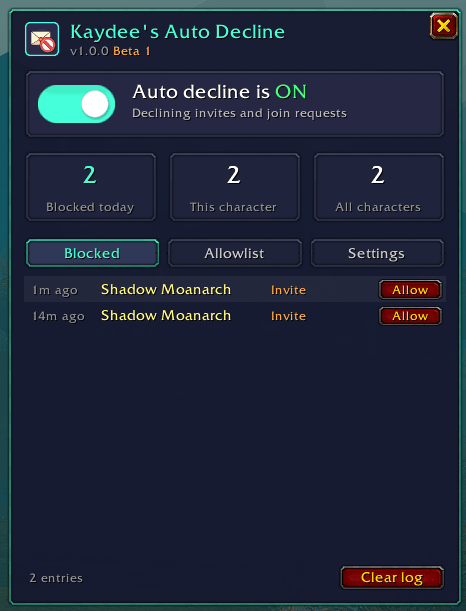
- Add someone by typing their name, adding your target, or clicking Allow next to them in the blocked log
- Understands names written different ways:
Bob,bob,Bob-Firemaw, two-word realms (Burning Blade/BurningBlade), and accented or Cyrillic names - Add a BattleTag (like
Name#1234) to let through all of a Battle.net friend's characters - shift-click Allow in the log to add it - Optional: always let through your friends, Battle.net friends or guild members
📊 Blocked counter & log
- See how many invites were blocked today, on this character, and on all characters
- A log of who sent each invite, in their class colour, whether it was an invite or a join request, and how long ago
- Someone spamming you? Repeat invites stack into one line with a count (
x3) - Hover any entry for the full details
🗺️ Minimap button
- Left-click to open the window, right-click to switch on / off
- Goes grey while auto decline is off, so you can see at a glance
- Fades out like other addon buttons and comes back when you mouse over the minimap
- Works on round and square minimaps - it finds your minimap's shape automatically (BasicMinimap, SexyMap and others), or you can pick it yourself
- Also shows up in the addons button by the minimap
💬 Friendly chat messages
- A short chat line whenever something is blocked (can be switched off)
⌨️ Commands
| Command | What it does |
|---|---|
/kad |
Open / close the window |
/kad on / off / toggle |
Switch auto decline on or off |
/kad allow <name> |
Add someone to your allowlist (no name = your target). Name, Name-Realm or BattleTag#1234 |
/kad remove <name> |
Take someone off your allowlist |
/kad list |
Show your allowlist |
/kad status |
On / off, counts and settings |
/kad clear |
Clear the blocked log |
/kad reset |
Reset the blocked counts |
/kad minimap |
Show / hide the minimap button |
/kad fade |
Fade the minimap button until you mouse over the minimap |
/kad shape |
Minimap shape for the button: auto / round / square |
/kad quiet |
Turn the chat message on / off |
/kad test |
Add a pretend blocked invite to see how the log looks |
/kad help |
List all commands |
/autodecline works too.
Key bindings: Options → Keybindings → AddOns → Kaydee's Auto Decline
🐛 Found a bug?
Please leave a comment here on CurseForge with:
- What happened, and what you expected to happen
- Any Lua error text (turn on errors with
/console scriptErrors 1) - The output of
/kad status
Thank you - every report helps!
💜 More addons by Kaydee
- Kaydee's Pockets - Marks pickpocketable mobs, learns what they carry and maps the good spots
- Kaydee's Miss Counter - See how often your attacks really land: misses, dodges, parries and blocks
- Kaydee's Retrack - Turns your tracking (Find Herbs / Minerals / Treasure) back on after you die
Kaydee's Auto Decline Team