Kaydee's Miss Counter
- By
See how often your attacks really land - counts misses, dodges, parries and blocks, yours and the enemy's, with hit %, fight timer and chat reports.
2026-10-04 17_46_19-World of Warcraft.png
2026-10-04 17_46_34-World of Warcraft.png

2026-10-04 18_13_50-World of Warcraft.png
Description
See how often your attacks really land.
Melee misses a lot - but how much? Kaydee's Miss Counter counts every miss, dodge, parry and block, both yours and the enemy's, and shows your real hit % in two small windows. No guessing, no combat-log digging.
Made with rogues in mind, but just as useful for warriors, other melee classes, and tanks who want to see their dodges, parries and blocks.
Works on WoW Forever, Classic Era (incl. Hardcore and Season of Discovery), TBC Anniversary and MoP Classic - it detects which game you're playing and adapts.
⚔️ Two Small Windows
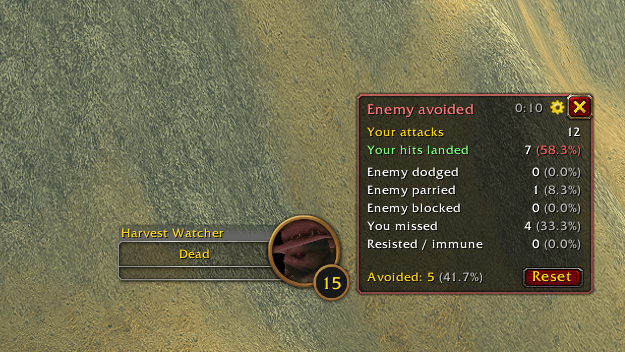
Enemy avoided - how often the enemy got out of the way of your attacks:
- Enemy dodged, parried, blocked, you missed, resisted / immune
- Your hits landed with your hit %, coloured green (80%+), yellow (65%+) or red (below)
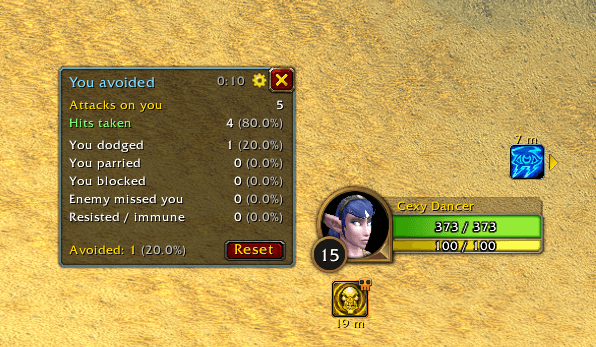
You avoided - how often you got out of the way of the enemy:
- You dodged, parried, blocked, enemy missed you, resisted / immune
- Hits taken - great for tanks
Every count shows its share of all attacks as a %. Drag the windows anywhere, lock them, resize them, change their opacity, or turn either one off.
⏱️ Fight Timer
A small timer next to each window's title starts when combat starts and stops when it ends. It stays on your last fight's time until the next one.
🔄 Auto Reset
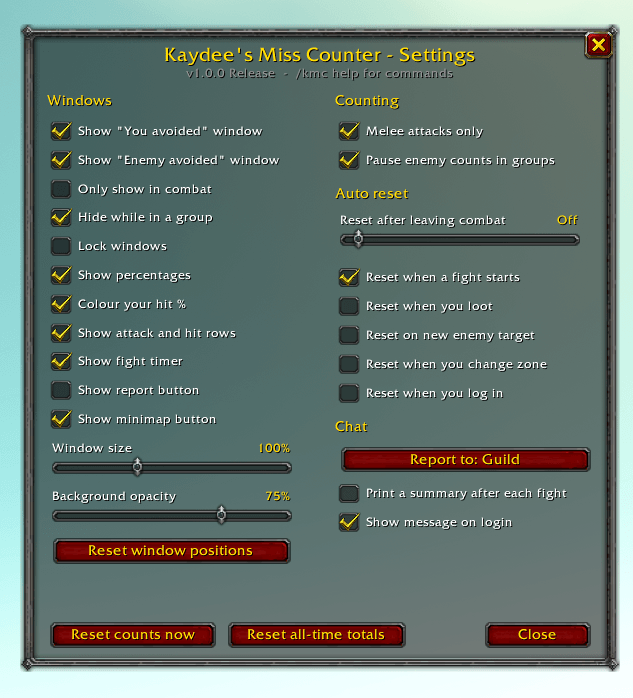
Choose when the counts go back to zero:
- When a fight starts (each fight from zero)
- A set time after leaving combat (5 seconds to 5 minutes, with a countdown above the windows)
- When you loot, target a new enemy, change zone or log in
All-time totals are kept separately - hover over a window to see them.
📣 Report to Chat
/kmc report posts one compact line, so your party knows exactly what you're up against:
Kaydee's Miss Counter: Young Goretusk L14 (+2), 0:23 - 19 attacks, 73.7% hit (3 missed, 2 dodged) - I avoided 2/8 (1 dodged, 1 parried)
It includes the mob's name, level (and how many levels above you it is), whether it's elite, rare or a boss, and how long you fought. Pick the channel in settings (auto, party, raid, guild, say, or only you), or add it to the command: /kmc report guild. Use /kmc report all for your all-time totals.
🗡️ Melee Only
On by default. Poisons, spells and ranged attacks are left out, so your hit % is about your weapon attacks - white swings and physical abilities like Sinister Strike or Heroic Strike.
👥 Groups
Classic: the addon reads the combat log, so it always knows whose attack it was. Only your own attacks are counted, in a group or not - nothing to worry about.
WoW Forever: the combat log isn't available to addons, so in a group the addon can't tell whose attack missed your target. By default:
- The windows fade out while you're in a group and come back when you leave (with a message in chat)
- If you turn that off, the Enemy avoided counts pause while you're grouped, so other players' misses don't get mixed in
- You avoided always stays accurate - attacks on you are always yours
🖱️ Minimap Button & Commands
- Left-click the minimap button: show / hide the windows
- Right-click: settings
- Shift-click: reset the counts
- It fades out a few seconds after you log in and comes back when you mouse over the minimap (turn this off in settings)
- Works on round and square minimaps
- You can set keybinds under Key Bindings → AddOns
| Command | What it does |
|---|---|
/kmc |
Show / hide the windows |
/kmc config |
Open settings |
/kmc report |
Post your stats to chat (add party, guild, say or all) |
/kmc reset |
Reset the counts |
/kmc lock |
Lock / unlock the windows |
/kmc minimap |
Show / hide the minimap button |
/kmc fade |
Turn the minimap button fading on / off |
/kmc help |
List the commands |
/misses works too.
Default Settings
- Melee attacks only: enabled
- Reset when a fight starts: enabled
- Hide while in a group: enabled on WoW Forever, disabled on Classic
- Pause enemy counts in groups: enabled (WoW Forever only - not needed on Classic)
- Coloured hit %: enabled
- Fight timer: enabled
- Fade minimap button: enabled
- Report button on the windows: disabled (use
/kmc report) - Fight summary in chat: disabled
Settings are shared across your characters; counts are kept per character.
Good to Know
- Partial blocks count as hits. If your attack lands and only some damage is blocked, the damage still went through. Only fully blocked attacks count as blocked.
- Bleed ticks: on Classic, bleed and poison ticks are never counted. On WoW Forever, Rupture, Garrote and Rend ticks do physical damage and the game gives addons no way to tell them apart from a swing, so they're included even with Melee only on.
Found a bug or have an idea? Leave a comment - I read them all.
Kaydee's Miss Counter Team