Ishkor's Raid Ready
- By
Raid checklist and raid leader tools: consumables, attunement, resistances, raid checks, boss jobs and a live tactics board.
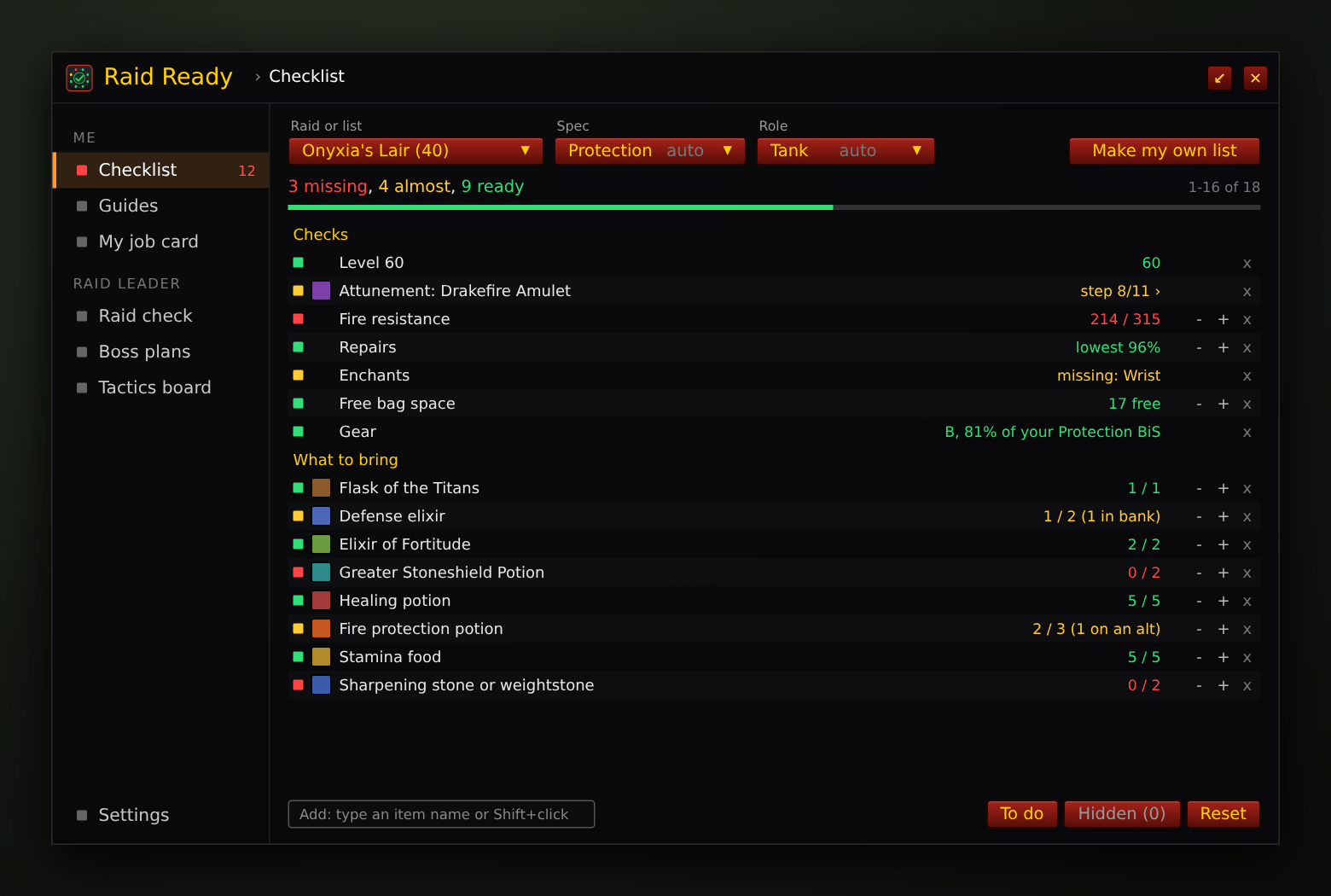
Your raid checklist: green = ready, yellow = almost, red = missing, with the menu on the left for every page.
Description
Ishkor's Raid Ready
Made for World of Warcraft: Forever (launch November 4, 2026). Built and tested in a simulated game and in Classic Era; anything that works differently in Forever gets an update right after launch.
What's new in 0.3.6: one window
- Everything in one window with a menu on the left: Checklist, Guides, My job card, Raid check, Boss plans, Tactics board and Settings. Nothing opens new windows, and your screen stays clean. A small window button shrinks it to just the checklist for a quick look in a raid.
- Guides, Show on map: opens your world map on the right zone with a pin on the spot (the quest giver, or where to go once you have the quest). Right-click the pin to remove it.
- Add items by typing their name (in your own lists and in the raid leader's Raid check). Suggestions show as you type: sharpening stones, elixirs, Juju, Zanza, protection potions and more.
- Tactics board: the drawing tools sit inside the page, plus Rename, Delete and Clear (the step you see) buttons.
- Raid check: the requirements are listed by role: Tanks, Healers, Physical damage, Casters.
See the Patch notes for every version.
Am I ready for the raid? Raid Ready answers that in one window: every flask, potion, reagent, attunement, resistance, repair and enchant you need, as green, yellow or red lines, each with where to get it. Made for World of Warcraft: Forever and its first raids: Onyxia's Lair, Hyjal Summit and Barrow Deeps (open December 9).
Open it with /raidready or the minimap button. Everything opens inside that one window.
Features
One checklist per raid
- Pick your raid, your spec and your role from dropdowns. With Ishkor's BiS Gear Grader they're filled in from your talents, and you can still change them (a Fury warrior who tanks tonight? Pick Tank).
- Green = ready, yellow = almost (it's in your bank or on an alt, or you have some), red = missing.
- Hover a line for where to get it: profession, vendor, quest chain.
- Click a number to type how many, or use + and -. Hide any line, and add any item: type its name (suggestions show as you type), Shift+click it or drop it on the window.
Your own lists
- Make your own list of what to bring and how many: start empty, or copy a raid's preset and change it.
- Give it a name and a raid (that raid's checks, like Onyxia's attunement, come with it). Make as many as you like.
What it checks
- Onyxia attunement: the Drakefire Amulet in your bags, with the Horde or Alliance quest chain if you don't have it.
- Fire resistance for Onyxia, with a target per role.
- Repairs, enchants (back, chest, wrists, hands, feet, weapons), free bag space, level 60, and ammo for hunters.
- Consumables: flasks, elixirs, potions, food, weapon stones and oils, with counts per raid (one boss in Onyxia, thirteen in Hyjal).
- Class reagents: Arcane Powder, Sacred Candles, Wild Thornroot, Ironwood Seeds, Symbols of Kings, Ankhs, Soul Shards, Flash Powder and poisons.
- New Forever items (like Elixir of the Grizzly) are recognized by name.
- After a game patch it looks through the game's items once by itself (in the background, never in combat) and finds the raid items' new or changed item IDs.
/raidready itemsshows what changed.
Get it done
- To do prints what to take out of the bank, mail from your alts and buy.
- On an alt at the mailbox: one button mails the raid items your other characters need. You press Send.
- A small reminder when you enter a raid with red lines. Never a big window popping up.
Guides
Step-by-step guides for raid attunements, key dungeon quests and reputation, so you can easily track your progress. Open Guides in the menu (or /raidready guide).
- Onyxia's Lair attunement for Alliance and Horde, every step of the Drakefire Amulet chain.
- Dungeon keys: Upper Blackrock Spire (Seal of Ascension), Blackrock Depths (Shadowforge Key), Scholomance (Skeleton Key), Stratholme and Dire Maul, and the new City of Dalaran.
- Weapons and raid rewards: Quel'Serrar (the tank sword) and the Head of Onyxia.
- Reputation and Legacy: Guardians of Hyjal, the Legacy Point dungeon bosses (a checklist of every final boss per bracket) and the Lord Valthalak chain.
- The step you're on is opened up: who to talk to, where, what to do, and your quest objectives ("12/20"). Steps you can do in any order sit side by side. Hover any step for details.
- Progress bars from red to green, finished guides move to Done, and every section folds up.
- Show on map opens your map on the step's zone with a pin on the spot: the quest giver, or where to go once you have the quest (Blackrock Mountain, dungeon entrances, the drakes for the Test of Skulls…). Right-click the pin to remove it.
- Post in group, and your alts' progress.
- Your raid leader's check shows each player's attunement step, like "step 7/11".
- Loaded only when you open it, so it costs nothing until then.
For raid leaders
Open Raid check, Boss plans or Tactics board in the menu (or /raidready leader). These tools load only when you open them, so they cost raiders nothing.
- Raid check: set what your raid must bring (start from the presets, or type an item's name and pick who needs it), listed by role, then press Start check. Everyone with Raid Ready gets an Allow / Decline popup like a ready check. Their addon checks their bags, bank, enchants, fire resistance and repairs, and your grid fills in live: green, yellow, red per requirement, problems first. Post missing in chat tells the raid who needs what.
- Boss plans: jobs for each boss (Main tank, Heal group 1, Interrupts, Whelps…) with a note each. Everyone gets their own job card, and again when that boss is pulled. Whisper the rest sends players without the addon their job.
- Tactics board: draw the fight step by step: pen, lines, arrows, raid markers, role icons and text, on a grid or the map of where you stand. The tools sit next to the board; Rename, Delete and Clear (the step you see) are one click away. Send it so your raid can open it any time, or Present live: everyone's board follows you as you draw and change steps, with a pointer.
- Private to your group: only people in your group receive anything, only from the leader or an assistant. Everyone can turn it off or block a player.
- Versions: if someone's Raid Ready is too old to talk to yours, both of you are told to update, and the check grid shows "other version".
Patch notes
0.3.6 (October 24, 2026)
- Fixed: the "IshkorsRaidReady has been blocked from an action only available to the Blizzard UI" message when logging out.
- Show on map opens the map the same way the M key does. In combat it only sets the pin; open the map after the fight.
0.3.5
- Tactics board: Clear clears only the step you see (asks first); your other steps stay.
0.3.4
- Add items by typing their name in your own lists and in the Raid check: suggestions from Raid Ready's raid items, about 110 common raid consumables, your bags and bank, and any item the game has seen. Enter takes the first, or click one.
- Raid check: add Raid Ready's item groups ("Sharpening stone or weightstone": any of them counts), then pick who needs it with its role button.
- The sharpening stone line also counts Elemental Sharpening Stones.
0.3.3
- Tactics board: Rename and Delete buttons next to the Background list (Delete asks first; a board your leader shared can be removed from your list).
0.3.2
- Raid check: requirements listed by role: the checks first, then items for everyone, Tanks, Healers, Physical damage and Casters.
0.3.1
- Guides: Show on map always opens the map and goes to the pin, also before you've opened the map since logging in. Right-click the pin to remove it.
0.3.0: One window
- Everything in one window with a menu on the left; every page opens inside it. Only the raid leader's check question and your job card on the pull still pop up, small.
- Small window button: just the checklist (
/raidready small). Opens on the page you used last. - Tactics board tools inside the page; one Board list for your boards and the ones your leader shared.
- Guides: Show on map pins the spot right away.
- New My job card and Settings pages.
- Text never runs out of the window; the raid leader pages show more lines.
0.2.1
- Fixed: going from the Guides back to the Checklist could make the windows disappear.
- Guides: the Map button was hidden behind the guides window.
0.2.0 (October 24, 2026): Guides
- Guides for raid attunements, key dungeon quests and reputation: Onyxia's Lair attunement (Alliance and Horde), dungeon keys (Upper Blackrock Spire, Blackrock Depths, Scholomance, Stratholme and Dire Maul, City of Dalaran), Quel'Serrar, Head of Onyxia, Guardians of Hyjal, Legacy Point dungeon bosses and Lord Valthalak.
- The step you're on shows who to talk to, where, what to do and your quest objectives; steps you can do in any order sit side by side; right-click to tick a step yourself.
- Progress bars from red to green, finished guides move to Done, foldable sections, Map and Post in group buttons, your alts' progress.
- The checklist's attunement line shows your step and opens the guide; the raid leader's check shows each player's step.
- Loads only when you open it.
0.1.0 (first version)
- Raid checklists for Onyxia's Lair, Hyjal Summit and Barrow Deeps, for your spec and role (dropdowns; filled in by Ishkor's BiS Gear Grader, always changeable).
- Your own lists with a name, a raid and how many of each item.
- Checks: Onyxia attunement, fire resistance, repairs, enchants, bag space, level, hunter ammo, consumables and class reagents, counted in bags and bank (and on alts with Ishkor's Bag Brain).
- To do in chat, a mail button on alts and a small reminder when you enter a raid with red lines.
- Minimap button: left-click the checklist, Shift+click the raid leader tools, right-click options, drag to move.
- Raid leader tools: raid check with Allow / Decline and a live grid, boss plans with job cards, and a tactics board you can send or present live.
- Item scan: after a game patch, the raid items' item IDs are found in the game by itself;
/raidready itemsand/raidready scan. - Message version check between raid leader and members.
Tested on launch day (Nov 4)
The game isn't out yet, so these are checked in the live game first, and an update follows right away if anything needs fixing:
- Item IDs and names: Forever may have changed or added consumables, reagents and the Drakefire Amulet. The item scan finds them in the game on day one; its report is used to update the built-in item list with Forever's real IDs.
- Counting in bags, bank and on alts; enchant, repair, bag space and fire resistance checks.
- Spec and role filled in by Ishkor's BiS Gear Grader.
- Guides: quest IDs and names, the map pins (Forever has new quests, like "Blood and Thunder" and City of Dalaran's chain), new dungeons' final bosses for the Legacy list, Guardians of Hyjal.
- Raid leader tools with real players: the Allow / Decline popup, the results grid, job cards on the pull, and the tactics board sent and presented live (the game's message limits).
- Looks: default UI and EllesmereUI.
Raids open December 9. After that: presets tuned to the real fights, boss names for pull reminders, and more.
Commands
/raidready: open or close Raid Ready (also/irr)/raidready small: the small window (just the checklist), or back to the full window/raidready onyxia | hyjal | barrow: pick a raid/raidready newlist <name>,/raidready list <name>: make or open your own list/raidready spec <name> | autoand/raidready role tank | healer | melee | caster | auto: pick your spec and role/raidready todo: what to fetch, mail and buy, in chat/raidready add <item> [count]: add an item (Shift+click it), or type its name in the Add box/raidready guide: the guides/raidready leader: the raid check/raidready board,/raidready card: the tactics board and your job from the leader/raidready items: which raid items were found in the game (new IDs, missing or renamed items)/raidready scan: look through the game's items again now/raidready options(the Settings page),/raidready status
Key binding (Esc > Options > Keybindings > AddOns): Show Raid Ready.
Good to know
- The download has three folders: IshkorsRaidReady, IshkorsRaidReady_Leader (the leader tools) and IshkorsRaidReady_Guides (the guides). The last two load only when you open them. Keep all three.
- The presets are a starting point. Change them to your raid's plan once the fights are known.
- Your bank is counted everywhere, not only at the bank. Your alts are counted with Ishkor's Bag Brain.
- Works with Forever's character names (first name and surname).
Works great with
- Ishkor's Bag Brain: counts the potions on your alts, and never sells the items on your raid list.
- Ishkor's BiS Gear Grader: a Gear line ("B, 81% of your Fury BiS", click it for your BiS list) and your role from your spec.
Feedback & bug reports
Found a bug, or have an idea? Join my Discord: discord.gg/XChtPDmJYT. That's the best place for bug reports, ideas and feedback. You can also come say hi on my stream, twitch.tv/ishkor, or leave a comment here on CurseForge.
License
Copyright (c) 2026 Ishkor. All Rights Reserved. You may use this addon and read its code. You may not re-upload it, publish modified or renamed versions, or reuse its code without permission. This CurseForge page is the only official download.
World of Warcraft is a trademark of Blizzard Entertainment. This addon is not made or endorsed by Blizzard.
Ishkor's Raid Ready Team