Ishkor's Leveling Guide
- By
A 1-60 leveling route that follows your real progress: Fastest or Relaxed, step window and arrow, class and dungeon quests.
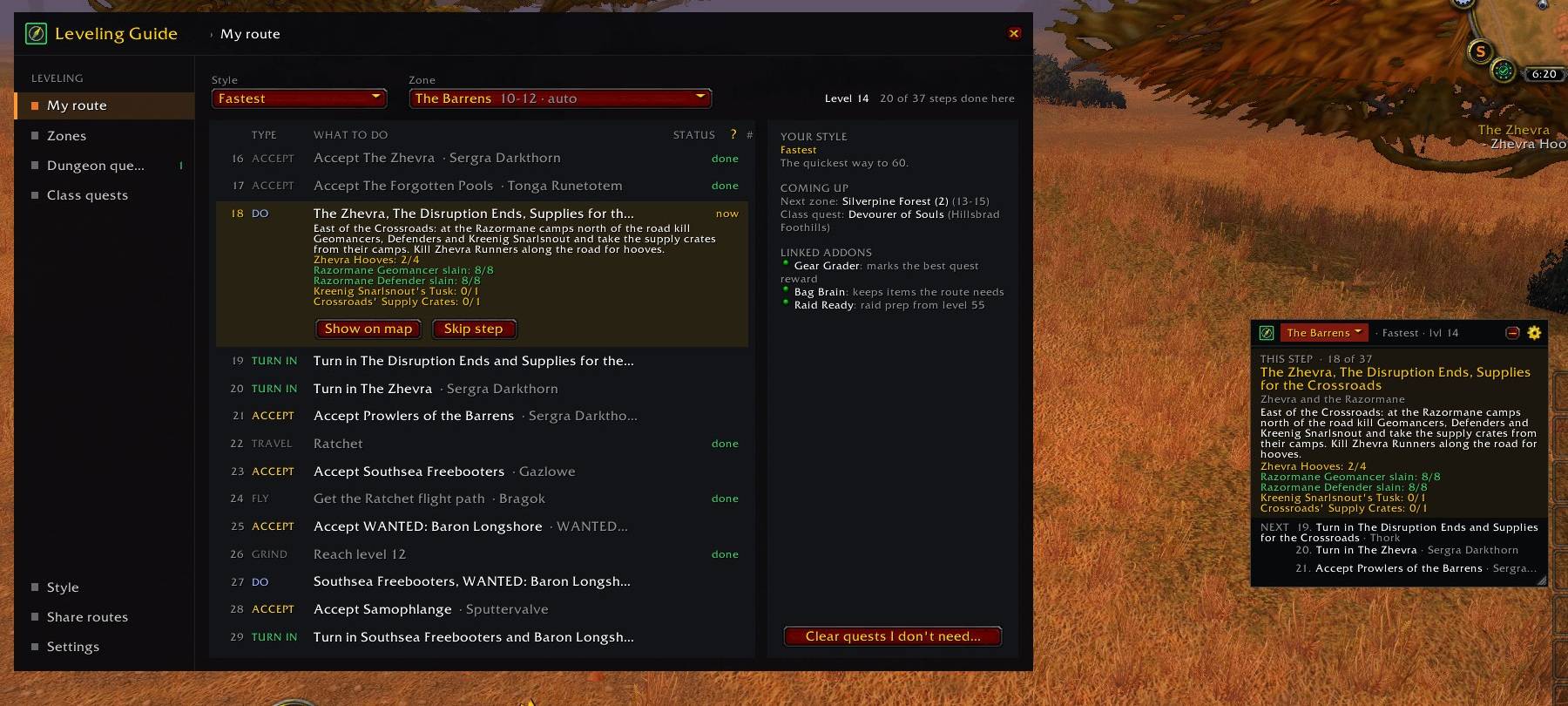
Every step of the zone part you're in, what to do now, a search for any quest in the route, and the step window that stays on screen.
Description
Ishkor's Leveling Guide
A complete 1-60 leveling guide for Classic Era and WoW Forever that follows your real progress. Pick a style, follow the step window and the arrow, and the guide keeps track of every quest itself. Or record your own route and share it.
Routes are free to share. Ishkor's Leveling Guide doesn't support paid routes, and you never need to pay for anything to use it.
Two files, one for each game: pick "(Forever)" for WoW Forever and "(Classic Era)" for Classic Era. Each has only what its game needs.
WoW Forever
- Forever's new quests in every zone the route visits, and the Skyborne's start on Zephras Isle.
- Forever's new class quests: Undead Paladins, Dwarf Shamans and the Skyborne classes, with their trainers.
- Forever's new dungeons: Hall of Thanes, Ruins of Lordaeron, Excavation Site and City of Dalaran, with their quests, ways in and level ranges.
Follow the guide
- A route for every zone, 1-60, Horde and Alliance, in an order that fits your race.
- Two styles: Fastest and Relaxed. Fastest is the quickest way to 60 solo: only the quests worth the time, no group or elite quests, no long walks for little XP. Relaxed does the stories and side chains too. Change any time; your progress stays.
- Step window: this step and the next ones, with the quest names, what to do, your progress and short tips (elites, timed quests). Drag, resize, lock, collapse, light or dark background.
- Arrow: a small arrow to the next spot, also in combat. On quests with objectives in several places it moves on by itself to what's left. Knows shortcuts like the Undercity sewers.
- Guide line: a line of small dots from you to your step on the world map and the minimap.
- Map and minimap marks: the current step in purple and the next ones in blue on the world map, purple circles for objective areas, one small dot on the minimap.
- Coordinates on the world map: the zone under your mouse and its coordinates, or your own position.
- Flights and hearthstone: at the flight master the guide takes your step's flight by itself (hold Shift to choose yourself), gets flight paths you'll need when you pass them, sets your hearthstone where it saves running, and puts a flight or your hearthstone first when it's clearly faster.
- Never too high: the guide doesn't send you to quests more than 2 levels above you. When the rest of a zone is too high, it sends you on and brings you back later.
- Never behind: Fastest adds extra quests back when you're behind a zone's levels, so you don't have to grind long.
- Auto zone choice, or pick your own: switch zones any time; every zone keeps its own progress.
- Knows your progress from the game itself: quests you did before installing it, skipped, abandoned or picked up elsewhere. A short catch-up summary tells you where you start.
- Auto accept and turn in for your current step (it waits when there's a reward to pick; hold Shift to do it yourself).
- Trainers: the arrow points to your class trainer.
Dungeons
- Tick the dungeons you want (all off by default). Their quests become part of your route, in Fastest and Relaxed.
- Dungeon quests page: for every dungeon, what to pick up before you go and where, each quest chain as one row with its parts underneath, its rewards, "Show on map" for every quest giver, and a button to post your dungeon quests in group.
- The right time to run it: the guide gathers the quests first and runs the dungeon at 1 level above its minimum.
- Every quest before the run: right before a dungeon, the guide takes you to pick up any of its quests you still need, wherever they are (skip one if you don't want it). Tick a dungeon again to bring back its quests you skipped or cleared.
Class quests
- Ability quests are in your route automatically: pets, stances, totems, forms, poisons and the rest.
- Class quests page: every other class quest chain for your class and race, with its status. Press Start and the guide takes you through it as a detour, then back to your route where you left it.
Build and share your own route
- Record your route while you level, over as many sessions as you like, with your own notes.
- Share it as a line of text. Others import it and follow it; it shows "Route by …" so the recorder gets the credit.
- Report for the author: where quest givers stand and Forever's new quests, to help the next update for everyone.
Find, clean up, mark
- Find a quest: search the whole route 1-60 on the My route page and see at once if a quest is on your route, where, and if not, why (Relaxed only, a dungeon you didn't pick, too low for you now…).
- Clear quests: a window lists the quests your route no longer needs, and the quest items that go with them. Untick what you want to keep; nothing is abandoned without your click.
- Quest mobs: orange nameplates and tooltip progress for mobs you still need (kills and drops). Works with the default nameplates, EllesmereUI and Plater.
- Mob levels: the step window warns when a quest's mobs are well above you.
- Gathering skill in tooltips: your Herbalism, Mining, Skinning or Fishing when you point at a herb, ore, skinnable mob or fishing pool.
Works with
- Ishkor's BiS Gear Grader: the best quest reward is marked (the guide never picks for you), and dungeon rewards are graded.
- Ishkor's Bag Brain: items your route still needs are never sold.
- Ishkor's Raid Ready: raid prep from level 55.
Light on memory and CPU: only your faction's routes load, and nothing runs while nothing changes.
Commands: /ilg or /leveling (/ilg help lists them all). Minimap button, key bindings and a settings page. Made by Ishkor - twitch.tv/ishkor
Feedback & bug reports
Found a bug, or have an idea? Join my Discord: discord.gg/XChtPDmJYT. That's the best place for bug reports, ideas and feedback. You can also come say hi on my stream, twitch.tv/ishkor, or leave a comment here on CurseForge.
Ishkor's Leveling Guide Team