Ishkor's BiS Gear Grader
- By
BiS lists for every spec and S to D grades on every item, with item search and where to get it.
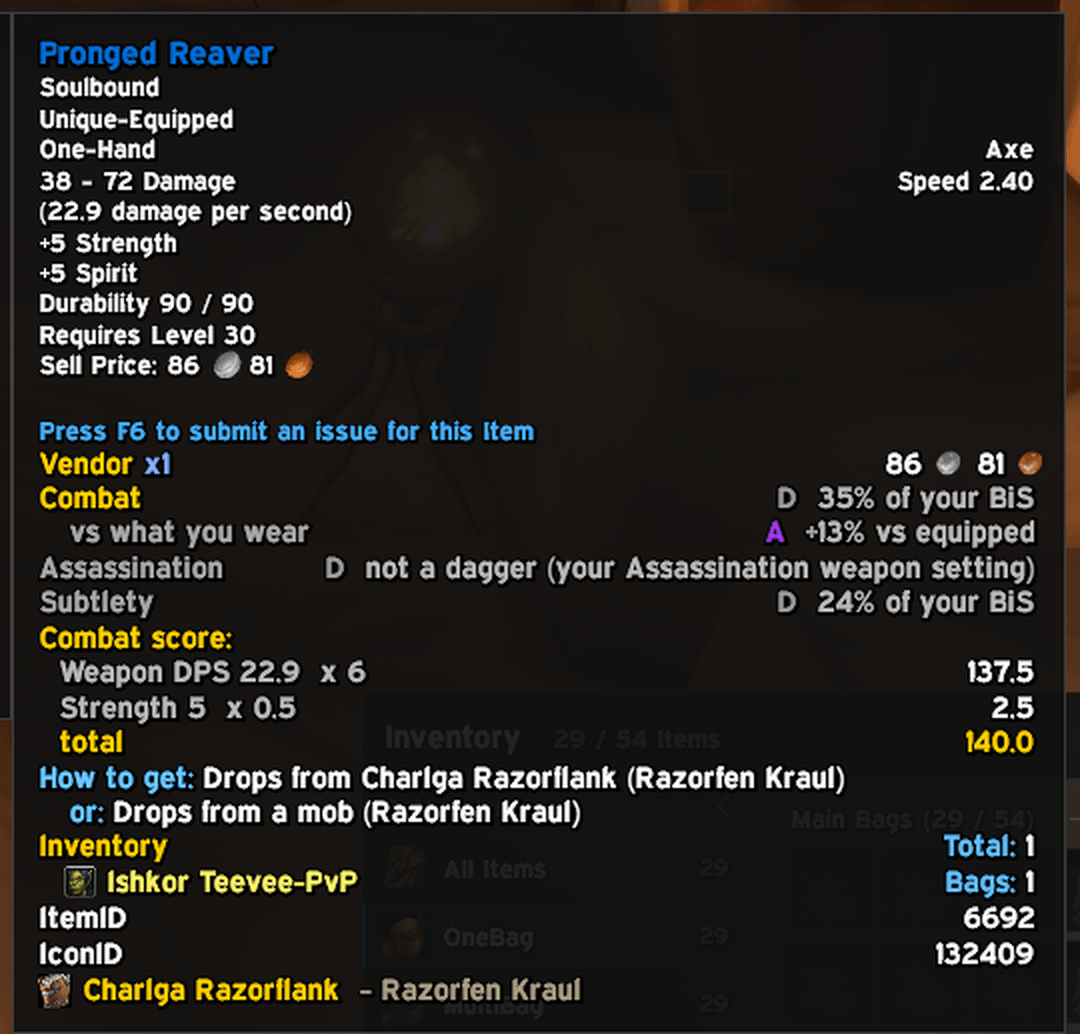
Every item is graded for each of your specs, compared with your saved BiS, with a second line comparing it to what you wear. Hold Shift to see the score stat by stat, plus where the item drops.
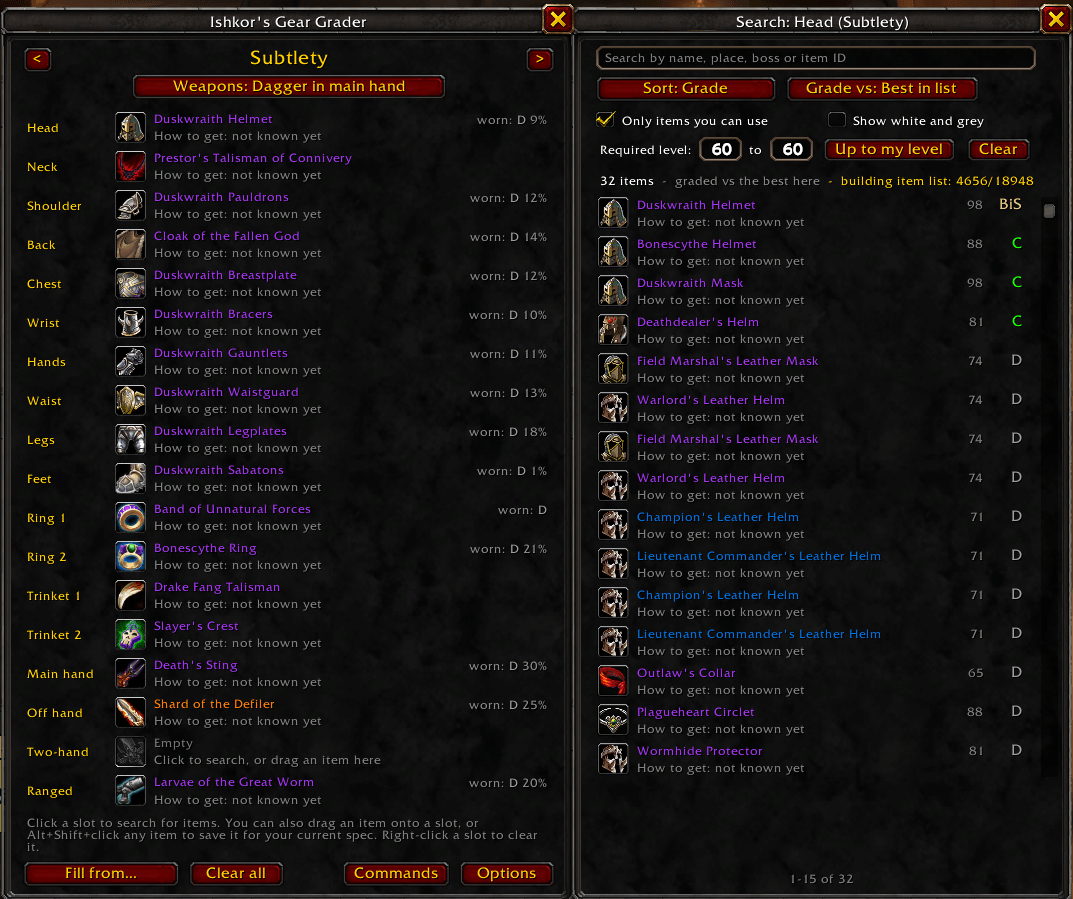
Save a BiS list for each spec. Click a slot to search every item in the game by name, dungeon or boss, filtered by level and sorted by grade. Rogues pick their weapons per spec.
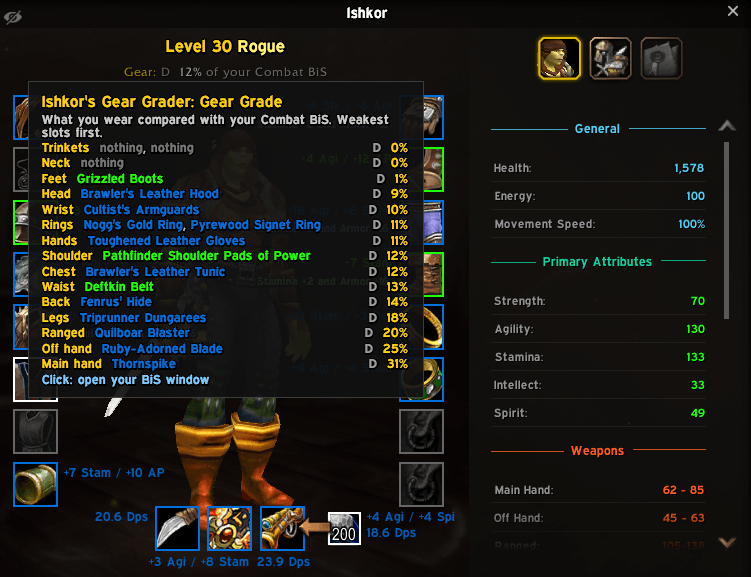
See how close your gear is to your BiS at a glance. Hover the Gear Grade under your level for every slot's grade, weakest first, so you know what to upgrade next.
Description
Ishkor's BiS Gear Grader
Is this item good for me? BiS Gear Grader answers that on every item: a clear grade from S to D for your spec, where to get it, and your own best-in-slot list for each spec. Made for World of Warcraft: Forever.
Open it with /grader or the minimap button.
Recent changes
0.9.10
- Fixed: items with only stamina (like Darkwood Staff) are no longer graded D "wrong stats". Stamina is never wrong stats for any class; tanks are graded as before.
0.9.9
- Works with Ishkor's Bag Brain's gear for alts: BoE gear you don't need can be suggested for the alt whose class and spec it suits.
Every version's full changelog is on the Files tab.
Features
Grades on every item
- A grade from S to D for your current spec on every item tooltip, plus a line for each of your other specs.
- When an item is graded against your BiS, a second line shows how it compares with what you wear right now.
- Hold Shift to see where the score comes from, stat by stat.
- Items with the wrong stats for your spec are graded D. Agility won't be called S for a Warlock.
- Items made for another class, like a Mage set piece with Mage-only set bonuses, are graded C at most.
- Grades also show on the Need/Greed window when an item drops.
Your Gear Grade
- Your character sheet shows how close your gear is to your BiS, for example "Gear: B 81% of your Combat BiS".
- Hover it to see every slot's grade, weakest first, so you know what to upgrade next.
Your own best-in-slot list
- One BiS list per spec. Grades compare with your list first, so they follow your choices, not someone else's guide.
- Click a slot to search for items, drag an item onto a slot, or Alt+Shift+click any item in the game.
- Two-handers have their own slot, so you can keep a two-hand setup and a main hand + off hand setup side by side.
- Fill from… fills a list from what you're wearing, or copies another spec's list.
- Rogues choose weapons per spec: a dagger in the main hand, daggers in both hands, or any weapon.
Search every item in the game
- It builds its own list of every wearable item from the game itself, in the background. It refreshes after a patch by itself.
- Search by name, item ID, dungeon or boss ("deadmines" lists everything that drops there).
- Filter by required level ("Up to my level" shows what you can wear now).
- Sort by grade, item level, required level or name. Compare with your BiS, what you wear, or the best item in the list.
- Shows only what your class can use: armor type, weapons, class-only and race-only items. Right-click an item to hide it.
How to get
- Boss drops, trash drops, shared boss loot and dungeon quest rewards, read from the Dungeon Journal addon if you have it installed.
- Mobs and chests you loot, quest rewards you're offered and vendors you open are remembered too, for all your characters.
Easy setup
- Grades for your spec are picked automatically from your talents. Druids can pick Feral (Bear) for tanking.
- Options are in Esc > Options > AddOns, and on the Settings page of Ishkor's Addon Manager.
- A Commands window (
/grader help) lists everything with Run buttons.
Commands
/grader: open or close your BiS window/grader help: the Commands window/grader options: open the options/grader spec <name>or/grader spec auto: choose the spec to grade for/grader set <item>: save an item as BiS/grader stats: show how the last hovered item was read/grader itemlistand/grader rescan: the searchable item list/grader unhide: show items you hid from search again/grader minimap: show or hide the minimap button/grader reset: reset the addon completely (this character's BiS lists, settings, item list and learned sources). Asks first, then reloads your UI/iggworks everywhere/graderdoes.
Good to know
- Grades come from stat weights for each spec. Forever is new, so the weights are starting values and will be tuned as players test. Feedback is very welcome.
- The item list is built after login, a few items at a time, and pauses in combat. It can take a while the first time, and carries on next session.
- Set-bonus and "how to get" text detection works on English game clients.
Feedback & bug reports
Found a bug, or have an idea? Join my Discord: discord.gg/XChtPDmJYT. That's the best place for bug reports, ideas and feedback. You can also come say hi on my stream, twitch.tv/ishkor, or leave a comment here on CurseForge.
License
Copyright (c) 2026 Ishkor. All Rights Reserved. You may use this addon and read its code. You may not re-upload it, publish modified or renamed versions, or reuse its code without permission. This CurseForge page is the only official download.
World of Warcraft is a trademark of Blizzard Entertainment. This addon is not made or endorsed by Blizzard.
Ishkor's BiS Gear Grader Team