Instance Collection Helper
- By
Track available mounts, toys, and pets from instances and easily set required instance difficulty
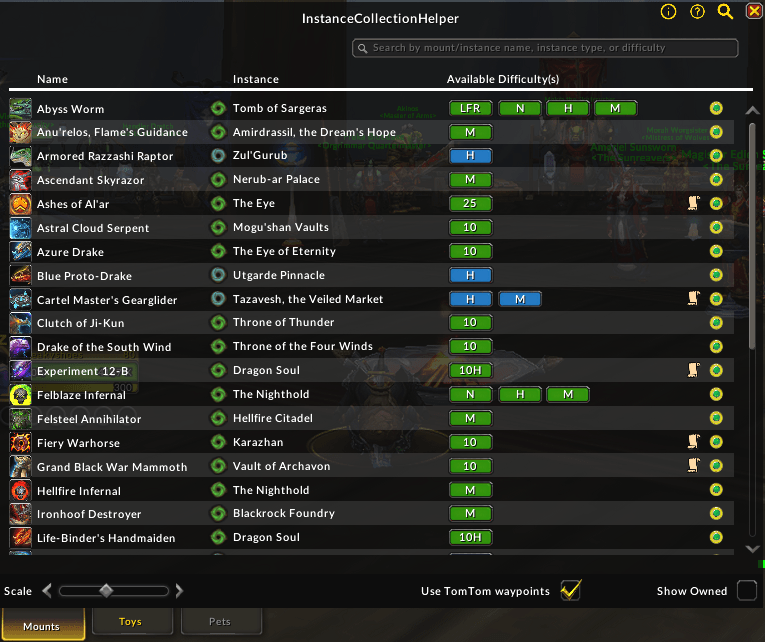

Instructions for how to use the AddOn are available via tooltip by hovering over the information icon in the top-right of the AddOn window
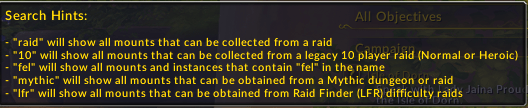
Tips for using the search bar are available via tooltip by hovering over the magnifying glass icon in the top-right of the AddOn window
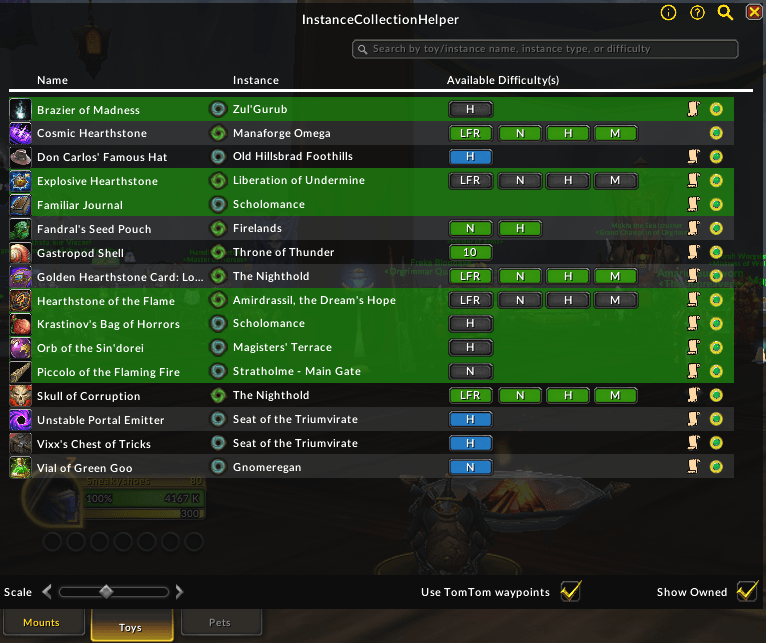
Features a list of toys available from instances similar to the mounts list
Description
Instance Collection Helper
Track available collectibles from instances and easily set required instance difficulty
Feedback on this AddOn or any others that I develop/maintain is always welcome. If you enjoy using any of my AddOns and would like to support future development, it is greatly appreciated.




Instance Collection Helper was released in July 2025 to help players with tracking mounts and setting the correct instance difficulty for the Collector's Bounty event. Since then, it has evolved further into a list and tracking system for other collectibles such as toys, pets, and decor with more versatile options for sorting and filtering lists.
ICH will be continue to be supported in the Midnight expansion and beyond for the foreseeable future. I am looking for translators to help verify AddOn translations in non-English languages. If interested, please contact me via Discord or any other method from my Linktree.
Highlights
- Tabs for mounts, toys, pets, and decor that are available from instances
- Search for a collectible by its name, an instance name or type, a difficulty setting, by expansion, or by the zone or parent zone it can be found in
- Supports
&(AND),|(OR), and!(NOT) logical operators with grouping via parentheses
- Supports
- Easily keep track of all available collectibles offered by Timewalking vendors along with their costs
- Multi-column scrollable UI with the ability to "favorite" items and sort by a specific column
- "Mini-window" that can appear when inside an instance that shows which collectibles you are missing
- BETA Feature: Instance farming World Tour that guides you through different zones in the game for the chance to grab any collectibles you're still missing
- Farming route is based on the Mount Planner feature from Simple Armory
- Creates a map pin for each travel destination and instance entrance
- Choose which combinations of mounts, pets, toys, or decor to include in your route
- Feature is still heavily under development, so usage and feedback on how it can be improved and what might be missing are welcome and encouraged
- Preview mounts, pets, decor, and cosmetics in a dressing room window by clicking on the collectible's icon
- Open instance and/or encounter journal entries for each list item
- Ability to drop a map pin at the instance entrance to make navigating easier
- If the TomTom AddOn is enabled, an option to use TomTom waypoints instead of Blizzard map pins is available
- Buttons to easily set your desired instance difficulty with a single click
- DataBroker integration for quick access to options via minimap button or other DataBroker AddOns
- AddOn Compartment integration to easily open the AddOn when the minimap button is hidden
Summary
Instance Collection Helper is a list and tracking system for collectibles (Mounts, Toys, Pets, and Decor) available from instances as well as the Timewalking vendor. Each tab shows items relevant to that category along with where (and sometimes how) to get them. Items can be sorted by column header and marked as favorites, with favorites always pinned to the top of the list.
A search bar is available to filter lists by a number of options, including support for AND, OR, and NOT logical operators with parenthetical grouping for complex queries. A "Show Available Only" toggle hides collectibles that your character is currently locked out for until the next daily or weekly reset. For Timewalking Vendor items, this option restricts the list to items sold during the currently active Timewalking event. If no Timewalking event is active, no items are shown in this tab. When a collectible cannot be obtained on a given difficulty, that difficulty button for the item is disabled, making it easy to see at a glance what you still need and on which difficulty. The Timewalking Vendor tab shows each item alongside its cost.
If desired, you can enable the option to show a mini-window when inside an instance. This window will allow you to see all of the available collectibles from that instance on your current difficulty at a glance. When an item is no longer available due to being locked out, it will appear desaturated (greyed out).
Some AddOn preferences can also be managed using the settings panel, such as the ability to show/hide the mini-window or bulk-clear favorites.
If you see any items missing from a list, please let me know and I'll be happy to add them ASAP.
Supported Languages
All collectible and instance names will appear in the language that the game is being played in, but other text may appear in English. Currently, the following languages are either supported or in the process of being localized:
- English (
enUS) - European Spanish (
esES) - Mexican Spanish (
esMX) - French (
frFR) - Korean (
koKR) - Italian (
itIT) - Brazilian Portuguese (
ptBR) - Russian (
ruRU) - German (
deDE) *credit: Fargoran* - Traditional Chinese (
zhTW) *credit: BNS333* - Simplified Chinese (
zhCN) *credit: 柳心怡*
Usage
List Sorting
The four instance-based lists (Mounts, Pets, Toys, and Decor) can be sorted by either collectible name or instance name. Timewalking Vendor items can be sorted in a few other ways, such as expansion, collectible type, and cost to purchase from the vendor.
Settings Panel
Some AddOn settings can be viewed and modified from the settings panel. This window can be opened by a number of means
- Right-click on the minimap/databroker/AddOn compartment icon
- Click on the gear icon in the top-left of the AddOn window
- Slash command (listed below)
Options currently modifiable from the settings panel include:
- Show minimap icon
- Show mini-window in instances
- Show mini-window during Mythic+ dungeons (disabled and has no effect if the mini-window is not shown)
- Mark pets owned only when you own max amount available
- Clear all favorite items (per category or across the board)
Slash Commands
Aside from the AddOn UI itself, Instance Collection Helper provides a few other utilities via slash commands. A comprehensive list of available commands is shown below:
/ich: Opens the AddOn window/ich help: List all available slash commands for the AddOn/ich diffs: Print current difficulty settings for Dungeons, Legacy Raids, and Raids in the chat window/ich dung <difficulty>: Set Dungeon difficulty to the specified value/ich raid <difficulty>: Set Raid difficulty to the specified value/ich lraid <difficulty>: Set Legacy Raid difficulty to the specified value/ich minimap: Show or hide the minimap icon for the AddOn/ich mini: Show a mini-window of available collectibles while inside an instance/ich config: Toggle the settings panel/ich about: Opens a window showing information about the addon, authors and contributors, etc./ich wt: Opens the World Tour window for farming collectibles out of multiple dungeons based on what you are currently missing
Notes
- For both
/ich dungand/ich raid,<difficulty>can be one ofnorm(Normal),hero(Heroic), ormyth(Mythic) - For
/ich lraid,<difficulty>can be one of10(10 player),25(25 player),10h(10 player (Heroic)),25h(25 player (Heroic)), or40(40 player)
Planned Updates
- Track Achievements available in instances
- Ability to view lockouts/available attempts of alts
- Allow AddOn properties such as fonts, backgrounds, skins, etc. to be configurable
Instance Collection Helper Team