InPlateSight
- By
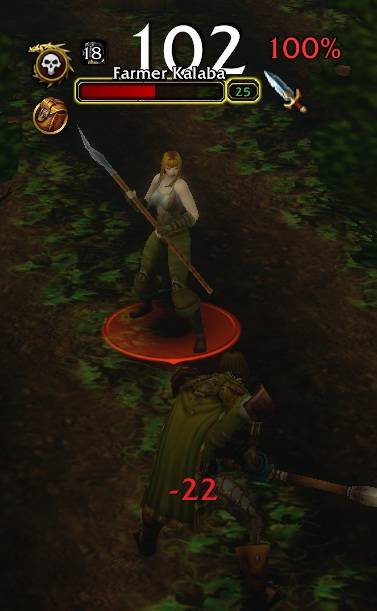
Quest and threat intelligence for WoW Forever nameplates! Identify Kill and Loot objectives, see which enemies target you, monitor live threat percentages, and customise icons, positioning, colours and thresholds with Tank mode support.
Description
Quest, loot and threat intelligence for enemy nameplates — see what matters before you engage, and know when you're drawing attention!
InPlateSight
InPlateSight adds useful quest and combat information directly to hostile nameplates, helping you quickly identify which enemies matter, which ones are targeting you, and how much threat you're generating.
Designed specifically for WoW Forever, InPlateSight enhances Blizzard's existing nameplates without replacing them, keeping important information visible, customisable and immediately useful.
Features
Quest and Objective Awareness
- Quest Relevance — A prominent gold ! identifies enemies relevant to unfinished active quests, including enemies that may drop required quest items.
- Separate Kill and Loot Indicators — Optionally distinguish between enemies you need to kill and enemies carrying required quest items using distinctive Skull and Backpack icons.
- Combined Objectives — Enemies relevant to both Kill and Loot objectives display both icons, while objectives that cannot be confidently classified retain the familiar gold !.
- Automatic Updates — Quest indicators update as objectives are completed and quest relevance changes.
Threat and Combat Awareness
- Attacking You — Displays your selected Threat icon when an enemy is actively targeting your character, helping you identify incoming enemy attention.
- Threat Percentage — Displays your current threat percentage directly on enemy nameplates, helping you monitor aggro in solo and group combat, including enemies targeting other players.
- Six Threat Icon Choices — Choose from Elite Gold, Target, Focus, Combat Attack Cursor, Targeting Skull or Faction PvP Emblem.
- Faction-Aware Icons — The Faction PvP Emblem option automatically displays the appropriate Horde or Alliance symbol for your character.
- Colour-Coded Threat — Threat percentages change colour as your threat increases, providing visual warnings when approaching or exceeding configured thresholds.
- Customisable Threat Thresholds — Adjust warning and danger thresholds to suit your playstyle, with defaults of 85% and 100%.
- Tank Mode — Reverses threat colours so high threat is desirable and low threat becomes a warning.
- Flexible Threat Display — Choose between Threat icon only, percentage only, both or neither.
Customisation and Interface
- Adjustable Indicator Layouts — Customise the size, positioning and X/Y offsets of quest markers, Threat icons and threat percentages.
- Live Nameplate Preview — Preview your chosen icons, positioning and sizes using a sample enemy nameplate before returning to gameplay.
- Customisable Quest Display — Switch between a single gold quest marker and separate Kill/Loot indicators.
- Minimap Button — Quickly access InPlateSight, with the option to hide the button.
- Persistent Settings — Your preferences are retained across reloads and gameplay sessions.
- Multiple Enemies — Quest and combat information is displayed independently across visible hostile nameplates.
- Lightweight Integration — Enhances Blizzard's standard nameplate interface without requiring a complete nameplate replacement addon.
Settings and Controls
InPlateSight includes a dedicated panel within Blizzard's AddOns Settings, allowing you to configure quest indicators, threat displays, icon selection, positioning, warning thresholds and Tank mode.
Access the settings through the minimap button or by typing /ips options.
Quick Commands
/ips on— Enable InPlateSight./ips off— Disable InPlateSight./ips quest— Toggle quest indicators./ips options— Open the InPlateSight settings panel.
Compatibility and Development
InPlateSight is designed for WoW Forever and uses Blizzard's existing nameplate system.
The addon will continue to receive refinements based on testing, client updates and player feedback, particularly around combat and threat awareness.
No additional addons required.
InPlateSight Team