CopyChat
- By
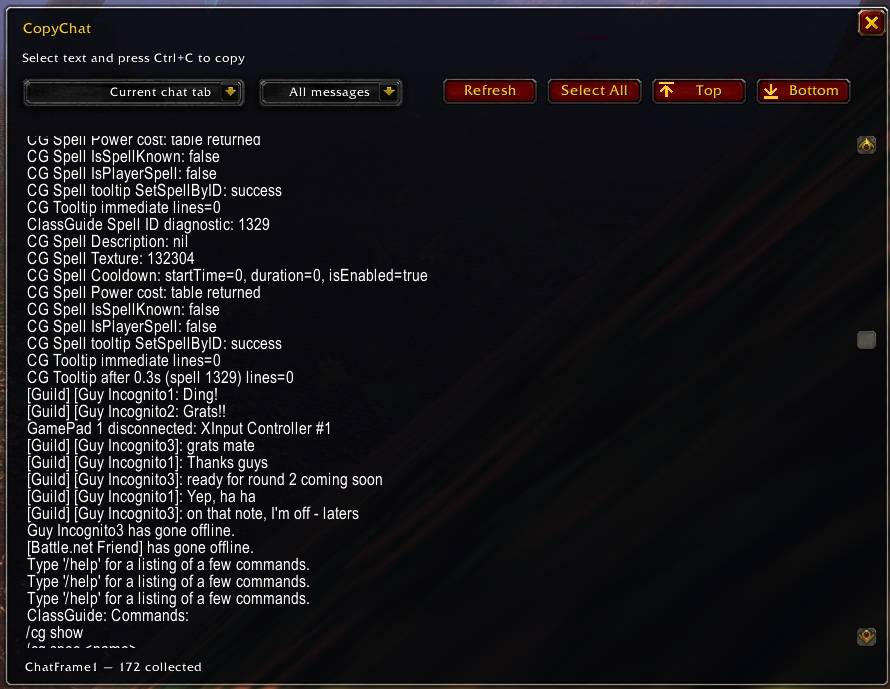
CopyChat makes copying World of Warcraft chat messages easy! Select a chat window, capture and copy messages with Ctrl+C. Perfect for sharing conversations, debugging addons, and saving important chat history.
Description
CopyChat
CopyChat is a lightweight World of Warcraft addon that makes it easy to copy messages from your in-game chat windows.
Instead of manually retyping messages, CopyChat provides a simple, scrollable window where chat history can be viewed, selected and copied directly to your clipboard using Ctrl+C.
Features
- Copy Chat Messages: Select and copy chat history from General and other supported chat windows.
- Chat Window Selection: Choose which chat window to copy from using a dropdown menu, or use your currently selected chat tab.
- Message Limits: Display the last 50, 100 or 250 messages, or all available messages. Message selections automatically refresh the displayed chat history.
- Extended Chat History: Optionally increase supported chat windows' history capacity from 128 to 1,000 messages, allowing you to capture longer conversations. This increases the number of messages retained during your current session but conversations are not permanently archived.
- One-Click Selection: Use the Select All button to quickly highlight messages for copying.
- Optional Timestamps: Include message timestamps when available.
- Clean Text Formatting: Optionally remove WoW colour codes and other formatting while preserving readable text and hyperlink labels.
- Battle.net Compatibility: Supports Battle.net whispers and friend notifications, using a placeholder for protected friend names when necessary.
- Refresh Chat History: Update the displayed messages without reopening the window.
- Minimap Button: Quickly open CopyChat using a movable minimap button.
- Customisable Settings: Configure timestamps, formatting and minimap visibility through the addon settings.
Compatibility
CopyChat includes additional message compatibility checks designed to improve reliability on WoW Forever.
Messages are validated before being displayed, with additional formatting cleanup attempted when necessary. Messages that cannot be safely transferred into the copyable text window are skipped rather than preventing other messages from displaying.
Battle.net Messages: Due to Blizzard's handling of protected player information, Battle.net friend names may appear as [Battle.net Friend] rather than their actual names. Message content is preserved where accessible.
Combat Log: Combat Log copying is not supported due to restrictions in the WoW Forever client that prevent most combat messages from being accessed as readable text.
CopyChat — Because chat messages should be easy to copy!
CopyChat Team