HP5 Timer
- By
A bar that counts down to your next health regeneration tick in WoW: Forever and turns amber when it is time to sit.
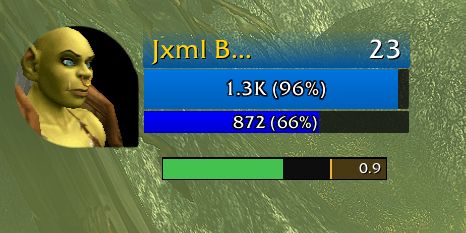
The bar counts down to the next health regeneration tick.
Description
HP5 Timer shows a bar that counts down to your next health regeneration tick in WoW: Forever and turns amber with Sit just before it. The Spirit tooltip says "Health Regeneration is increased by 33% while sitting or reclining".
Seen in the game: the bar counts down to each tick and turns amber with Sit just before it. /hp5 status shows whether the bar has locked to a tick and the spacing between ticks.
What the bar shows
- Fill: grows from left to right over the time between ticks and starts again at each tick
- Seconds: the time left to the next tick, in tenths, on the right
- Sit cue: for the last 0.5 seconds before the tick (set by Sit cue seconds before the tick) the fill turns amber and Sit appears on the left
- Waiting: Waiting for a health tick shows until the bar has found the tick
The bar is hidden when you are dead and, unless Show in combat is on, while you are in combat.
While Lock is off the bar always shows, labelled HP5 Timer, so you can drag it.
How it finds the tick
Health regenerates in server ticks. Out of combat, each health event is a possible tick. Two events that are one to three tick spacings apart lock the bar to the tick. Because it works from the timing of health events, it does not need the health numbers. The spacing starts at 2.0 seconds and is learned from your health events when Seconds between ticks is Auto.
Options
Options > AddOns > HP5 Timer, /hp5, or the addon list on the minimap.
- Width: 100 to 400. Default 200.
- Height: 8 to 30. Default 14.
- Sit cue seconds before the tick: 0.1 to 1.5. Default 0.5. How early the bar turns amber.
- Sound at the cue: plays a short sound once per tick. Default off.
- Show in combat: default off.
- Hide at full health: default on.
- Seconds between ticks: Auto learns the spacing from the health ticks, Fixed uses the next setting. Default Auto.
- Fixed seconds between ticks: 1.0 to 6.0. Default 2.0. Used when Seconds between ticks is Fixed.
- Lock: default on. Off lets you drag the bar.
- Reset position: puts the bar back at its starting place.
Commands
/hp5: options/hp5 lockand/hp5 unlock/hp5 reset: bar position/hp5 status: seconds between ticks and where the value comes from, whether the bar is locked to a tick, whether health is readable, and the spacing of the last three health events out of combat/hp5 help
Limits
- Client: WoW: Forever only (1.60.1, interface 16001).
- Hide at full health: works only where the game gives addons the health numbers. Forever withholds them, so the bar stays up at full health.
- Locking: the bar locks after it sees two ticks, so it starts only while you are below full health.
- Combat: health events in combat are not used for finding ticks. A spacing across a fight is dropped.
- Learned spacing: kept across a
/reloadwith the lock, and learned again after each login.
HP5 Timer Team