Hey whats your ilvl - Forever
- By
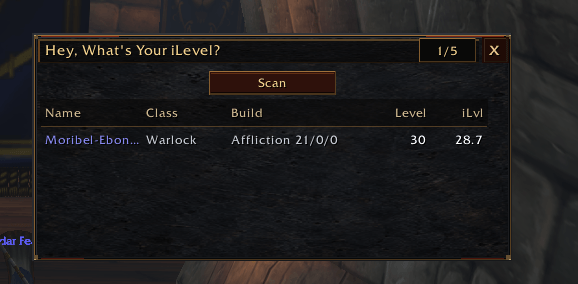
A lightweight WoW Forever party roster addon with manual Scan/Rescan for talent builds and equipped average iLvl, plus stable party tracking for dungeons and world transitions.
ilvlnew.PNG
Description
# Hey, What's Your iLevel?
A compact, lightweight group roster for WoW Forever, with a faction-neutral dark fantasy frame and useful player information at a glance.
Current beta: **0.1.14-beta**.
## Your group at a glance
**Name | Class | Build | Level | iLvl**
Illustrative rows:
- `Olan | Warlock | Affliction 11/0/0 | 90 | 10.7`
- `Dalemar | Druid | Restoration 0/0/11 | 90 | 11.0`
- `Medore | Mage | Frost 0/0/11 | 90 | 12.2`
Names retain their class colors. Long names and Builds are clipped to keep the columns readable, with the full information available in the row tooltip.
The movable **400 × 190 px** window shows five rows at a time. Larger groups use the mouse wheel or compact vertical scrollbar while the title, Scan/Rescan button, and headers stay fixed. The roster supports solo play and parties, and implements capacity for up to **40 friendly players** in raid-style groups, including friendly battleground teams when the client exposes them through its group APIs. Live large-group verification is still pending.
## Group member counter
The title bar also has a small informational group counter beside the close button. It counts confirmed unique members, including you once: solo/party use `/5`, raid-style groups use `/40`. It updates automatically without scanning and retains the last confirmed count through incomplete roster reads and zoning. Smaller battleground capacities have not been reliably verified in Forever; a 15-member team therefore shows `15/40`, not a guessed `15/15`.
## Talent Builds
WoW Forever uses traditional talent trees rather than Retail-style selected specializations. A Build shows the dominant tree and the actual purchased talent points across the three trees in game order. Automatically granted ranks are not counted.
Examples include `Affliction 11/0/0`, `Protection 0/11/0`, `Beast Mastery 10/0/0`, and `Feral Combat 0/10/0`. Invested-point ties display `Hybrid`; a confirmed zero-point allocation displays `No Talents 0/0/0`. Missing data is not presented as an invented zero-point Build.
## Equipped average item level
The iLvl column shows the real equipped average item level reported by WoW Forever, not GearScore or a subjective gear rating. Local values come from the player's equipped-average API; remote values come from matching inspection data.
Values are rounded to one decimal place: `10.6875` displays as `10.7`. The raw reported value remains available in the combined row tooltip and debug output.
## Manual Scan / Rescan
Press **Scan / Rescan** or use `/hwilvl scan` to retrieve remote Talent Builds and equipped average iLvl. Group membership, names, classes, levels, and your own Build/iLvl update automatically; remote inspection starts only when you choose.
Scans handle one player at a time, use conservative throttling and timeouts, match results by GUID, and reject stale results. They respect combat and Blizzard's Inspect window. Scans include off-screen group members; scrolling does not initiate inspection. Zoning cancels an active scan without automatically restarting it.
Unknown remote fields show `—` before scanning and `…` while queued without a prior value. An unavailable inspection shows `Unavailable` for an unverified Build and `—` for unknown iLvl. Previously verified values survive failed rescans and brief group-token inconsistencies; a later successful manual scan can refresh them.
## Clear row tooltips
One tooltip across each row shows the full name, Class, Build, equipped iLvl, and raw reported value when available.
- Successfully scanned remote players show **Last scanned: just now**, seconds, or whole minutes since their last successful inspection.
- A failed rescan preserves the previous values and successful timestamp, adding **Last rescan unavailable**.
- Never-successfully-scanned players show **Not yet scanned**, with **Last attempt: unavailable** after a failed attempt.
- The local player's tooltip never claims a manual remote-scan time.
Elapsed time is calculated when the tooltip is shown, not continuously updated. Recycled rows clear their hover and tooltip state while scrolling.
## Compact dark fantasy UI
A dark stone/iron backdrop, bronze trim, restrained ember accents, and inset title bar give the roster a faction-neutral fantasy look. Scan/Rescan, the close button, and scrollbar share the same style. Subtle full-row hover and a fixed header divider help keep the table readable.
There is no watermark, settings gear, extra configuration panel, animated effect, or decorative frame enlargement.
- Minimap button for manual open/close
- Saved window/minimap positions and open state
- No auto-open when joining a group
- No background inspection, per-frame polling, or external addon libraries
## Commands
- `/hwilvl` — toggle the roster.
- `/hwilvl show` / `/hwilvl hide` — control the window directly.
- `/hwilvl scan` — start the same manual scan as the button.
- `/hwilvl debug` — toggle diagnostics; off by default.
- `/hwilvl talents` — print a one-time detailed local talent diagnostic dump.
## Installation and beta status
Install the complete `HeyWhatsYourILevel` folder inside your WoW Forever beta `_classic_beta_/Interface/AddOns/` directory. This build targets Interface **16001**.
Earlier live beta testing verified local and nearby party-member Talent Builds and equipped average iLvl, solo/party support, and GUID-safe remote inspection. The newer group counter, visual theme, scan-age tooltip polish, and raid/battleground scrolling paths have deterministic fixture coverage, but their live-client checks remain pending. This is a **beta**, not a claim of fully live-verified 40-player support.
WoW Forever client/API updates may require compatibility changes. Feedback and bug reports are welcome; please include your addon/client version, group size, steps to reproduce, and any Lua error.
There is no GearScore, damage meter, automatic group action, raid management, talent calculator, or automatic targeting.
Hey whats your ilvl - Forever Team