Vault of Alts
- By
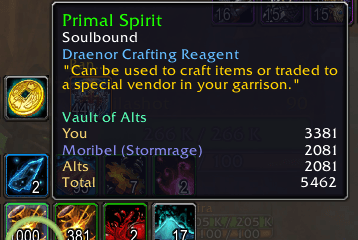
Simple lightweight addon that shows the item count of items over all of your characters so you dont have to go on each one to check for a certain item.
vaultofalts1.PNG
Description
Vault of Alts
Vault of Alts is a lightweight World of Warcraft Retail addon that shows where your items are stored directly in item tooltips.
Quickly see how many copies of an item are stored in your current character’s bags and bank, on scanned alternate characters, and in your warband bank. No separate inventory window or external libraries are required.
Features
-
Shows item counts directly in tooltips.
-
Tracks bags and character banks separately.
-
Displays saved bag and bank counts for alternate characters.
-
Includes available warband bank totals.
-
Shows a combined total across all tracked storage.
-
Uses class-colored character names.
-
Offers compact and detailed tooltip modes.
-
Supports optional freshness information for saved scans.
-
Includes lightweight item search and saved-data maintenance commands.
-
Remains dependency-free and focused on tooltip information.
How Scanning Works
Vault of Alts uses saved inventory scans. It does not inspect offline characters in real time.
To populate your account data:
-
Log into each character you want to track with the addon enabled.
-
Open that character’s bank at least once to save its bank contents.
-
Open the warband bank when available to save its contents.
-
Repeat these steps occasionally when you want to refresh older data.
Your current character’s bags update automatically while playing. Bank information updates when the corresponding bank is opened.
Tooltip Information
Depending on your settings and available saved data, item tooltips can show:
-
You (Bags) -
You (Bank) -
Individual alt bag and bank counts
-
Combined
Altscount in compact mode -
Warband -
Overall
Total
Locations with no copies of the item are omitted to keep tooltips clean.
Commands
-
/voa help– Display command help. -
/voa status– Show tracked characters, scan times, and bank-data status. -
/voa rescan– Rescan the current character’s available storage. -
/voa search <item name>– Search saved inventory data. -
/voa find <item name>– Alternate search command. -
/voa cleanup– Find and safely remove invalid or empty saved entries. -
/voa forget <name>– Remove a saved character. -
/voa debug– Toggle diagnostic messages. -
/voa config– Display current tooltip settings. -
/vaultofalts– Alternate command alias.
Tooltip Settings
-
/voa config compact on|off -
/voa config showwarband on|off -
/voa config showalts on|off -
/voa config realms on|off -
/voa config sort alpha|count -
/voa config freshness on|off -
/voa config breakdown on|off
Installation
Install Vault of Alts using the CurseForge app, or extract the VaultOfAlts folder into:
World of Warcraft/_retail_/Interface/AddOns/
Restart World of Warcraft or use /reload, then ensure Vault of Alts is enabled in the AddOns menu.
Important Notes
-
Offline character information comes from the last saved scan and may become outdated.
-
A character’s bank cannot be counted until that character has opened its bank with the addon enabled.
-
Warband bank totals update only while those containers are available to the game client.
-
Item searches depend on item names being available in the local World of Warcraft item cache.
-
Vault of Alts does not transfer, mail, move, or modify items.
Compatibility
Designed exclusively for World of Warcraft Retail.
Current release: Vault of Alts 1.1.6
Interface: 120100
Compatible with the Retail 12.1 client line.
Vault of Alts is intentionally small, dependency-free, and focused on answering one question quickly: Where did I put that item?
Vault of Alts Team