Hey what's your ilvl
- By
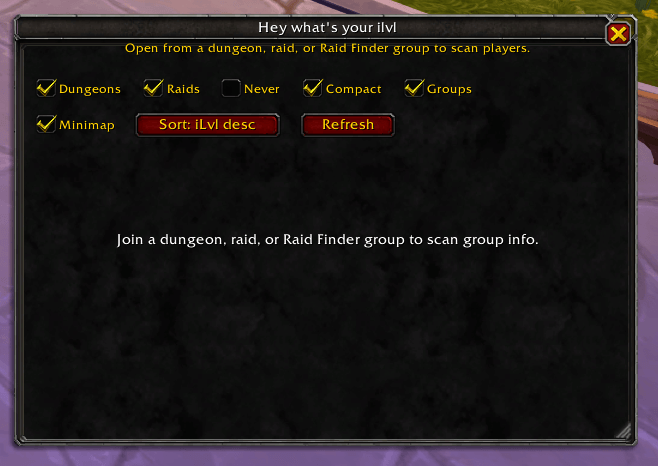
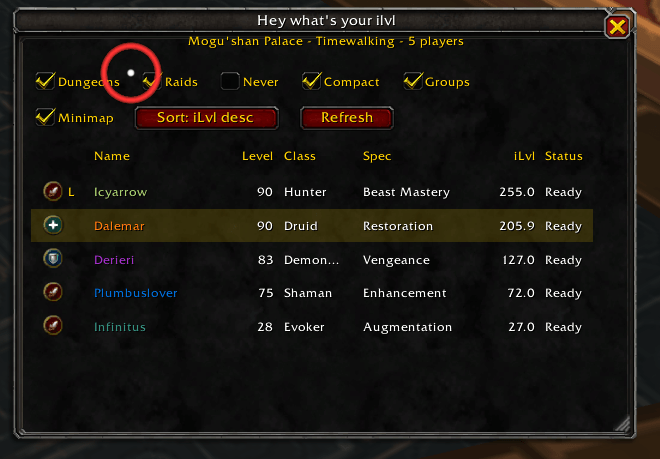
Retail World of Warcraft addon for quickly viewing dungeon and raid group member ilvl, class, spec, character level information.
ilvl1.PNG
ilvl2.PNG
Description
Hey what's your ilvl
Retail World of Warcraft addon for quickly viewing dungeon and raid group member information.
Features
- Movable Blizzard-style window with ESC-to-close support.
- Minimap button for opening and closing the window.
- Slash commands:
/hwyiand/heyilvl. - Supports 5-player dungeons, Mythic+, normal/heroic/mythic raids, Raid Finder, Delves, and Open World.
- Shows name, level, class, specialization, average item level, role, subgroup, and inspect status where available.
- Compact raid mode for larger rosters.
- Sort modes for item level, subgroup, class, role, and name.
- Saved frame position, frame size, minimap position, minimap visibility, sort modes, and auto-open preferences.
Slash Commands
/hwyior/heyilvltoggles the main window./hwyi refreshforces a roster and inspect refresh./hwyi minimaphides or shows the minimap button./hwyi sort ilvl,/hwyi sort group,/hwyi sort class,/hwyi sort role, and/hwyi sort namechange sorting.
Minimap Button
Click the minimap button to toggle the main window. Drag the button to move it around the minimap. Its position and hidden state are saved.
Inspect Limitations
World of Warcraft inspect data is asynchronous and range-limited. The addon queues one inspect request at a time and waits for INSPECT_READY before reading specialization and item level. Players who are out of range, still loading, or temporarily unavailable may show Pending, Out of range, Unknown, or -- until a later retry succeeds.
Install
- Download or unzip the addon folder.
- Place
HeyWhatsYourIlvlinWorld of Warcraft/_retail_/Interface/AddOns/. - Restart WoW or run
/reload. - Enable Hey what's your ilvl in the AddOns list.
Hey what's your ilvl Team