Forgemaster
- By
A crafting planner for WoW: Forever. Pick what to make: it works out the materials, counts what all your characters hold, gathers and buys the rest, and sets each craft up. Also routes levelling, gathering included, and ranks recipes by profit.
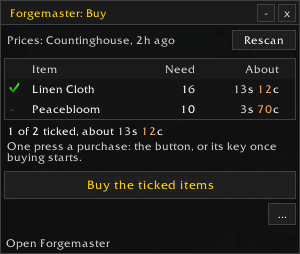
Buy-Panel.png
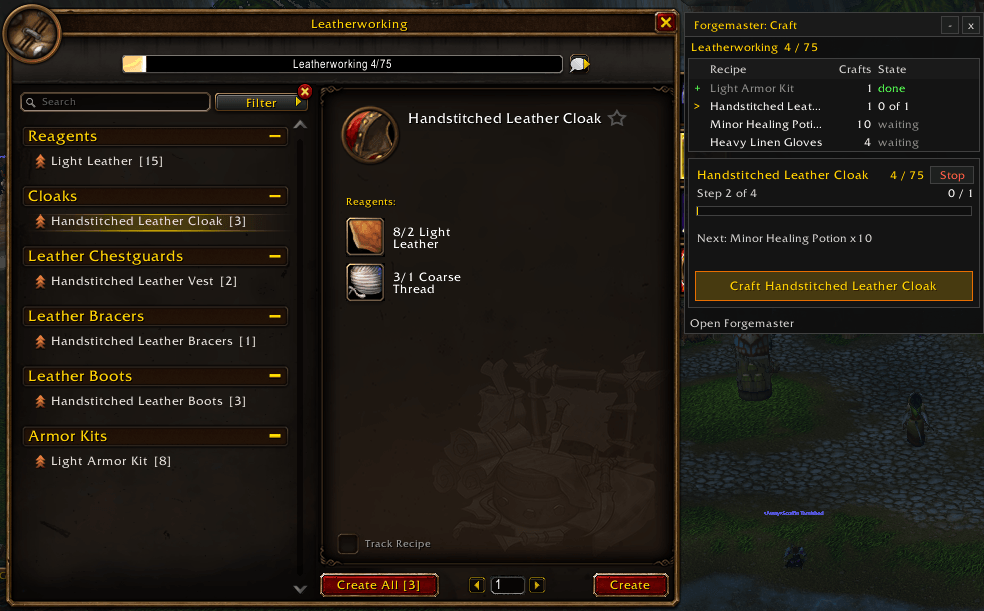
The Craft panel lists your plan's recipes for the open profession and sets each step up in Blizzard's window. One press of its Craft button crafts the step, and it moves on to the next by itself.
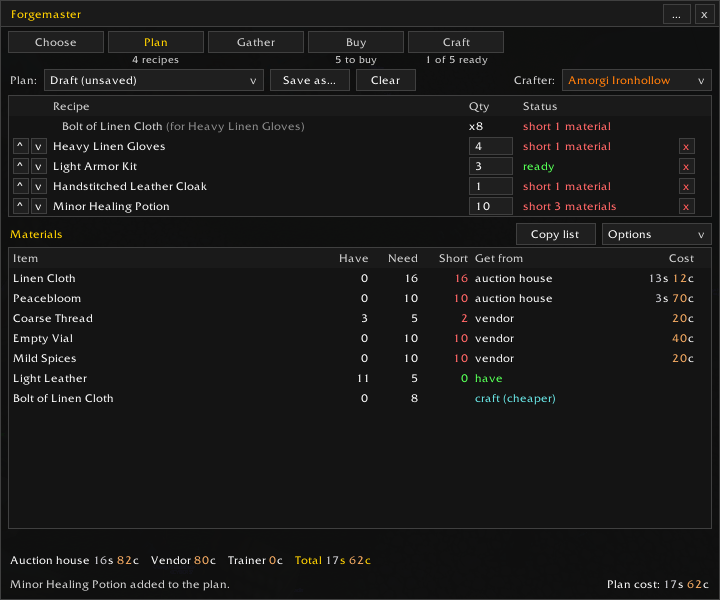
Your crafting order, with Bolt of Linen Cloth added as an intermediate because making it is cheaper. The materials list says what you have, what is short and where to get it: the auction house, a vendor or your own crafting, with the cost added up.
Description
Levelling a profession, or making a batch of something, is mostly bookkeeping: what does it take, what have I got, where is it, what does the rest cost. Forgemaster keeps the books, for every character on your account.
What it does
One window with a tab for each stage (Choose, Plan, Gather, Buy, Craft), and a small panel beside the game's own window where the work happens: the auction house, the bank and mailbox, the profession window, trainers and vendors.
- Choose what to make: the recipes you know (Known), everything the profession has (All recipes), a levelling route (Levelling), or what is worth crafting at today's prices (Profit). Search, filter (learned or not, where a recipe comes from, what it makes, slot, quality, level, stats, skill-up colour, whether you have the materials) and sort the list, under the game's headings or as one flat list. Hover a recipe for the game's own tooltip, with its reagents and how many you have.
- Skill-up colours from the game's own data. A recipe's name is orange, yellow, green or grey for your character's skill, even in a profession you have not opened yet. A recipe you have not learned is light blue when a trainer will teach it to you now, and red when you cannot learn it yet.
- Plan it: your crafting order, reordered by dragging, with intermediates worked out for you (a cloak that needs bolts of cloth puts the bolts in the plan and the cloth on the list). Save plans and load them again; a plan made in full is marked done by itself.
- Counts everything you already have. Bags, bank and mail on every character, including Forever's bank tabs and the reagent bag, so the list is only what is actually missing. Open each bank once to count it.
- Gathers it. At the bank or mailbox, a panel takes what the plan needs into your bags in one press. On another character it fills a mail to your crafter with what was asked for, for you to check and send: it never sends by itself. A plan you no longer want is dropped from the same panel with Stop asking.
- Buys the rest. At the auction house, a panel lists what is still needed, ticked and priced, and buys it one press at a time, never over a price cap set from the scanned price.
- Crafts it. Forever lets no addon craft, so a panel beside the profession window sets each step up in Blizzard's window, the right recipe and the right count, and puts a Craft button on it: one click crafts the step, and it moves on to the next. The panel shows only when your plan has something for the profession you have open, and its Stop ends the game's batch too.
- Levels you by the cheapest route, at today's auction prices, point by point, including recipes you would have to buy or train first. A fixed guide is there too; its Alchemy follows Forever's own recipes.
- A gathering route to 300. Mining, Herbalism and Skinning are in Choose > Levelling as well: a ladder of steps (Copper Vein to 65, Tin Vein to 125, and so on) with your step marked, and for each step the nodes, how they stand to your skill and the zones to find them in. Skinning's steps are creature levels. The zones are vanilla's, so Forever's five new zones are not among them.
- Crafting Profit ranks every recipe you know by what it makes you: the materials at auction prices against the best of three sales for the result, posted just under the cheapest listing after the auction house's cut, sold to a vendor, or disenchanted (with Countinghouse). The To column says which, and the tooltip shows all three. Items listed by only one or two sellers are marked, because an asking price is not a sale.
- At trainers and vendors, a panel beside the window (Blizzard's, or Belphie's Dialogue's) lists what your plan and route still need there, with Learn and Buy buttons.
One plan for all your characters
When a plan needs something that another character on your account can make and the crafter cannot, and making it is cheaper than buying it, the plan says made by that character instead of buying it, and counts what its materials cost. That character is told at login: /fm jobs lists what your plans ask of it, and /fm jobs add puts it in its own plan. The mailbox's Gather panel does the mails both ways: the materials to them, and what they make back to you.
Disenchanting
A Disenchant window lists every item in your bags that can be disenchanted, with what its materials would come to, what a vendor pays and what it sells for at auction. It opens with your Enchanting window when something is waiting to be disenchanted, or with /fm disenchant at any time. Put items in its queue, and one button disenchants the next: one press, one item, nothing without a press, and never in combat. Items in a gear set, rares and epics (until you ask for them) and, if you choose, anything worth more sold are left out, each with its reason. What each disenchant gave is written down and totalled. The materials' worth needs Countinghouse; without it the window works and that column is empty.
With Countinghouse
With Countinghouse installed, Forgemaster uses its full-scan prices whenever they are fresher than its own, the Buy panel sits beside Countinghouse's window, and Countinghouse's Shopping tab can buy your plan's list. With Countinghouse kept up to date:
- Your own sales in Crafting Profit. Sells says about how long your own auctions of the item took to sell, and A day is the profit a day at the rate yours have sold over the last 30 days.
- Keep in stock. What an item you keep in stock there is short of goes into your plan as crafts, the next time you open Forgemaster's window on a character that knows the recipe.
- Disenchanting is valued at the materials' market price, in Crafting Profit and the Disenchant window.
- Countinghouse's Crates tab costs a bundle your character can craft from its reagents, at Forgemaster's prices, beside buying it.
Neither needs the other.
Settings
Every panel can be switched off in Settings > General, and closed for one visit with its close button. Settings are the same on every character unless you turn off "Use global settings" on one (top of General), are kept in BLib's profiles (/blib profile save), and are found by the search at the top of BLib's /blib launcher. The auction price line Forgemaster adds to item tooltips is set to Always, With Shift or Off in BLib's Tooltip lines window (/blib tips).
What Forever does not allow
No addon may craft or open a profession window on Forever, and a refused craft looks exactly like one that worked. So Forgemaster sets each step up in Blizzard's window and you press its Craft button, and when a step needs a profession window it asks you to open it and carries on when you do. Buying at the auction house needs a key press behind each purchase, so the buyer is one press per purchase.
Commands
| Command | |
|---|---|
/fm |
the window |
/fm plans |
the Plan tab |
/fm jobs |
what your other characters' plans ask this one to make |
/fm jobs add |
puts those jobs in this character's plan |
/fm profit |
Crafting Profit |
/fm route [skill] |
the cheapest levelling route, up to a skill; on or off switches between it and the fixed guide |
/fm mats |
the Gather tab |
/fm disenchant |
the Disenchant window |
/fm config |
settings |
/fm help |
every command |
The game's Key Bindings have a key for the window and one for Crafting Profit, under Forgemaster. Shift-click the minimap button for Crafting Profit.
Requirements
BLib, which the CurseForge app installs with it; keep it updated alongside this addon.
Version support
Built for WoW: Forever. The versions before 1.2.0 were tested on the Forever beta. The beta closed on 24 October and there is no Forever client until launch, so 1.2.0 was tested on retail (12.1.5). TBC Anniversary is not a development target and will receive no further work.
Forgemaster Team