GreyGreed Tank & Raid Tools Forever
- By
Simplify raids with tank and healer dashboards, raid markers, pings, buff checks, armor monitoring, and group management tools for WoW Forever.
Screenshot 2026-11-06 135827.png
Screenshot 2026-11-06 135948.png
Screenshot 2026-11-06 145457.png
Screenshot 2026-11-06 145716.png
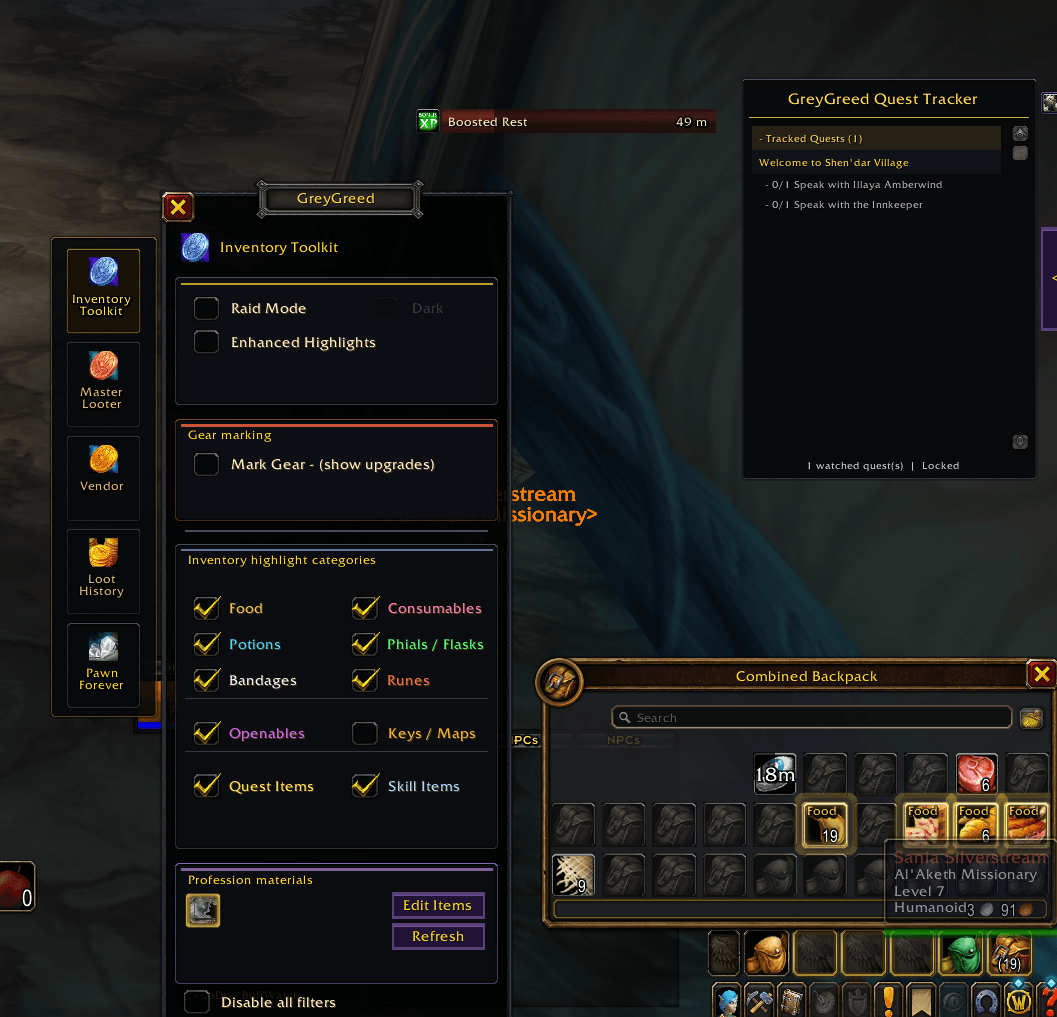
Screenshot 2026-11-06 145739.png
Description
GreyGreed Raid & Tank Tools Forever + Core
Lead with confidence. Coordinate with ease. Enjoy the adventure!
Welcome to GreyGreed Raid & Tank Tools Forever, a powerful collection of tanking, healing, raid management, and quality-of-life utilities designed for World of Warcraft Forever (Camelot).
Whether you're leading a raid, tanking a dungeon, coordinating healers, checking group readiness, or preparing for your next boss encounter, GreyGreed puts useful tools right at your fingertips.
Everything you need to help organize your group, all in one convenient interface!
This edition combines three integrated toolsets:
-
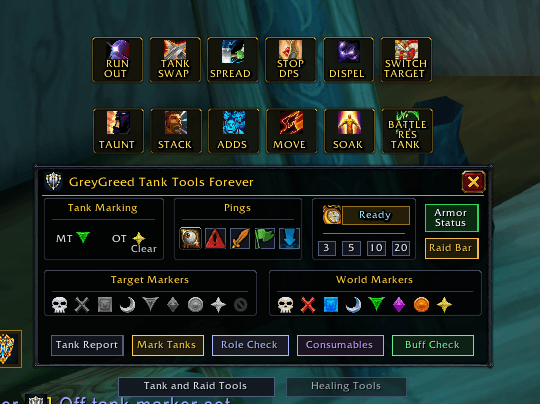
Tank Tools — Tank marking, armor monitoring, target markers, pings, and tank utilities.
-
Raid Management — Ready checks, pull timers, group-role checks, consumable checks, raid buffs, and customizable announcements.
-
Heal Tools — Healer readiness, mana checks, healing assignments, coverage reports, and quick-access healing utilities.
And because this edition includes GreyGreed Core, you also get a customizable square minimap, quest tracker, buff bars, shared settings, and convenient everyday tools.
Everything is customizable. Turn on the features you enjoy, disable those you don't, and make GreyGreed work the way you play.
🛡️ Tank Tools — Take Control of Your Group
Main Tank & Off Tank Management
Keeping track of tanks shouldn't be complicated.
GreyGreed Tank Tools includes convenient controls for identifying and marking your group's tanks.
Features include:
-
Detect tanks using available group-role information
-
Assign configurable Main Tank (MT) and Off Tank (OT) raid markers
-
Mark your tanks using dedicated MT and OT buttons
-
Optionally receive prompts to mark newly detected tanks
-
Review detected tanks with a Tank Report
-
Clear assigned tank markers when necessary
-
Customize which raid icons are used for your tanks
Persistent Tank Markers
Ever had someone accidentally change your Main Tank's raid marker?
Persistent Marks can help!
When enabled, GreyGreed watches your assigned tank markers and can provide a convenient one-click option to restore them when another player changes them.
-
Monitors assigned tank markers
-
Provides restore controls when a marker changes
-
Avoids unnecessary group-chat announcements
-
Keeps marker restoration under your control
Tank marking follows Blizzard's secure-action requirements. Markers require an appropriate player click and cannot bypass combat restrictions.
Customizable Tank Dashboard
Tank Tools provides an organized dashboard for frequently used controls.
Quickly access tank assignments, raid markers, pings, armor information, and group-preparation tools.
The dashboard includes convenient tabs for moving between Tank Tools, Raid Management, and Heal Tools.
You can also customize dashboard appearance, scaling, placement, and supported visibility options.
⚔️ Raid Management — Keep Your Group Organized
Ready Checks & Pull Timers
Preparing for a boss encounter?
GreyGreed brings convenient ready-check and pull-timer controls directly to your dashboard.
-
Start Blizzard ready checks
-
Launch selectable pull countdowns
-
Display Ready/Pull controls on the Tank dashboard, Raid dashboard, or both
-
Use compatible DBM or BigWigs countdown functionality when available
-
Fall back to supported game countdown functionality
Spend less time navigating menus and more time preparing your group.
Raid Buff Check
Don't discover missing buffs after the pull!
Raid Buff Check helps identify major class raid buffs that may be missing from your group.
The check considers the classes available in your current group and reports which players appear to be covered.
Features include:
-
Check major class-provided raid buffs
-
Identify missing buffs
-
Display readiness results
-
Review players who are offline or unavailable
-
Manually report results to group chat
-
Enable more detailed reports with player names
Checks are available out of combat.
Consumables Check
Food and flasks can make a difference during challenging encounters.
GreyGreed's Consumables Check helps you review your group's preparation before a fight.
-
Check for food buffs
-
Check for flask or phial buffs
-
Display group readiness totals
-
Identify players who may be missing consumables
-
Manually send results to group chat
Perfect for those last-minute checks before a dungeon boss or raid encounter.
Role Check — Is Everyone in the Right Role?
Accidentally queue as a healer while using a damage specialization?
GreyGreed's Role Check compares assigned group roles against specialization information available from the game.
Role Check can:
-
Review assigned Tank, Healer, and Damage roles
-
Compare roles with detected specializations
-
Identify confirmed role/spec mismatches
-
Distinguish unavailable information from confirmed mismatches
-
Skip classes that cannot select the relevant Tank or Healer specializations
-
Provide optional manual group reports
-
Start a Blizzard role poll where supported
Role Check helps identify possible mistakes without treating unavailable inspection data as proof that something is wrong.
🎯 Raid Markers, World Markers & Pings
Good communication makes group content easier.
GreyGreed puts commonly used coordination tools directly on your dashboard.
Target Markers
Quickly mark enemies, friendly targets, and other important units using familiar raid icons.
-
Skull
-
Cross
-
Square
-
Moon
-
Triangle
-
Diamond
-
Circle
-
Star
Assign markers with a click or clear a marker when it is no longer needed.
World Markers
Use convenient world-marker controls to designate locations for your group.
World markers can help identify gathering points, positioning locations, or other useful areas during an encounter.
Available actions depend on your group permissions and Blizzard's rules.
Group Pings
Need your group's attention?
GreyGreed provides convenient access to supported ping actions, including:
-
Look
-
Warning
-
Attack
-
Assist
-
Move / On My Way
Send supported pings to a target or cursor location using the game's available ping functionality.
📣 Customizable Raid Callouts
Sometimes a quick warning is all your group needs.
GreyGreed includes customizable raid announcement buttons that let you send important messages with a single deliberate click.
Tank & Raid Callouts
Available preset callouts include messages for situations such as:
-
TAUNT — Request a taunt
-
STACK — Tell players to group together
-
ADDS — Direct attention to additional enemies
-
MOVE — Warn players to reposition
-
SOAK — Call for players to handle a mechanic
-
TANK SWAP — Coordinate tank changes
-
SPREAD — Tell players to spread apart
-
STOP DPS — Ask the group to stop attacking
-
DISPEL — Request an important dispel
-
BATTLE RES — Request a combat resurrection
Make the Callouts Your Own
You can customize supported buttons with:
-
Your own button labels
-
Custom announcement messages
-
Selectable Blizzard icons
-
Individual button visibility
-
A movable Raid Bar
-
Position and appearance options
Announcements are sent only when you manually activate a callout.
When Raid Warning isn't available, configurable fallback channels can be used where permitted.
Clear communication without typing the same warnings repeatedly!
🩺 Heal Tools — Keep Your Healers Coordinated
GreyGreed Raid & Tank Tools also includes a fully integrated healer dashboard.
You don't need to install a separate Heal Tools add-on!
Healer Readiness Check
Before pulling, make sure your healers are ready.
The Healer Check examines available group information and displays useful readiness details.
It can identify:
-
Assigned healers in your group
-
Available mana percentages
-
Low-mana healers
-
Dead healers
-
Offline healers
-
Players whose mana information isn't available
A convenient report window displays the results, with an option to manually communicate them to your group.
Healing Assignments
Organize your healing team before the encounter begins.
Healing Assignments allows you to assign detected healers to specific tanks or to general raid healing.
Features include:
-
Review detected healers
-
Assign healers to tanks
-
Assign healers to raid healing
-
Refresh assignments when group composition changes
-
Clear assignments when needed
-
Manually report assignments to group chat
These assignments are intended for group coordination and don't control or automate healing spells.
Healing Coverage
Need a quick overview of your group's tank and healer coverage?
GreyGreed provides convenient coverage information and a manual reporting function.
This helps group leaders review their available Tank and Healer roles before starting an encounter.
Healer Quick Slots
Keep important items close at hand.
Heal Tools includes two customizable Quick Slots.
Drag supported usable items into the slots while out of combat, and use the corresponding buttons when the game permits.
Quick Slots display item icons, available quantities, and supported cooldown information.
Assignments are saved per character.
Healer Callouts
Heal Tools also includes customizable callout buttons for common healing situations.
Examples include:
-
Mana or healing assistance requests
-
Innervate requests
-
Healer down warnings
-
Emergency assistance
-
Battle resurrection requests
Customize the button labels, messages, icons, and visibility to match your group's communication preferences.
An optional Use Raid Warnings setting lets permitted announcements use the raid-warning channel.
🔧 Armor Status — Keep Your Equipment Ready
Broken gear is never a welcome surprise during a boss encounter!
GreyGreed includes an Armor Status window that helps you monitor the condition of your equipped items.
Personal Armor Monitoring
-
View overall equipment durability
-
See the durability of individual equipment slots
-
Identify your lowest-durability item
-
Identify broken equipment
-
Review available repair-cost information
-
Access convenient armor information from the dashboard
Optional Armor Warnings
Enable durability reminders to help avoid entering group content with damaged equipment.
Warnings can alert you after login or when entering an instance queue if an equipped item falls below the configured warning threshold.
Group Armor Check
GreyGreed also includes an optional Group Armor Check.
This tool can display durability information shared by compatible group members and provide manual repair reminders.
Group Armor Check uses compatible add-on synchronization and supported data sources. Durability information for players without compatible data sharing may be limited or unavailable.
📏 Range Tools — Know Your Distance
Positioning matters during group encounters.
GreyGreed includes configurable Range Tools that provide estimated distance information using available game data.
Features include:
-
Estimated distance to your target
-
Optional focus tracking
-
Optional mouseover tracking
-
Friendly and enemy unit display options
-
In-combat and out-of-combat visibility settings
-
Multiple visual display styles
-
Customizable range colors
-
Class and specialization-based range zones
-
Custom range boundaries
Choose between number displays, badges, and range-tape styles.
Distance estimates depend on the information provided by the game and should not be treated as exact measurements.
Optional Cursor Beacon
Lost your mouse pointer during a busy encounter?
GreyGreed includes an optional Cursor Beacon with visual effects that help you locate your cursor.
Customize the appearance, color, size, and cursor-trail settings to suit your interface.
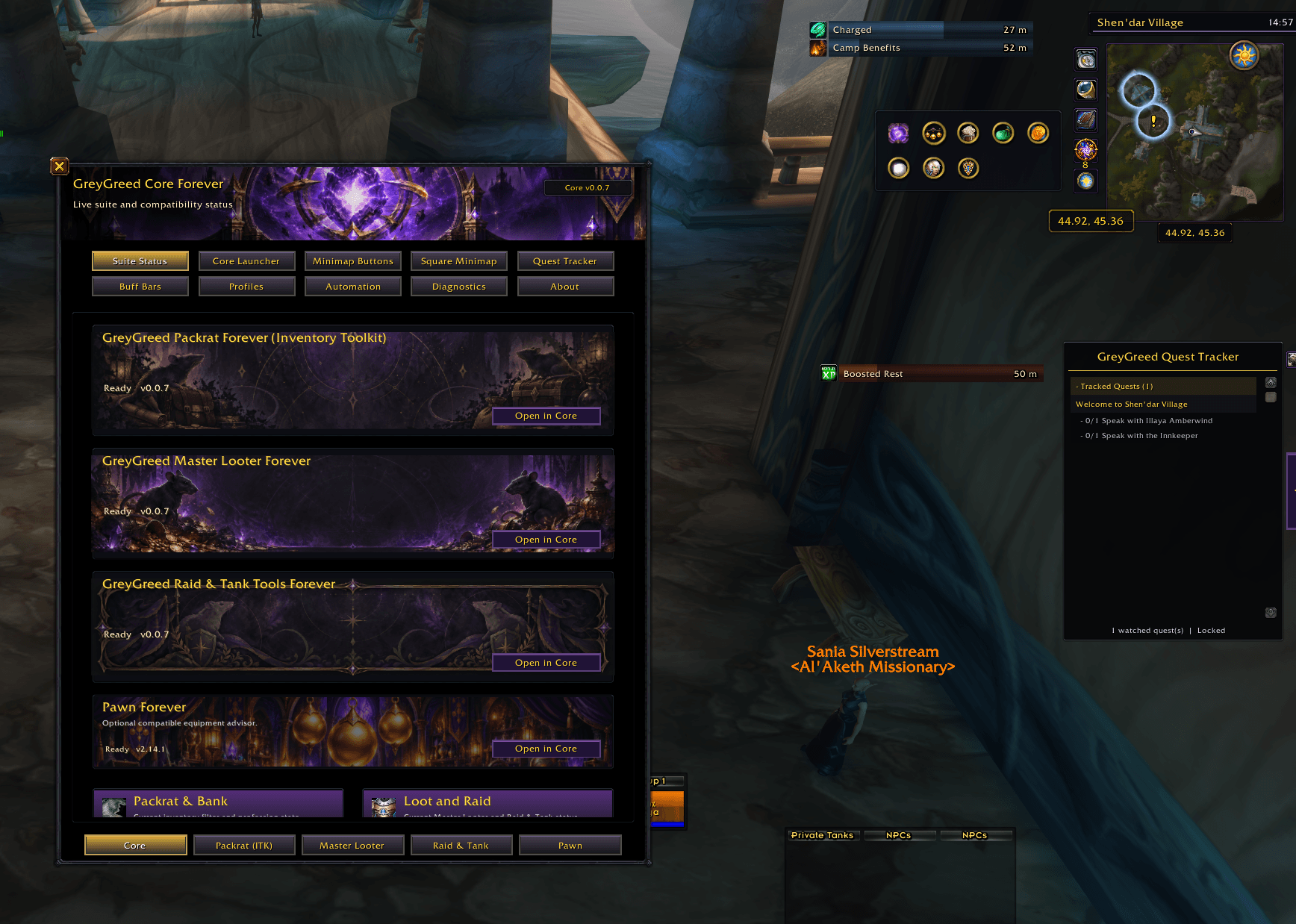
⚙️ GreyGreed Core — Included With Your Download!
Every GreyGreed companion edition includes the shared Core foundation.
Core is already included with Raid & Tank Tools Forever. You don't need to download it separately!
Core provides shared settings, profiles, and several additional quality-of-life utilities.
One Central Settings Window
Manage your installed GreyGreed modules from one convenient interface.
-
Navigate between installed GreyGreed components
-
Adjust shared settings
-
Customize individual modules
-
Review component availability
-
Manage saved settings and profiles
-
Access optional integrations
No need to hunt through unrelated menus to find your favorite options.
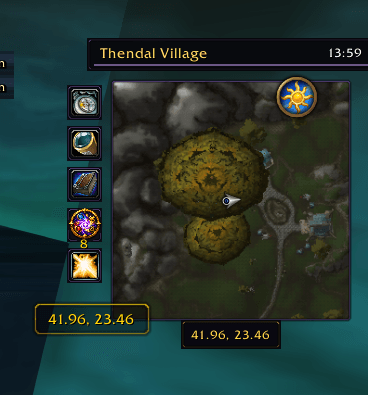
Customizable Square Minimap
Give your minimap a fresh look while keeping its familiar functionality.
Square Minimap features include:
-
Optional square minimap appearance
-
Adjustable size and position
-
Multiple decorative frame choices
-
Configurable utility-button rail
-
Convenient calendar, tracking, mail, and queue controls
-
Day/night indicator integration
-
Position locking
-
Customizable clock display
Minimap Button Collector
Tired of add-on buttons scattered around your minimap?
GreyGreed Core includes a Minimap Button Collector that organizes compatible add-on buttons into an expandable tray.
Customize its position, direction, arrangement, and closing behavior.
Enjoy a cleaner interface without losing access to your favorite add-ons.
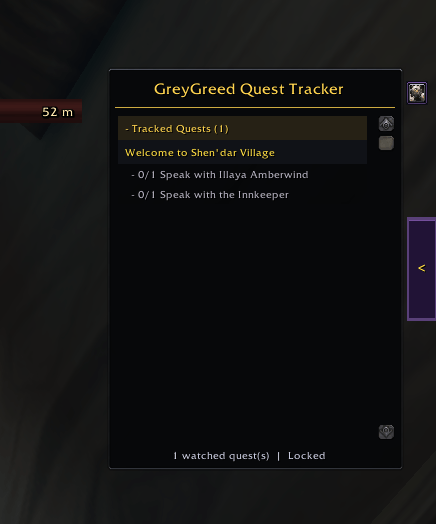
Optional GreyGreed Quest Tracker
Want more control over your quest-tracking interface?
Core includes an optional customizable Quest Tracker.
Features include:
-
Movable and resizable quest tracking
-
Quest difficulty coloring
-
Optional quest-level display
-
Quest sorting and current-zone filtering
-
Expandable quest sections
-
Adjustable background appearance and opacity
-
Optional collapsible, edge-docking launcher
Use GreyGreed's tracker or keep Blizzard's default tracker.
Custom Buff & Debuff Bars
Core includes configurable buff and debuff bars with adjustable appearance, positioning, and duration displays.
Arrange them to match your preferred interface.
Everyday Quality-of-Life Features
Core also includes several useful conveniences.
Automatic Equipment Repair: Repair damaged equipment when visiting a repair vendor, with optional guild repair-fund support when permitted.
Simplified Item Deletion: Skip typing DELETE into supported confirmation dialogs while retaining manual confirmation.
Shared Profiles: Save, manage, and restore configurations for different characters and playstyles.
Optional Pawn Integration: Access compatible Pawn features through GreyGreed's interface when Pawn is installed.
🎮 Designed for Tanks, Healers, and Raid Leaders
GreyGreed recognizes that every player approaches group content differently.
Some players want a full dashboard with tank markers, pings, ready checks, and callouts.
Others want a smaller set of tools that stays out of the way until needed.
Healers may prefer quick access to assignments and readiness information, while raid leaders may focus on consumables, group checks, and communication.
GreyGreed lets you customize the experience around your role.
Use the features you need, arrange your interface the way you prefer, and enjoy having useful group-management tools in one place.
📦 What's Included?
This download contains two complete, integrated add-ons.
GreyGreed Raid & Tank Tools Forever
Includes:
-
Tank and Raid Management dashboards
-
Integrated Heal Tools dashboard
-
Main Tank and Off Tank marking
-
Optional Persistent Tank Marks
-
Ready checks and pull timers
-
Raid Buff Check
-
Consumables Check
-
Role Check
-
Target and world markers
-
Group ping controls
-
Customizable raid and healer callouts
-
Healer readiness and mana checks
-
Healing assignments and coverage reports
-
Healer Quick Slots
-
Personal and compatible group armor checks
-
Range Tools
-
Optional Cursor Beacon
GreyGreed Core Forever
Includes:
-
Centralized GreyGreed settings
-
Shared profiles and configuration management
-
Customizable Square Minimap
-
Minimap Button Collector
-
Optional Quest Tracker
-
Custom buff and debuff bars
-
Automatic equipment repair
-
Simplified item deletion confirmation
-
Optional Pawn integration
Both components are included in this edition.
GreyGreed Packrat Forever and GreyGreed Master Looter Forever are separate companion products and are not included in this download.
🚀 Getting Started
-
Install GreyGreed Raid & Tank Tools Forever + Core.
-
Enable both GreyGreed Core Forever and GreyGreed Raid & Tank Tools Forever in your AddOns list.
-
Enter the game.
-
Type
/ggcoreto open the shared settings interface. -
Select Raid & Tank Tools to explore the available features.
-
Configure the dashboards, tank markers, group checks, raid callouts, and appearance settings.
Recommended First Steps
Start by reviewing your dashboard visibility and tank-marker preferences.
Next, explore the Raid Management tab for Ready Checks, Pull Timers, Buff Checks, and Consumables Checks.
If you play a healer, open the integrated Heal Tools dashboard and configure your healing assignments, callouts, and Quick Slots.
Finally, customize GreyGreed Core's minimap and shared interface features to suit your playstyle.
Optional Add-on Compatibility
GreyGreed works alongside supported raid tools and game functionality.
Compatible DBM or BigWigs installations can be used for certain pull-countdown functions.
Pawn is optional and is not required for the Tank, Raid Management, or Heal Tools dashboards.
Some group information, inspection results, communication actions, and marker controls depend on game API availability, group permissions, and combat restrictions.
Compatibility
Game: World of Warcraft Forever (Camelot)
Supported interface: 16001
Version: 1.0.0
This edition is designed for the Forever client, not the separate modern World of Warcraft Retail client.
GreyGreed uses Blizzard-supported actions and respects combat restrictions. It does not automatically cast spells, make combat decisions for players, or bypass Blizzard's protected-action requirements.
❤️ Enjoy Your Adventures!
GreyGreed Raid & Tank Tools Forever was created to make group content easier to organize, easier to coordinate, and more enjoyable.
Whether you're leading a raid, protecting your group as a tank, keeping everyone alive as a healer, or simply helping prepare for the next encounter, GreyGreed gives you convenient tools without taking away the familiar World of Warcraft experience.
Less time managing menus. Better group coordination. More time enjoying Azeroth!
Thank you for choosing GreyGreed Raid & Tank Tools Forever!
Created by Sashaielle — Steamweedle Cartel
Part of the GreyGreed Forever Suite
GreyGreed Tank & Raid Tools Forever Team