GreyGreed Master Looter
- By
Take control of your loot with smart auto rules, player loot requests, loot history, and convenient vendor tools.
Screenshot 2026-05-17 155759.png
Screenshot 2026-05-19 204611.png
Screenshot 2026-11-07 174829.png
Screenshot 2026-11-07 174818.png
Screenshot 2026-11-07 174811.png
Description
GreyGreed Master Looter
Intelligent Loot Management + GreyGreed Core
Smarter looting. Better gear opportunities. Automated junk selling. Powerful interface tools.
Tired of missing potential gear upgrades, manually sorting through unwanted loot, or constantly managing your inventory after every dungeon?
GreyGreed Master Looter is a customizable looting and item-management addon for World of Warcraft Retail, designed to make collecting, tracking, and managing loot easier.
Whether you're running Mythic+ dungeons, raiding, farming older content, or simply exploring Azeroth, Master Looter provides practical tools to help you manage loot more efficiently.
GreyGreed Core is included! Your installation also provides Core's Square Minimap, Rat Radar, Buff Bars, Minimap Button Collector, customizable Quest Tracker, and other interface enhancements.
One installation. Two powerful addons. More control over your loot and your interface.
💰 GREYGREED MASTER LOOTER FEATURES
🎒 Intelligent Auto-Loot Management
Collect the loot you want without unnecessary hassle.
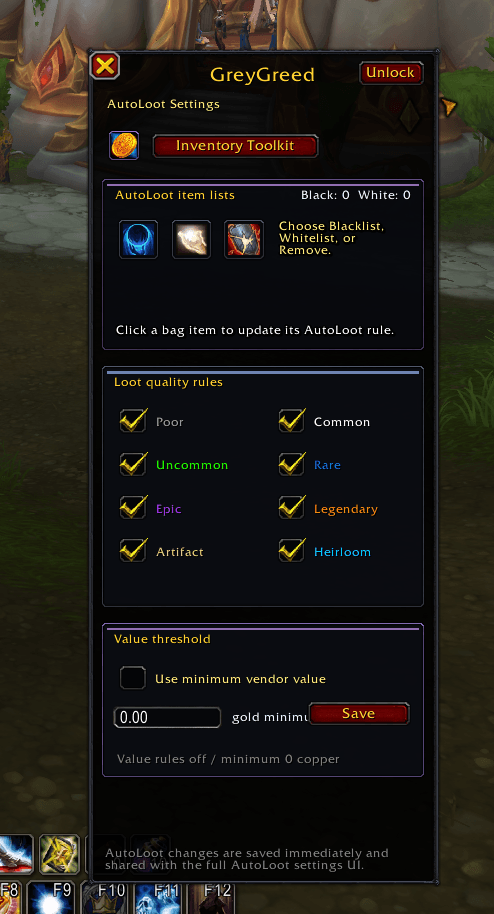
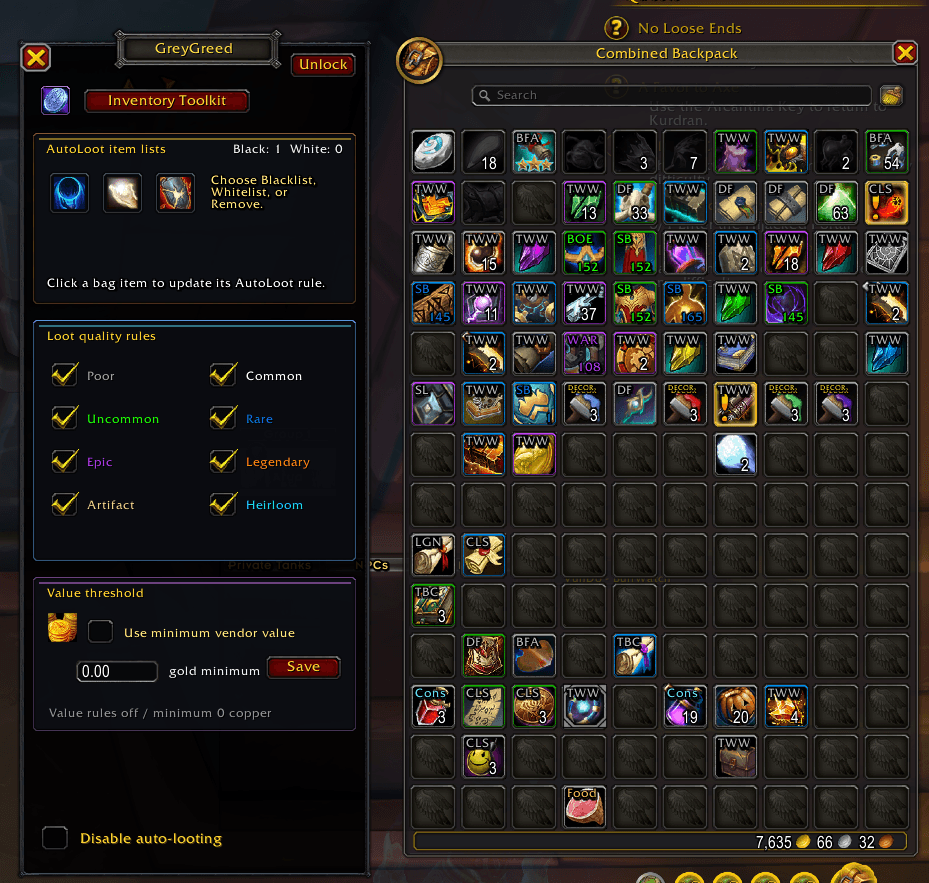
GreyGreed Master Looter enhances traditional looting with configurable rules that give you greater control over eligible items.
Features include:
-
Customizable Auto-Loot – Configure how supported loot is handled.
-
Loot Rules – Establish preferences for items you want to collect or exclude.
-
Item Quality Awareness – Apply supported loot rules based on item rarity.
-
Personalized Item Lists – Use lists to help control how specific items are handled.
-
Group-Aware Behavior – Respect supported group-looting restrictions and conditions.
-
Blizzard Auto-Loot Compatibility – Preserve normal Blizzard Auto Loot functionality when GreyGreed's custom looting is disabled, paused, or unavailable.
-
Optional Automation – Enable or disable supported automation features according to your preferences.
Whether you're farming materials, collecting gear, or running dungeons, Master Looter helps streamline routine looting.
🏆 Group Loot Advisor – Find Potential Upgrades
That item someone else just looted might be an upgrade for you!
One of Master Looter's most useful features is its Group Loot Advisor, designed to help identify potentially useful equipment obtained by other players during dungeon and raid encounters.
Instead of trying to monitor every loot message yourself, Master Looter can track supported group loot events and evaluate whether an item may be useful to your character.
Features include:
-
Group Loot Tracking – Monitor supported loot obtained by dungeon and raid group members.
-
Potential Upgrade Detection – Identify items that may improve your equipped gear.
-
Equipment Comparison – Compare relevant item levels against your current equipment.
-
Class & Equipment Suitability – Consider whether your class can use the item.
-
Specialization Awareness – Apply supported specialization and stat suitability checks.
-
Item Quality Filtering – Set a minimum rarity for tracked loot.
-
Optional Pawn Integration – Use supported Pawn upgrade opinions when Pawn is installed.
-
Recipient Identification – See which group member received an item.
-
Loot Opportunity List – Review recently detected group loot opportunities.
Master Looter helps bring potentially useful loot to your attention without requiring you to constantly watch the chat window.
Upgrade recommendations depend on available game and item information. An identified opportunity does not guarantee the item is tradable or that another player will offer it.
💬 Loot Requests – Ask for Gear Easily
See something useful? Ask for it without typing everything manually.
Master Looter includes a dedicated Loot Request system to make contacting group members about eligible gear more convenient.
When a potential loot opportunity is detected, an optional on-screen popup can bring it to your attention.
Features include:
-
Loot Request Popups – Display supported opportunities as they are detected.
-
Item Information – View the item icon and linked item details.
-
Player Identification – See who received the item.
-
Potential Upgrade Information – Understand why an item may be useful.
-
Ask Button – Send a request with a direct player action.
-
Customizable Whisper Message – Personalize the text used when requesting an item.
-
Item Link Insertion – Include the relevant item in your request.
-
Configurable Quality Thresholds – Choose which item rarities are worth tracking.
-
Dismiss Controls – Close individual requests or clear the visible popup.
-
Duplicate-Request Protection – Reduce repeated messages about the same loot opportunity.
The Loot Request system is designed to make asking for gear convenient while avoiding unnecessary group-chat spam.
🤝 Optional Automatic Loot Requests
Let GreyGreed help identify and request useful gear.
For players who prefer additional automation, Master Looter offers an optional automatic whisper feature.
When enabled, eligible group loot opportunities can trigger a request using your configured message.
Features include:
-
Opt-in automatic request messaging.
-
Configurable minimum item rarity.
-
Equipment and upgrade suitability checks.
-
Safeguards for unknown item information.
-
Duplicate-message protection.
-
Message cooldowns.
-
Additional controls for determining when a request is appropriate.
-
Independent control of tracking and automatic messaging.
Automatic whispers are disabled by default. Players can use the Loot Request interface without enabling automatic messaging.
Master Looter respects supported combat and communication restrictions and does not automatically transfer, award, or trade another player's loot.
📋 Loot History & Tracking
Keep track of what you've collected and what you've missed.
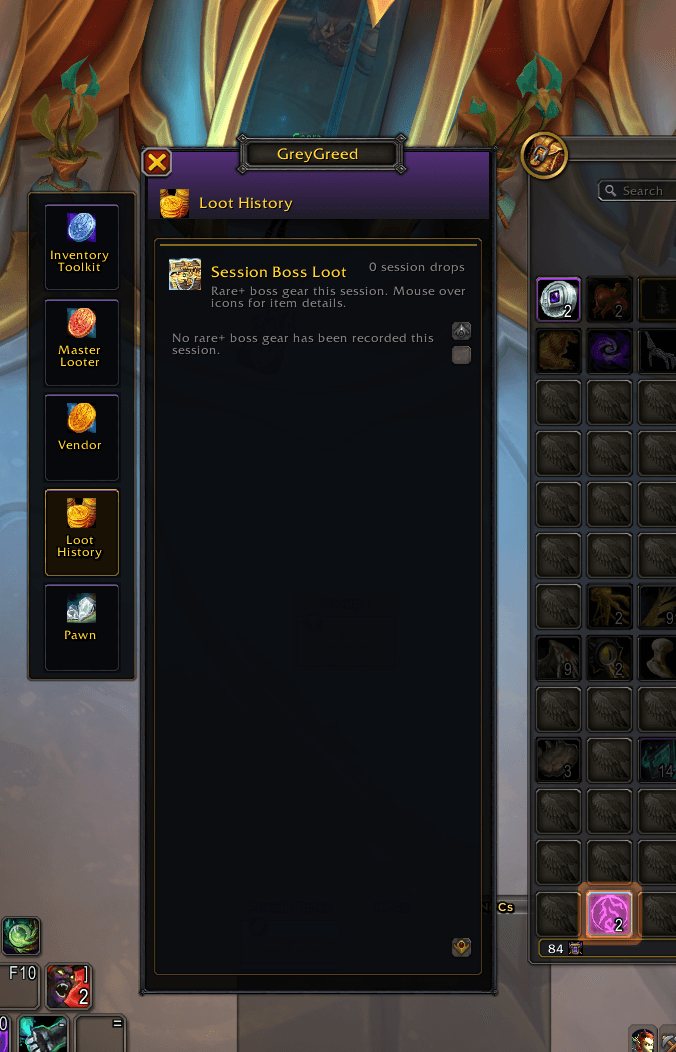
Master Looter provides loot-history tools to help players review supported item acquisitions and loot activity.
Features include:
-
Recent Loot History – Review recorded loot activity.
-
Collected Item Tracking – See items acquired during supported gameplay.
-
Loot Information – Review recorded item details and associated loot information.
-
Boss Loot Tracking – Review supported boss-related loot records.
-
Currency Information – Access supported recorded currency activity.
-
Group Loot Opportunities – Review tracked opportunities during the current supported dungeon or raid session.
-
Convenient History Interface – Access relevant information through Master Looter's settings and history pages.
Useful for farming sessions, dungeon runs, and players who like keeping track of their loot.
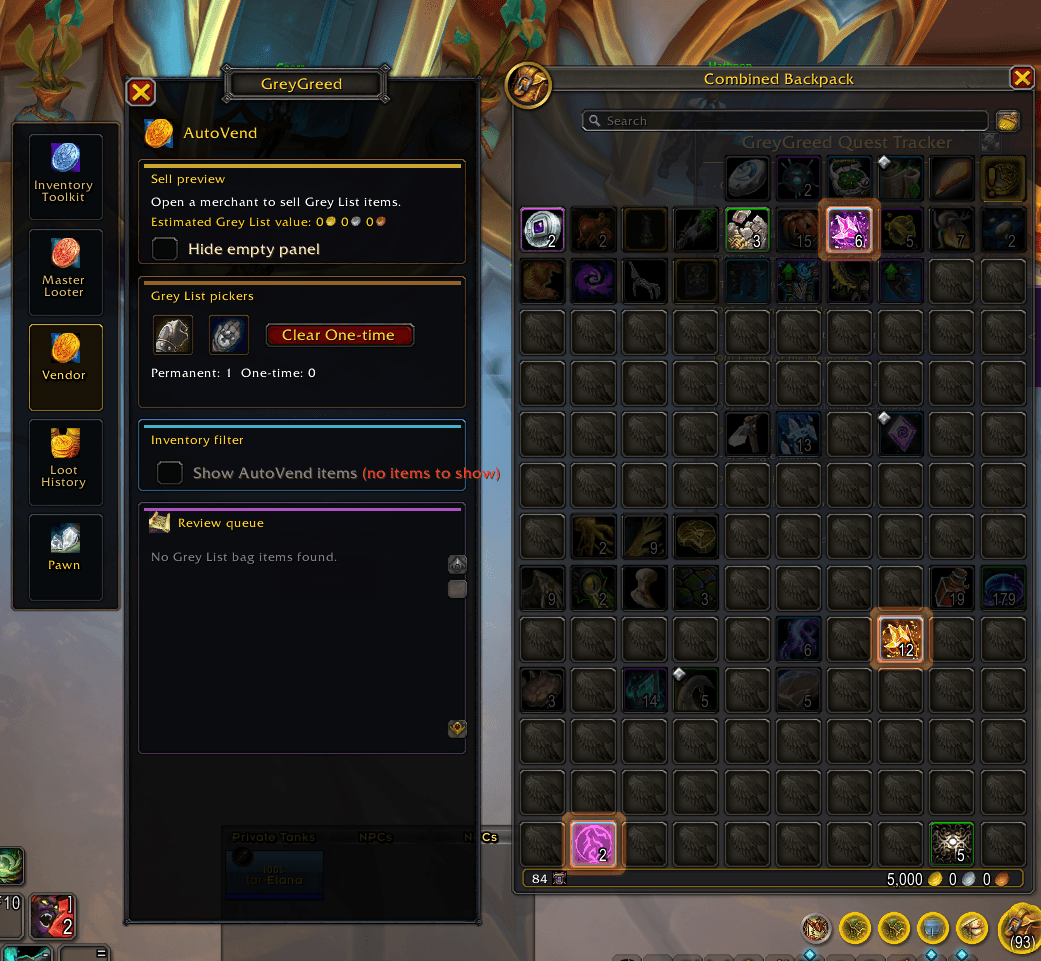
🛒 AutoVend – Simplify Vendor Visits
Turn unwanted junk into gold without sorting every bag slot.
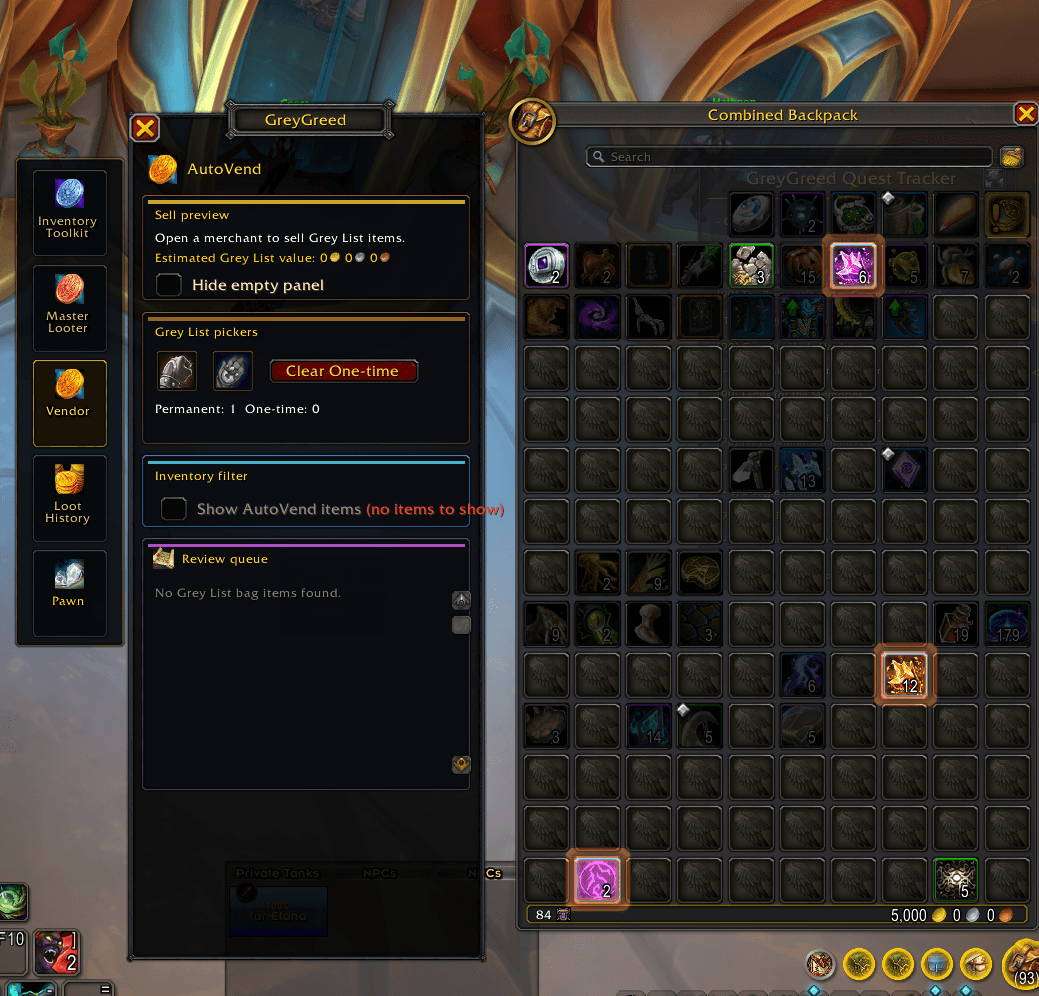
Master Looter includes AutoVend tools designed to simplify selling eligible unwanted items when visiting merchants.
Features include:
-
Automatic Grey-Junk Selling – Sell eligible poor-quality vendor trash at merchants.
-
Customizable Grey Lists – Manage supported items designated for selling.
-
Vendor Preview – Review eligible items and estimated selling value.
-
Protected Item Handling – Exclude supported protected, locked, quest-related, or otherwise ineligible items.
-
Customizable Selling Preferences – Control supported merchant automation.
-
Inventory Integration – Access AutoVend-related tools from supported inventory views.
Spend less time clearing out bags after farming and more time adventuring.
📃 Grey Lists, Blacklists & Whitelists
You decide what happens to your loot.
Master Looter provides configurable item lists for more precise control over loot and vendor behavior.
Features include:
-
Grey Lists – Designate supported items for selling workflows.
-
Blacklists – Exclude selected items from applicable automated actions.
-
Whitelists – Identify items that should be treated according to your preferred allow/protection rules.
-
Item-Specific Controls – Manage supported list entries by item identity.
-
Persistent Preferences – Keep your selected item rules between gameplay sessions.
-
Vendor Rule Integration – Use list preferences with supported selling features.
These tools help make sure your automated settings reflect what you actually want to keep, collect, or sell.
🧹 Optional Bag Cleanup
Get rid of unwanted grey junk when you're away from a merchant.
Master Looter includes an optional Bag Cleanup tool for players who want to remove eligible low-value grey-quality items manually.
Features include:
-
Optional Cleanup Mode – Enable the feature only when you want it.
-
Grey-Quality Item Detection – Identify eligible poor-quality items.
-
Manual Delete Action – Select the next eligible grey-item stack for deletion with a player click.
-
Item Protection – Exclude supported quest items, listed items, and other ineligible inventory contents.
-
One Stack at a Time – Maintain control over each deletion.
-
Merchant & Combat Safeguards – Restrict cleanup when the action isn't appropriate.
Bag Cleanup is designed as a deliberate, player-controlled tool rather than unattended item deletion.
Deletion is subject to Blizzard's protected-action rules and any applicable confirmation prompts.
🔔 Loot Alerts & Notifications
Keep useful loot information visible.
Master Looter includes configurable alerts and notifications that help keep players informed about relevant loot activity.
Depending on your enabled features, Master Looter can provide information about supported loot events, requests, and other useful item-management activity.
Features include:
-
Configurable alert preferences.
-
Loot opportunity notifications.
-
Loot Request popup controls.
-
Relevant item and recipient information.
-
Notification and warning preferences.
Customize supported notifications so they provide useful information without unnecessarily distracting from gameplay.
👤 Personalized Settings & Profiles
Make Master Looter work the way you play.
Different characters and different activities often require different loot-management preferences.
Master Looter supports saved settings and configurable profiles.
Features include:
-
Configurable loot rules.
-
Saved item-list preferences.
-
Loot Request settings.
-
Automatic whisper preferences.
-
AutoVend and Bag Cleanup options.
-
Profile-based configuration.
-
Persistent settings between gameplay sessions.
Fine-tune your configuration for dungeon runs, raiding, farming, or everyday adventuring.
⚙️ GREYGREED CORE – INCLUDED WITH MASTER LOOTER
Every GreyGreed Master Looter Retail package includes GreyGreed Core!
Along with Master Looter's loot-management tools, you'll receive Core's interface customization features and shared GreyGreed settings.
🗺️ Square Minimap
A cleaner, more modern minimap.
Replace Blizzard's traditional circular minimap with an optional square design.
Features include:
-
Optional Square Minimap.
-
Switch between square and circular layouts.
-
Preserve familiar Blizzard minimap functionality.
-
Supported minimap button positioning.
-
Clean, minimalist appearance.
-
Reversible minimap customization.
Enjoy a more organized map without replacing the entire Blizzard minimap system.
🐀 Rat Radar – Mouse Cursor Locator
Never lose your mouse cursor during a chaotic encounter again!
When spell effects fill your screen, even experienced players can lose track of their cursor.
Rat Radar provides visual tools to help you locate it quickly.
Features include:
-
Customizable cursor highlighting.
-
Animated pulse locator.
-
Multiple pulse color options.
-
Adjustable pulse size and opacity.
-
Optional cursor trail.
-
Mouse-shake activation.
-
Configurable activation keybinding.
-
Enable and disable controls.
Especially useful for healers, tanks, raiders, and players using mouseover abilities.
✨ Custom Buff Bars
Track buffs and debuffs without filling your screen with icons.
GreyGreed Core includes customizable Buff Bars designed to make active effects easier to monitor.
Features include:
-
Beneficial buff tracking.
-
Harmful debuff tracking.
-
Visual duration bars.
-
Readable spell names.
-
Countdown timers.
-
Stack counters.
-
Permanent buff support.
-
Combined or separate buff/debuff displays.
-
Supported combat-aware aura updates.
-
Right-click cancellation of removable buffs where Blizzard permits it.
-
Optional display and positioning controls.
Keep important effects visible and monitor remaining durations at a glance.
🧩 Minimap Button Collector
All your addon buttons. One convenient location.
Stop letting dozens of addon buttons crowd your minimap.
GreyGreed's Minimap Button Collector organizes compatible launchers into a convenient expandable menu.
Features include:
-
Automatic collection of supported minimap buttons.
-
Expandable flyout menu.
-
Four expansion directions: left, right, above, and below.
-
Movable collector launcher.
-
Button exclusions.
-
Refresh Button Discovery.
-
Find Launcher utility.
-
Preserved original button click actions and tooltips.
-
Reversible button collection.
Compatibility depends on how third-party addons implement their buttons. GreyGreed avoids competing with MinimapButtonButton (MBB).
📜 Enhanced Quest Tracker
Keep track of your adventures without unnecessary screen clutter.
GreyGreed Core includes an enhanced quest-tracking interface with customizable positioning and display options.
Features include:
-
Movable quest tracker.
-
Docking and positioning controls.
-
Collapsible quest sections.
-
Quest level identification.
-
Difficulty-based quest title colors.
-
Clear objective progress.
-
Completed objective indicators.
-
Quest completion status.
-
Optional Blizzard tracker replacement.
Keep your active quests accessible and organized as you explore Azeroth.
🔧 Merchant Repairs & Repair History
Take some of the hassle out of equipment maintenance.
GreyGreed Core includes supported merchant-repair utilities and repair tracking.
Features include:
-
Configurable automatic equipment repair.
-
Repair cost tracking.
-
Repair history information.
-
Convenient merchant-related settings.
Keep track of repair expenses after dungeon runs, raids, and other adventures.
⚙️ Unified GreyGreed Settings
One interface for your GreyGreed tools.
GreyGreed Core provides the shared settings and navigation system for the GreyGreed Suite.
Features include:
-
Centralized configuration window.
-
Organized settings categories.
-
Suite Status overview.
-
Convenient navigation between installed GreyGreed components.
-
Saved settings and preferences.
-
Optional saved-settings snapshots.
-
Companion addon detection.
-
Optional Pawn integration when Pawn is installed.
Spend less time navigating unrelated addon menus and more time enjoying the game.
🔗 PART OF THE GREYGREED SUITE
GreyGreed Master Looter is part of a collection of optional World of Warcraft gameplay enhancements.
⚙️ GreyGreed Core
Minimap customization, Buff Bars, Rat Radar, Quest Tracker, Minimap Button Collector, repair utilities, and shared settings.
Included with Master Looter.
📦 GreyGreed Packrat
Advanced inventory and bank organization.
-
Inventory filtering and item highlighting.
-
Item labels and equipment identification.
-
Profession material organization.
-
Personal and Warband Bank tools.
-
Consumable highlighting and Raid Mode.
Optional companion addon. Not included in Master Looter.
🛡️ GreyGreed Raid & Tank Tools
Additional utilities for group content.
-
Tank and healer management.
-
Raid markers and pings.
-
Group readiness tools.
-
Buff and consumable checks.
-
Armor status information.
-
Customizable group dashboards.
Optional companion addon.
⭐ WHY CHOOSE GREYGREED MASTER LOOTER?
Loot smarter, manage your inventory more efficiently, and take control of your interface.
✔ Customize supported auto-loot behavior.
✔ Discover potential equipment upgrades from group loot.
✔ Request useful gear through convenient popups.
✔ Personalize loot request whispers.
✔ Track supported loot and acquisition history.
✔ Sell eligible junk automatically at merchants.
✔ Organize item rules with Grey Lists, Blacklists, and Whitelists.
✔ Clean up unwanted grey items with optional manual controls.
✔ Save your preferred loot and vendor settings.
✔ Enjoy the Square Minimap, Rat Radar, Buff Bars, Quest Tracker, and Minimap Button Collector through the included GreyGreed Core.
Two powerful addons in one convenient package.
📥 INSTALLATION & COMPATIBILITY
Designed for World of Warcraft Retail.
This GreyGreed Master Looter package includes:
-
GreyGreed Master Looter – Loot Management & Group Loot Utilities
-
GreyGreed Core – Interface & Customization
Install the package through a supported addon manager or manually extract the included addon folders into your World of Warcraft Retail Interface/AddOns directory.
Open GreyGreed Core through its minimap launcher or the /ggcore command to access your available settings.
Important: GreyGreed Core is already included. Players installing multiple GreyGreed companion packages should use matching versions and avoid conflicting installations of the same Core folder.
Note: Master Looter enhances supported looting, group loot tracking, and item-management workflows. It does not bypass Blizzard's loot-trading rules, automatically award other players' loot, or override protected group-roll decisions.
💰 LOOT SMARTER. PLAY BETTER.
Stop wasting time sorting unwanted items, searching loot messages, and digging through cluttered addon menus.
Whether you're a dungeon runner, raider, collector, or dedicated gold farmer, GreyGreed Master Looter gives you tools to make your adventures more convenient.
Smarter looting. Better organization. More control.
GreyGreed Master Looter + GreyGreed Core
Everything you need to manage your loot and customize your interface.
GreyGreed Master Looter Team