GreyGreed Packrat ITK
- By
Priority-based inventory item labels that instantly tell you what matters at a glance— BOE, Soulbound, Warbound, old expansions, profession items and more. Bank, sell, and repair automations.
Screenshot 2026-11-07 173840.png
Screenshot 2026-11-07 173829.png
Screenshot 2026-11-07 173808.png
Screenshot 2026-11-07 173756.png
Screenshot 2026-11-06 135827.png
Description
GreyGreed Packrat
Advanced Inventory Management + GreyGreed Core
Smarter bags. Organized banks. Powerful item highlighting. A cleaner interface.
Tired of searching through cluttered bags, struggling to find crafting materials, or sorting through hundreds of items every time you visit the bank?
GreyGreed Packrat is an advanced inventory and bank management addon for World of Warcraft Retail, designed to help you find, identify, organize, and manage your items more efficiently.
Packrat goes beyond basic inventory organization with powerful filtering, customizable item labels, highlighting, bank tools, equipment information, and convenient everyday utilities.
Best of all, GreyGreed Core is included! Every Packrat installation also provides Core's interface enhancements, including the Square Minimap, Rat Radar, Minimap Button Collector, Quest Tracker, and more.
One installation. Two powerful addons. A more organized World of Warcraft experience.
📦 GREYGREED PACKRAT FEATURES
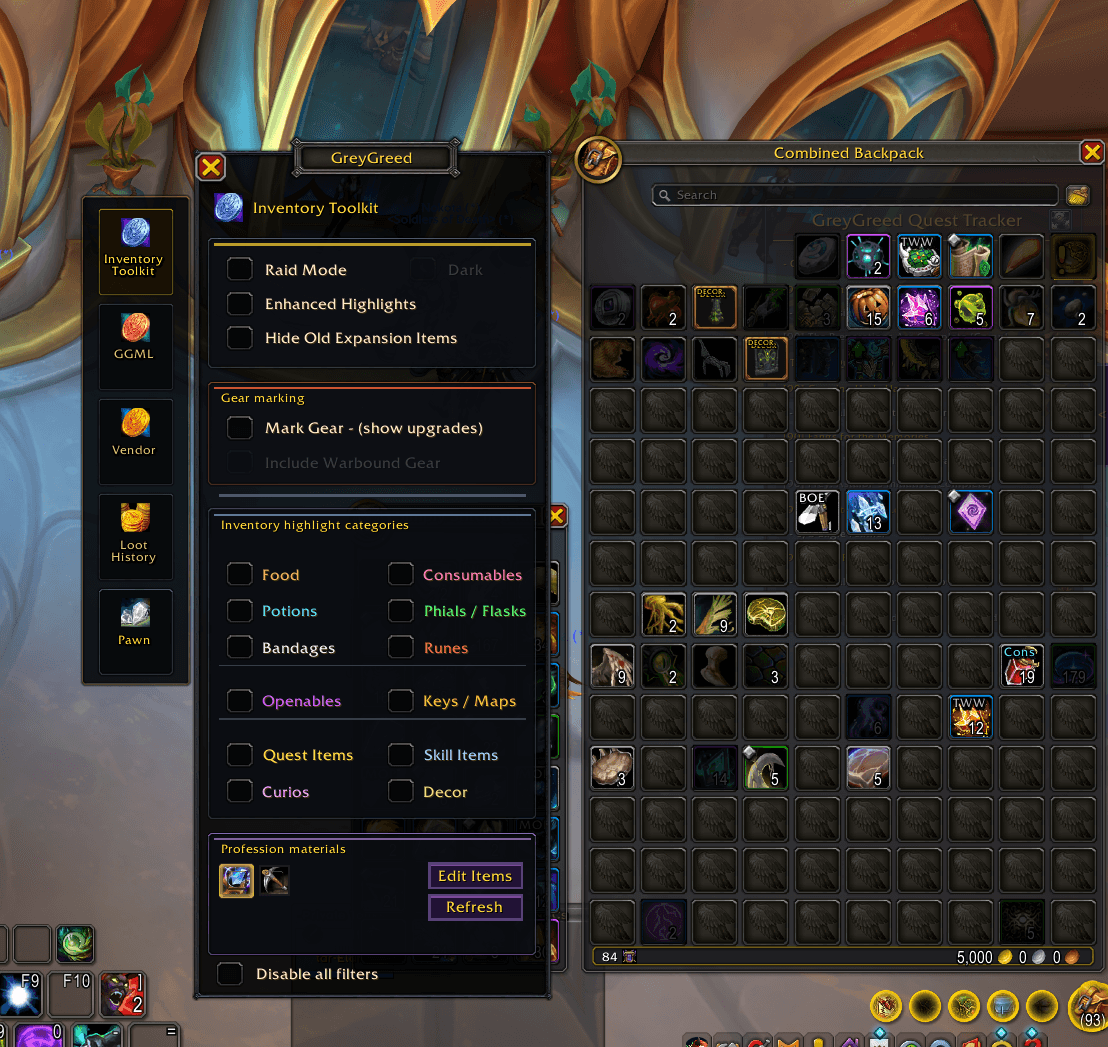
🎒 Advanced Inventory Filtering
Find what you need without digging through your bags.
Packrat makes it easier to identify specific types of items by highlighting the items you want to find and reducing the visual clutter around them.
Features include:
-
Profession Materials – Quickly identify crafting and gathering materials.
-
Consumables – Highlight useful potions, food, flasks, phials, runes, and other consumable items.
-
Equipment & Gear – Easily locate weapons, armor, and other equipment.
-
Quest Items – Identify items associated with your current adventures.
-
Item Quality Filtering – Use item quality information to distinguish valuable equipment and materials.
-
Expansion Identification – Recognize items associated with different World of Warcraft expansions.
-
Selective Highlighting – Choose which item categories receive visual emphasis.
-
Darkened Nonmatching Items – Reduce distractions by dimming items that don't match your selected filters.
Instead of manually examining every slot, Packrat helps the items you're looking for stand out.
✨ Enhanced Item Highlighting
Important items should be easy to spot.
Packrat provides visual item highlighting that helps distinguish useful items from the rest of your inventory.
Features include:
-
Enhanced Highlights – Make matching items more visually noticeable.
-
Customizable Item Categories – Decide which types of items receive highlighting.
-
Dark Mode Filtering – Dim unrelated inventory items to emphasize matching items.
-
Quality-Aware Presentation – Preserve useful item-quality information.
-
Flexible Display Options – Combine highlighting with item labels and other filtering features.
-
Instant Filter Changes – Adjust highlighted categories as your needs change.
Whether you're sorting crafting materials, preparing for a raid, or reviewing newly acquired gear, Packrat makes inventory management easier.
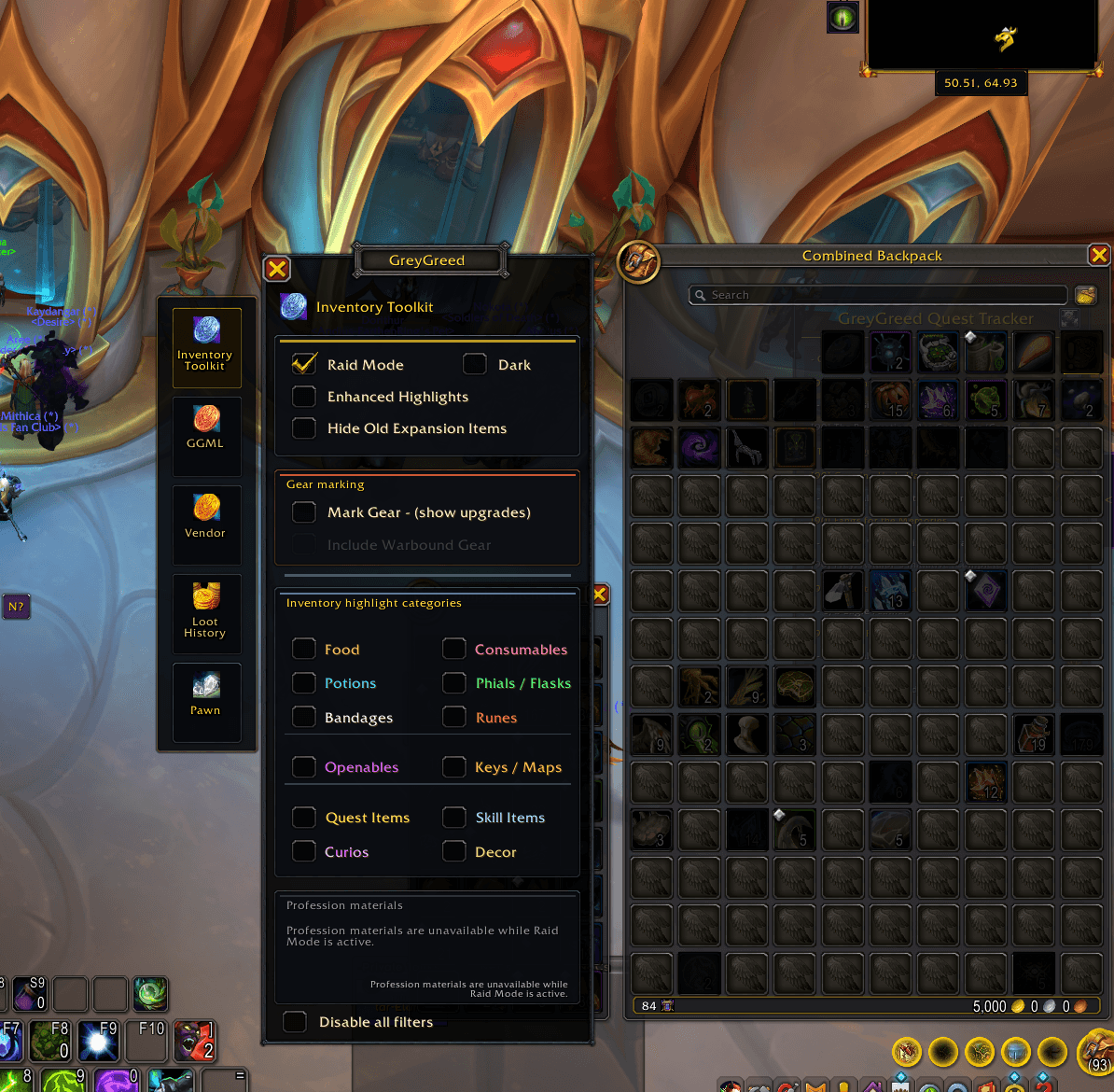
🛡️ Raid Mode – Find Your Raid Essentials
Stop searching your bags for that last-minute consumable.
Packrat includes a dedicated Raid Mode designed to help players focus on the supplies they need for group content.
Use your selected inventory categories to emphasize raid-related items while reducing distractions from other inventory contents.
Features include:
-
Highlight selected food and consumables.
-
Quickly locate potions, phials, runes, and other useful supplies.
-
Reduce the visibility of unrelated items.
-
Use enhanced highlighting to make selected supplies easier to recognize.
-
Customize which categories are emphasized.
-
Return to your normal inventory presentation when Raid Mode is disabled.
Raid Mode respects your selected filtering categories, giving you control over what is highlighted rather than forcing a fixed list of items.
Perfect for dungeon preparation, Mythic+, and raiding.
🏷️ Customizable Item Labels
Know what you're carrying at a glance.
Packrat can display helpful labels directly on inventory items, reducing the need to inspect individual tooltips.
Supported information includes:
-
BOE – Bind on Equip items.
-
SB – Soulbound items.
-
WAR – Warbound items.
-
QI – Quest-related items.
-
Decor – Housing and decoration items.
-
Old – Items associated with older expansions.
-
Item Level – Quickly identify equipment levels.
-
Expansion Tags – Identify expansion-related items.
-
Consumable Identification – Recognize selected food and consumable categories.
Additional customization includes:
-
Enable or disable individual label categories.
-
Adjust label display sizes.
-
Use quality-aware label colors.
-
Choose a simplified single-label presentation.
-
Combine labels with other inventory highlighting features.
Packrat helps turn a crowded collection of icons into useful, instantly recognizable information.
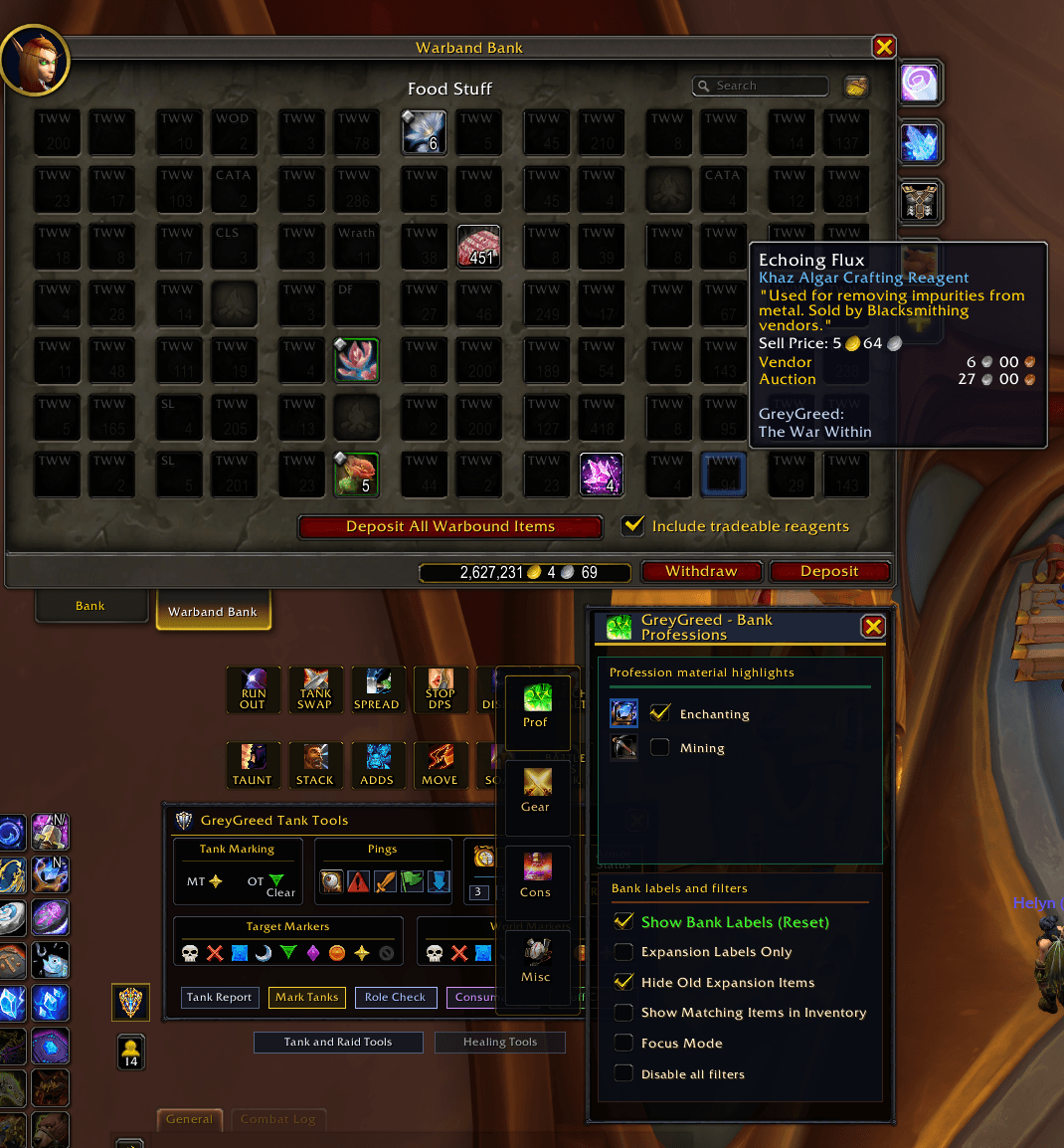
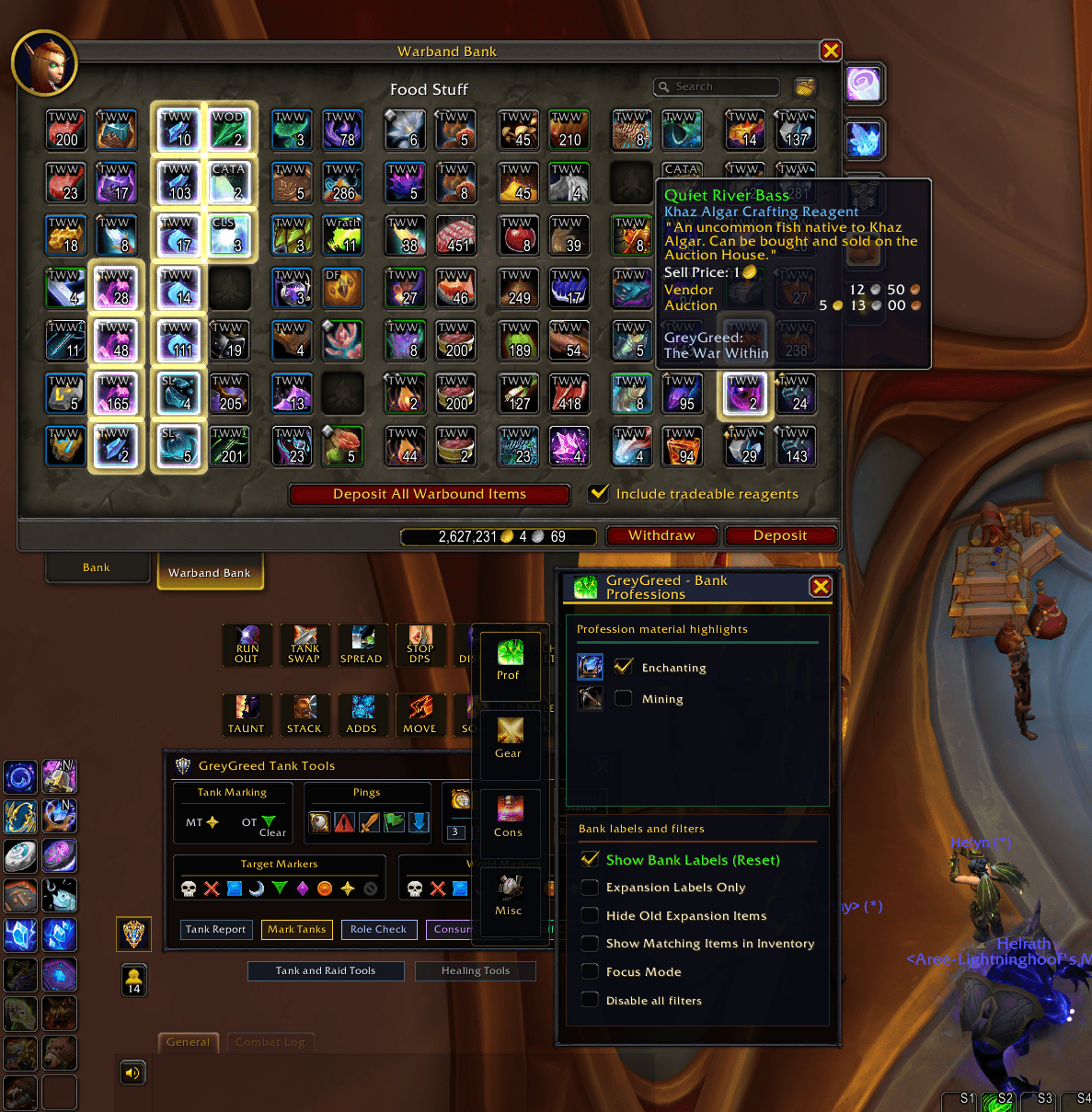
🏦 Advanced Bank Management
Your bank should be organized, not overwhelming.
Packrat extends its filtering and highlighting tools to supported bank interfaces, making it easier to locate stored items.
Features include:
-
Bank Item Filtering – Highlight selected categories of stored items.
-
Profession Materials – Find crafting resources without searching every bank tab.
-
Gear Filtering – Locate stored equipment more easily.
-
Consumable Filtering – Find food, potions, and other supplies.
-
Miscellaneous Item Filtering – Identify other useful stored items.
-
Personal Bank Support – Apply supported filters to your character bank.
-
Warband Bank Support – Work with supported account-wide Warband Bank storage.
-
Bank Item Labels – Display supported identification labels on stored items.
-
Expansion-Based Identification – Recognize items from older content.
-
Independent Bank Settings – Customize bank filtering separately from your normal inventory.
Packrat keeps bank and inventory filtering preferences separate, allowing you to organize stored items without changing how your everyday bags are displayed.
🔎 Inventory Focus & Visibility Tools
Make the items you want easier to see.
Packrat offers additional visibility controls to reduce inventory clutter.
Features include:
-
Highlight selected item categories.
-
Dim items that don't match active filters.
-
Focus attention on useful equipment and materials.
-
Identify older-expansion items.
-
Control optional item labels.
-
Combine filters with enhanced highlighting.
-
Quickly restore your normal inventory presentation.
These tools are especially useful for players with large inventories or characters carrying materials from multiple expansions.
🧰 Quick Slots & Everyday Utilities
Convenient tools for your daily adventures.
Packrat includes additional inventory utilities designed to make frequently used actions more accessible.
Features include:
-
Quick Slots – Convenient access to supported commonly used items.
-
Item Information – Additional identification details directly in your inventory.
-
Inventory Convenience Tools – Reduce repetitive steps when working with your items.
-
Configurable Preferences – Customize supported utility features for your playstyle.
Spend less time navigating menus and more time playing.
💰 Merchant, Repair & Gold Management
Simplify routine visits to merchants.
GreyGreed's included Core utility system provides tools for everyday vendor and equipment-maintenance tasks.
Features include:
-
Automatic Repair Options – Configure supported equipment-repair behavior at merchants.
-
Repair History – Review recorded repair costs.
-
Merchant Convenience – Reduce repetitive vendor interactions.
-
Saved Preferences – Keep your chosen settings between sessions.
Useful for players who regularly run dungeons, raids, or other content that requires frequent repairs.
👤 Customizable Profiles
Different characters. Different needs.
Your farming character probably doesn't need the same inventory setup as your raid tank or main crafting character.
Packrat supports configurable settings profiles, allowing you to maintain different inventory preferences.
Features include:
-
Global settings profiles.
-
Character-specific settings.
-
Shared profile options.
-
Saved item-label preferences.
-
Customizable filtering and highlighting settings.
-
Persistent preferences between gameplay sessions.
Configure your inventory tools to fit the way each character plays.
⚙️ GREYGREED CORE – INCLUDED WITH PACKRAT
Packrat includes GreyGreed Core, providing additional interface and quality-of-life features.
In addition to the inventory toolkit, your installation includes Core's interface customization and shared addon settings.
🗺️ Square Minimap
A cleaner minimap with a modern design.
Replace Blizzard's traditional round minimap with an optional square layout.
Features include:
-
Optional Square Minimap.
-
Switch between square and circular designs.
-
Preserve familiar Blizzard minimap controls.
-
Supported addon-button positioning.
-
Reversible customization without a complete minimap replacement.
Enjoy a cleaner minimap while keeping the features you're accustomed to using.
🐀 Rat Radar – Mouse Cursor Locator
Never lose your cursor during a chaotic encounter again!
Rat Radar makes your mouse pointer easier to find, especially during raids and dungeon encounters with heavy visual effects.
Features include:
-
Customizable cursor highlighting.
-
Animated cursor pulse.
-
Multiple pulse colors.
-
Adjustable pulse size and transparency.
-
Optional cursor trail.
-
Mouse-shake activation.
-
Custom keybinding.
-
Enable/disable controls.
Especially useful for healers, tanks, and players who rely on precise mouse positioning.
🧩 Minimap Button Collector
Take control of your minimap clutter.
Keep compatible third-party addon buttons organized in a convenient expandable collector.
Features include:
-
Automatic discovery of supported minimap buttons.
-
Expandable button collection.
-
Four expansion directions.
-
Movable collector launcher.
-
Button exclusions.
-
Refresh button discovery.
-
Find Launcher utility.
-
Original button click and tooltip functionality.
-
Restore collected buttons when the collector is disabled.
Keep your favorite addons accessible without covering your minimap in buttons.
Not all third-party addon buttons are compatible. The collector avoids conflicting with MinimapButtonButton (MBB).
📜 Enhanced Quest Tracker
Keep your quests organized and your objectives easy to follow.
GreyGreed Core includes a customizable quest-tracking interface for everyday adventuring.
Features include:
-
Movable quest tracker.
-
Docking and positioning options.
-
Expandable and collapsible tracking.
-
Quest level display.
-
Difficulty-based quest title identification.
-
Clear objective progress.
-
Completed quest and objective indicators.
-
Customizable quest-tracking preferences.
Follow your adventures without letting your quest list dominate your screen.
⚙️ Unified GreyGreed Settings
One convenient interface for your GreyGreed tools.
GreyGreed Core provides the shared configuration interface for supported GreyGreed components.
Features include:
-
Centralized settings window.
-
Organized addon categories.
-
Suite Status overview.
-
Direct navigation between installed GreyGreed components.
-
Saved customization preferences.
-
Optional Pawn integration when Pawn is installed.
-
Shared interface settings and navigation.
Configure Packrat and Core from one convenient location.
🔗 PART OF THE GREYGREED SUITE
GreyGreed Packrat is part of a growing family of World of Warcraft addons.
📦 GreyGreed Core
Interface customization, Square Minimap, Rat Radar, Minimap Button Collector, Quest Tracker, and shared settings.
Included with Packrat.
💰 GreyGreed Master Looter
Additional group loot tools, loot request management, configurable loot rules, and loot history.
Optional companion addon.
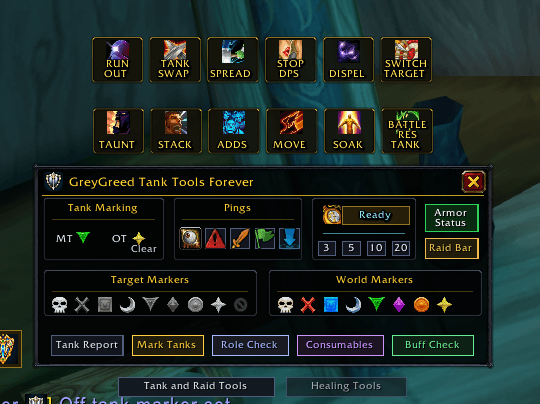
🛡️ GreyGreed Raid & Tank Tools
Group coordination tools for tanks, healers, and raid leaders, including raid markers, pings, readiness checks, and armor information.
Optional companion addon.
⭐ WHY CHOOSE GREYGREED PACKRAT?
Your inventory should be organized, your important items should stand out, and your interface should work for you.
✔ Find useful items faster with advanced inventory filtering.
✔ Organize your personal and Warband Banks.
✔ Identify BOE, Soulbound, Warbound, quest, and expansion items.
✔ Highlight crafting materials, consumables, equipment, and more.
✔ Prepare for raids with customizable Raid Mode.
✔ Reduce inventory clutter with Dark Mode and selective highlighting.
✔ Customize item labels and filtering preferences.
✔ Manage different characters with configurable profiles.
✔ Enjoy additional interface tools through the included GreyGreed Core.
✔ Customize your minimap, locate your cursor, and organize addon buttons.
Two powerful addons in one convenient package.
📥 INSTALLATION & COMPATIBILITY
Designed for World of Warcraft Retail.
The GreyGreed Packrat package includes both:
-
GreyGreed Packrat – Inventory Toolkit
-
GreyGreed Core – Interface & Customization
Install the package through a supported addon manager or manually extract the included addon folders into your World of Warcraft Retail Interface/AddOns directory.
Open GreyGreed Core using its minimap launcher or the /ggcore command to access your settings and available components.
Important: GreyGreed Core is included in the Packrat package. Players using multiple GreyGreed companion packages should ensure they are using matching versions and avoid conflicting installations of the same Core folder.
🐀 MAKE YOUR INVENTORY WORK FOR YOU!
Whether you're a dedicated raider, a professional crafter, a collector, an adventurer, or someone who just wants cleaner bags, GreyGreed Packrat provides powerful tools to make inventory management easier.
Less clutter. Smarter organization. Better gameplay.
GreyGreed Packrat + GreyGreed Core
Everything you need to take control of your inventory and customize your interface.
GreyGreed Packrat ITK Team