Greygreed Core Forever
- By
Enhance WoW Forever with a square minimap, quest tracker, buff bars, button collector, profiles, shared settings, and handy utilities.
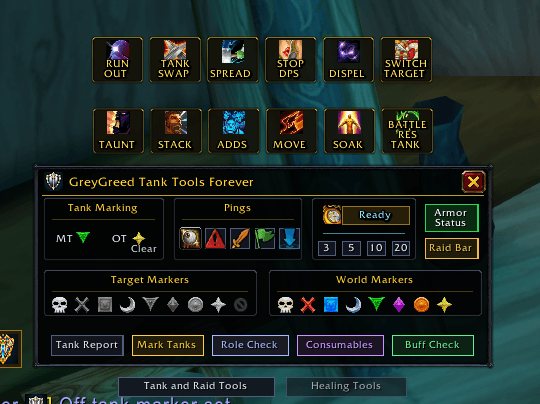
Screenshot 2026-11-06 135827.png
Screenshot 2026-11-06 135948.png
Screenshot 2026-11-06 145457.png
Screenshot 2026-11-06 145716.png
Screenshot 2026-11-06 145739.png
Description
GreyGreed Core Forever
Your interface. Your adventure. Your way!
Welcome to GreyGreed Core Forever, a customizable collection of interface enhancements and everyday quality-of-life tools designed specifically for World of Warcraft Forever (Camelot).
Want a cleaner minimap? A better way to organize add-on buttons? A customizable quest tracker? Convenient buff bars? Or simply a few helpful tools that make everyday adventuring easier?
GreyGreed Core brings all of these features together in one convenient add-on!
Whether you're questing, exploring, running dungeons, or just enjoying your time in Azeroth, Core helps you organize your interface without taking away the familiar World of Warcraft experience.
And the best part?
GreyGreed Core works completely on its own!
You don't need Packrat, Master Looter, or Raid & Tank Tools to enjoy Core's features.
Everything is configurable. Enable the tools you like, turn off the ones you don't, and create an interface that feels right for you.
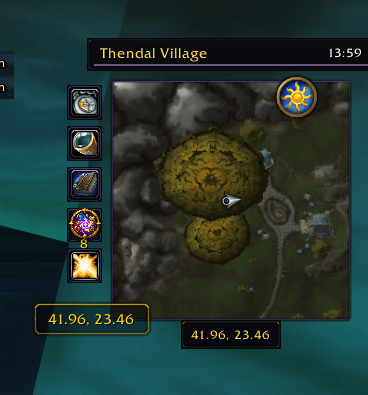
🗺️ Square Minimap — Give Your Minimap a Fresh Look!
Your minimap is one of the most frequently used parts of your interface.
GreyGreed's Square Minimap gives it a clean, customizable appearance while preserving familiar minimap functionality.
Customizable Appearance
-
Enable or disable the square minimap
-
Adjust the minimap's size
-
Move it to your preferred screen location
-
Lock its position to prevent accidental movement
-
Reset its size and location when needed
-
Choose from multiple decorative frame styles
Available frame styles include:
-
Plain — A clean, simple appearance
-
Blizzard Classic — A familiar Blizzard-inspired frame
-
GreyGreed Gold — Decorative gold styling
-
Arcane Purple — A magical purple-themed frame
Choose the style that best complements your interface.
Convenient Minimap Utility Rail
GreyGreed includes a configurable utility-button rail that keeps frequently used minimap features organized.
Available controls include:
-
Day / Night Indicator — View the current realm day/night indicator
-
Calendar — Convenient calendar access
-
Tracking — Access minimap tracking controls
-
AddOns — Quick access to supported add-on controls
-
Mail — See your mail indicator
-
Dungeon / Raid Queue — Convenient queue-status access
-
Button Collector — Open your collected add-on buttons
Customize which supported controls appear, arrange their order, and choose whether the rail sits on the left or right side of your minimap.
A cleaner minimap without sacrificing useful features!
🕒 Customizable Minimap Clock
Keep track of time without opening another window.
GreyGreed Core includes a configurable minimap clock with convenient display options.
Clock Features
-
12-hour time with AM/PM
-
24-hour military time
-
Your computer's local time
-
Realm time
-
Convenient integration with the minimap
Switch between local and realm time depending on your preferences.
🧲 Minimap Button Collector — Say Goodbye to Button Clutter!
If you use several add-ons, you've probably experienced the dreaded circle of minimap buttons.
GreyGreed's Minimap Button Collector helps clean up that clutter!
Instead of leaving compatible add-on buttons scattered around your minimap, Core gathers them into a convenient expandable tray.
Features Include
-
Automatically collect compatible add-on minimap buttons
-
Expand or collapse the collection with a click
-
Customize the flyout direction
-
Choose how many buttons appear in each row
-
Move the collector launcher
-
Lock its position
-
Anchor the launcher to your minimap
-
Integrate the launcher into the Square Minimap utility rail
-
Automatically close the collection after five seconds
-
Optionally close the collection when your mouse leaves
-
Refresh the collector to find newly available buttons
-
Exclude individual buttons you want to leave on the minimap
Keep Your Favorite Add-ons Accessible
Collected buttons retain their original click actions and tooltips where supported.
Need a button that isn't showing up? Use the Refresh Buttons option to scan for compatible buttons again.
Want to return to your original arrangement?
Simply disable the collector to return captured buttons to their original locations.
Less clutter. Easier access. A cleaner interface!
Compatibility depends on how individual add-ons create and manage their minimap buttons. Core is designed to work with compatible buttons rather than replace their functionality.
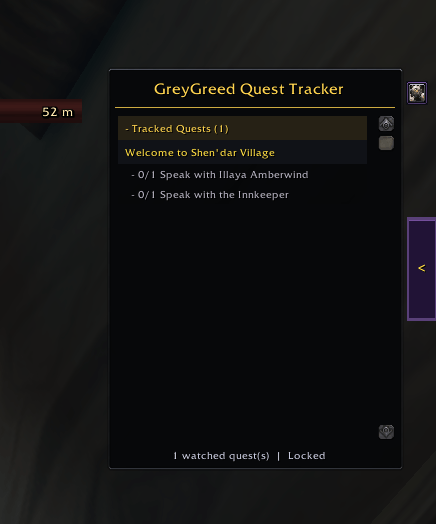
📜 GreyGreed Quest Tracker — Questing Your Way!
Looking for a little more control over your quest-tracking interface?
GreyGreed Core includes an optional, customizable Quest Tracker that works with Blizzard's existing quest information.
A Quest Tracker You Can Customize
-
Enable a standalone GreyGreed Quest Tracker
-
Optionally replace Blizzard's default objective tracker
-
Move the tracker around your screen
-
Resize it to fit your interface
-
Lock its position
-
Reset its location and size
-
Sort tracked quests by watch order or quest name
-
Filter quests to your current zone
-
Expand or collapse supported quest sections
Quest Difficulty Colors
Make it easier to recognize challenging quests at a glance.
Enable optional quest difficulty coloring to distinguish between easier quests, similarly leveled quests, and more difficult objectives.
You can also display quest levels directly alongside quest names.
Organized Quest Sections
Control the display of supported sections, including:
-
Campaign Quests
-
World Quests
-
Tracked Quests
Keep the information you want visible without filling your screen with unnecessary details.
Custom Appearance
Choose between available tracker themes, including:
-
Arcane Purple
-
Gold / Slate
Adjust the background transparency to better match your interface.
Easy Quest Interaction
Click a tracked quest to access its details, or use the available tracking controls to stop watching a quest.
The tracker stays connected to Blizzard's quest information.
📌 Collapsible Quest Tracker Launcher
Want your quests available without keeping a large tracker open all the time?
GreyGreed includes an optional Quest Tracker Launcher.
This small movable control lets you expand or collapse your tracker whenever you need it.
Launcher Features
-
Expand or collapse the tracker with a click
-
Move the launcher independently
-
Dock it to the left, right, top, or bottom screen edge
-
Customize which direction the tracker opens
-
Adjust the launcher's position along the selected edge
-
Keep your quest list hidden until you need it
Perfect for players who prefer a clean interface while exploring or participating in group content.
Your quests are only a click away!
✨ Custom Buff & Debuff Bars
Important character effects shouldn't be difficult to find.
GreyGreed Core includes configurable Buff and Debuff Bars to help you keep track of active effects.
Features Include
-
Display active player buffs
-
Display harmful debuffs
-
Show remaining effect durations
-
Customize buff and debuff bar positioning
-
Adjust visual appearance
-
Lock bars in place
-
Use separate positioning for buffs and debuffs
-
Configure supported Blizzard buff-display options
Arrange your bars around your character, action bars, or other interface elements.
Whether you're tracking a useful buff or watching a harmful debuff expire, GreyGreed gives you another way to organize that information.
⚙️ Everyday Automation — Small Conveniences That Add Up!
Sometimes it's the little things that make the biggest difference.
GreyGreed Core includes optional everyday conveniences designed to save you a few clicks during regular gameplay.
Automatic Equipment Repair
Ever finish a dungeon and forget to repair your equipment?
Enable Auto Repair and GreyGreed can automatically repair damaged equipment when you visit a compatible repair vendor.
Features include:
-
Optional automatic equipment repair
-
Use personal gold for repairs
-
Optionally use permitted guild repair funds
-
Fall back to personal funds when applicable
-
Recorded repair information
Auto Repair only operates when appropriate vendor services and sufficient funds are available.
Simplified Item Deletion
Tired of typing DELETE every time you want to remove an item?
GreyGreed includes an optional Skip Typing DELETE feature.
When enabled, supported item-deletion confirmations no longer require you to manually type the confirmation word.
Important: You must still confirm the deletion yourself.
GreyGreed does not automatically delete your belongings.
💾 Profiles & Saved Settings — Make Your Interface Your Own!
Have several characters with different playstyles?
Prefer one interface layout for questing and another for group content?
GreyGreed Core includes profile and settings-management tools to help organize your preferences.
Character Profiles
-
Save your current GreyGreed settings
-
Load previously saved profiles
-
Rename saved profiles
-
Delete unwanted profiles with confirmation
-
Review available character profiles
-
Import compatible previous GreyGreed profiles
Saved Settings & Recovery
GreyGreed also includes named settings snapshots.
These allow you to:
-
Save your current configuration
-
Give saved settings a recognizable name
-
Restore previously saved settings
-
Rename stored configurations
-
Delete older saved sets
-
Create recovery backups when restoring supported profiles
The profile system can also coordinate supported settings from other installed GreyGreed modules.
Experiment with your interface while keeping a way back to your preferred configuration!
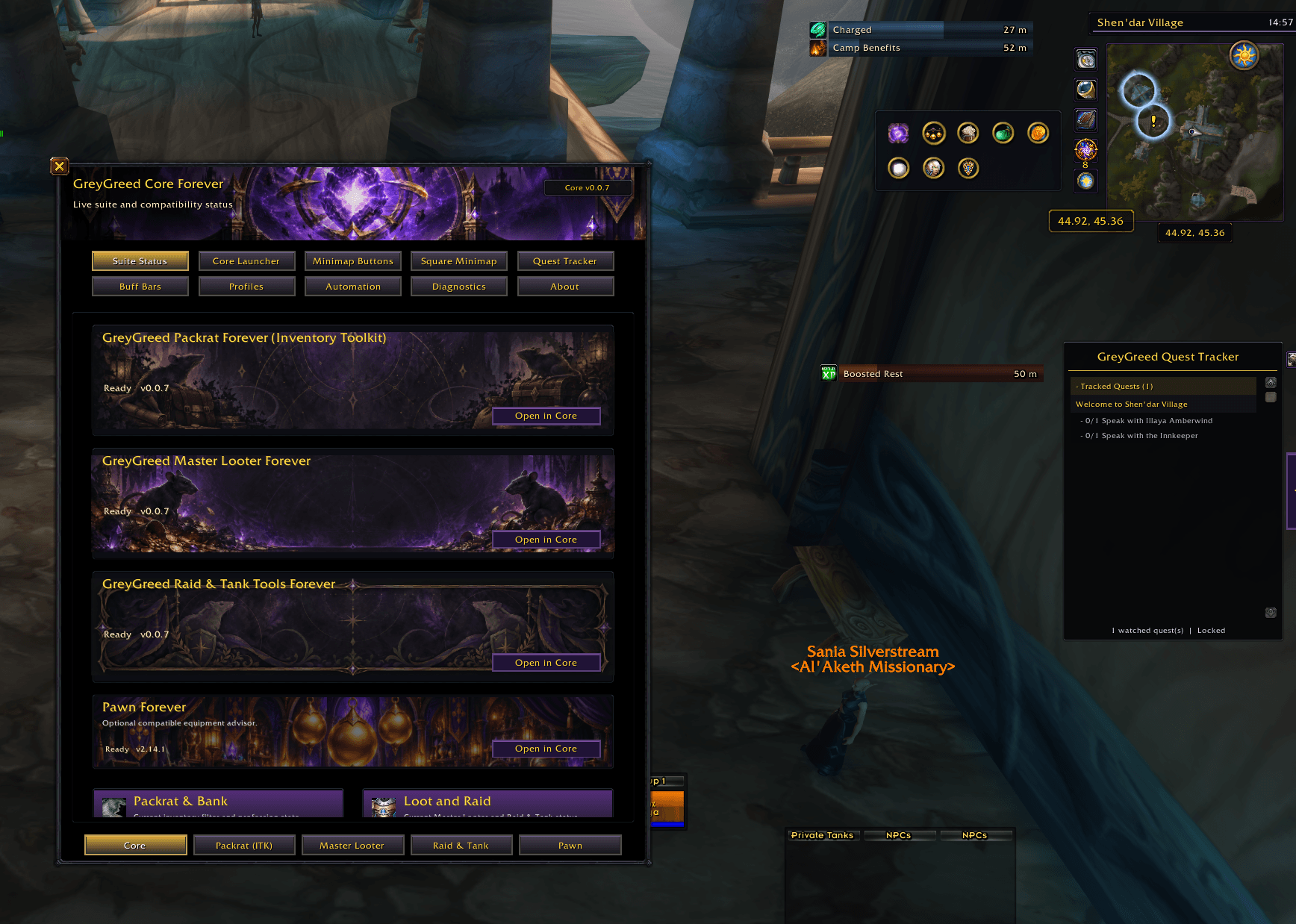
🧩 One Central GreyGreed Settings Window
GreyGreed Core provides a dedicated settings interface that brings its tools together in one convenient location.
Instead of searching through several unrelated menus, you can manage your settings from a single organized window.
Available Settings Include
-
Square Minimap
-
Minimap Clock
-
Minimap Button Collector
-
Quest Tracker
-
Buff & Debuff Bars
-
Core Automation
-
Character Profiles
-
Saved Settings & Recovery
-
Optional Add-on Integrations
-
Installed GreyGreed Component Status
Use the settings window to customize Core's features and review which additional GreyGreed products are installed.
🔍 Add-on Status & Integration
Core serves as the shared foundation for the GreyGreed family.
Its settings interface can identify compatible GreyGreed components and display their availability.
Supported companion modules include:
-
GreyGreed Packrat Forever
-
GreyGreed Master Looter Forever
-
GreyGreed Raid & Tank Tools Forever
If one of these optional companions isn't installed, Core continues functioning normally.
You can also access compatible companion settings from the shared interface when those modules are installed and enabled.
Optional Pawn Integration
GreyGreed Core includes optional integration with Pawn, a separate equipment-comparison add-on.
When a compatible version of Pawn is installed, GreyGreed can provide convenient access to Pawn controls through its settings and optional minimap launcher.
Additional inventory-specific integration is available when a compatible inventory companion is present.
Pawn is completely optional.
Core does not require Pawn or any other GreyGreed companion to function.
🎮 Designed for Every Adventurer
You don't need to be a raid leader, tank, healer, or dedicated collector to enjoy GreyGreed Core.
It's designed for players who simply want more control over their interface.
Love your Blizzard minimap? Keep it! You can still use Core's other features.
Prefer Blizzard's default quest tracker? No problem. GreyGreed's tracker is optional.
Already happy with your buff display? Leave the custom buff bars disabled.
Just want the Minimap Button Collector? Use it on its own!
GreyGreed Core is about giving you choices, not forcing you to use every feature.
📦 What's Included?
This standalone download contains:
GreyGreed Core Forever
Interface Customization
-
Optional Square Minimap
-
Decorative minimap frames
-
Utility-button rail
-
Day/night indicator integration
-
Configurable minimap clock
-
Minimap Button Collector
Questing Tools
-
Customizable Quest Tracker
-
Quest difficulty coloring
-
Quest-level display
-
Quest sorting and filtering
-
Collapsible tracker launcher
-
Screen-edge docking
Character Utilities
-
Custom Buff & Debuff Bars
-
Automatic equipment repair
-
Simplified item-deletion confirmation
Configuration & Integration
-
Centralized GreyGreed settings
-
Character profiles
-
Saved settings and recovery
-
Compatible add-on status
-
Optional Pawn integration
-
Shared support for GreyGreed companion add-ons
All of these features work without installing any other GreyGreed product.
🚀 Getting Started
Getting started with GreyGreed Core is simple!
-
Install GreyGreed Core Forever.
-
Enable GreyGreed Core Forever in your AddOns list.
-
Enter World of Warcraft Forever.
-
Type
/ggcoreto open the GreyGreed settings window. -
Explore the available features and customize your interface!
Useful Commands
/ggcore — Open the main GreyGreed Core settings.
/ggcore status — Review GreyGreed component status.
/ggcore profiles — Open profile management.
/ggcore collector — Open or close the Minimap Button Collector.
/ggcore reset — Access the Core reset function.
Recommended First Steps
Start with the Square Minimap and Minimap Button Collector to organize your minimap.
Next, explore the Quest Tracker and decide whether you prefer GreyGreed's tracker or Blizzard's original.
Finally, check the Buff Bars, Automation, and Profiles sections to personalize your everyday experience.
There is no required setup beyond installing and enabling the add-on.
🌟 Expand Your Experience With GreyGreed
Enjoying Core?
GreyGreed Core is also the foundation for several optional companion add-ons.
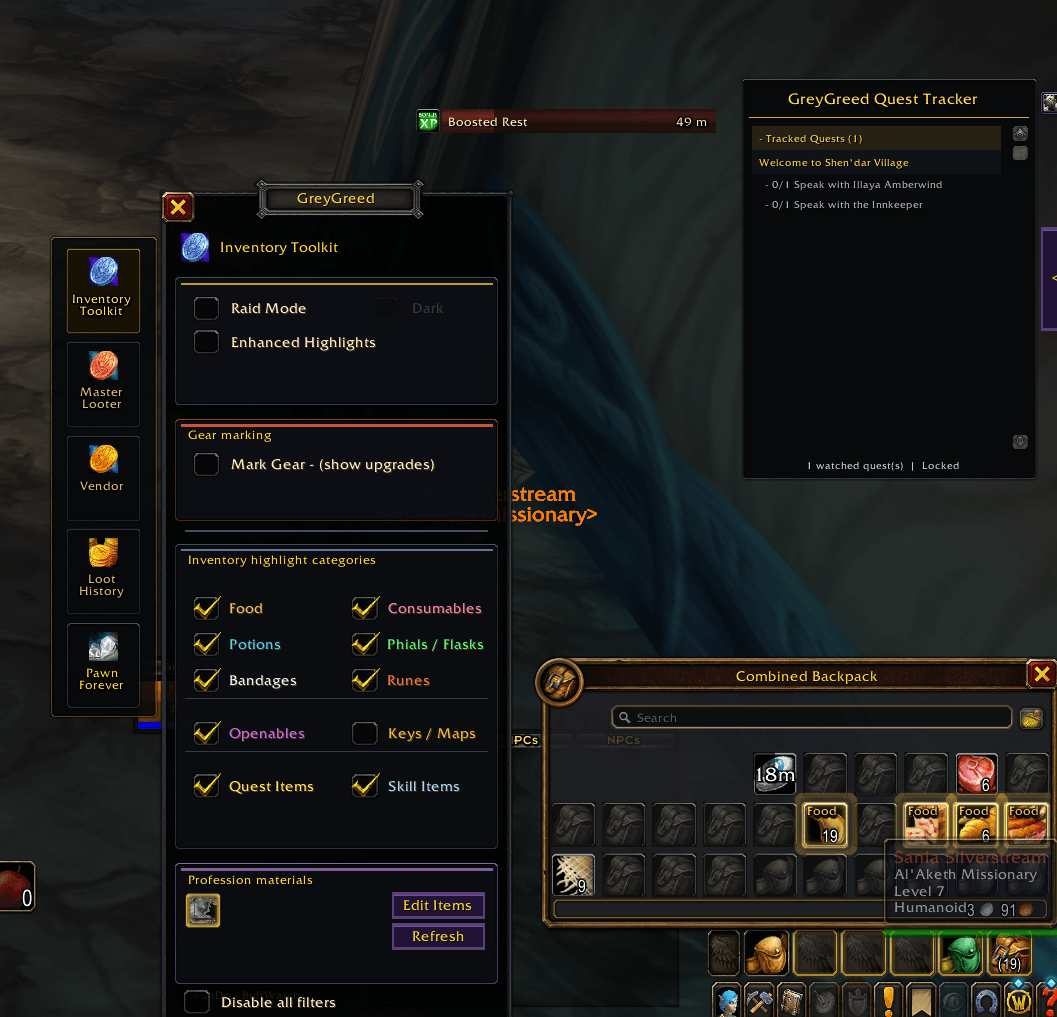
🐀 GreyGreed Packrat Forever
Inventory highlighting, item labels, profession-material identification, bank organization, and gear assistance.
💰 GreyGreed Master Looter Forever
Customizable loot rules, item lists, loot requests, loot alerts, merchant tools, and loot history.
🛡️ GreyGreed Raid & Tank Tools Forever
Integrated tank, raid management, and healer dashboards featuring readiness checks, markers, pings, callouts, armor monitoring, and group-management utilities.
These are separate optional products and are not included in the standalone Core download.
You can enjoy Core independently or expand your GreyGreed experience with the tools that match your playstyle.
Compatibility
Game: World of Warcraft Forever (Camelot)
Supported interface: 16001
Version: 1.0.0
This edition is developed specifically for World of Warcraft Forever and is not intended for the separate modern World of Warcraft Retail client.
Some interface changes may be deferred until combat ends to respect Blizzard's protected-action rules.
❤️ Make Azeroth Your Own!
GreyGreed Core Forever was created to make everyday gameplay a little more comfortable, organized, and enjoyable.
Whether you're improving your minimap, keeping your quests organized, cleaning up add-on buttons, or simply looking for a few useful conveniences, GreyGreed gives you the freedom to build an interface that works for you.
No complicated setup. No unnecessary requirements. Just useful tools and the freedom to choose how you use them.
Less clutter. More convenience. More time enjoying Azeroth!
Thank you for choosing GreyGreed Core Forever!
Created by Sashaielle — Steamweedle Cartel
Part of the GreyGreed Forever Suite
Greygreed Core Forever Team