GearCheckPro
All-in-one gear check for MoP Classic: self-check your own gear plus live GearScore/ItemLevel scanning for your whole party or raid — spot missing enchants, gems, upgrades and empty slots at a glance.






Broker_TT_2.jpg

Tooltipp_1.jpg

Raid_Groups_1.jpg

Dashboard_1.jpg
Description
GearCheckPro
All-in-one gear analysis suite for MoP Classic — combining the proven engines of iLevelGS and GearCheckMoP with a full party/raid inspection dashboard.
GearCheckPro replaces both iLevelGS and GearCheckMoP with a single, unified addon. Everything you relied on from both addons is here — plus party and raid scanning, a live dashboard, and a whisper report system.
What's New in v2.0
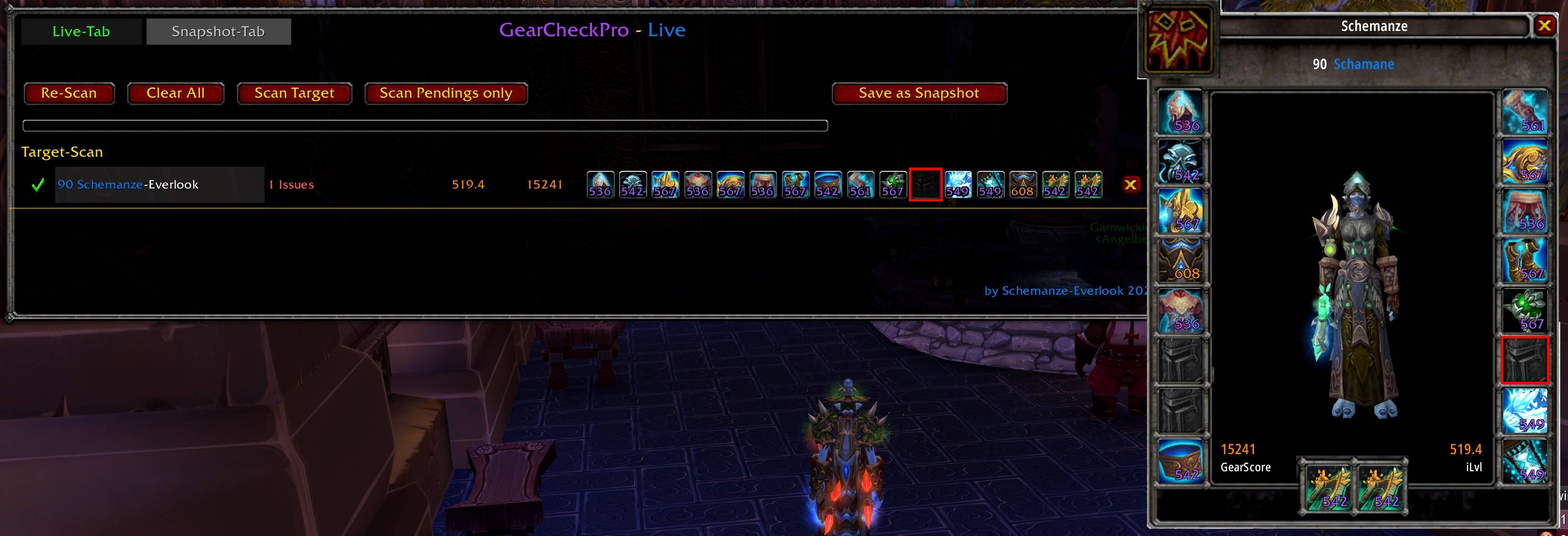
- CharSim — Simulated Character Window — Click any player name in the Dashboard (Live-Tab or
Snapshot-Tab) to open a visual character window showing the player's equipped gear on a 3D model.
Technology ported from the companion addon MyRepuViewer, fully integrated into GearCheckPro. - Per-Slot Issue Tooltip in CharSim — Hover any slot icon for the full item tooltip. Hold
Shift, Alt or Ctrl while hovering to switch to the issue tooltip for that slot — showing upgrade
status, missing enchantment, empty sockets and more, directly on the item. - CharSim: GearScore Colour Scale — GearScore and average ItemLevel in the CharSim window
use the same green-to-red colour scale as the Dashboard. - CharSim: Freely Repositionable — Move the CharSim window anywhere on screen via
Ctrl+Shift+Drag. - Clickable Player Names in Dashboard — Player names in the Dashboard are now clickable
in both Live-Tab and Snapshot-Tab, opening the CharSim for that player. - Red Border on Problem Slots — Problem slots in the Dashboard and CharSim now show a
clean red border outline instead of a red colour overlay, keeping item icons fully readable.
What's New in v1.6
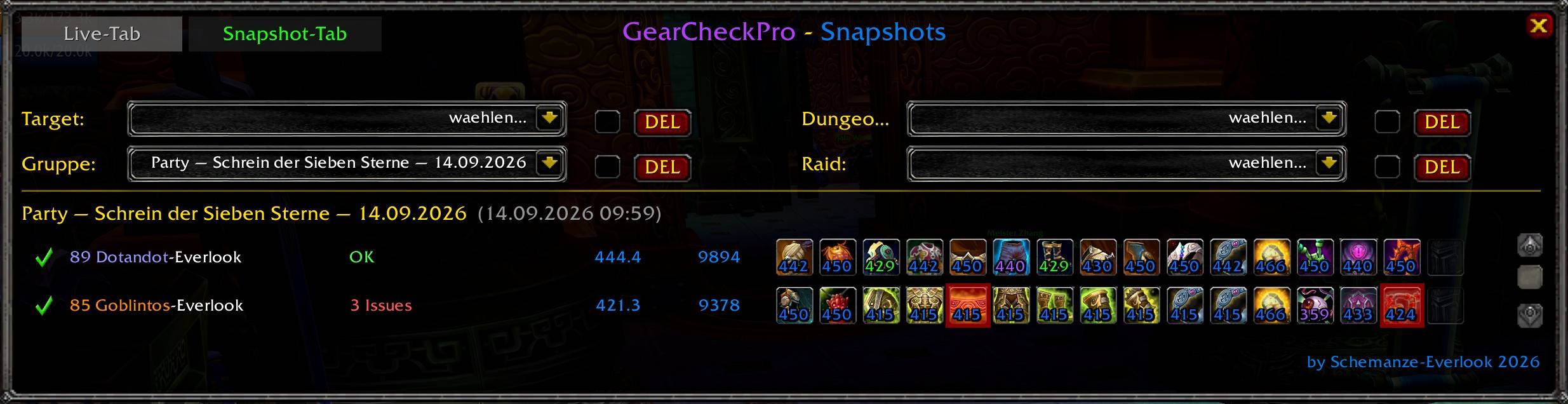
- Snapshot System — Manually save the current Party, Dungeon, Raid or Target scan from the
Dashboard with the new "Save as Snapshot" button. Snapshots are grouped into four independent
categories (Target, Group, Dungeon, Raid), each with its own history. - Pin & Auto-Cleanup — Pin any snapshot to keep it permanently; unpinned snapshots are
automatically removed after 30 days. Each category keeps its most recent entries up to a fixed limit
(50 Target / 20 Group / 30 Dungeon / 20 Raid). - Automatic Snapshot Titles — Titles are generated from instance name, difficulty and date (e.g.
"Throne of Thunder — 25 Player Heroic — 14.09.2026"), so history stays readable at a glance. - Dashboard Redesign: Live-Tab & Snapshot-Tab — The Dashboard is now split into two clearly
highlighted tabs: the existing live scan view, and a new Snapshot-Tab to browse, pin and delete saved
snapshots. - Full Snapshot Detail View — Selecting a snapshot shows the saved gear exactly as it looked at
capture time — item icons, ItemLevel, GearScore and all detected issues — even if the player is no
longer online.
Party & Raid Dashboard + Target Scan
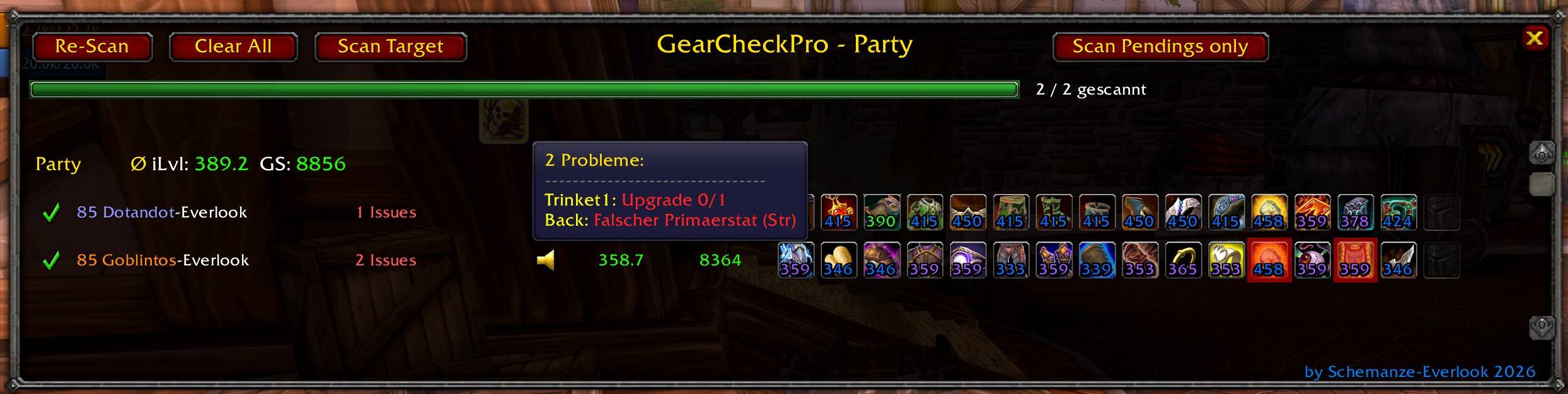
Open with /gcp dashboard` or right-click the minimap icon. Scans all reachable party or raid members automatically. Use "Scan Target" to inspect any player on demand, outside of group.
Detected per member (direct inspect)
- Incomplete item upgrades (e.g. Upgrade 0/2)
- Missing enchantments on all enchantable slots
- Empty gem sockets
- Missing belt buckle (Living Steel Belt Buckle)
- Fishing rod equipped in Main Hand
- Wrong primary stat on items and gems (Spec-aware, toggleable)
- Wrong weapon stat — Spell Power on a physical spec, Attack Power on a caster spec, in Main Hand
and Off Hand - Wrong trinket proc stat — flagged only when none of the proc stats match the player's spec; universal
multi-stat procs (e.g. Alchemist Stone) are correctly excluded
Detected via cross-check (heuristic, requires at least one member with the feature)
- Missing Blacksmith extra socket on Gloves or Bracers — flagged when one member has the extra
socket and another does not - Missing Engineering tinker on Cloak, Gloves or Belt — flagged when one member has a tinker and
another does not
Dashboard display & navigation
- Redesigned with two tabs: Live-Tab (scan view) and Snapshot-Tab (saved snapshots) — active tab
clearly highlighted - Per-slot item icons with ItemLevel — red highlight on problem slots
- GearScore and average ItemLevel per player
- Party layout: sorted by party frame order
- Raid layout: sorted by raid group (1–8), alphabetical within group
- Group and raid-wide average ItemLevel and GearScore in header
- Scan progress bar with live counter ("X / Y scanned")
- Scan pauses during combat, resumes automatically after
- Equipment changes by a member trigger an automatic re-scan of that member
- "Scan Pendings only" — re-scans only members that were out of range before, without resetting
already scanned members - Target-Scan entry is cleared automatically when the Dashboard is closed
- Re-Scan, Clear All, Scan Target and Save as Snapshot buttons
Whisper Report
- Manual whisper button per player row — never automatic
- Sends a structured report listing all detected issues
- Each missing upgrade step and each empty socket counted individually
- Long reports automatically split into batches to avoid chat throttling
Snapshots
- Manually save the current Party, Dungeon, Raid or Target scan via the "Save as Snapshot" button
- Four independent categories with separate history: Target, Group, Dungeon, Raid
- Pin snapshots to exempt them from the automatic 30-day cleanup
- Per-category retention limit: 50 Target / 20 Group / 30 Dungeon / 20 Raid entries
- Automatic, readable titles generated from instance name, difficulty and date
- Full detail view: item icons, ItemLevel, GearScore and all detected issues exactly as captured — no live
connection to the player required - Live-Tab and Snapshot-Tab: clearly separated Dashboard views, active tab highlighted
Self-Check (own character)
Available instantly after login or reload — no inspect needed. Results shown in the Broker tooltip and in your own row in the Dashboard.
The Self-Check has full access to your character data and detects more than the party/raid scan:
- Missing enchantments on all enchantable slots
- Empty gem sockets (all types, all client languages)
- Belt buckle detection (Living Steel Belt Buckle)
- Blacksmith extra socket detection on Gloves & Bracers — directly detected, no cross-check needed
- Engineering tinker detection on Cloak, Gloves & Belt — directly detected, no cross-check needed
- Ring enchant check — only flagged when your Enchanting skill is high enough to enchant rings
yourself - Incomplete item upgrades flagged with current/max level (e.g. "Upgrade 0/2")
- Missing weapon / offhand slots
- Wrong primary stat on items and gems (Spec-aware, always active)
- Wrong weapon stat — Spell Power on a physical spec weapon, Attack Power on a caster spec weapon,
in Main Hand and Off Hand - Wrong trinket proc stat — universal multi-stat procs correctly excluded
- Broker display with average equipped item level and total issue count
- Toggle: Missing Only / All Items
- Minimap icon support
Tooltip Integration (iLevelGS engine)
Fast, accurate ItemLevel and GearScore on every player tooltip.
- GearScore and average ItemLevel in mouseover tooltips
- Correct tooltip for party, raid, and inspect targets
- Upgrade-aware ItemLevel (shows actual upgraded level, not base)
- Correct two-handed weapon calculation
- Correct Hunter ranged weapon and wand classification
- Missing slots counted as 0 — no artificially inflated averages
- Group hint icon in tooltip when issues are detected in party/raid
Character & Inspect Frame Overlays
- ItemLevel numbers on every equipment icon in the Character Frame
- GearScore and average ItemLevel shown in Character and Inspect Frames
- Updates instantly on item upgrades
Slash Commands
- /gcp dashboard` — Open/close the party/raid dashboard
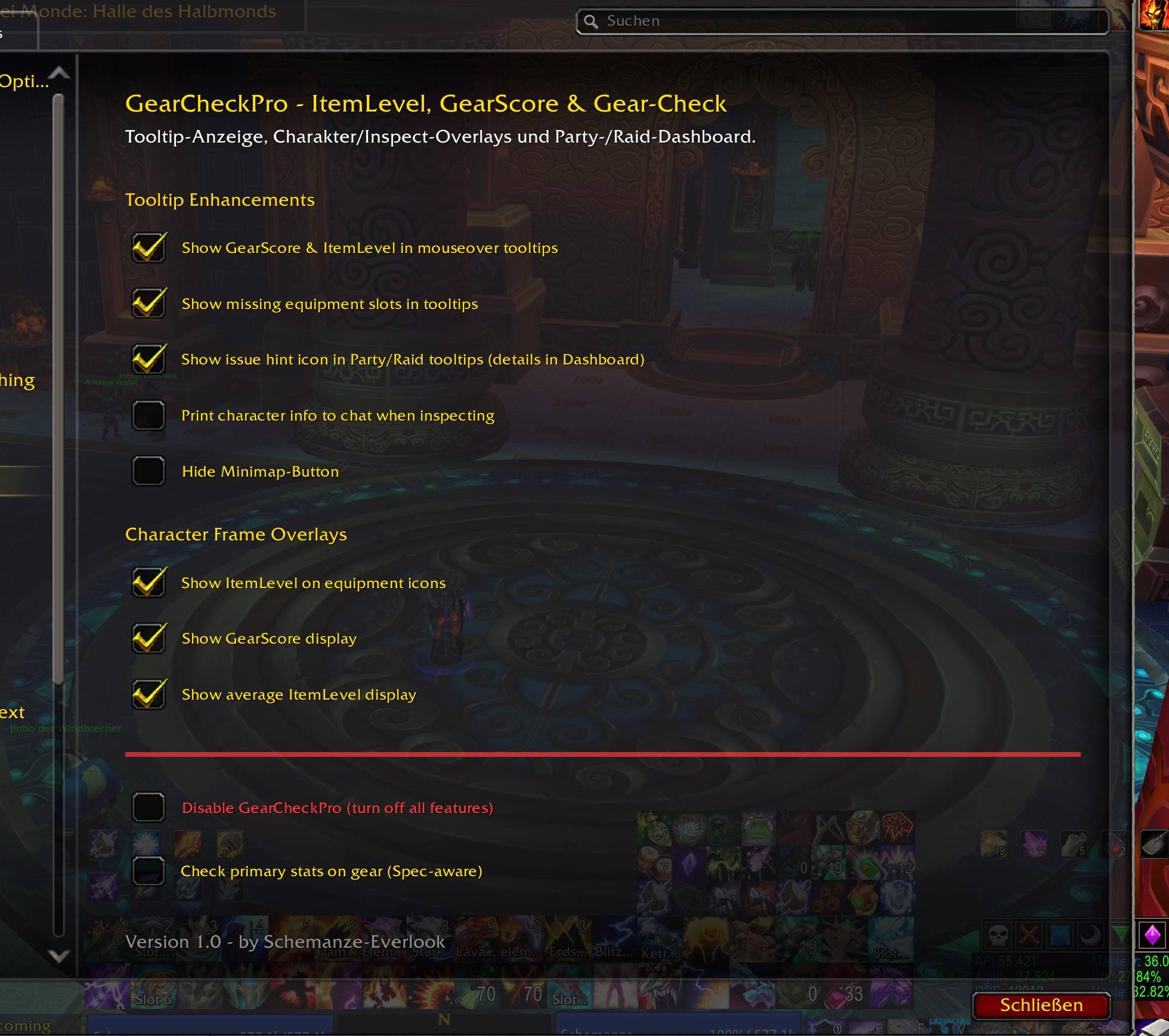
- /gcp config` — Open the settings panel
- /gcp ttinfo on|off` — Toggle GS/iLvl info in tooltips
- /gcp ttgrouphint on|off` — Toggle group issue hint icon in tooltips
- /gcp avgilvl on|off` — Toggle average ItemLevel display
- /gcp gearscore on|off` — Toggle GearScore display
- /gcp itemilvl on|off` — Toggle ItemLevel overlays on equipment icons
- /gcp chatinfo on|off` — Toggle GS/iLvl output to chat
- /gcp minimap on|off` — Show/hide minimap icon
- /gcp disable on|off` — Completely disable or re-enable the addon
- /gcp sc` — Toggle Self-Check display mode (Missing Only / All Items)
Replaces
- iLevelGS — tooltip GS/iLvl engine fully integrated, deactivate iLevelGS when using GearCheckPro
- GearCheckMoP — self-check engine fully integrated, deactivate GearCheckMoP when using
GearCheckPro
Companion Addon: MyRepuViewer — account-wide character overview with iLvl, GearScore, reputations, currencies, equipment viewer and more.
GearCheckPro Team