CancelYourQuests-Forever
Selective quest abandoning for WoW Forever and Midnight 12.1.x with zone/quest selection and smart filters. Includes a quest item bar with custom items, configurable quest sounds and auto-accept/turn-in for quests.

Description
Cancel Your Quests - Forever
New in Version 1.2:
Quest sounds, auto-accept/turn-in and a new config window
Selective quest abandoning and quest item bar for World of Warcraft: Forever and Midnight 12.1.x
Key Features
Selective Quest Management
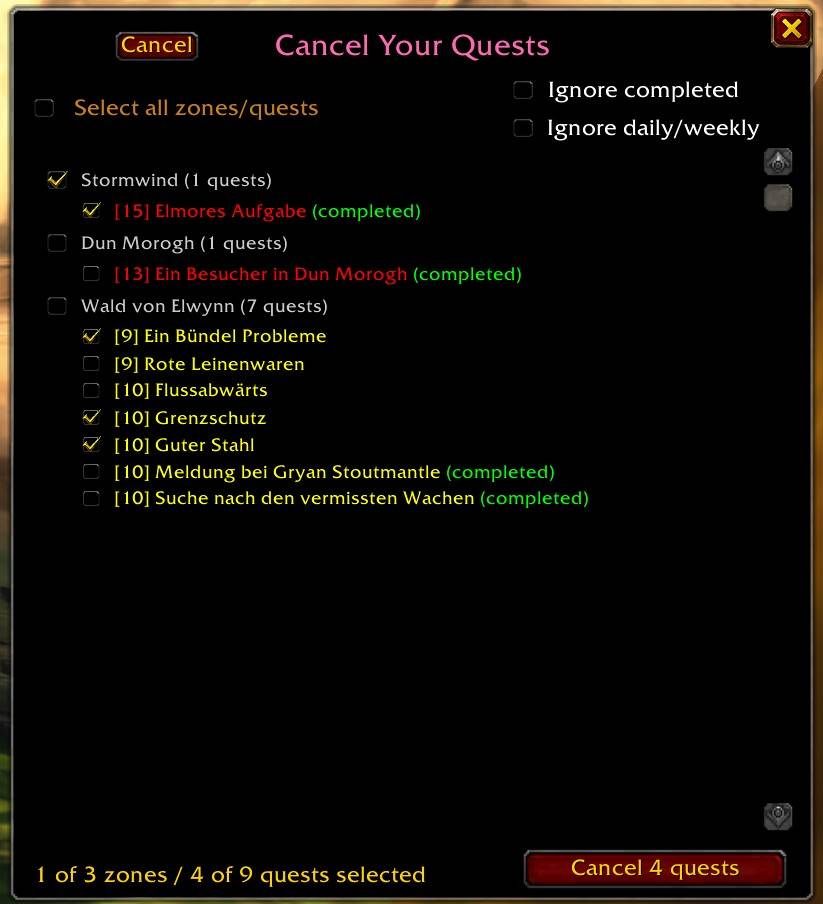
- Target specific zones or individual quests for abandoning
- Select All functionality - mark everything with 2 clicks
- Intelligent checkbox synchronization between quests, zones, and Select All
- Fast processing - quests disappear from the list one by one while canceling
- Window stays open after canceling for further cleanup
Smart Filtering System
- Ignore completed quests - skip already finished content
- Ignore daily/weekly quests - protect recurring content
- Filters are saved per character
Enhanced Quest Display
- Difficulty color coding based on player level
- Quest level display for easy identification
- Quest type indicators (daily, weekly, group size)
- Completion status clearly marked
- Quests that cannot be abandoned are shown grayed out and are not selectable
Quest Sounds NEW
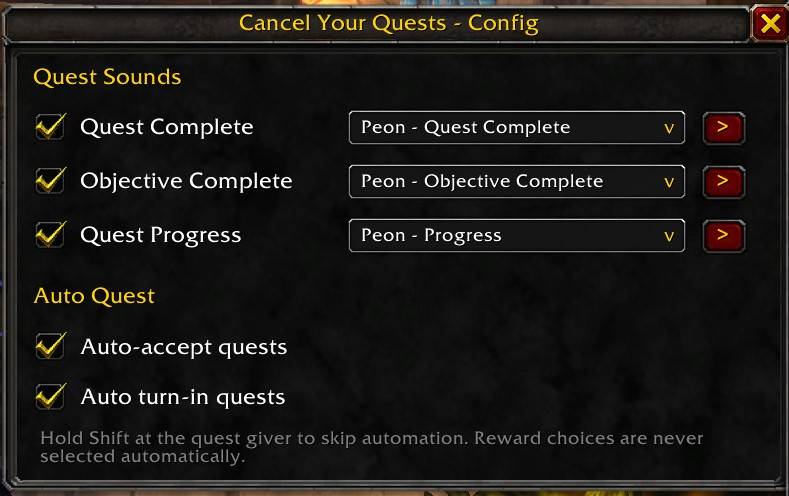
- Sound alerts for quest complete, objective complete and quest progress
- 33 selectable sounds per event, Peon sounds preselected
- Each event can be turned on or off, test button to preview the sound
- A sound can only be used for one event at a time
Auto Quest NEW
- Auto-accept quests at quest givers
- Auto turn-in of completed quests
- Hold Shift at the quest giver to skip automation
- Reward choices are never selected automatically
Quest Item Bar
- Automatic quest items - usable quest items appear on the bar and can be used with one click
- Quest starter detection - items that start a quest are marked with a yellow !
- Completion marker - green check mark when the quest is ready to turn in
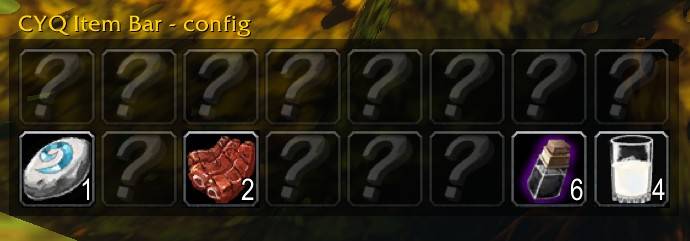
- Custom items - drag up to 8 items of your choice onto the bar (potions, food, trade goods…)
- Live item counts - custom items always show their count, a red 0 when you run out
- Fixed slots - items keep their position, no jumping around
- Setup mode - rearrange items by drag & drop, add custom items to any free slot
- Horizontal or vertical, freely scalable and movable
- 16 slots in 2 rows, an extra row appears automatically when you carry more quest items
- Item positions are saved per character, bar position and size account-wide
User-Friendly Interface
- CYQ button on the world map for quick access
- Draggable windows, positions are remembered
- ESC closes the windows
- Confirmation dialogs prevent accidental quest or item loss
CYQ Map Button
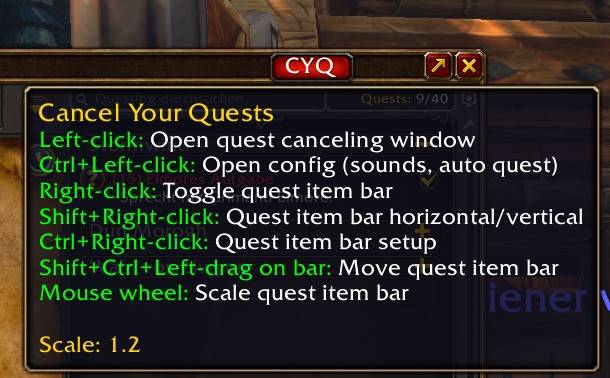
- Left-click - open quest canceling window
- Ctrl+Left-click - open config window (sounds, auto quest)
- Right-click - toggle quest item bar
- Shift+Right-click - quest item bar horizontal/vertical
- Ctrl+Right-click - quest item bar setup mode
- Mouse wheel - scale quest item bar
Quest Item Bar Controls
- Left-click - use item
- Shift+Ctrl+Left-drag - move the bar
- Shift+Right-click on a custom item - remove it (with confirmation)
- Setup mode: drag items from your bags onto a free slot, drag items between slots to swap them
📟 SLASH COMMANDS (/cyq or /cancelyourquests)
| Command | Function |
|---|---|
| /cyq | Open quest canceling window |
| /cyq help | Show this list in-game |
| /cyq config | Open config window (sounds, auto quest) |
| /cyq bset | Quest item bar setup mode (toggle) |
| /cyq bar | Toggle quest item bar |
| /cyq bar flip | Quest item bar horizontal/vertical |
| /cyq bar scale <0.5–2.0> | Scale quest item bar |
| /cyq clear | Remove all custom items from the bar |
| /cyq reset | Reset all settings to defaults |
Why This Addon?
Abandoning quests one by one is tedious. Cancel Your Quests lets you clean up your quest log in seconds, the quest item bar keeps every usable quest item and your most important consumables within reach, and quest sounds plus auto-accept/turn-in make questing smoother.
Perfect for quest log cleanup, switching leveling routes, or just keeping your bags and quest items organized.
The CancelYourQuests-Forever Team